A freelance price list card is a simple but powerful way to present your services, packages, and rates in a clear and professional format. Whether you are a graphic designer, writer, web developer, virtual assistant, photographer, social media manager, or another type of freelancer, a well-designed pricing card can make it easier for potential clients to understand what you offer.
Instead of sending a long message explaining every service and price, you can use a concise freelance pricing card to communicate important information at a glance. A professional price list can also strengthen your brand identity and help clients feel more confident about contacting you.
In this guide, you will learn what a freelance price list card should include, how to structure your rates, how to make the design more effective, and how to create a pricing template that is easy to customize and share online or in print.
What Is a Freelance Price List Card?
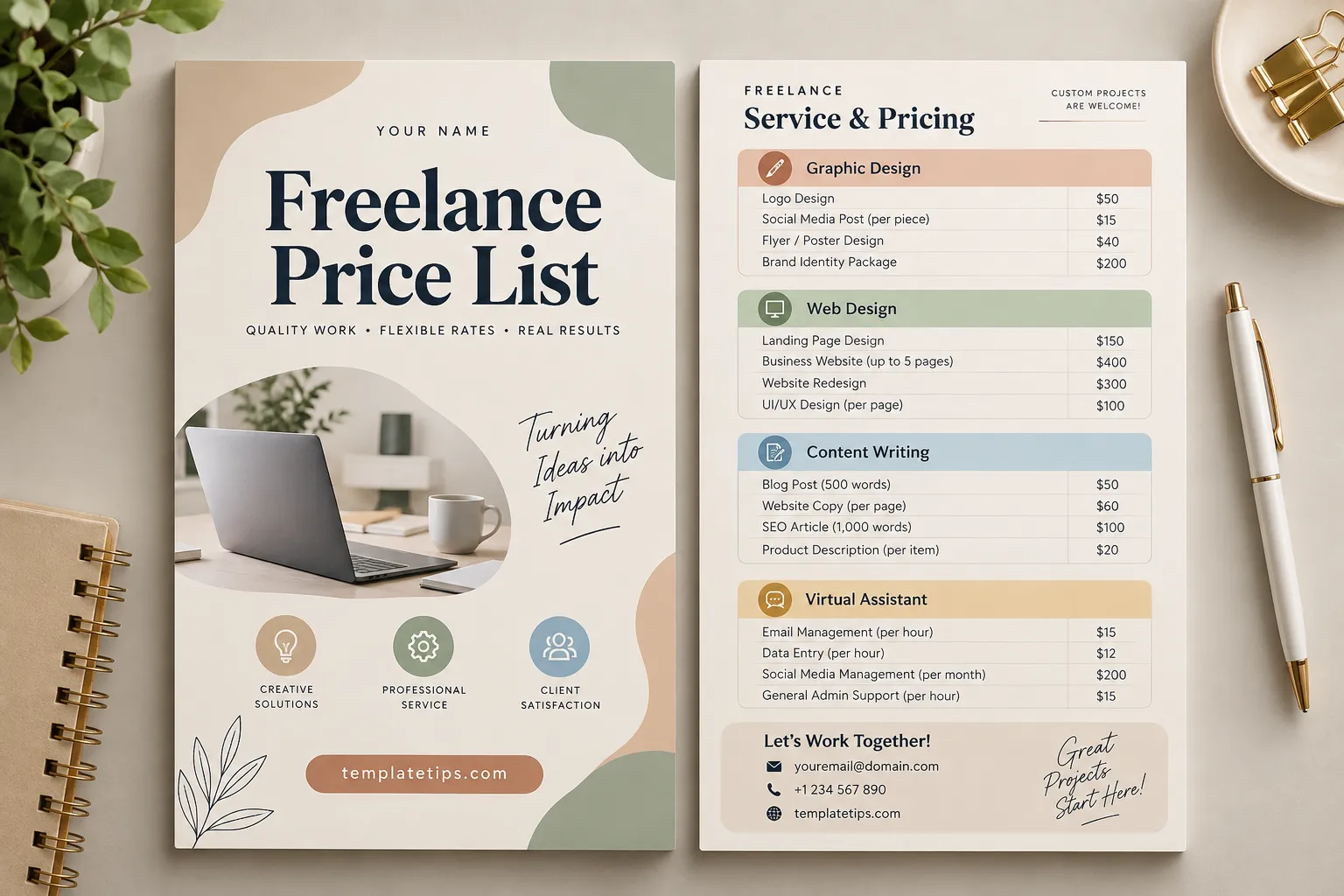
A freelance price list card is a visual document that displays a freelancer’s services, pricing, packages, and basic business information. It can be designed as a single-page document, social media graphic, printable card, PDF, or digital image.
The main purpose is to make your pricing information easy to scan. Rather than forcing potential clients to ask about every service individually, the card provides a useful starting point for conversations and project inquiries.
A typical freelance price list card may include:
- Freelancer or business name
- Logo and brand colors
- List of available services
- Individual service prices
- Package or bundle prices
- Short descriptions of each service
- Contact information
- Website or social media handles
- Notes about revisions, deposits, or custom projects
Why Use a Freelance Pricing Card?
Freelancers often need to communicate their value quickly. A well-organized pricing card helps potential customers understand your offer without reading a lengthy proposal.
It Makes Your Services Easier to Understand
Clients may not know exactly what is included in a particular freelance service. A pricing card lets you organize your offerings into categories, making the information much easier to navigate.
It Creates a Professional First Impression
Presentation matters when you are selling creative or professional services. A clean price list can demonstrate that you pay attention to details and have an organized approach to your business.
It Saves Time
Answering the same pricing questions repeatedly can take up valuable time. A reusable freelance price list template gives you a convenient resource that can be sent to prospective clients whenever they ask about your rates.
It Supports Consistent Branding
Your pricing card can use the same typography, colors, logo, and visual style as your portfolio and other marketing materials. This creates a consistent brand experience across your freelance business.
What Should You Include in a Freelance Price List Card?
The best pricing cards provide enough information to be useful without becoming overcrowded. Focus on the services clients ask about most frequently and present the information in a logical order.
1. Your Name or Business Name
Start with clear identification. Include your name, freelance business name, or studio name at the top of the card. If you have a logo, place it somewhere visible without allowing it to overpower the pricing information.
2. Your Main Services
Group related services into categories. For example, a freelance graphic designer might use categories such as logo design, social media design, print design, and branding.
A content writer could organize services into blog writing, website copy, product descriptions, and SEO content.
3. Clear Pricing
Display prices in a format that is easy to understand. Depending on your service, you can charge per project, per hour, per page, per word, or per package.
- Logo Design — Starting at $50
- Blog Article — Starting at $50
- Landing Page Design — Starting at $150
- Social Media Management — From $200/month
Using phrases such as “starting at” or “from” can be useful when the final price depends on project complexity.
4. Package Options
Packages can make your freelance price list more attractive because clients can compare different levels of service. For example, you might offer Basic, Standard, and Premium packages with different deliverables.
5. Contact Details
Make it easy for clients to take the next step. Include your email address, website, social media account, or another appropriate business contact method.
How to Set Freelance Prices for Your Services
Creating a price list is not only about choosing attractive numbers. Your rates should reflect the amount of work involved, your operating costs, your experience, and the value of the service.
Calculate the Work Involved
Consider how much time a typical project requires, including communication, research, planning, revisions, production, and delivery. A project that takes several hours should not be priced as though it requires only a few minutes.
Consider Your Business Costs
Freelancers may have expenses such as software subscriptions, equipment, internet access, payment processing fees, marketing, education, and other business costs. These expenses should be considered when establishing sustainable rates.
Choose a Pricing Model
Different freelance services work better with different pricing models. Hourly pricing can be useful for ongoing support, while project-based pricing may be easier for clients to understand when the scope is clearly defined.
- Hourly pricing: Useful for flexible or ongoing work.
- Project pricing: Suitable for defined deliverables.
- Package pricing: Useful for combining multiple services.
- Retainer pricing: Appropriate for recurring monthly services.
Freelance Price List Card Design Tips
A pricing card should be visually attractive, but readability should always come first. Clients should be able to find the service and price they need within seconds.
Use Clear Visual Hierarchy
Make the title prominent, use clear section headings, and separate service categories with enough spacing. Prices should be visually distinct from descriptions so readers can scan the card quickly.
Keep the Layout Simple
Avoid filling every available space with text, icons, or decorative elements. White space helps separate sections and makes the document easier to read.
Use Consistent Typography
Choose a small number of complementary fonts and use them consistently. A strong heading font combined with a highly readable body font can create a professional appearance without making the design complicated.
Match Your Brand
Use colors and design elements that are consistent with your portfolio, website, and social media presence. A cohesive visual identity makes your freelance business easier to recognize.
How to Make Your Freelance Price List More Effective
A pricing card should not only show numbers. It should help clients understand what they receive in exchange for those prices.
Whenever possible, include short descriptions of deliverables. Instead of listing only “Website Design — $300,” you could explain that the service includes a responsive website, a specific number of pages, and a defined number of revisions.
You can also add a small note explaining that custom projects are available. This prevents your standard price list from limiting projects that fall outside your usual packages.
Where to Use a Freelance Price List Card
Once created, your pricing card can be used across several marketing and communication channels.
- Freelance portfolio websites
- Instagram and Facebook posts
- LinkedIn business profiles
- Email inquiries
- Client proposals
- WhatsApp or other business messaging
- PDF service guides
- Printed promotional materials
For social media, consider creating a square or vertical version that is easy to read on mobile devices. For proposals and email, a PDF or high-resolution image may be more appropriate.
Tips for Updating Your Freelance Price List
Your freelance pricing should not remain unchanged forever. As your skills, workload, operating costs, and services develop, your rates may need to be reviewed.
Schedule occasional reviews of your pricing card and update outdated services. Remove services you no longer offer and add new packages when your business evolves.
It is also useful to keep an editable master version of your price list. This allows you to update prices, contact information, and service descriptions without rebuilding the entire design.
Common Mistakes to Avoid
Too Much Information
A price list is not a complete business proposal. Keep detailed terms, long explanations, and project-specific requirements for your proposal or contract.
Unclear Pricing
A client should be able to identify the price associated with each service without guessing. Keep service names and prices visually connected.
Inconsistent Branding
Using random fonts, colors, and layouts can make your business look less cohesive. Your pricing card should feel like part of your overall brand.
Missing Contact Information
Even a beautiful pricing card is less useful if clients do not know how to contact you. Always provide a clear next step.
Final Thoughts on Freelance Price List Cards
A freelance price list card can turn complicated pricing information into a clear, professional, and reusable marketing asset. By organizing your services into logical categories, displaying rates clearly, explaining important deliverables, and maintaining consistent branding, you can create a resource that works for both digital and printed use.
The most effective freelance pricing templates are simple, easy to scan, and flexible enough to accommodate custom projects. Start with your most frequently requested services, choose a pricing structure that fits your workflow, and update your card whenever your business changes.
Whether you are launching your freelance career or refining an established service business, a professional price list card can give potential clients a clearer understanding of what you offer and make the next conversation much easier.
