An event management software Template is best understood as a structured framework for organizing the information, workflows, schedules, finances, people, and operational tasks required to run an event. Instead of beginning with an empty workspace, a well-designed template gives planners a logical starting structure that can be adapted to conferences, workshops, exhibitions, corporate meetings, festivals, community programs, and private occasions.
The real value of a template is not its appearance. It is the way it turns scattered event details into connected records and repeatable processes. Modern event-management dashboards commonly bring together registrations, attendees, schedules, budgets, vendors, tasks, and reporting so that organizers can see the condition of an event without searching through multiple disconnected records.
For a small team, the right template can provide enough structure to coordinate an event without introducing unnecessary complexity. For a growing organization, it can become the blueprint for a more sophisticated system. The important question is therefore not simply whether a template looks attractive, but whether its fields, views, calculations, permissions, and workflow match the way the event team actually works.

What an event management software Template should contain
A useful template normally begins with an event master record. This should identify the event name, event type, organizer, venue, start date, end date, operating status, capacity, and primary objectives. Keeping these details in one controlled record prevents the same information from being typed differently across schedules, attendee lists, financial records, and reports.
The next layer is operational planning. A strong structure should allow planners to divide work into tasks, milestones, dependencies, owners, deadlines, and status values. This makes it possible to distinguish between an event that is generally progressing well and one that has a critical unresolved task. A simple status model such as planned, in progress, blocked, completed, and cancelled can often provide enough clarity for smaller teams.
Financial planning deserves its own structured area. The template should distinguish planned amounts from committed costs and actual payments. This separation is important because a vendor commitment can affect the remaining budget before the invoice has been paid. A budget view can also group costs by venue, catering, equipment, staffing, transportation, promotion, technology, insurance, and contingency.

Registration and attendee management form another major component. Useful fields may include registration ID, attendee name, contact information, ticket type, payment state, RSVP status, accessibility needs, dietary requirements, session selections, and check-in status. The exact fields should be limited to information the event team genuinely needs, because excessive data collection makes maintenance harder and can introduce privacy concerns.
Scheduling should connect the event date with sessions, rooms, speakers, setup periods, breaks, rehearsals, vendor arrivals, and teardown activities. A calendar view is useful for understanding the overall timeline, while a detailed run-of-show can provide minute-by-minute operational instructions for event day. Templates should avoid treating these two views as competing systems; they serve different planning purposes.
Reporting completes the structure. A management view might emphasize registrations, attendance, revenue, expenditure, capacity, task completion, and unresolved risks. A post-event report may instead focus on attendance conversion, budget variance, session participation, feedback, vendor performance, and lessons for the next event. Event dashboards are most useful when metrics are grouped around decisions rather than displayed simply because they are available.
Choosing the right template structure
Not every organization needs the same type of template. A one-day workshop may require a compact event brief, attendee register, agenda, supplier list, budget, and task tracker. A multi-day conference needs a much deeper structure because it may include multiple tracks, speakers, rooms, ticket categories, exhibitors, sponsors, volunteers, and simultaneous sessions.
Teams should therefore start with their workflow rather than choosing a template because its dashboard looks impressive. Ask what information is entered first, which records change frequently, which people need access, what decisions are made each day, and which reports must be produced after the event. These answers determine the structure that matters.
A practical template also needs a clear distinction between master data and transactional data. Event details, venue records, speaker profiles, and supplier records are relatively stable. Registrations, payments, task updates, attendance events, and expenses change continuously. Keeping these categories logically separated makes reporting more reliable and reduces accidental duplication.

Spreadsheet-based structures
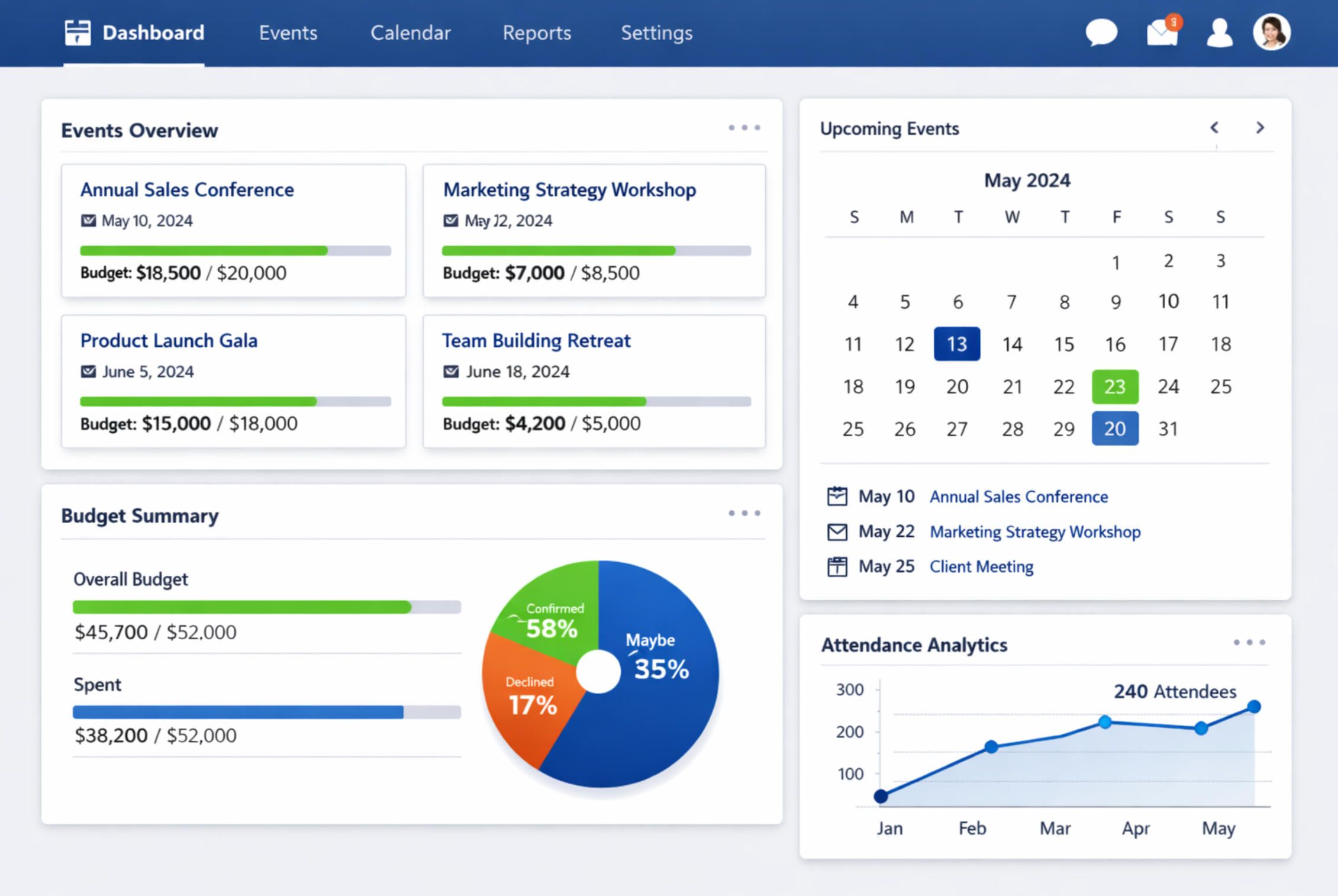
A spreadsheet can be an effective starting point when the event is relatively simple and the team already understands spreadsheet workflows. An event management software template excel structure can use separate worksheets for the event overview, task plan, attendees, vendors, budget, schedule, and reporting. Formulas can calculate totals and variances while filters can make larger lists easier to manage.
The main strength of a spreadsheet template is flexibility. Columns can be added, labels can be changed, formulas can be adapted, and multiple event formats can be supported without redesigning an entire system. The weakness is that flexibility can become inconsistency when several people edit the same workbook without agreed rules.
For that reason, spreadsheet templates should include controlled categories, consistent date formats, clearly marked input cells, protected formula areas where appropriate, and documented definitions for important fields. The goal is not to make a spreadsheet look like enterprise software. The goal is to make the data dependable.
Cloud spreadsheet structures
An event management software template google sheets workflow can be useful when several stakeholders need to collaborate on the same planning information. Shared spreadsheets can support centralized task lists, budgets, attendee records, schedules, and supplier information while giving teams a familiar editing environment.
However, collaboration introduces governance requirements. Decide who owns the master file, who can edit financial records, who can change formulas, and how archived events are handled. A shared document without clear ownership can quickly become difficult to trust because users may overwrite formulas, rename categories, or create conflicting versions.
The most effective cloud spreadsheet structure therefore combines convenience with discipline. Use standardized field names, validation lists, protected calculations, clear naming conventions, and a documented process for adding new events. These practices matter more than decorative formatting.

Budget, expense, and financial control
Budgeting is one of the strongest reasons to use a structured event template. A useful financial model should begin with planned categories and then track actual financial activity against them. The template should make it immediately clear whether a figure represents an estimate, an approved commitment, an invoice, a payment, or a final actual amount.
A simple budget worksheet can include category, supplier, description, planned amount, committed amount, paid amount, remaining amount, payment date, and notes. More advanced structures can connect these records to an event dashboard. This allows planners to see budget utilization without manually adding figures every time a supplier invoice changes.
Budget variance should also be treated as a management signal rather than merely a mathematical result. A negative variance may require renegotiating a supplier, changing a specification, delaying a purchase, or reallocating money from a lower-priority category. The template should make those decisions easier to identify.

For recurring events, financial history becomes especially valuable. Comparing planned and actual spending across several editions can reveal recurring cost patterns. For example, a planner may discover that venue expenses consistently exceed the original estimate while printing costs consistently remain below budget. That information can improve future planning assumptions without pretending that historical values guarantee future prices.
Financial fields should also distinguish event revenue from event costs. Depending on the event model, revenue may include ticket sales, sponsorships, exhibitor fees, donations, grants, or merchandise. The template can then calculate gross revenue, total cost, net result, and relevant ratios. These are planning metrics, not universal measures of event success, so they should be interpreted alongside attendance and experience data.
Templates should never hide financial assumptions. If a budget includes estimated taxes, service charges, contingency reserves, or payment fees, those assumptions should be visible. Transparency makes the workbook or dashboard easier for another planner to audit and maintain.
Scheduling, tasks, and event-day operations
A schedule should represent more than the public agenda. Behind every published session is a chain of preparation activities: room setup, equipment checks, speaker arrival, registration opening, signage placement, catering delivery, technical rehearsal, presentation loading, and teardown. A useful event template makes these dependencies visible.
The task system should include an owner and deadline for every meaningful action. A task without ownership is effectively an unresolved assumption. Similarly, a task without a due date is difficult to prioritize. The combination of owner, deadline, status, and dependency provides enough information for a coordinator to identify operational risk before the event day.
Calendar and list views serve different purposes. A calendar is best for seeing collisions and workload distribution across dates. A task list is better for filtering overdue work or reviewing responsibilities for a particular person. A timeline view is useful when tasks depend on one another. A strong template can support these views from the same underlying records.

Run-of-show planning should be especially precise for complex events. It can include exact times, activity descriptions, responsible roles, locations, required equipment, communication notes, and contingency instructions. The purpose is not to predict every possible problem but to give the team a shared operational reference.
Vendor coordination should be connected to the schedule. If a catering supplier must arrive at a particular time, that information belongs in the operational timeline as well as the supplier record. This prevents important details from remaining isolated in contact lists or email conversations.
The same principle applies to speakers and presenters. A speaker record may contain contact details, session assignment, arrival time, presentation status, technical requirements, and confirmation state. Connecting those fields to the agenda helps planners see whether every session has both a confirmed presenter and the required supporting materials.
Attendee registration and data management
Registration data should be designed around the decisions the event team needs to make. Basic fields may include attendee identity, contact information, registration status, ticket type, payment status, and check-in state. Optional fields can cover session choices, dietary requirements, accessibility needs, organization, or other information directly connected to event delivery.
Registration records become more useful when status definitions are standardized. For example, confirmed, pending, cancelled, waitlisted, and checked in should have clear meanings. A registration should not simultaneously appear as cancelled and confirmed because two team members interpreted the same field differently.
Capacity management is another important part of the design. A template can compare confirmed registrations with venue capacity and show the remaining places. If different ticket categories have separate limits, the structure should track those limits individually rather than relying on a single total.

Check-in should be treated as a separate operational stage. Registration tells the team who intends to attend; check-in records who actually arrived. Comparing the two can support post-event analysis and future capacity planning. Dashboards often use registration and attendance together because the difference between the two can reveal important operational patterns.
Privacy should be considered from the beginning. Only collect information that has a legitimate operational purpose, limit access to sensitive fields, and establish how long records should be retained. A template is easier to govern when the data model itself reflects a clear need for each field.
For organizations running repeated events, attendee history can also support segmentation. A planner might distinguish first-time participants from returning participants, compare registration channels, or identify which sessions attract the greatest interest. Such analysis should be used to improve planning rather than to collect unnecessary personal information.

Website and front-end planning
An event management system often needs a public-facing website structure as well as an internal planning structure. The public side may contain event information, dates, venue details, schedules, speakers, ticket information, registration instructions, sponsors, and contact details. The internal side needs operational records that visitors should not see.
An events management website template download may appear attractive when someone wants a rapid starting point for the public-facing portion of an event system, but visual design should not be confused with operational functionality. A website layout can communicate event information while a separate data structure handles registrations, schedules, budgets, and staff responsibilities.
Similarly, an events management website template free resource can be useful as a visual reference when evaluating navigation, event cards, schedule sections, registration calls to action, and mobile layouts. Before adopting any external resource, verify its licensing terms, technical compatibility, maintenance status, and ability to support the actual workflow required.

A public event page should make essential information easy to find. Visitors generally need to understand what the event is, when it happens, where it takes place, who it is for, what the schedule looks like, and how registration works. Avoid hiding essential details behind excessive navigation or decorative interactions.
Mobile responsiveness is also important because attendees may access event information while traveling or while moving through the venue. A compact schedule, clear session information, and accessible registration flow can be more useful than a visually complex layout that performs poorly on smaller screens.
The internal dashboard should remain focused on operational control. Public marketing content and internal financial or staffing information should not be mixed into one undifferentiated interface. Separate views make permissions easier to manage and reduce the chance of exposing information that should remain internal.

Git-based and startup-oriented approaches
The phrase event management software template github usually signals an interest in examining reusable source structures, project organization, interface patterns, or open-source event systems. Git-based projects can be valuable for technical teams because the source structure can reveal how event records, registrations, schedules, authentication, and reporting are modeled.
However, source availability does not automatically mean that a project is production-ready. Before adopting a repository, examine its license, recent maintenance activity, dependency health, documentation, security practices, database structure, and deployment requirements. An old project can be useful as a learning reference while still being unsuitable for a live event operation.
For a startup, the phrase event management software template for startups points toward a different priority: speed without creating an architecture that becomes impossible to extend. A startup template should begin with a small set of essential workflows, such as event creation, registration, scheduling, attendee management, basic finance, and reporting.

Startup teams should avoid building every possible feature before validating the core workflow. A focused first version can establish the event, attendee, ticket, session, venue, task, and payment relationships. Later capabilities such as sponsor portals, exhibitor management, advanced analytics, complex permissions, or multi-event reporting can be introduced when there is a clear operational reason.
Modularity is particularly important for growing teams. If the registration structure is independent from the venue structure, for example, the same registration logic can potentially support conferences, workshops, and community events without rebuilding the entire system. Reusable components reduce future design and maintenance effort.
A good startup template should also make ownership explicit. Someone should be responsible for data definitions, another person may manage operational content, and financial records may require restricted access. Even a small team benefits from clear responsibilities when an event becomes time-sensitive.

How to evaluate a template before adopting it
Start with the data model. List the records the event requires and check whether the template has a logical place for each one. If you need attendees, tickets, sessions, speakers, rooms, vendors, expenses, tasks, and sponsors, the template should not force all of these into one oversized worksheet.
Next, test the workflow using a hypothetical event. Enter an event date, create several sessions, add vendors, create attendees, enter expenses, assign tasks, and change a few statuses. Watch what happens when information changes. A useful template should remain understandable when the event becomes more complicated than the original example.
Then test reporting. Ask whether the template can answer practical questions such as how many people are registered, how much budget remains, which tasks are overdue, which sessions are missing speakers, which vendors are awaiting payment, and how attendance compares with registration.

Finally, review maintenance. A template that works today but becomes confusing after several months is not a strong operational foundation. Look for clear naming, consistent formatting, predictable status values, documented calculations, sensible permissions, and an archive strategy for completed events.
Licensing should also be checked before using third-party assets or code. The fact that a resource is publicly visible does not automatically grant unrestricted rights to redistribute, modify, or use it commercially. Treat licensing as part of technical due diligence rather than as an afterthought.
For spreadsheet-based systems, also examine formula dependencies and input validation. For software-based systems, examine authentication, authorization, backups, error handling, and data export. The evaluation criteria should reflect the risks of the environment in which the template will operate.
Common mistakes when building an event template
One common mistake is attempting to track everything on one page. A single giant worksheet may initially seem convenient, but it becomes difficult to filter, maintain, and understand. Separate logical records with clear relationships are usually easier to manage.
Another mistake is prioritizing visual decoration over data structure. Attractive cards and charts can make a dashboard look professional, but they do not solve missing fields, duplicate records, unclear statuses, or inaccurate formulas. Visual design should help people interpret reliable data rather than disguise weak data.
Teams also frequently create too many status categories. If every possible situation receives a different status, users may struggle to decide which one applies. A smaller, clearly defined status vocabulary is usually easier to maintain.

Another issue is failing to separate planned work from completed work. A task list that does not preserve status history can make it difficult to understand what happened. Similarly, a budget that replaces estimates with actuals loses useful information about planning accuracy.
Templates can also become overloaded with optional fields. Every additional field creates a maintenance burden. A better approach is to identify essential information first, then add optional fields only when they support a specific decision or operational requirement.
Finally, planners sometimes neglect the transition from planning to post-event review. The same system that tracks preparation should make it easy to capture final attendance, actual spending, unresolved issues, supplier performance, and lessons learned. That creates a feedback loop for future events.
Practical Solution
The most practical way to build an event management software Template is to start with seven connected areas: event overview, schedule, tasks, attendees, vendors, budget, and reporting. Begin by defining the event record and its key identifiers. Then create the other records so each one can be connected to the correct event. This prevents the common problem of having multiple independent lists that cannot be reconciled later.
Next, create a minimum viable workflow. Enter the event, establish its dates and venue, create the agenda, add the main tasks, define the budget categories, register a small sample of attendees, and add representative vendors. Test the system from beginning to end. If changing an event date forces manual changes in several unrelated places, redesign the relationships before adding more features.
After the basic workflow works, add dashboards only for decisions that matter. A management screen might show registration progress, capacity, budget variance, overdue tasks, upcoming milestones, and unresolved issues. A finance view can focus on planned versus actual costs. An operations view can emphasize schedule readiness, vendor status, room assignments, and event-day tasks.

For a small event, a spreadsheet structure may be sufficient. For a growing program with multiple simultaneous events, a centralized system becomes more attractive because it can maintain relationships between records and provide controlled access. The choice should be based on scale, complexity, collaboration requirements, and reporting needs rather than on the popularity of a particular tool.
For teams researching event management software template download resources, evaluate the actual structure before committing to a particular file. Check whether the resource contains the worksheets or interface components it claims to contain, whether the license permits the intended use, and whether its formulas or integrations can be inspected. A polished preview is not enough evidence of suitability.
Likewise, an event management software template free download search should not be treated as a quality filter. A zero-cost resource may be useful, but its value depends on accuracy, maintainability, compatibility, licensing, and workflow fit. The same principle applies to an event management software template free resource: evaluate its structure rather than assuming that price determines usefulness.
When researching free online event management templates, compare the underlying data fields and workflow rather than comparing colors and typography. Look for registration tracking, task ownership, schedule management, budget controls, supplier records, and reporting. These are the components that determine whether the template can support real event operations.
A practical event management excel template can remain valuable when the event is small or when a team needs a familiar planning environment. Keep formulas separate from input areas, standardize categories, protect calculations where appropriate, and establish a naming convention. For repeated events, archive completed records so the active workspace remains manageable.
A software event planning template should go one step further by connecting workflows. When an attendee registers, the registration should appear in the attendee record. When a session changes, the schedule should reflect the new information. When a vendor expense is recorded, the budget should reflect it. The goal is to reduce duplicated data entry and improve consistency.

For teams looking for events management website template free resources, separate the public website layer from the operational planning layer. The website should communicate the event clearly, while the internal system should control schedules, attendee records, finances, suppliers, and tasks. Connecting the two layers can create a smoother workflow without exposing internal information.
The best template is ultimately the one that makes the next decision easier. If a coordinator can quickly see what is happening, what is late, what is over budget, who is responsible, and what needs attention next, the template is doing its job. If users spend most of their time correcting duplicate records or searching for information, the structure needs improvement regardless of how polished it looks.

Reference Examples
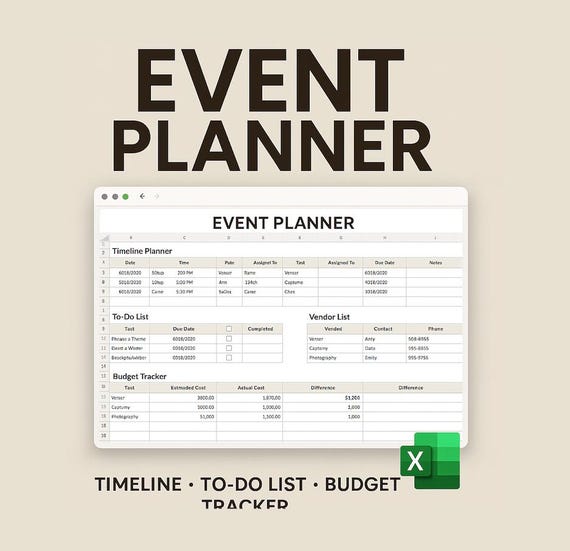
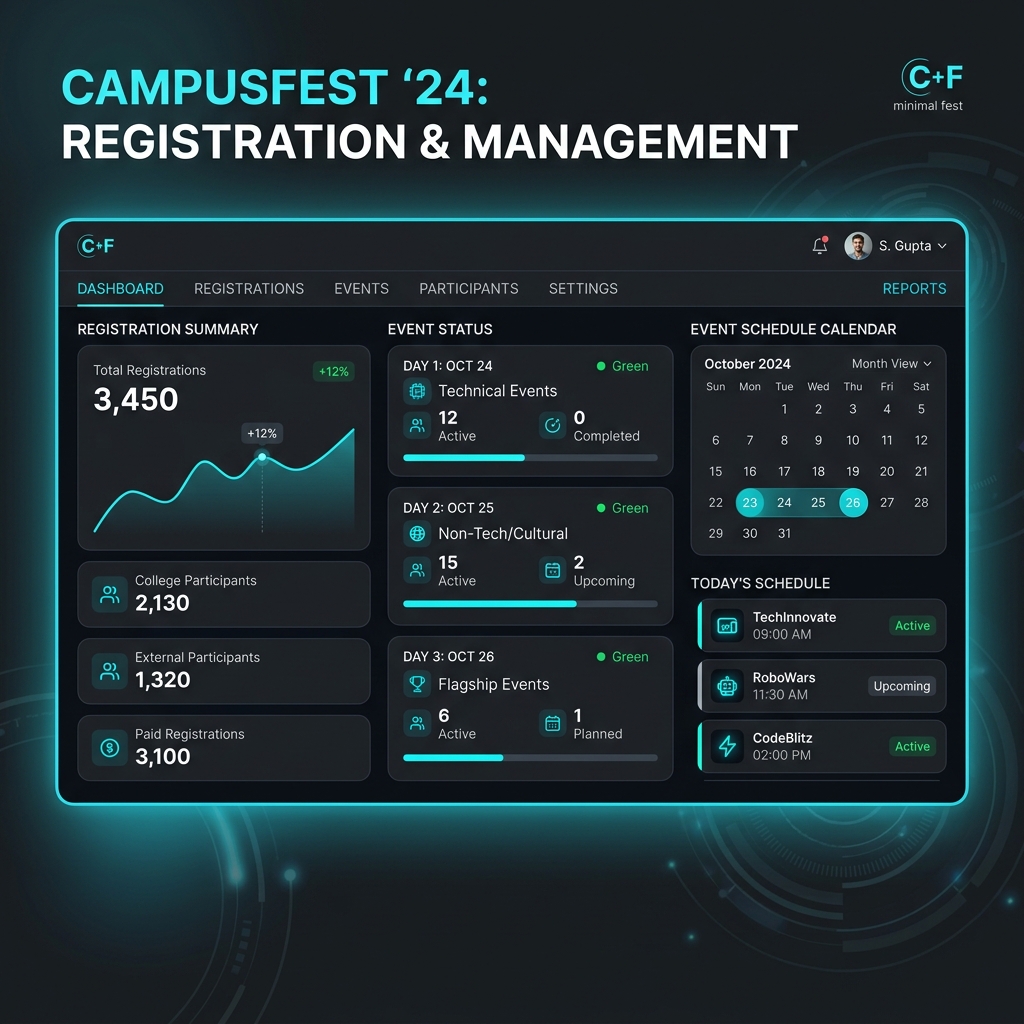
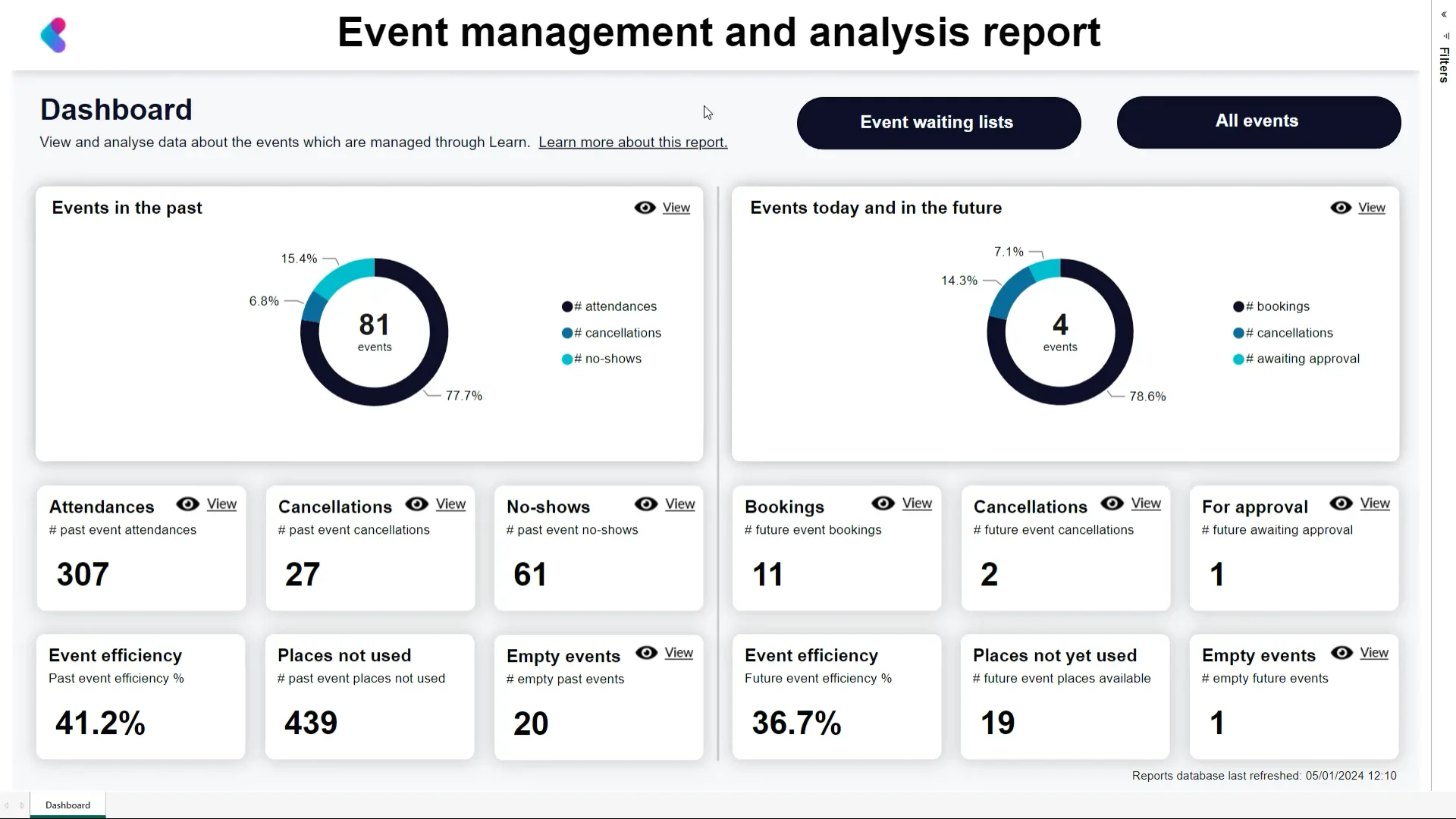
An event management software Template can take many visual forms, from a spreadsheet with separate planning worksheets to a centralized dashboard with calendars, financial indicators, registration records, task lists, and operational reports. The examples below illustrate different ways event information can be organized visually. Some emphasize scheduling, others focus on registration, financial control, analytics, or the relationship between public event information and internal coordination. They should be treated as visual references rather than universal designs, because the appropriate structure depends on event size, workflow complexity, team responsibilities, data requirements, and reporting needs.
These references also demonstrate why evaluating an event management software Template requires more than judging colors or interface style. A useful visual should make important information easy to locate and should reflect a coherent planning model. Calendar layouts can reveal timing relationships, financial dashboards can clarify budget structure, registration views can show capacity and attendee states, and task-oriented screens can expose operational readiness. Comparing these patterns can help planners identify which components belong in their own structure and which features would add unnecessary complexity.
Event Budget Template Excel
Source: Engineering Management

2026 Catholic Men’s Conference Dashboard
Source: Gatheringline
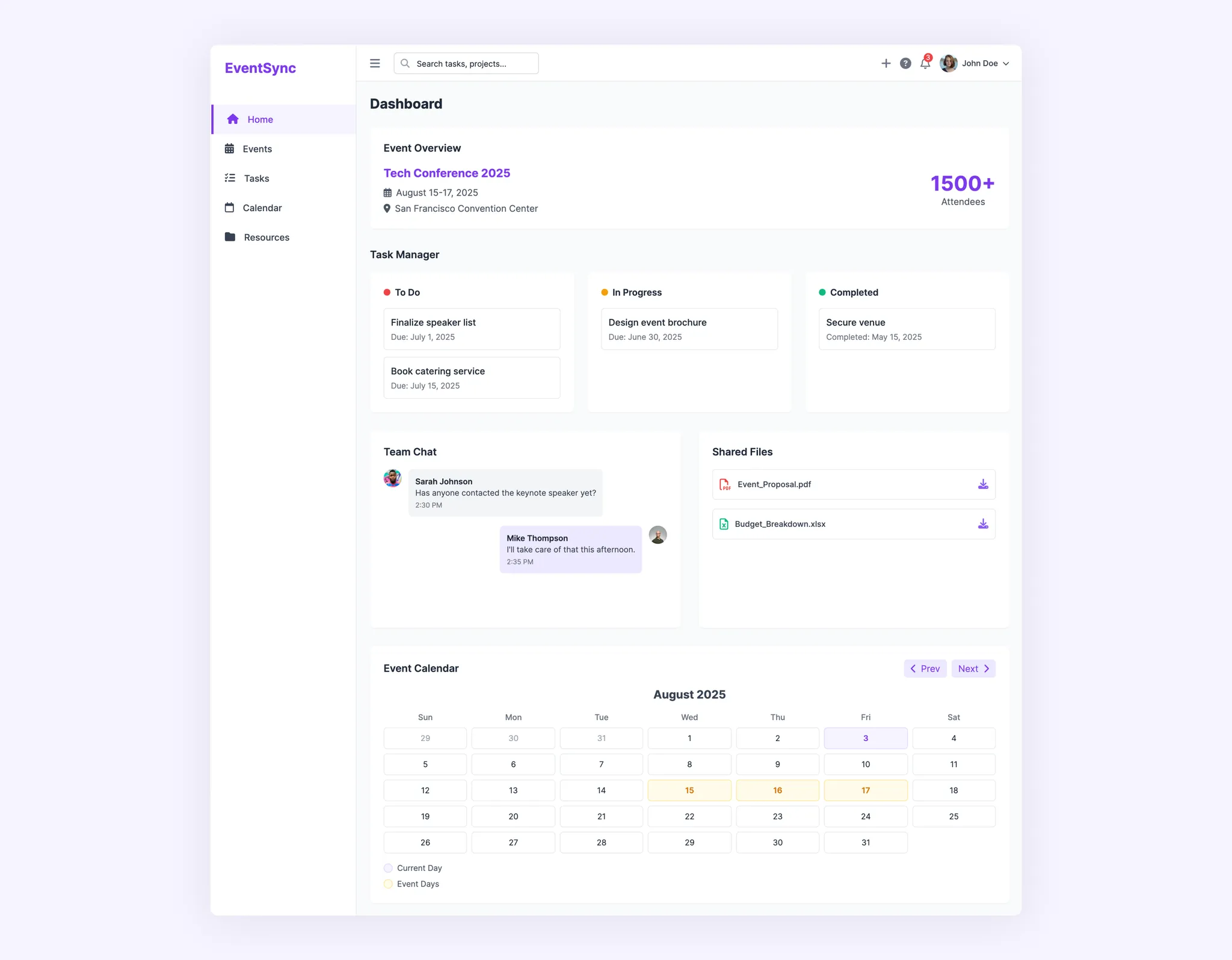
EventSync Conference Dashboard
Source: UX Pilot

Beoflow Event Operations Dashboard
Source: Bastida Systems
