Risk assessment is fundamentally a structured decision-making process. The International Labour Organization describes a practical five-step approach: identify hazards, identify who may be harmed and how, evaluate risks and controls, assign responsibility and time frames, then record, monitor, review, and update the assessment. :contentReference[oaicite:0]{index=0}
Searches for a format risk assessment template can therefore mean several different things. One person may need a simple one-page workplace form, another may need an Excel register with scoring, while a construction manager may need a task-specific assessment that connects hazards with controls and responsible people. Events, schools, laboratories, offices, and project teams can all require different levels of detail.
This guide explains the structure behind effective templates rather than treating one document as suitable for every situation. It covers the fields that matter, practical risk-rating methods, Excel and Word considerations, PDF use, industry-specific adaptations, review practices, common mistakes, and a practical workflow for turning a blank template into a useful working document.
It is also important to distinguish a template from an official legal requirement. A template is a documentation aid; whether a particular jurisdiction, regulator, client, insurer, school authority, or organization requires a specific assessment method depends on the circumstances. For example, the UK Health and Safety Executive provides a general risk-assessment template while explicitly emphasizing that users must consider the specific hazards and controls relevant to their own work. :contentReference[oaicite:1]{index=1}
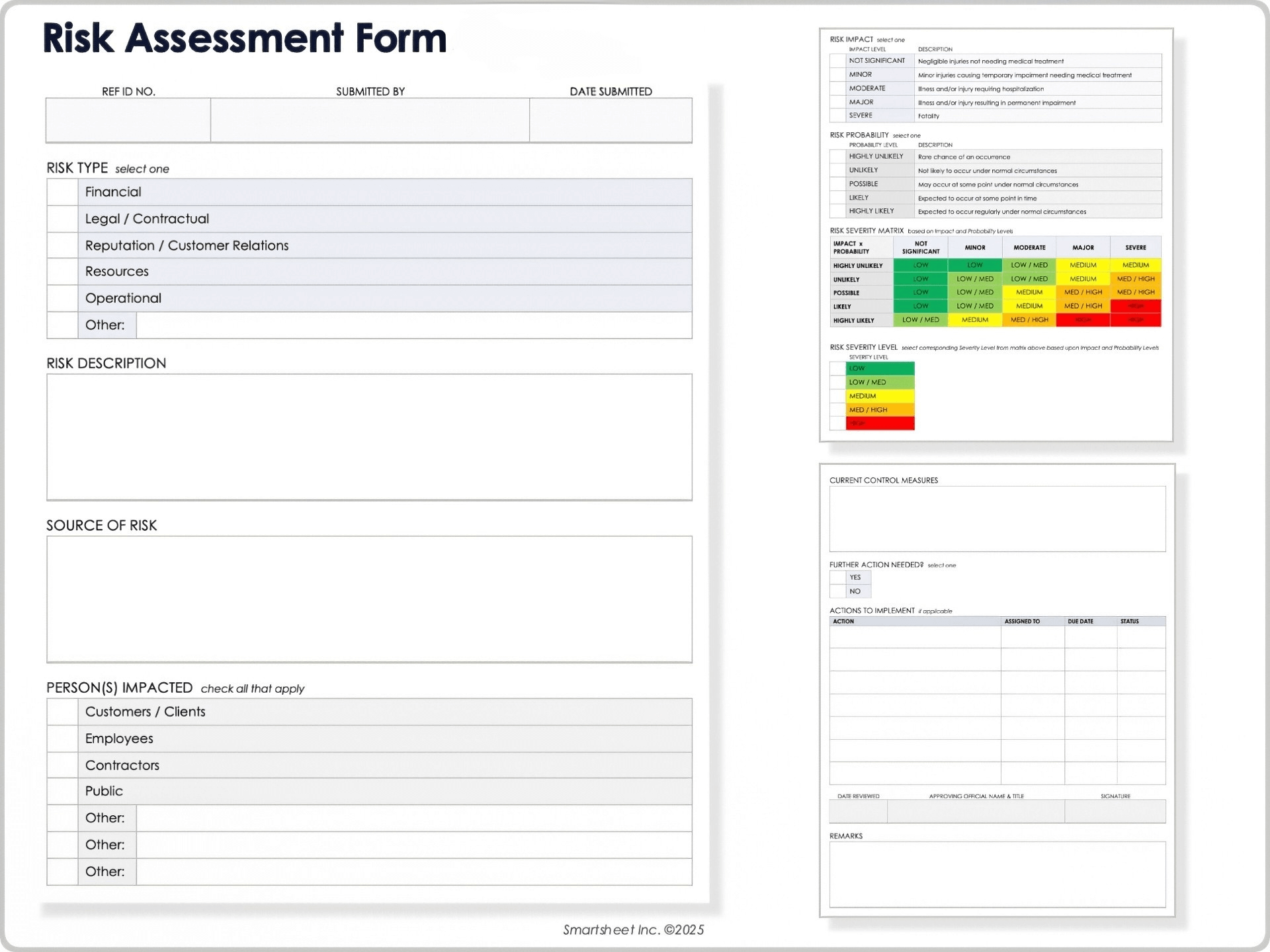
The strongest templates begin with context. A reader should be able to tell what is being assessed, where it occurs, when the assessment was completed, and who performed it. Without that context, even a technically correct risk rating can become difficult to interpret later.
Typical identifying fields include the activity, task, workplace, project, department, location, assessment date, assessor, and review date. For a project, it may also be useful to include a project reference, phase, contractor, supervisor, or approval field. The level of detail should match the complexity of the activity.
Scope is equally important. A statement such as “warehouse operations” may be too broad to produce useful controls because receiving deliveries, operating equipment, storing goods, picking orders, and cleaning may involve very different hazards. A more focused assessment can address one activity or a clearly defined group of related tasks.
A good scope statement also establishes boundaries. It can explain whether the assessment covers normal operations only or includes setup, shutdown, maintenance, cleaning, emergencies, contractors, visitors, and unusual conditions. This reduces the chance that important situations are silently excluded.
Documentation should remain understandable to the people who will use it. The HSE’s general template focuses on practical fields such as who might be harmed, existing controls, further action, responsibility, and deadlines rather than turning the assessment into an unnecessarily elaborate report. :contentReference[oaicite:2]{index=2}
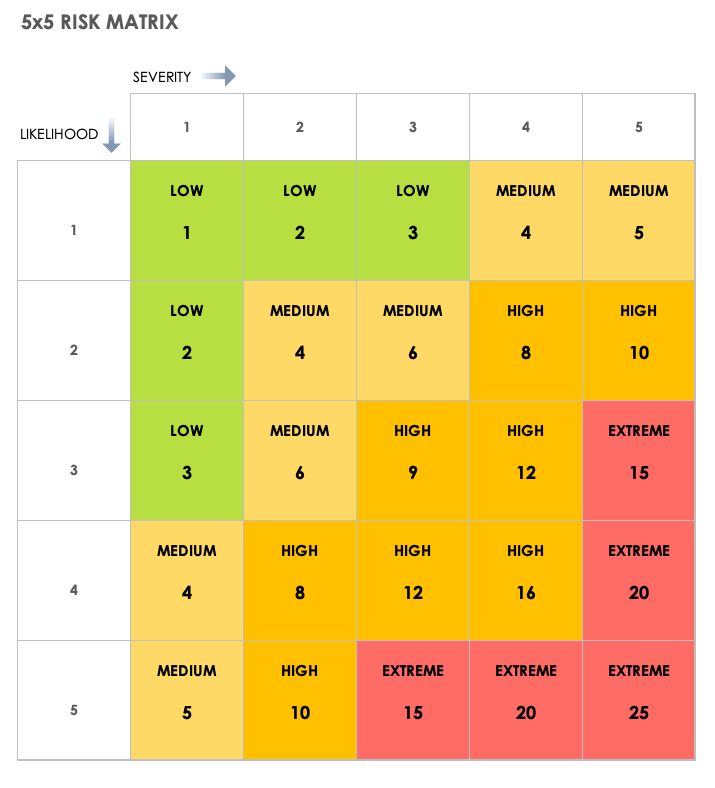
Hazard identification is the foundation of the assessment. A hazard is a source or situation with the potential to cause harm, while risk describes the combination of the likelihood of an unwanted outcome and the severity of its consequences. Keeping these concepts separate helps prevent vague entries such as “high risk” without explaining what actually creates the risk.
Effective identification methods combine several information sources. Walk through the work area, observe tasks as they are actually performed, review previous incidents and near misses, examine equipment and substances, speak with workers, and consider foreseeable abnormal conditions. The people doing the work often know about practical hazards that are absent from formal procedures.
Hazards can be organized by category when that improves completeness. Physical hazards may include slips, falls, noise, heat, moving objects, or energy sources. Chemical hazards may involve exposure, storage, incompatibility, or release. Ergonomic hazards can arise from repetitive work, awkward posture, force, or manual handling. Environmental, biological, electrical, fire, and psychosocial considerations may also be relevant.
The template should provide enough space to describe the hazard specifically. “Wet floor near loading area after deliveries” is more actionable than “slip hazard.” The specific description points toward a specific control, such as drainage, housekeeping, surface treatment, barriers, or changes to the delivery process.
Many established templates use separate columns for the hazard, affected people or resources, likelihood, impact, current controls, further actions, ownership, and status. This structure creates a logical chain from observation to decision and then to follow-through. :contentReference[oaicite:3]{index=3}

Identifying who may be affected is more precise than simply listing employees. Depending on the activity, relevant groups can include workers, contractors, visitors, customers, students, volunteers, delivery personnel, members of the public, or people who may be particularly exposed because of the environment or task.
For each hazard, ask who could encounter it and how exposure might occur. A hazard may affect people performing the task directly, but it may also affect someone passing through the area. A maintenance activity, for example, can create temporary hazards for people who are not involved in the maintenance itself.
Vulnerability should be considered where it materially changes the assessment. Events may involve children, older attendees, people unfamiliar with a venue, or people with accessibility requirements. Schools may need to consider students with different supervision or support needs. Construction projects may involve workers from several employers and members of the public near the site.
The description of potential harm should also be proportionate. It should communicate the credible consequence without exaggeration. Clear wording helps the assessor select a defensible severity rating and makes the control strategy easier for another reviewer to understand.
A useful assessment therefore connects three questions: what can go wrong, who could be affected, and what could reasonably happen if the hazard is not adequately controlled. That information is more valuable than a numerical score by itself.

Risk scoring is where a template converts descriptive information into a prioritization system. A common approach is to rate likelihood and consequence separately, then combine them through a predefined matrix. Many organizations use scales such as 1–5, but there is no universal requirement that every organization must use a five-by-five model.
A simple five-level likelihood scale might range from very unlikely to very likely. A consequence scale might range from minor to severe. The exact definitions should be written into the template so different assessors do not interpret the same number in radically different ways.
For example, a hypothetical organization might calculate an initial score by multiplying likelihood by consequence. A likelihood of 3 and consequence of 4 would produce 12 under that method. The score itself is not a physical measurement; it is a structured convention for prioritizing attention.
That distinction matters because numerical risk scores can create false precision. A score should support professional judgment rather than replace it. Two hazards with the same numerical score may require different controls because their mechanisms, affected populations, or practical control options differ.
A matrix is most useful when it leads to an action decision. The organization should define what different bands mean, such as routine monitoring, additional controls, management review, or escalation. The definitions should be approved within the organization’s own risk-management system rather than copied blindly from an unrelated template.

Existing controls should always be recorded before deciding what additional controls are necessary. Otherwise, an assessment can overstate exposure by pretending that safeguards do not exist, or understate exposure by assuming that a written procedure automatically means the procedure is effective.
Controls can include physical changes, equipment safeguards, engineering measures, administrative arrangements, training, supervision, inspection, maintenance, signage, scheduling, access restrictions, emergency arrangements, or personal protective equipment. The most suitable control depends on the hazard and the circumstances.
The hierarchy of controls is a useful way to think about control quality. In general terms, eliminating a hazard is preferable to merely warning people about it, while engineering or design controls can often provide stronger protection than relying entirely on individual behavior. PPE can be important, but it should not automatically be treated as the first or only answer.
When documenting a control, describe what actually happens. “Training provided” is weaker than “operators receive task-specific instruction and supervisors verify competence before independent operation,” provided that statement accurately describes the organization’s process.
Controls should also be connected to verification. If the assessment says an inspection is required, identify what is inspected, who performs it, how often it occurs, and what happens when a defect is found. This turns a static document into part of a functioning risk-management process.

Action planning is one of the most important parts of a risk assessment because identification without follow-through does not meaningfully reduce exposure. Each additional control should have a clear owner and, where appropriate, a target date.
A useful action entry describes the required change rather than merely repeating the hazard. For example, “improve safety” is not a practical action. “Install a physical barrier around the restricted area and verify completion before the next shift” is more specific and easier to close out.
Priority should influence deadlines. A higher-priority issue may need immediate interim controls while a permanent solution is developed. Lower-priority actions can still be important, but they may be scheduled through normal maintenance or improvement processes.
Status fields are valuable in digital templates. Options such as not started, in progress, complete, overdue, or on hold provide a quick picture of implementation. The assessment should also provide space for comments when an action cannot be completed as originally planned.
Responsibility should be assigned to a role or person who can actually influence the action. Assigning every item to a generic department can make accountability unclear. A named owner or defined responsible role makes follow-up much more practical.

Excel is particularly useful when the assessment contains many risks, repeated assessments, or calculations. A spreadsheet can provide columns for likelihood, consequence, score, risk level, control status, owner, due date, and review date, while formulas can reduce manual arithmetic.
The main advantage of an Excel-based format risk assessment template is consistency. Drop-down lists can standardize rating terminology, conditional formatting can highlight priority areas, and filters can help users find overdue or high-priority items.
However, automation needs governance. A formula that calculates a score correctly can still produce a misleading result if users select the wrong rating or if the definitions are poorly designed. Protected formula cells, clear instructions, and validation rules can reduce these problems.
Large workbooks should also be structured logically. A practical design may separate assessment instructions, rating definitions, the main assessment table, an action tracker, and a summary view. Avoid unnecessary complexity that makes a simple assessment difficult to maintain.
Spreadsheet templates are best treated as controlled working documents. Version numbers, review dates, ownership, and change records can help users distinguish the current assessment from obsolete copies.

Word is often preferable when the assessment needs more narrative explanation. A Word-based document can combine tables with scope statements, methodology notes, assumptions, photographs, approval sections, and detailed descriptions of controls.
A Word format is also useful when a completed assessment must be circulated for review or incorporated into a broader safety document. Its page-oriented structure can make a concise assessment easier to print and read during meetings.
The limitation is that Word is generally less convenient than a spreadsheet for large numbers of risks and automated scoring. Manual calculations and repeated edits can increase the possibility of inconsistent ratings or formatting errors.
Good Word templates therefore keep tables simple. Each row should have a clear purpose, headings should be unambiguous, and there should be enough writing space for meaningful descriptions without creating enormous blank sections.
Official and institutional examples show that Word remains a common format for editable risk assessments. For example, the University of Bath publishes an editable risk assessment template alongside its risk assessment safety standard. :contentReference[oaicite:4]{index=4}

PDF is useful when the completed assessment needs a stable, printable version. Once a document has been reviewed and approved, PDF can help preserve the appearance of tables and headings across devices.
A PDF is not automatically better simply because it looks professional. If users need to edit the assessment frequently, a source Word or Excel document may be more practical. The PDF can then serve as the controlled or distributed version.
When choosing a PDF template, distinguish between a static printable PDF and a fillable PDF. A static form may require printing and handwriting, while a fillable document can contain interactive fields. Either approach can work if it fits the actual workflow.
PDF records should have enough identifying information to prevent confusion between assessments. Include the activity or project name, assessment date, revision or version number where appropriate, assessor, and review information.
A useful document system may therefore maintain an editable master in Word or Excel and issue a PDF copy when a stable record is needed. This avoids repeatedly editing a finalized PDF when a change should instead trigger a new review.

Construction assessments usually require more task and site specificity than a generic office assessment. Activities can change as the project progresses, and hazards may depend on the current phase, work area, equipment, sequencing, contractors, temporary works, and surrounding activities.
A construction-focused template can therefore include project identification, task or activity, project phase, hazard, people exposed, likelihood, consequence, risk level, current controls, additional controls, responsible person, action date, and status.
Pre-task assessments can be especially useful when conditions change quickly. A contractor may review the day’s planned work, identify hazards associated with the sequence, confirm controls, and communicate important precautions before work begins.
Construction templates should not become substitutes for detailed planning documents where those documents are required. A risk assessment may work alongside method statements, permits, inspection records, emergency arrangements, equipment information, and other project controls.
Current template collections commonly include construction matrix forms, project risk assessments, excavation assessments, and welding assessments, illustrating how the same basic risk logic can be adapted to different activities. :contentReference[oaicite:5]{index=5}

For excavation work, the assessment should be task-specific rather than relying on a generic construction row. Consider the planned excavation activity, surrounding conditions, access and egress, equipment, underground services where applicable, spoil or material placement, changing site conditions, and the people who may enter or approach the area.
The assessment should make clear which controls are already in place and which controls are conditions for starting the task. This distinction helps supervisors understand whether a listed measure is merely recommended or must be completed before work proceeds.
Similarly, welding assessments may need to consider the task environment, equipment condition, ignition sources, fumes, nearby materials, work area controls, and relevant protective measures. The template should capture the controls actually selected for the specific work.
Construction risk assessments should also account for interfaces. One crew’s work can create hazards for another crew, and a temporary control can become ineffective when site conditions change. Regular review is therefore essential on active projects.
A strong construction template supports communication as much as documentation. The person completing it should be able to explain the hazards and controls to the people carrying out the work, rather than simply completing fields for filing.

Events require a different perspective because the risk environment changes when a venue is occupied by a temporary population. Organizers may need to consider attendees, performers, vendors, contractors, volunteers, venue staff, and people who are unfamiliar with the site.
An event assessment can begin with event name, location, dates and times, expected attendance, audience profile, activities, site layout, and responsible event manager. It can then move into hazards involving access, crowd movement, temporary structures, equipment, traffic, weather, food service, emergency arrangements, and other relevant issues.
Setup and teardown deserve their own attention. The venue may look very different during installation, when vehicles, equipment, contractors, temporary barriers, cables, tools, and incomplete structures can introduce hazards that do not exist during the public event.
Emergency planning should also connect to the assessment. The event team should know how hazards will be managed if conditions deteriorate, an incident occurs, an area becomes unavailable, or evacuation or other emergency action becomes necessary.
Published event templates illustrate this broader approach. The City of Wollongong, for example, provides an event risk assessment matrix among its event-management templates, while an event safety checklist published by the University of the Sunshine Coast includes planning, site access, contractors, emergency arrangements, amenities, and other event considerations. :contentReference[oaicite:6]{index=6}

Schools need templates that reflect both ordinary school operations and activities outside the normal classroom environment. Facilities, playgrounds, laboratories, sports areas, maintenance tasks, trips, events, and student projects can all require different assessments.
A school template can include school identification, location or activity, hazard, people at risk, likelihood, consequence, existing controls, further action, responsible person, completion date, and review status. This gives administrators a structured way to track actions rather than relying on informal notes.
School trips deserve particular attention because the risk environment changes when students and staff leave the normal premises. Destination, transportation, supervision, activities, accommodation where relevant, emergency arrangements, and communication procedures may all affect the assessment.
Student projects may also benefit from a simpler form that encourages students to identify hazards before practical work begins. The assessment should be appropriate to the student’s age, competence, activity, and supervision arrangements.
Education authorities publish examples that demonstrate this adaptation. The Victorian Department of Education provides an OHS risk register in spreadsheet form and a risk assessment template in DOCX format for school-related use. :contentReference[oaicite:7]{index=7}

A practical assessment workflow starts before anyone opens the template. First define the activity and purpose, then gather enough information to understand how the work is actually performed. This avoids completing a form based solely on assumptions.
Next, walk through the activity step by step. Identify hazards at each stage and consider normal, abnormal, maintenance, cleaning, setup, shutdown, and foreseeable emergency conditions where relevant. Recording hazards in the sequence in which they occur can reveal interactions that a generic checklist misses.
Then identify who could be affected and how. This is where the assessment becomes more than a hazard inventory. It establishes the pathway from hazard to potential consequence and helps determine whether current controls are adequate.
After that, assess the initial or existing level of risk using the organization’s approved definitions. Record current controls, identify gaps, select additional measures, and reassess residual risk if the organization’s methodology requires it.
Finally, assign actions, communicate the results, and schedule review. The ILO recommends recording responsibility and time frames and then monitoring and updating the assessment when necessary. :contentReference[oaicite:8]{index=8}

Data collection does not need to be complicated, but it should be evidence-based. Useful information may include observations, inspection findings, equipment records, maintenance information, incident reports, near-miss reports, worker feedback, task procedures, manufacturer information, environmental conditions, and previous assessments.
Interviews and worker consultation can reveal hazards that are difficult to see during a short inspection. Ask what usually goes wrong, what conditions make the task harder, which controls are inconvenient, and what workers do when the written process does not match reality.
Photographs can also help when they clarify a physical condition. A photo of an access route, storage arrangement, temporary barrier, workstation, or equipment position can make the assessment easier to review later. Photographs should supplement written descriptions rather than replace them.
Historical information should be treated carefully. Previous incidents can reveal recurring hazards, but the absence of reported incidents does not prove that a hazard is insignificant. Reporting behavior, exposure frequency, and detection opportunities can all affect the available evidence.
When evidence is uncertain, document the assumption instead of presenting speculation as fact. This creates a more transparent record and gives reviewers a clear reason to request additional information.

Analysis should turn collected information into decisions. Start by separating hazards that require immediate attention from those that can be managed through routine controls and monitoring. The rating system provides structure, but professional judgment remains important.
Look for patterns across the assessment. Several individually moderate hazards may point to a common underlying problem, such as poor housekeeping, inadequate maintenance, insufficient training, unclear responsibilities, or an unsuitable workflow.
Residual risk is particularly important. After additional controls are selected, estimate the remaining exposure using the same definitions that were used for the initial assessment. If the residual level remains unacceptable under the organization’s criteria, additional action may be required.
Do not automatically lower a rating because a control has been written into a procedure. The relevant question is whether the control is implemented and effective. Evidence such as inspection records, observations, maintenance records, training verification, or monitoring can provide stronger support.
The assessment should ultimately answer a practical question: given what is known, what needs to happen next, who will do it, and how will the organization know the control is working?

Reporting is where the assessment becomes useful to decision-makers who may not have participated in the original inspection. A concise summary should explain the scope, major findings, priority risks, important controls, outstanding actions, and review arrangements.
For a small workplace, this may be a short completed form. For a large project, it may involve a register, dashboard, action tracker, and supporting documents. The format should reflect the complexity of the risk rather than following a fixed page count.
Tables are particularly useful because they allow reviewers to compare hazards quickly. Columns such as hazard, affected people, likelihood, consequence, rating, control, owner, deadline, and status provide a logical progression from assessment to action.
Visual summaries can be helpful for management reviews, but they should not hide important details. A red cell on a matrix is not enough information to decide what should be done. Reviewers need to know the hazard, mechanism, current controls, and proposed response.
Good reporting also preserves traceability. A reviewer should be able to determine when the assessment was made, who made it, what evidence was considered, what decisions were taken, and whether subsequent actions were completed.

Common mistakes when using a format risk assessment template
One of the most common mistakes is copying a generic assessment without checking whether it reflects the actual workplace or activity. A template provides structure, but it cannot know the organization’s equipment, people, layout, processes, or operating conditions.
Another mistake is using vague hazard descriptions. Entries such as “machinery,” “weather,” or “manual handling” are categories rather than complete assessments. A stronger entry explains the specific task, exposure, location, and credible consequence.
Overreliance on numerical scores is another problem. A score can help prioritize, but it should not become a substitute for understanding the hazard. The HSE specifically warns users not to copy an example and simply attach their own company name; assessments must consider the specific hazards and controls involved. :contentReference[oaicite:9]{index=9}
Templates can also fail when actions have no owners or deadlines. A beautifully completed assessment is still incomplete if nobody is responsible for implementing the control measures identified in it.
Finally, some organizations review assessments only after an incident. A stronger system treats review as an ordinary part of risk management and also triggers reassessment when significant changes occur, such as new equipment, new processes, altered layouts, organizational changes, or other circumstances that can change exposure.
How to choose the right template structure
The simplest useful template is usually better than the most elaborate one. Start with the minimum information needed to identify hazards, evaluate risk, specify controls, assign actions, and demonstrate review. Add fields only when they serve a real decision or record-keeping purpose.
For routine workplace inspections, a compact table may be sufficient. For complex projects, a risk register with unique IDs, categories, owners, action dates, and residual ratings may be more appropriate. For events, activity and venue fields can be especially important.
Choose Excel when repeated calculations, filtering, sorting, status tracking, and larger risk registers are central to the workflow. Choose Word when narrative explanation, signatures, page layout, and printable documentation matter more. Choose PDF when the assessment is being distributed or retained as a stable record.
Accessibility should also influence the design. Tables should have clear headings, readable text, sensible page breaks, and sufficient contrast. Color should not be the only way to communicate risk level because some readers may not distinguish colors reliably.
Most importantly, choose a template that matches the organization’s established definitions and approval process. Changing the layout is easy; changing scoring rules or control expectations can have wider consequences and should be managed deliberately.
Practical examples
Example 1: Office housekeeping hazard
Imagine a hypothetical office where an air-conditioning unit occasionally leaks near a walkway. The hazard is not simply “water.” The assessment can describe the wet walking surface, identify employees and visitors as potentially affected, and consider the likelihood and consequence using the organization’s rating definitions.
Existing controls might include routine inspections and housekeeping. Additional controls could involve repairing the source of the leak, providing temporary isolation until repair is complete, and verifying that the area is safe before normal access resumes.
The action owner might be facilities management, with a target date based on the organization’s priority criteria. The residual assessment can then be updated after the permanent repair is completed and verified.
This example illustrates why a good template separates hazard, existing controls, additional action, owner, and status. Combining everything into a single comments field makes follow-up much harder.
The same structure can be adapted to other office hazards without creating an entirely new form for every issue.
Example 2: Hypothetical construction task
Consider a hypothetical renovation task involving work in an area where materials must be moved through a shared access route. The assessment could identify movement of materials as the activity, obstruction or contact as potential hazards, and workers or other site users as people who may be affected.
The assessment would then consider existing controls such as designated routes, housekeeping, supervision, scheduling, barriers, or other measures appropriate to the actual site. Additional controls should be selected based on the specific conditions rather than automatically copied from another project.
The responsible person should be someone with authority to implement the controls, and the assessment should be reviewed if the route, task sequence, equipment, or surrounding work changes.
A construction template can make this process easier by including project phase, task, risk, control, action owner, deadline, and status in the same working table.
This approach demonstrates the difference between a useful assessment and a generic checklist: the useful assessment describes the actual work and connects identified conditions with decisions.
Example 3: Hypothetical school activity
Suppose a school plans a practical student activity involving equipment, a defined workspace, and teacher supervision. The assessment can identify the activity, hazards associated with the equipment and environment, students and staff who may be affected, and the supervision arrangements.
The control section could document equipment checks, instructions, workspace organization, supervision, emergency arrangements, and any other controls relevant to the activity. The exact controls should come from the school’s established procedures and the circumstances of the activity.
A student project assessment can be shorter than a facility-wide assessment because the purpose is different. It may focus on the particular project, location, equipment, materials, and supervision arrangements.
The completed assessment can then be reviewed before the activity begins and updated if the project changes significantly.
This example demonstrates why a flexible format is preferable to a one-size-fits-all document.
Practical Solution
The most practical solution is to build one controlled master template and then create clearly defined versions for the activities your organization assesses regularly. Begin with a core structure containing assessment identification, scope, hazard, people at risk, risk evaluation, existing controls, additional controls, responsibility, deadlines, status, review, and approval where appropriate.
Step 1 is to define your organization’s rating system before populating the template. Write down what each likelihood and consequence level means, explain how the overall rating is determined, and define what action is expected for each risk band. This prevents two assessors from interpreting the same scale differently.
Step 2 is to build the main assessment table. Keep each row focused on one meaningful hazard or risk scenario. Include enough room for a specific description and make the relationship between the hazard and its controls obvious.
Step 3 is to add an action tracker. At minimum, capture the action, responsible person or role, target date, status, and completion or verification information. If your organization needs residual-risk assessment, include that field after the additional control has been implemented.
Step 4 is to select the working format. An Excel version is useful for filtering, formulas, risk registers, and repeated assessments. A Word version is useful for narrative assessments and formal documents. A PDF version is useful for stable distribution and records. If multiple formats are maintained, establish one source of truth so versions do not drift apart.
Step 5 is to test the template with a real but manageable assessment. Select an ordinary task, complete every field, and ask another person to review it. If the reviewer cannot understand the scope, hazard, rating, control, owner, or next action, improve the template before deploying it widely.
Step 6 is to introduce review triggers. Do not rely solely on a calendar date. Review the assessment when there is a significant change to the activity, equipment, workplace, staffing, layout, materials, or operating conditions, and when new information shows that an existing assessment may no longer be adequate.
Step 7 is to close the loop. Completed actions should be verified rather than merely marked complete. Where appropriate, confirm that the control was implemented, that affected people understand it, and that the residual risk is consistent with the organization’s criteria.
This workflow turns a format risk assessment template into a practical management tool. The document becomes the visible record of a process that includes observation, consultation, analysis, control selection, responsibility, implementation, verification, and review.
The goal is not to produce the longest assessment or the most colorful spreadsheet. The goal is to create a record that accurately describes the situation, focuses attention on meaningful risks, and makes the next action unmistakably clear.
Reference Examples
The following reference examples illustrate different layouts and use cases for risk assessment documentation. They are examples of publicly accessible formats and should be adapted to the actual hazards, procedures, and requirements of the organization using them.
ormat risk assessment template excel

Source: Template.net :contentReference[oaicite:10]{index=10}
format risk assessment template free

Source: Template.net :contentReference[oaicite:11]{index=11}
format risk assessment template free download

Source: Template.net :contentReference[oaicite:12]{index=12}
format risk assessment template for construction

Source: documentof.com :contentReference[oaicite:13]{index=13}
format risk assessment template pdf
Source: HubSpot :contentReference[oaicite:14]{index=14}
format risk assessment template word
Source: HubSpot :contentReference[oaicite:15]{index=15}
format risk assessment template for events

Source: LinkedIn :contentReference[oaicite:16]{index=16}
format risk assessment template for schools

Source: LinkedIn :contentReference[oaicite:17]{index=17}
format for a risk assessment

Source: Wagner-Meinert, LLC Safety Services :contentReference[oaicite:18]{index=18}
template for risk assessment
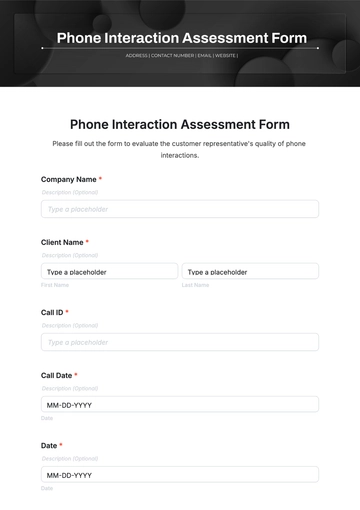
Source: Template.net :contentReference[oaicite:19]{index=19}
risk assessment template free pdf
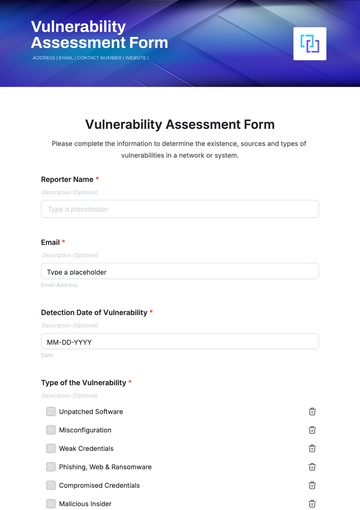
Source: Template.net :contentReference[oaicite:20]{index=20}
risk assessment free template
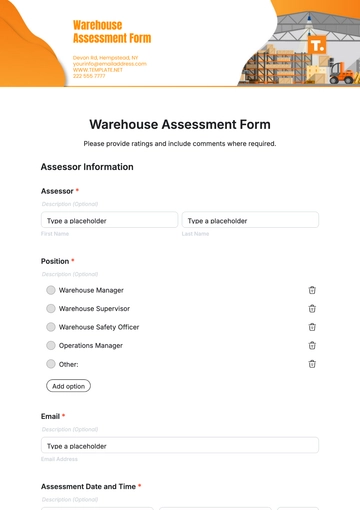
Source: Template.net :contentReference[oaicite:21]{index=21}
Frequently Asked Questions
What is a format risk assessment template?
A format risk assessment template is a structured document used to record hazards, affected people, risk evaluations, existing controls, additional actions, responsibility, deadlines, and review information. The exact fields vary according to the activity and organization’s process.
What should a basic risk assessment template contain?
A basic template should normally identify the activity and assessment date, describe hazards, identify who may be affected, evaluate risk using defined criteria, document existing controls, specify further controls, assign responsibility, and provide a review mechanism.
Is a 5×5 risk matrix required?
No universal rule makes a 5×5 matrix appropriate for every assessment. A 3×3, 4×4, 5×5, qualitative scale, or another method may be suitable depending on the organization’s methodology and the complexity of the risk. Consistent definitions matter more than choosing a particular grid size.
Is Excel a good format for risk assessments?
Excel can be very effective when the assessment involves repeated entries, calculations, filters, status tracking, or a larger risk register. It is especially useful when formulas and validation rules are carefully controlled.
When is Word better than Excel?
Word is often better when an assessment requires narrative explanation, formal page layout, signatures, photographs, or integration with a broader written document. A spreadsheet is generally more convenient for large registers and automated calculations.
Should a risk assessment always be converted to PDF?
Not necessarily. PDF is useful for stable distribution and records, but the editable source may be more practical for ongoing work. Organizations can maintain an editable master and issue PDF copies when a fixed version is needed.
Can one generic template be used for construction, events, and schools?
The core logic can be shared, but the fields and examples should be adapted. Construction may require task and project-phase information, events may require venue and crowd considerations, and schools may need activity, student, supervision, or trip-specific fields.
How often should a risk assessment be reviewed?
The review frequency should follow the organization’s process and the nature of the activity. In addition to scheduled reviews, reassessment is appropriate when significant changes occur or when new information indicates that existing controls may no longer be adequate. The HSE and ILO both emphasize monitoring and updating assessments rather than treating them as permanently static records. :contentReference[oaicite:22]{index=22}
Can I copy an example risk assessment and use it unchanged?
No. Examples are useful for understanding structure and possible hazards, but the completed assessment must reflect the actual activity, environment, people, controls, and risk criteria. The HSE specifically advises against simply copying an example and putting a company’s name on it. :contentReference[oaicite:23]{index=23}
What makes a risk assessment useful rather than just compliant paperwork?
A useful assessment describes real hazards, uses understandable risk definitions, records effective controls, assigns actionable tasks, communicates important findings, and is reviewed when circumstances change. Its success is measured by the quality of decisions and controls it supports, not by how impressive the blank form looks.
Conclusion
The best format risk assessment template is not necessarily the longest or most sophisticated one. It is the format that helps people clearly identify hazards, understand who may be affected, evaluate risk consistently, select effective controls, assign responsibility, track actions, and review the result when circumstances change. Excel, Word, and PDF can all be appropriate when they support that workflow. A well-structured template provides the framework, but the quality of the completed assessment depends on site-specific information, sound judgment, effective controls, clear accountability, and continual review. I can also create a custom image explaining the risk assessment workflow.
