The idea sounds simple, but the quality of the data structure matters. A spreadsheet with dozens of inconsistent columns can become just as difficult to manage as a collection of PDFs. A useful template starts with the decisions the organization needs to make and then captures only the information necessary to support those decisions. Current contract-management guidance commonly emphasizes metadata such as contract title, counterparty, type, dates, value, owner, notice period, obligations, and status because those fields make a repository more searchable and useful for reporting.
Searchers looking for a legal contract data template may actually have several different needs. Some want a contract register for tracking agreements. Others need a document template for drafting an agreement, while others need a spreadsheet for legal operations, renewal management, audit preparation, or contract analytics. These are related but different jobs, so the right structure depends on whether the template is intended to create a contract, describe a contract, or manage a portfolio of contracts.
This guide explains those distinctions and provides a practical framework for designing a reliable system. It covers the essential data fields, document formats, workflow considerations, California-specific caution points, spreadsheet design, reporting, data quality, version control, and practical implementation. It also explains when a simple template is sufficient and when an organization should consider a dedicated contract lifecycle management system.
The examples throughout this article are illustrative rather than legal advice. Contract requirements vary by jurisdiction, industry, transaction type, and organizational policy. A template should therefore be treated as an operational starting point, not as a substitute for legal review.
What Is a Legal Contract Data Template?
A legal contract data template is a predefined structure for recording standardized information about one contract or a portfolio of contracts. The structure may be implemented as an Excel workbook, Google Sheet, database table, Word document, PDF form, intake form, or contract-management platform.
The central concept is metadata. Metadata is information about a contract rather than the complete contractual text itself. For example, a signed agreement may be 40 pages long, but its metadata might tell a legal operations team that it is a vendor agreement, that the counterparty is a particular supplier, that the agreement began on a certain date, that it renews automatically, and that a notice must be sent before renewal.
This distinction is important because most routine contract-management questions do not require reading an entire agreement. A manager may simply need to know which contracts expire next quarter, which agreements are owned by a particular department, which suppliers have automatic renewal provisions, or which contracts exceed a particular value threshold.
A structured template makes those questions easier to answer. Instead of searching through emails, folders, PDFs, and spreadsheets separately, users can filter and sort standardized fields. A repository becomes much more useful when every contract record follows the same basic vocabulary and data rules.
Contract metadata specifications and modern contract-management practices also show why standardized fields are valuable. The World Wide Web Consortium has documented contract-management metadata concepts, while contemporary contract-management resources emphasize consistent information for search, reporting, renewal monitoring, and obligation management.

Source: Terzo
Why Contract Data Structure Matters
Contracts contain business commitments, financial terms, operational responsibilities, and legal rights. When those details are poorly organized, the organization can struggle to answer basic questions quickly. A template creates a common structure that allows information from different agreements to be compared without changing the underlying contracts.
One major benefit is searchability. Suppose a company has several hundred agreements stored as PDFs. Searching for every agreement associated with a particular vendor, department, renewal period, or contract type becomes difficult if those facts are not stored consistently. A metadata table can provide those fields without requiring users to open every document.
A second benefit is deadline management. Expiration dates are useful, but a strong tracker should also consider renewal dates, notice periods, termination deadlines, milestone dates, insurance expirations, reporting deadlines, and other dates that create action requirements.
A third benefit is accountability. Every active contract should have an identifiable owner or responsible function. The owner does not necessarily need to be a lawyer. Depending on the organization, responsibility may sit with procurement, finance, sales, operations, human resources, IT, or another business function while legal provides appropriate oversight.
A fourth benefit is reporting. Once contract information is structured, teams can summarize contracts by type, business unit, counterparty, value, status, renewal period, risk level, or other dimensions. The result is a transition from document storage toward portfolio management.
Core Fields in a Legal Contract Data Template
The best template is not necessarily the one with the most columns. Excessive fields create administrative burden, inconsistent completion, and unreliable information. A practical design separates essential fields from optional fields and adds more detail only when a real business process depends on it.
1. Contract identification
Start with a unique contract ID or reference number. The ID should remain stable even if the document is amended or moved to a different folder. Add the contract title, contract type, business unit, and internal owner.
The title should be understandable without opening the document. A title such as “Acme Services Agreement” is more useful than a filename such as “Final_Final_v7.pdf.” If the organization has naming conventions, the template should reflect them.
Contract type should use controlled values rather than free-form descriptions. Depending on the organization, examples could include master services agreement, statement of work, nondisclosure agreement, purchase agreement, license agreement, lease, employment agreement, consulting agreement, vendor agreement, or amendment.
A controlled list makes reporting more reliable. If one user enters “NDA,” another enters “Non Disclosure,” and another enters “Confidentiality Agreement,” a report may treat those as three different categories even though they represent similar document types.
It is also useful to distinguish the contract record from the document filename. A contract can have multiple versions, exhibits, schedules, amendments, and attachments. The data record should provide a stable identity while the document repository handles the files themselves.
2. Parties and ownership
Record the legal names of the contracting parties as they appear in the executed agreement. Where relevant, distinguish the legal entity from a trading name or brand. This prevents confusion when a business operates through multiple subsidiaries.
Useful party fields include counterparty name, counterparty type, internal legal entity, external contact, internal business owner, contract manager, legal reviewer, and procurement owner.
Ownership should be explicit. A shared mailbox or department name can be useful as a backup, but a named responsible person or clearly defined role is better for operational accountability.
For organizations with many subsidiaries, consider adding fields for parent company, subsidiary, region, country, and business unit. These fields can make portfolio reporting much more useful.
Do not automatically assume that the person who negotiated an agreement remains responsible for managing it. Contract ownership can change after execution, so the template should make ownership easy to update.
3. Dates and lifecycle information
Dates are among the most important fields in a contract data system. At minimum, consider execution date, effective date, commencement date, expiration date, renewal date, notice deadline, termination date, and amendment date where applicable.
Do not treat the expiration date and renewal decision date as interchangeable. A contract might expire on December 31 while requiring notice 60 or 90 days earlier. The operational deadline is therefore the notice date, not simply the final day of the term.
For automatic renewals, capture the renewal mechanism separately. Useful fields include auto-renewal status, renewal term, notice period, notice deadline, and renewal decision. This creates a much clearer action list than a single “renewal date” column.
Dates should use a consistent format. In a spreadsheet, use actual date values rather than text strings whenever possible. This allows sorting, filtering, date arithmetic, conditional formatting, and automated calculations.
If a contract has several important dates, do not force all of them into one notes field. A structured obligations or milestones table may be more appropriate for complex agreements.

Source: Contract Logix
Financial and Commercial Fields
Contract value should be recorded in a way that matches the commercial structure of the agreement. A fixed-fee agreement may have a single total value, while a subscription may have an annual value, monthly amount, implementation fee, usage charges, and renewal increases.
Useful financial fields can include total contract value, annual recurring value, monthly value, currency, payment frequency, payment terms, budget owner, cost center, purchase order number, and approved budget.
Be careful when comparing values across contracts. A three-year agreement worth $300,000 is not equivalent to a $300,000 annual agreement. The template should distinguish total contract value from annualized value when the distinction matters.
Payment information can also support operational monitoring. For example, a contract record might identify whether invoices are submitted monthly, whether payments depend on acceptance of deliverables, or whether rebates or incentives apply.
Financial fields should not attempt to reproduce every accounting record. The contract data template should link to the authoritative finance system when detailed transaction-level information already exists elsewhere.
Scope, Deliverables, and Obligations
Contract value alone does not explain whether an agreement is being performed successfully. A strong data structure records what each party is expected to deliver and when.
For simple contracts, a single obligations field may be sufficient. For more complex agreements, use a related obligations table with contract ID, obligation ID, responsible party, description, due date, status, evidence, reviewer, and escalation status.
Deliverables can be tracked using milestone dates and performance indicators. A useful status vocabulary might include not started, in progress, completed, delayed, disputed, waived, or not applicable. The actual values should be tailored to the organization.
Where an agreement includes service levels, capture the measurable requirement rather than only the phrase “SLA applies.” For example, a record might identify response-time requirements, service availability thresholds, reporting frequency, or remediation obligations, provided the underlying contract supports those values.
Obligation tracking is especially valuable after signature because the signed document does not automatically ensure that business teams remember every commitment. The data model should connect each important obligation to a responsible owner and an appropriate evidence source.

Source: Seldon.Basis
Risk, Compliance, and Approval Data
Risk information should be structured carefully because a vague “high/medium/low” field often lacks enough context to support decisions. A useful risk record identifies the issue, probability, potential impact, mitigation, responsible owner, current status, and review date.
Some organizations use a risk matrix that combines likelihood and impact. That approach can be useful when the scoring methodology is documented and applied consistently. The purpose is not to create a sophisticated score for every agreement but to make important risks visible and actionable.
Approval fields should record who approved the contract, what function they represented, the approval date, and whether any conditions were attached. If an organization uses approval thresholds, those thresholds should come from internal policy rather than being invented inside the template.
Compliance fields may include required certificates, insurance information, regulatory reviews, privacy assessments, security assessments, or other controls that apply to specific contract types. Not every contract requires every control, so conditional fields are preferable to forcing users to complete irrelevant sections.
An audit trail should distinguish between the current value and historical changes. If a contract owner changes, for example, the current owner should be updated while the history remains available through the system’s change log or amendment history.

Source: RBC Companies
Contract Amendments and Version Control
One of the most common weaknesses in contract tracking is treating an amended contract as though it were simply a replacement file. Amendments can change price, term, scope, parties, obligations, or other important provisions, so the relationship between the original agreement and its amendments should remain visible.
A practical amendment structure can include amendment number, amendment date, effective date, summary of changes, affected clauses, approving authority, and document location.
Version control should also distinguish draft versions from executed documents. A filename such as “Contract_Final.pdf” does not prove that it is the executed version. Better systems identify document status explicitly, for example draft, under review, approved, signed, superseded, or terminated.
Where multiple people edit documents, establish a clear source of truth. A contract should not exist simultaneously as an email attachment, desktop file, shared-drive copy, and cloud-storage copy without a defined authoritative version.
The contract data record should therefore contain a link or repository identifier pointing to the authoritative document. The link should not be the only information about the contract, however. If the link breaks, the metadata should still identify what the agreement is and who owns it.
How to Choose the Right Format
The right format depends on the job. A drafting template and a contract-data register are not interchangeable. A Word document is usually better for composing contractual language, while a spreadsheet is better for comparing many contract records.
When to use a spreadsheet
Spreadsheets work well for smaller portfolios, initial data cleanup, pilot projects, and teams that need a simple tracker without deploying specialized software. They are flexible, familiar, and easy to customize.
A spreadsheet becomes more useful when it has controlled dropdowns, date validation, formulas, filters, protected fields, consistent naming, and a clear owner. It becomes less useful when every user can freely change field names, create duplicate tabs, or enter the same concept in different ways.
When to use Word
Word is appropriate when the primary purpose is drafting the agreement itself. A legal contract format template in Word can provide standardized headings, clause order, defined terms, signature blocks, and approved language.
A Word template should be governed carefully. Legal teams should control the master version, document approved clauses, and define who can modify the standard language.
When to use PDF
PDF is often useful for distribution, printing, final execution, archiving, and preserving a particular document layout. A PDF is generally not the best primary format for maintaining a large portfolio of structured contract metadata because extracting information from individual files can be labor-intensive.
A legal contract data template pdf can still be useful as an intake or printable form. The important distinction is between a PDF that records data and a PDF that serves as the final executed agreement.
When to use Google Docs or Google Sheets
Cloud-based formats can be practical for teams that collaborate remotely. Google Docs is suited to collaborative document drafting, while Google Sheets is better for tabular contract records, renewal tracking, and shared operational registers.
Collaboration does not eliminate the need for governance. Teams should still define permissions, naming conventions, approved versions, document ownership, and archival rules.

Source: Agrello
How to Build a Legal Contract Data Template Step by Step
Begin by identifying the questions the organization needs the template to answer. Examples include which contracts expire within 90 days, which agreements are automatically renewable, which department owns a contract, which vendors account for the largest commitments, and which agreements still require legal review.
Next, list the data fields required to answer those questions. Avoid starting with a giant spreadsheet containing every field someone might possibly need. A smaller set of reliable fields is generally more useful than a large set of mostly empty columns.
Third, define each field. Create a data dictionary that explains what the field means, who supplies it, what format it uses, whether it is mandatory, and where the information should come from.
Fourth, create controlled values for fields that should not be free text. Contract type, status, business unit, risk rating, and renewal status are common examples. Controlled values reduce spelling differences and make reporting more reliable.
Fifth, test the template using several realistic but hypothetical contracts. Include a short contract, a long contract, an automatically renewing agreement, an agreement with amendments, and an agreement with multiple deliverables. Testing different scenarios reveals structural problems that a single example will not expose.
Example Contract Data Structure
A basic portfolio register could contain fields such as Contract ID, Contract Title, Contract Type, Internal Entity, Counterparty, Business Unit, Contract Owner, Legal Reviewer, Effective Date, Expiration Date, Renewal Type, Notice Period, Notice Deadline, Contract Value, Currency, Status, Risk Level, Repository Link, and Notes.
A more advanced model could separate the information into related tables. One table could hold contract-level data, another could hold parties, another obligations, another amendments, another important dates, and another approvals.
This relational approach prevents the main contract record from becoming excessively wide. It also allows multiple obligations or amendments to be attached to one contract without forcing users to create multiple inconsistent copies of the contract itself.
For a small organization, however, a single worksheet may be entirely appropriate. The objective is not to create a sophisticated database for its own sake. The objective is to make contract information accurate, understandable, searchable, and actionable.
A useful test is whether another trained employee could take over the tracker without needing a private explanation from its creator. If the answer is no, the data definitions and workflow probably need improvement.
Using Excel for Contract Data
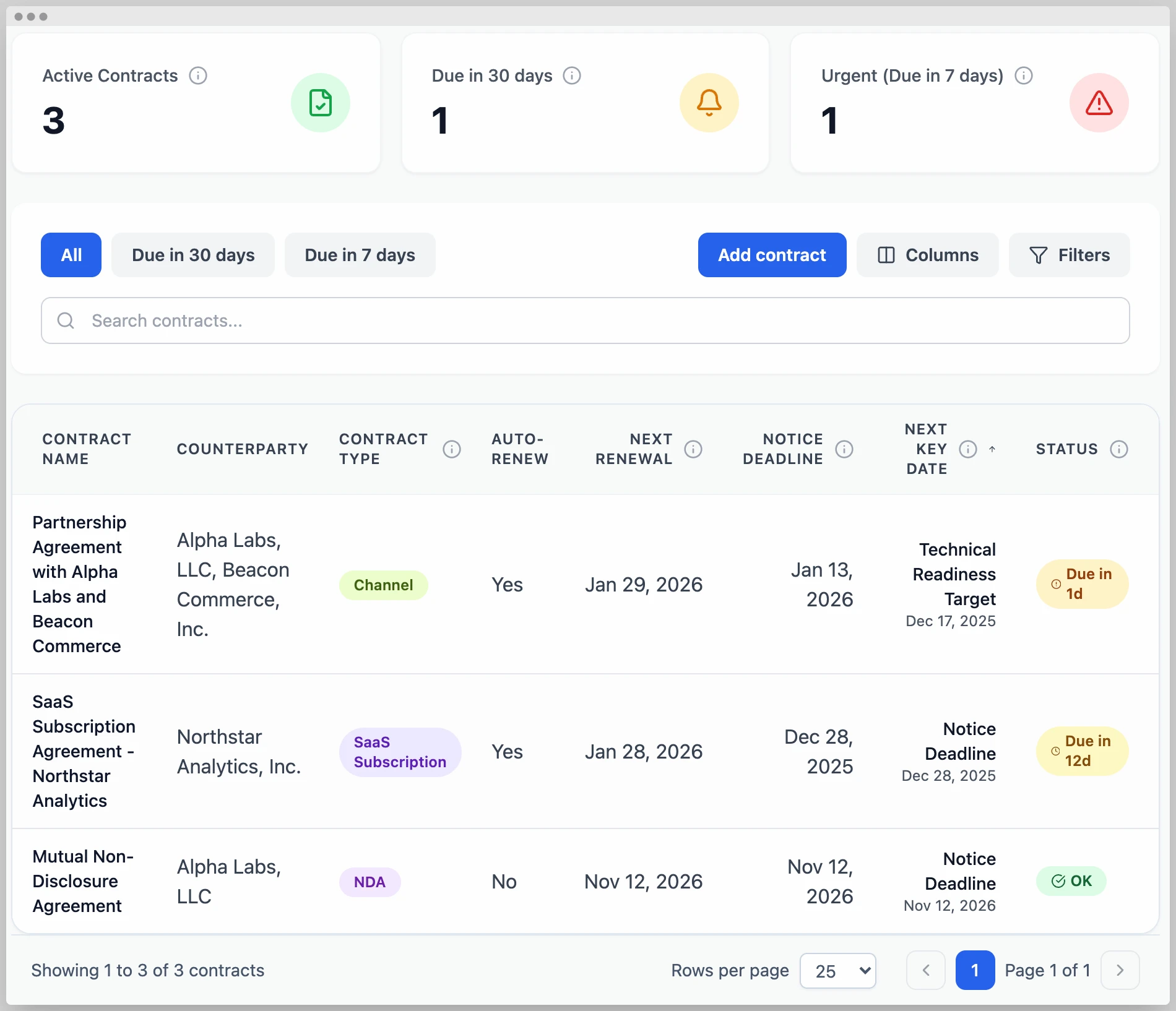
A legal contract data template excel workbook can be designed as a simple register or as a multi-sheet management tool. A basic workbook might contain a contract register, obligations sheet, amendment log, renewal calendar, and reporting dashboard.
Use one row per contract in the main register. Avoid putting multiple contracts into a single cell. Similarly, do not put several dates into one text field if those dates have different meanings.
Use data validation for status fields and contract types. Use actual date values for dates. Protect formulas. Keep column headings stable. Freeze the header row. Apply filters. Avoid merged cells inside the data table because they interfere with sorting and filtering.
Conditional formatting can highlight approaching renewal dates, missing information, overdue obligations, or high-risk records. These visual indicators should support the data rather than replace it.
Finally, document the workbook. Include a read-me sheet explaining field definitions, update frequency, responsible owner, status values, and any formulas that users should not change.
Contract Data in California
A legal contract data template california users employ should not be presented as a universal California legal form. California has extensive state-specific rules, and requirements can differ depending on whether the agreement concerns employment, public procurement, construction, services, intellectual property, real estate, or another subject.
For California state contracting, the Department of General Services publishes the State Contracting Manual and related resources. The manual addresses subjects including contracting processes, standard contract formats, approval, contract management, and other government-specific requirements. Those official requirements should be checked whenever the template is intended for California state-government contracting.
Recordkeeping is also important. California procurement guidance emphasizes maintaining documentation in sufficient detail to allow reviewers to understand how a procurement was requested, conducted, awarded, and administered. That principle supports a broader lesson: contract metadata should help reconstruct the lifecycle of an agreement, not merely identify its title.
For private California agreements, do not assume that a generic online template satisfies every state-specific requirement. A template can organize information, but legal counsel should determine whether particular clauses, disclosures, notices, or statutory requirements apply to the transaction.
For California-specific workflows, add a jurisdiction field and, where appropriate, a legal-review requirement. This helps distinguish a generic contract record from an agreement that needs review under a particular state or local rule.
Drafting With a Legal Contract Format Template
A legal contract format template is different from a data register. Its purpose is to establish a repeatable document structure for drafting an agreement.
A typical drafting template may include a title, introductory paragraph, identification of parties, definitions, scope, obligations, payment terms, confidentiality, intellectual property, representations, warranties, limitation of liability, indemnification, insurance, term and termination, dispute provisions, governing law, notices, miscellaneous provisions, and signature blocks.
Not every contract should contain every provision. The appropriate clauses depend on the transaction and applicable law. A template library should therefore distinguish standard language from optional language and provide clear rules for when specialized clauses are required.
Legal teams should also maintain version histories for drafting templates. A user who finds an old document on a shared drive should not unknowingly reuse obsolete language.
Clause libraries can reduce this risk by centralizing approved language. The goal is not simply faster drafting. It is controlled reuse of language that has been reviewed and approved for the appropriate circumstances.
Building a Legal Department Contract Template
A legal department contract template should reflect how the legal team actually works. The legal function may need fields for requester, business sponsor, matter number, contract type, jurisdiction, assigned attorney, review priority, negotiation status, approval status, and execution status.
The template should distinguish legal review from business approval. Legal may determine whether language is acceptable, while finance may approve commercial terms and a business executive may approve the underlying relationship.
An intake form can collect information before a lawyer begins drafting. This reduces unnecessary email exchanges and helps legal teams identify missing information early.
A practical legal intake process might collect the parties, transaction purpose, requested effective date, commercial value, contract type, proposed counterparty, business owner, data-security considerations, intellectual-property considerations, and any unusual terms already requested by the counterparty.
For higher-risk transactions, the intake workflow can route the matter to specialists such as privacy, tax, security, employment, regulatory, or intellectual-property counsel as appropriate.
Source: Bellwatch
Free Templates: What “Free” Should Mean
People searching for legal contracts free template resources should distinguish between a genuinely free template, a free preview, a template that requires registration, and a resource that is free to view but charges for download or editing.
The same distinction applies to legal contract data template free resources. A free spreadsheet can be useful for getting started, but users should verify the file format, licensing terms, update date, included formulas, and whether the resource is actually suitable for the intended use.
A free template should also be evaluated for quality. A visually attractive spreadsheet is not necessarily a good data model. Check whether it has sensible fields, clear instructions, consistent date handling, logical status values, and enough flexibility for the organization’s actual workflow.
Never assume that the word “legal” in a template title means that an attorney has approved the template for every jurisdiction. A template provider’s disclaimer, licensing terms, and intended use should be reviewed before relying on the document.
Free resources are often most valuable as starting points. Teams can borrow the structural idea, then adapt it to their own policies, approval process, terminology, and legal requirements.
Data Collection and Quality Control
Creating the template is only the first step. Contract data becomes useful only when it is complete, accurate, current, and consistently maintained.
Start data collection by identifying authoritative sources. The signed contract should generally be the source for contractual terms, while finance systems may be authoritative for payment records and organizational directories may be authoritative for employee or department information.
Do not copy values blindly. During migration, verify important dates, counterparty names, renewal provisions, and values against the underlying agreements.
Use a confidence or verification field if the data is being migrated from legacy spreadsheets or scanned documents. For example, a record could be marked verified, needs review, or incomplete until someone checks it.
Periodic data-quality reviews should focus on the fields that drive action. Missing renewal dates, incorrect owners, broken repository links, and inconsistent contract types are usually more important than filling every optional descriptive field.

Source: ContractNow
Data Analysis and Reporting
Once the contract register is reliable, reporting can turn raw data into operational decisions. Start with simple reports rather than complicated dashboards.
A renewal report can show contracts expiring within 30, 60, 90, or 180 days. A responsibility report can show contracts by owner or department. A value report can group agreements by annualized value or total commitment. A risk report can identify agreements that require attention.
Trend reporting can compare the number of new agreements, amendments, renewals, terminations, and completed reviews over time. Legal operations teams can use these trends to identify workload patterns and recurring bottlenecks.
Another useful measure is contract-cycle time. Track the time between request, first draft, legal review, approval, signature, and execution. This can reveal where a process is slowing down without assuming that legal is always responsible for the delay.
Reporting should support decisions rather than create dashboards for their own sake. Every chart should answer a meaningful question and have a defined owner responsible for acting on the information.
Common Mistakes to Avoid
The first common mistake is building too many fields. A 50-column spreadsheet may look comprehensive, but if users cannot keep it current, it provides a false sense of control.
The second mistake is using inconsistent terminology. Without controlled values, the same contract type can appear under several names, making reports unreliable.
The third mistake is tracking expiration but ignoring notice periods. A renewal deadline may occur weeks or months before the contractual end date.
The fourth mistake is failing to identify ownership. A record without an accountable owner is difficult to maintain and easy to overlook.
The fifth mistake is storing sensitive information unnecessarily. A contract tracker should contain the minimum information required for its operational purpose. Access permissions should reflect the sensitivity of the underlying agreements.
Practical Solution: A Simple Implementation Workflow
The most practical way to implement a legal contract data template is to begin with a small, controlled dataset rather than attempting to digitize every historical contract immediately.
Step 1: Define the purpose. Decide whether the template is primarily for drafting, contract inventory, renewal management, obligation tracking, legal intake, or reporting. If it has several purposes, separate the related datasets rather than forcing everything into one table.
Step 2: Establish the core fields. Start with contract ID, title, type, parties, owner, effective date, expiration date, renewal information, value, status, and document location. Add risk, obligations, amendments, and approvals as the workflow requires.
Step 3: Create a data dictionary. For every field, define its meaning, format, source, required status, and responsible owner. This prevents different users from interpreting the same column differently.
Step 4: Create controlled lists. Standardize contract types, statuses, business units, risk categories, and other fields that will be used for reporting.
Step 5: Build the repository structure. Decide where executed agreements, amendments, schedules, exhibits, and supporting documents will live. Use consistent naming and access permissions.
Step 6: Import a pilot group. Select a manageable sample of contracts from different categories. Test the template against real workflows and correct structural problems before expanding it.
Step 7: Validate critical fields. Verify parties, dates, renewal provisions, values, owners, and document links against the underlying contracts.
Step 8: Add alerts and reports. Build renewal views, overdue-obligation reports, ownership reports, and other outputs that directly support action.
Step 9: Establish governance. Decide who can edit the template, who can change field definitions, who approves new contract types, and how corrections are documented.
Step 10: Review the system periodically. Remove fields nobody uses, add fields that repeatedly appear in business requests, and update the workflow when organizational responsibilities change.
When a Spreadsheet Is No Longer Enough
A spreadsheet can be an effective starting point, but it has practical limitations. Manual entry creates opportunities for errors. Multiple copies create version-control problems. Complex permissions are difficult to administer. Automated notifications require additional tooling. Large datasets can become difficult to maintain.
Dedicated contract-management software can centralize documents and metadata, automate workflows, maintain audit trails, provide role-based access, and generate reminders. These capabilities become more valuable as contract volume, organizational complexity, or regulatory requirements increase.
The decision should not be based solely on the number of contracts. A small portfolio containing highly sensitive, high-value, or heavily regulated agreements may justify stronger controls earlier than a larger portfolio of simple agreements.
A good migration strategy is to treat the spreadsheet as structured source data rather than disposable work. If the fields are defined cleanly, the information can potentially be migrated into a more sophisticated contract-management platform later.
The most important principle is continuity. The organization should not lose its contract IDs, field definitions, ownership information, or historical records simply because the underlying technology changes.
Reference Examples
The following examples illustrate different document, spreadsheet, workflow, dashboard, and contract formats. They are reference visuals rather than endorsements or universal legal forms. Availability, licensing, and suitability should be checked with the original provider before reuse.
legal contract data template free download
Source: Smartsheet
legal contract data template free
Source: ContractNow
legal contract data template pdf

Source: Adobe
legal contract data template excel
Source: Seldon.Basis
legal contract data template california

Source: Venngage
legal contract data template word
Source: Agrello
legal contract data template google docs

Source: Wikimedia Commons
legal contract data template google sheets
Source: Bellwatch
legal contract format template

Source: TemplateSample
legal department contract template

Source: Association of Corporate Counsel
legal contracts free template
Source: Contract Logix
legal contract online template

Source: tilyanPristka
Frequently Asked Questions
What should a legal contract data template contain?
At minimum, it should identify the contract, parties, type, owner, effective and expiration dates, renewal information, value where relevant, status, and location of the authoritative document. More advanced systems can include obligations, approvals, risks, amendments, compliance controls, and reporting fields.
Is a legal contract data template the same as a contract template?
No. A contract template is normally used to draft contractual language. A legal contract data template is primarily used to organize information about existing or proposed contracts. The two can work together but serve different purposes.
Can I build a legal contract data template in Excel?
Yes. Excel can be an effective starting point for smaller contract portfolios. Use structured tables, consistent field definitions, controlled values, protected formulas, date validation, filters, and clear ownership rules.
Can the same data be used in Google Sheets?
Yes. A well-designed spreadsheet structure can generally be recreated or imported into Google Sheets. The important issue is maintaining consistent field definitions and access controls rather than choosing one spreadsheet application over another.
Should every contract have the same fields?
Every contract should share a core set of fields, but specialized contract types may require additional information. A lease, employment agreement, software license, construction contract, and vendor agreement can have substantially different obligations.
How should renewal dates be tracked?
Track the contractual expiration or renewal date separately from the notice deadline. If the agreement automatically renews, record the renewal mechanism, notice period, notice deadline, and person responsible for the renewal decision.
How should amendments be recorded?
Give each amendment its own identifier and record its date, effective date, summary of changes, and relationship to the original agreement. Keep the executed amendment with the contract record and preserve the history of previous versions.
Is a free template legally valid everywhere?
No. A template’s availability does not establish its legal validity for a particular transaction or jurisdiction. Contract requirements depend on the circumstances, applicable law, industry, and parties involved.
When should a business move from Excel to contract-management software?
Consider a dedicated system when manual tracking becomes difficult to control, renewal reminders are being missed, multiple users need complex permissions, auditability becomes important, or the organization needs automated workflows and centralized document management.
What is the most important field in a contract data template?
There is no single universally most important field. Contract identity, counterparty, owner, dates, status, and document location form a strong core. The most important additional fields are those that support decisions the organization actually needs to make.
Conclusion
A well-designed legal contract data template does more than create a spreadsheet of agreements. It establishes a consistent language for identifying contracts, assigning responsibility, monitoring dates, understanding obligations, documenting approvals, evaluating risk, and producing useful reports. Whether the implementation begins as an Excel workbook, Google Sheet, Word-based workflow, PDF form, or dedicated contract-management platform, the same principles apply: define the purpose first, capture reliable metadata, use consistent field definitions, protect sensitive information, preserve document history, and connect important deadlines to accountable owners. The strongest legal contract data template is therefore not the longest or most complicated one; it is the structure that makes contract information accurate, searchable, understandable, and actionable throughout the agreement lifecycle.
