Accounts payable represents amounts a business owes to suppliers or other creditors for goods and services already received. A useful spreadsheet therefore needs to do more than list invoices. It should help the person responsible for payables understand what is owed, when it is due, what has already been paid, which invoices are overdue, and which transactions require review. Microsoft also provides Excel templates and an Accounts Payable team-site template that demonstrate how invoice, vendor, purchase-order, and document information can be organized. :contentReference[oaicite:0]{index=0}
The best workbook is not necessarily the most complicated one. A small company may only need a single invoice ledger with formulas for outstanding balances and payment status, while a larger finance team may need separate vendor, purchase-order, invoice, payment, aging, and dashboard sheets. The right structure depends on transaction volume, the number of people involved, approval requirements, reporting needs, and how closely the spreadsheet must interact with an accounting system.
This guide explains how to design a reliable accounts payable workbook from the ground up, how to evaluate different spreadsheet formats, which formulas are useful, how to organize monthly reporting, and how to introduce practical controls without turning a simple spreadsheet into an unnecessarily complicated system. The examples use hypothetical transactions so they can be adapted without treating sample numbers as real business statistics.
It also explains when a spreadsheet is appropriate and when a business should consider moving to dedicated accounting or accounts-payable software. A spreadsheet can be excellent for structured tracking, but it should not be treated as a substitute for professional accounting judgment, appropriate approvals, secure document storage, or the organization’s established financial controls.
What Is an Accounts Payable Template Excel Workbook?
An accounts payable workbook is a structured spreadsheet used to record and monitor money a business owes. At its simplest, each row represents one supplier invoice and columns capture information such as vendor name, invoice number, invoice date, due date, invoice amount, payment amount, balance due, and payment status.
The workbook becomes more useful when calculated fields are added. For example, the balance can be calculated as the invoice amount minus payments recorded against that invoice. A days-to-due field can compare the due date with the reporting date, while an aging field can classify open balances into categories such as current, 1–30 days overdue, 31–60 days overdue, 61–90 days overdue, and more than 90 days overdue.
Accounts payable templates can also include supporting information. A vendor identifier can make supplier records easier to reconcile, a purchase-order number can connect an invoice to an authorized purchase, and an approval field can document whether the transaction has passed the company’s internal review. A payment method and transaction reference can provide an audit trail after payment.
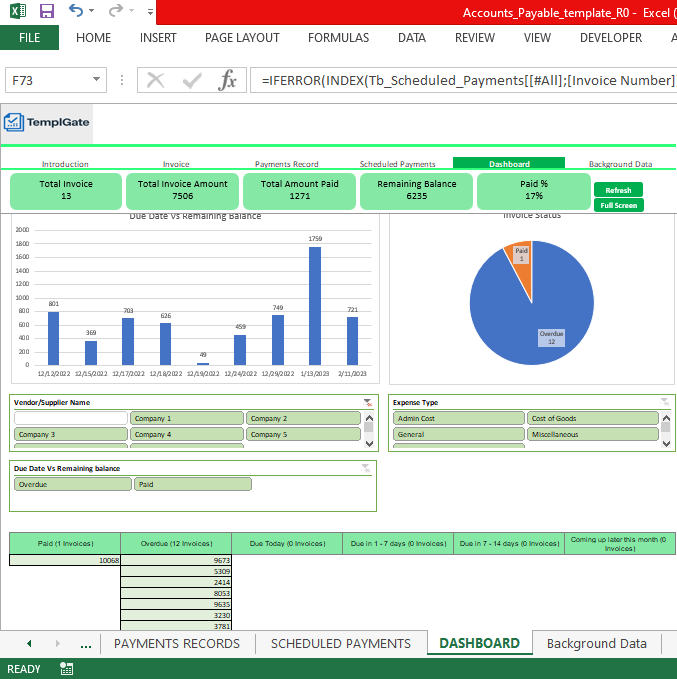
Modern spreadsheet designs may also include summary dashboards. These can show total outstanding payables, overdue balances, invoices due soon, payment activity, and aging categories. Microsoft Business Central documentation, for example, describes aged accounts-payable reporting that groups vendor balances by periods and supports analysis by vendor, currency, and time. :contentReference[oaicite:1]{index=1}
The important principle is separation between raw transaction data and management information. The transaction table should contain the underlying invoice and payment records. Summary cells, charts, and aging reports should be calculated from that source data rather than manually typed, reducing the possibility that a dashboard becomes disconnected from the ledger.

Why Businesses Use an Accounts Payable Spreadsheet
One major advantage of an accounts payable spreadsheet is visibility. Instead of opening individual emails or searching through folders to determine whether an invoice has been paid, a properly maintained workbook can provide a consolidated view of outstanding obligations.
A spreadsheet can also make payment scheduling easier. When due dates are stored consistently, the finance team can sort or filter the ledger to identify invoices due today, invoices due within a defined period, and invoices that have already passed their due date. This is particularly helpful when a business has many recurring supplier payments.
Another advantage is flexibility. A business can add fields for department, project, cost center, purchase order, tax treatment, currency, payment method, or approval owner without waiting for a software developer to modify a system. Excel also supports formulas, tables, filters, conditional formatting, charts, and pivot-based analysis.
Free templates can reduce the time needed to build the first version. Microsoft says its Office applications provide free pre-built templates that can be selected from the File and New experience, while Excel for the web also provides access to free templates through Microsoft Create. :contentReference[oaicite:2]{index=2}
However, flexibility creates responsibility. A spreadsheet can be accidentally overwritten, formulas can be changed, duplicate invoices can be entered, and multiple versions can circulate by email. The solution is not simply to add more formulas. The workbook needs a clear ownership model, controlled inputs, regular backups, consistent naming, and a defined process for review and reconciliation.

Core Components of an Accounts Payable Template
Vendor information
The vendor field identifies the supplier that issued the invoice. A consistent vendor name is important because variations such as “ABC Supplies,” “ABC Supply Co.,” and “ABC Supplies Ltd.” can make filtering and reporting unreliable.
Businesses with many suppliers may create a separate vendor master sheet. Useful fields can include vendor ID, legal name, trading name, contact information, payment terms, currency, tax information where appropriate, and an internal approval status.
A vendor master should be controlled carefully. Adding a supplier to a list and approving a payment are different activities, and organizations should define who can create or modify vendor records. Segregation of duties is a common internal-control principle because separating authorization, recordkeeping, and custody responsibilities can reduce opportunities for error or fraud. :contentReference[oaicite:3]{index=3}
For a very small business, one person may legitimately perform several roles because staffing is limited. Even then, a second-person review of unusual payments, new suppliers, or changes to bank details can provide an additional control where practical.
A useful vendor sheet should therefore be simple enough to maintain but structured enough to prevent inconsistent supplier names. If the same supplier appears under several names, the AP ledger can become fragmented and management may underestimate the total exposure to that supplier.
Invoice identification
Every invoice row should normally contain an invoice number or supplier reference. This field is essential when someone needs to investigate a payment, answer a supplier question, or compare the spreadsheet against the original document.
Invoice dates and due dates should be stored separately. The invoice date describes when the document was issued, while the due date determines when the obligation should normally be settled under the applicable payment terms.
Purchase-order references are valuable when the organization uses purchase orders. They create a connection between the authorized purchase and the subsequent supplier invoice. If no purchase order exists, a business can use another internal reference such as a project code, expense category, contract number, or approving department.
Descriptions should be specific enough to explain the transaction without becoming a substitute for the original invoice. For example, “January office supplies” is more useful than simply “expense,” while the invoice itself remains the authoritative document for detailed line items.
Consistent invoice identification also helps with duplicate detection. Accounts payable controls commonly include invoice numbering guidelines and duplicate-invoice searches because inconsistent invoice references can make duplicate payments harder to identify. :contentReference[oaicite:4]{index=4}

Designing the Main AP Ledger
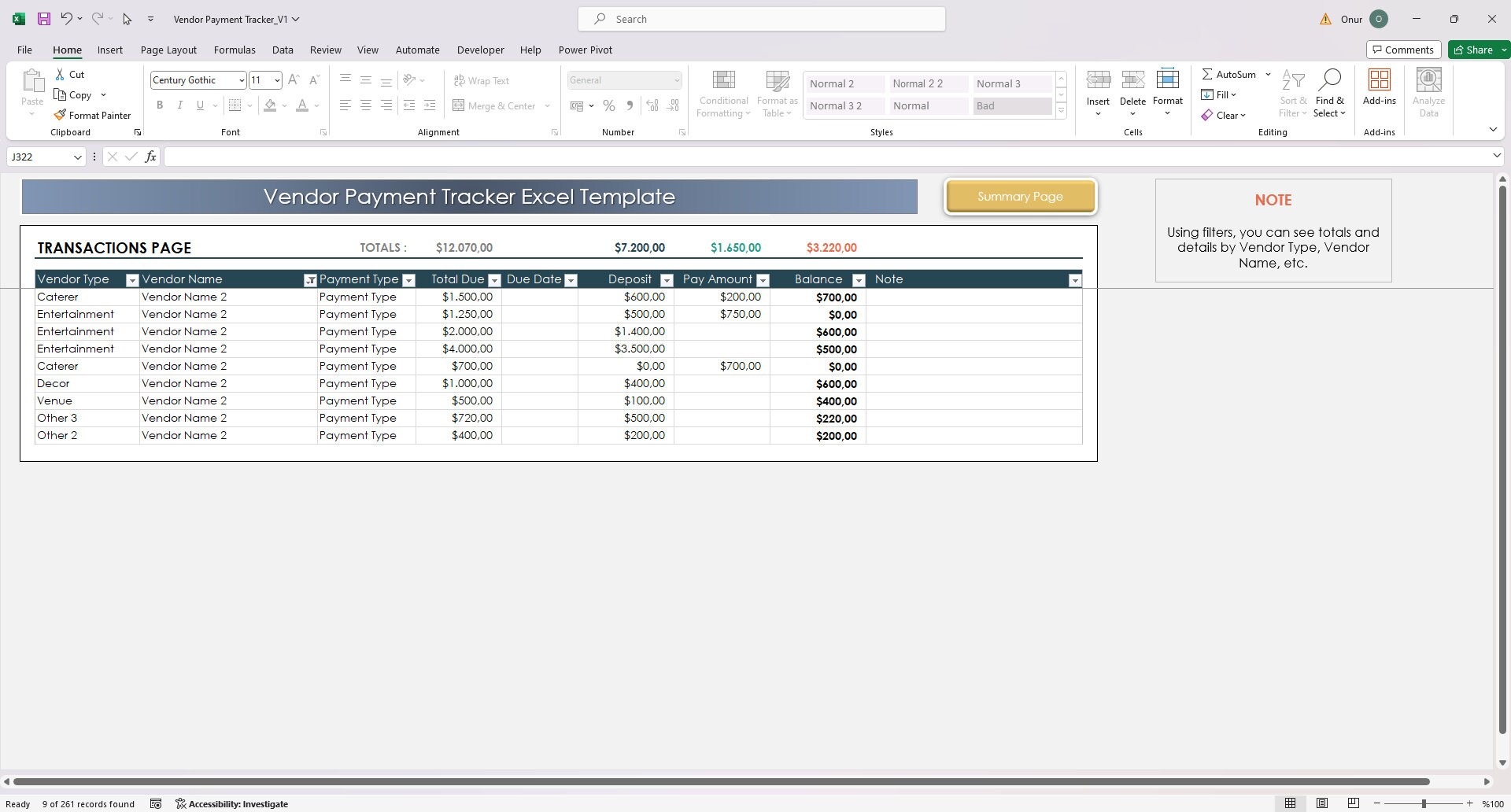
The central AP ledger should be treated as the workbook’s source table. A practical starting structure is: Vendor ID, Vendor Name, Invoice Number, Invoice Date, Due Date, Purchase Order, Description, Invoice Amount, Amount Paid, Balance Due, Payment Date, Status, Days Past Due, and Notes.
The ledger should use one row per invoice rather than placing several unrelated invoices into a single row. This makes sorting, filtering, formulas, pivot tables, and summaries much easier to maintain.
If an invoice receives several partial payments, there are two common approaches. A simple workbook can have one Amount Paid field that contains the cumulative amount. A more detailed workbook can maintain a separate payments table with one row per payment, allowing multiple payments to be associated with the same invoice.
The second approach is more scalable because it preserves payment history. The invoice table can then calculate the total paid from the payment table and derive the remaining balance. This prevents a payment history from being lost when the cumulative paid amount is updated.
A spreadsheet should also distinguish between data-entry cells and calculated cells. Input fields can be left unlocked or visually differentiated, while formulas can be protected where appropriate. This reduces the risk of accidentally replacing a formula with a manually typed value.
Accounts Payable Template Excel With Formulas
An effective workbook does not require hundreds of formulas. A few well-designed calculations can provide most of the useful automation needed for a small or medium-sized AP tracker.
For example, if the invoice amount is in cell H2 and the amount paid is in cell I2, a basic balance formula can be =H2-I2. This makes the outstanding amount respond automatically whenever the payment amount changes.
A days-to-due calculation can compare the due date with the current date. A simple example is =E2-TODAY(), assuming the due date is stored in E2. A positive result indicates days remaining, while a negative result indicates that the due date has passed.
A status formula can then classify the invoice. For example, a simplified model might return “Paid” when the balance is zero, “Overdue” when the balance remains open and the due date has passed, and “Open” otherwise. More advanced versions can distinguish “Due Today,” “Due Soon,” “Partially Paid,” and “Disputed.”
Formula-driven status is generally preferable to manually typing a status because the result can change automatically as dates and payments change. Several current spreadsheet templates use this general principle, with formulas calculating balances, status, overdue conditions, or aging categories from the underlying invoice data. :contentReference[oaicite:5]{index=5}
Useful formulas for an AP workbook
Balance due: Invoice Amount minus Amount Paid. This is the fundamental calculation for an open invoice.
Days until due: Due Date minus TODAY(). This helps identify invoices approaching their deadline.
Days overdue: A formula such as =MAX(0,TODAY()-DueDate) can prevent negative values and provide a clean overdue-days measure.
Total payable: =SUM(BalanceRange) can calculate the total outstanding amount across the ledger.
Conditional totals: SUMIF or SUMIFS can calculate amounts by vendor, status, department, due-date range, or aging bucket. These functions are particularly useful when the business wants summary information without manually adding filtered rows.

Using Aging Analysis to Prioritize Payments
An AP aging report groups unpaid balances according to how long they have remained outstanding. Common buckets include current, 1–30 days, 31–60 days, 61–90 days, and 90+ days, although businesses can choose different ranges when their payment cycle requires them.
The purpose is not merely to produce a colorful report. Aging helps management identify obligations that have become increasingly overdue and therefore deserve investigation or prioritization.
Aging can also reveal process problems. If many invoices remain stuck in the same overdue bucket, the problem may not simply be a lack of cash. It could indicate missing approvals, invoice disputes, receiving-document problems, incorrect purchase orders, duplicate records, or slow internal processing.
Microsoft’s aged accounts-payable reporting documentation describes grouping vendor ledger entries into aging periods and using worksheets, filters, and pivot-style analysis to examine balances. :contentReference[oaicite:6]{index=6}
A spreadsheet aging report should therefore connect directly to the underlying ledger. Avoid manually typing aging totals into a dashboard because the summary can quickly become inconsistent with the invoice records after new transactions or payments are added.

Three-Way Matching and Invoice Verification
Invoice approval becomes more reliable when the business compares the invoice against other transaction records. In a common three-way matching process, the invoice is compared with the purchase order and evidence that the goods or services were received.
The purpose is to confirm that the supplier billed for something the business actually ordered and received. Oracle documentation describes three-way matching as checking purchase-order, receipt, and invoice quantities within defined tolerances. :contentReference[oaicite:7]{index=7}
An Excel workbook can support this process with columns for PO number, invoice number, ordered quantity, received quantity, invoiced quantity, purchase price, invoice price, and match status. The spreadsheet does not need to make the final accounting decision automatically; it can simply highlight transactions that require review.
For example, a hypothetical invoice could show 100 units ordered, 100 units received, and 100 units invoiced. Another could show 100 ordered, 80 received, and 100 invoiced. The second record would deserve investigation before payment because the quantities do not align.
The same principle applies to price differences. If the purchase order contains an agreed unit price and the invoice shows a different price, the spreadsheet can calculate the variance and route the invoice for review instead of allowing an unexplained difference to pass unnoticed.

Accounts Payable Template Excel Small Business
An accounts payable template excel small business setup should favor clarity over complexity. A company with a few dozen invoices each month may not need multiple dashboards, macros, or elaborate automation.
A practical small-business workbook can begin with three sheets: Vendors, AP Ledger, and Payment Summary. The vendor sheet contains supplier details, the ledger contains invoice-level transactions, and the summary calculates total outstanding balances and upcoming payment obligations.
Adding an aging column is useful even for a small business. A company may have relatively few invoices but still face cash-flow pressure if several large bills become due in the same week.
Small businesses should also establish a weekly review routine. During the review, the responsible person can check new invoices, confirm approvals, update payments, investigate overdue items, and compare the spreadsheet balance against the accounting records or bank activity where appropriate.
Microsoft’s support materials show that Excel templates can be customized and saved for repeated use, making a standardized workbook practical for recurring business processes. :contentReference[oaicite:8]{index=8}

Choosing an Accounts Payable Template Excel Format
The accounts payable template excel format should match the way the business works. A simple ledger format is suitable when the primary requirement is tracking invoices and balances.
A payment-schedule format is better when management needs to see expected cash outflows by date. A dashboard format is useful when the finance team needs summary metrics, aging charts, or vendor-level analysis.
A multi-sheet workbook is appropriate when transaction detail and management reporting should remain separate. The raw ledger can contain every invoice, while separate sheets summarize vendor balances, aging, monthly activity, and payment forecasts.
Businesses should also consider compatibility. Microsoft’s documentation identifies .xlsx as the default Excel workbook format and .xltx as the standard Excel template format, while macro-enabled workbooks use formats such as .xlsm or .xltm. :contentReference[oaicite:9]{index=9}
For most AP trackers, a standard .xlsx workbook is a reasonable starting point because it supports formulas, tables, filters, charts, and formatting without requiring macros. Macro-enabled features should only be introduced when they solve a clearly defined workflow problem and the organization can manage their security and maintenance implications.

Accounts Payable Template Excel Spreadsheet Structure
An effective accounts payable template excel spreadsheet should make the most important information visible without requiring the reader to scroll through unrelated fields.
A recommended main table might include Vendor, Invoice Number, Invoice Date, Due Date, PO Number, Description, Invoice Amount, Amount Paid, Balance Due, Payment Date, Status, Days Overdue, and Notes.
For organizations with departments or projects, additional fields such as Cost Center, Department, Project, GL Account, or Approver can be useful. These fields should only be included when they serve a real reporting or control requirement.
Data validation can standardize fields such as status, department, payment method, and currency. Drop-down lists reduce spelling differences and make summary formulas more reliable.
Tables are generally preferable to manually formatted ranges because they make formulas and references easier to extend when new invoices are added. The key is to keep the table structure stable rather than frequently inserting or deleting columns that formulas depend on.

Accounts Payable Template Excel Monthly Reporting
An accounts payable template excel monthly workflow can help management understand how obligations change over time. Monthly reporting does not necessarily mean creating a new workbook every month.
A better approach is often to maintain one transaction ledger and use a reporting date or month field to produce monthly summaries. This preserves the transaction history while allowing management to compare periods.
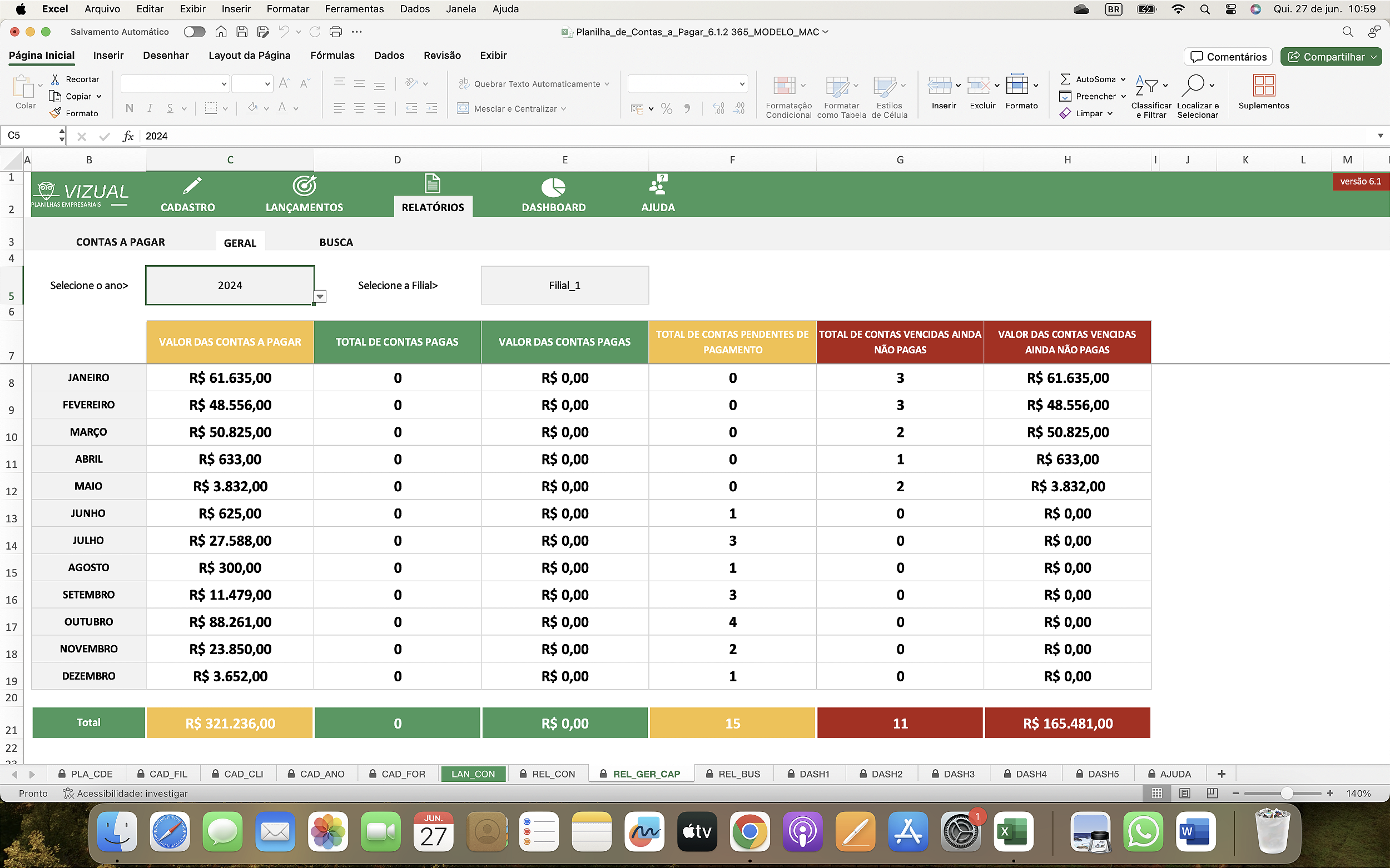
A monthly report might show opening outstanding payables, invoices recorded during the month, payments made, closing outstanding payables, overdue balances, and the number of open invoices.
For example, suppose a hypothetical business begins a month with $25,000 in outstanding invoices, records $18,000 of new invoices, and pays $20,000 during the month. Ignoring other adjustments, its closing balance would be $23,000. The example demonstrates the mechanics of movement rather than representing a real-world benchmark.
Monthly reports are also useful for spotting unusual changes. A sudden increase in unpaid balances may result from seasonal purchasing, a major project, delayed customer receipts, approval bottlenecks, or a deliberate decision to preserve cash. The spreadsheet should highlight the movement, while management investigates the reason.
Payment Scheduling and Cash-Flow Planning
Accounts payable is closely connected to cash management because invoices represent future cash outflows. A useful spreadsheet can therefore organize open invoices according to their due dates.
A payment schedule can include invoice number, vendor, amount due, due date, payment priority, approval status, and planned payment date. This allows the finance team to distinguish invoices that are ready for payment from invoices that still require approval or investigation.
Payment priority should not be determined solely by age. A recently received invoice with a near due date may deserve attention before an older invoice that is under a documented dispute.
Early-payment discounts can also be considered. If supplier terms provide a legitimate discount for paying within a specified period, the spreadsheet can include discount eligibility and estimated savings fields. The decision should consider available cash, contractual terms, and the company’s financial policy.
Payment scheduling should never be treated as permission to bypass required approvals. The spreadsheet is a planning tool; the organization’s approval and payment controls remain the governing process.
Vendor Reconciliation and Data Accuracy
Vendor reconciliation compares the business’s AP records with information supplied by a vendor or another accounting record. The objective is to identify missing invoices, duplicate entries, payment differences, credits, or other discrepancies.
A reconciliation sheet can contain two sections: vendor statement information and company records. A matching formula can compare invoice numbers, dates, and amounts and then return a result such as Match, Amount Mismatch, Missing in Company, or Missing on Statement.
This approach is especially useful when the vendor’s statement includes invoices that the company cannot locate in its own records. It creates a focused list for investigation instead of requiring someone to compare every line manually.
Reconciliation should also account for credit notes, partial payments, timing differences, and invoices that have been approved but not yet posted. A simple comparison based only on invoice number can therefore be insufficient.
The reconciliation process should be documented. The reviewer should know what source documents were compared, what period was covered, which exceptions were identified, and how unresolved differences were followed up.

Using Conditional Formatting Effectively
Conditional formatting can turn a long invoice ledger into a more useful operational tool. Instead of reading every row, the user can immediately see which records require attention.
Typical rules include highlighting overdue invoices, invoices due within a chosen number of days, unpaid high-value items, incomplete records, or transactions that failed a matching check.
Color should communicate status consistently. For example, one color can represent overdue, another can represent due soon, and another can indicate a completed payment. Too many colors create visual noise and reduce the value of the system.
Conditional formatting should never replace the underlying status calculation. The formula determines the state; the formatting simply makes the state easier to see.
Testing is important after adding rules. A new row should inherit the correct behavior, paid invoices should leave the overdue category, and blank rows should not unexpectedly appear as urgent transactions.

Building an AP Dashboard
A dashboard is a summary layer placed above the transaction data. It should answer practical management questions quickly rather than simply display attractive charts.
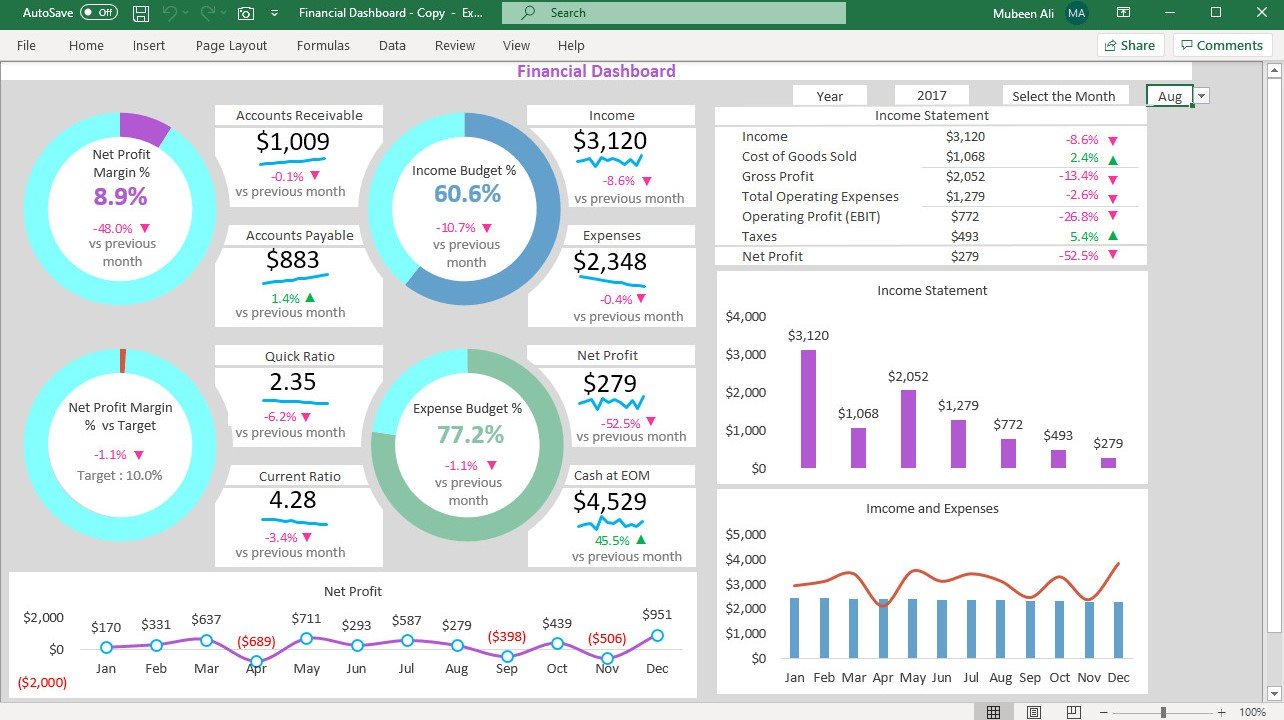
Useful metrics include total open payables, total overdue, number of open invoices, number of overdue invoices, amount due within seven days, amount due within thirty days, and aging distribution.
Vendor concentration can also be useful. If a significant portion of outstanding payables is concentrated among a small number of suppliers, management may want to understand whether those obligations are routine, seasonal, project-related, or unusually high.
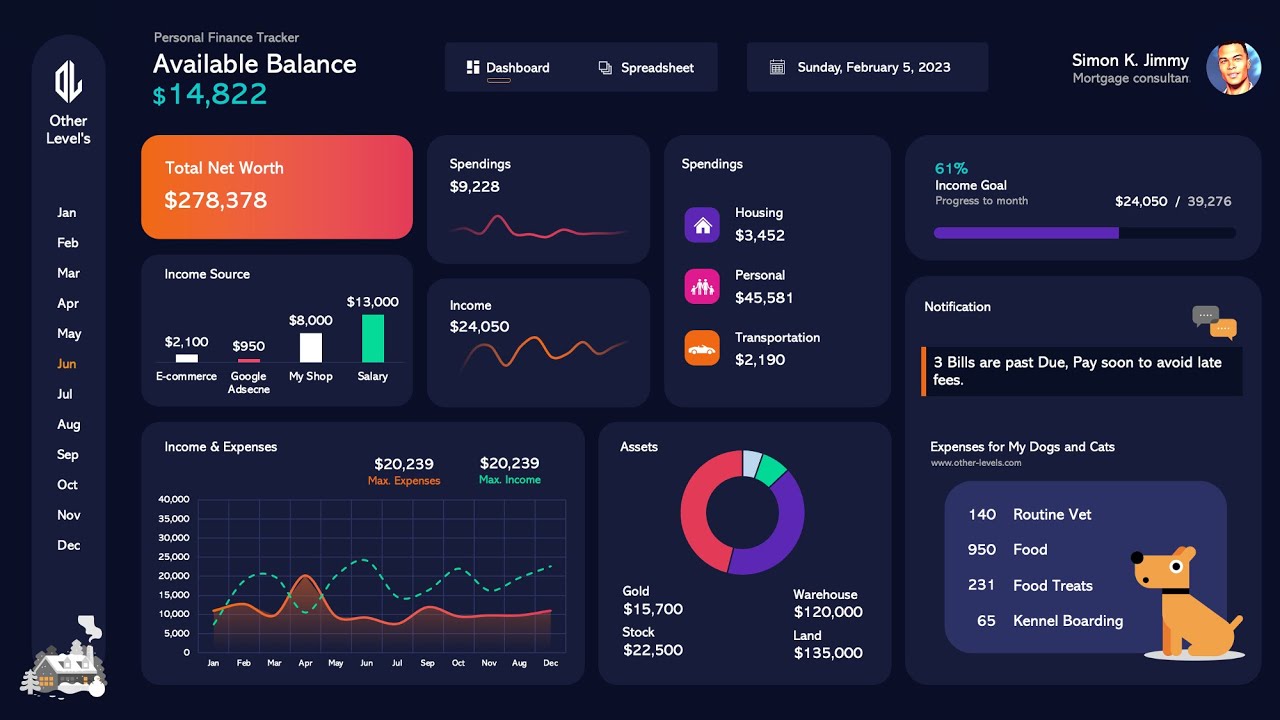
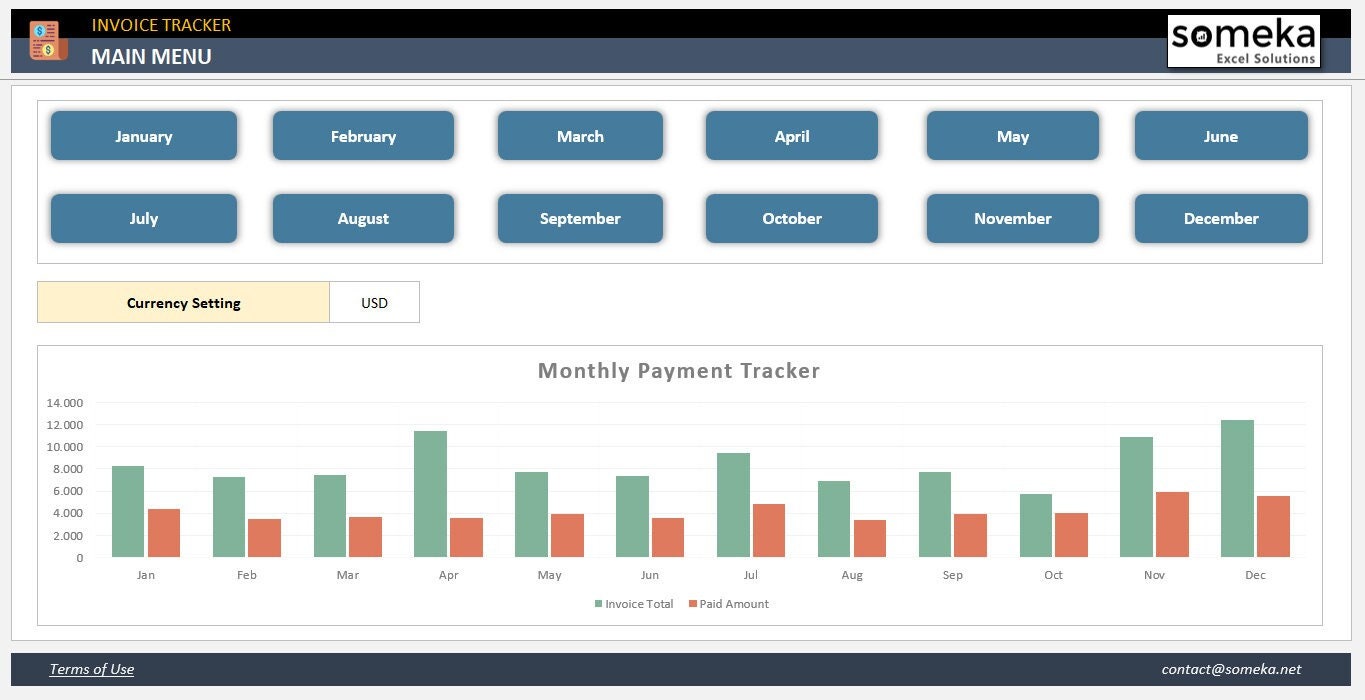
Charts can show monthly outstanding balances, payment activity, aging categories, and vendor exposure. Microsoft describes the use of charts and data visualization within its Accounts Payable team-site template as a way to present information visually. :contentReference[oaicite:10]{index=10}
The dashboard should remain connected to the underlying ledger. If a manager changes an invoice’s status or records a payment, the dashboard should update through formulas, tables, pivots, or another controlled mechanism rather than requiring a separate manual update.
How to Create an Accounts Payable Template Excel Workbook
Start by defining the business problem. Decide whether the workbook is primarily for invoice tracking, payment scheduling, monthly reporting, aging analysis, vendor reconciliation, or a combination of these tasks.
Next, list the minimum information needed for every invoice. Avoid copying every possible field from a sophisticated accounting system if the business will not maintain those fields consistently.
Create the AP ledger as an Excel table. Use clear headers, consistent date formats, consistent currency formatting, and a defined approach to blank values.
Add calculated columns only after the raw input fields are stable. This makes it easier to test formulas and prevents the calculation layer from becoming tangled with data entry.
Finally, create a summary section that draws directly from the ledger. Test the workbook with hypothetical invoices covering paid, unpaid, partially paid, overdue, disputed, and future-due cases before relying on it for live financial records.

Practical Example: A Simple AP Ledger
Imagine a hypothetical consulting company that receives invoices from an office-supply vendor, software provider, cleaning company, and professional-services firm. Each invoice is entered as a separate row with its invoice number, date, amount, due date, and payment status.
The first invoice is for $1,200 and has been paid in full. The second is $800 with a $300 partial payment. The third is $450 and is due in ten days. The fourth is $2,000 and is already overdue.
The balance formulas would return $0, $500, $450, and $2,000 respectively. The status logic could classify the first invoice as Paid, the second as Partially Paid, the third as Open, and the fourth as Overdue.
An aging summary could then show $450 as current or not yet due and $2,500 as open past-due or partially unpaid depending on the chosen classification rules. The exact categories should be documented so different reviewers interpret the report consistently.
The example illustrates why calculated fields are valuable. Instead of asking a staff member to manually recalculate balances and rewrite statuses every day, the workbook derives the information from the underlying amounts and dates.
Practical Solution: A Reliable AP Workflow in Excel
The practical solution is to build the spreadsheet around a repeatable workflow rather than treating it as a static form. Every invoice should enter the process through a defined point, receive an identifier, be reviewed, be recorded, and then be followed through to payment.
Step 1: Capture the invoice. Record the vendor, invoice number, invoice date, due date, amount, purchase order or project reference, and any other required information as soon as the invoice is received.
Step 2: Validate the invoice. Check the supplier, arithmetic, payment terms, supporting documentation, and required approvals. Where purchase orders and receiving records are used, perform the appropriate matching process.
Step 3: Record the liability. Enter the invoice into the central AP ledger rather than maintaining separate unofficial lists in email or personal spreadsheets.
Step 4: Monitor the due date. Use formulas to calculate days remaining or days overdue. Review the upcoming-payment view on a consistent schedule.
Step 5: Authorize payment. Follow the company’s established approval process. The spreadsheet should show whether an invoice is ready for payment, but it should not be used to circumvent approval controls.
Step 6: Record the payment. Enter the payment date, payment amount, payment method, and transaction reference. The outstanding balance should decrease automatically.
Step 7: Reconcile. Compare the spreadsheet with accounting records, bank activity, vendor statements, or other appropriate records. Investigate differences instead of simply adjusting totals until they agree.
Step 8: Review monthly. Examine outstanding balances, aging, unusual changes, recurring overdue items, vendor concentration, and payment trends.
This workflow keeps the spreadsheet focused on operational control. It also creates a clearer path for eventually migrating to dedicated AP software because the business has already defined its data fields and process stages.

Common Mistakes to Avoid
One of the most common mistakes is maintaining several versions of the same AP workbook. When different employees save separate copies, it becomes difficult to determine which file contains the most recent invoice or payment information.
Another mistake is manually typing calculated balances. A formula should normally calculate the outstanding balance from invoice and payment information. Manual balances can become stale after partial payments.
Using inconsistent dates is another source of errors. Dates should be stored as actual spreadsheet dates rather than text strings wherever possible, allowing formulas and sorting to work correctly.
Another problem is deleting paid invoices immediately. Removing historical transactions may make the workbook look cleaner, but it destroys useful history. A better approach is to retain the record and classify it as paid or closed.
Finally, avoid building a dashboard before establishing reliable source data. A beautiful dashboard based on inconsistent records creates a false sense of accuracy.
Security, Access, and Internal Controls
Accounts payable information can contain sensitive commercial information, including supplier pricing, payment schedules, bank-related references, and internal financial data. The workbook should therefore be stored in an approved location with appropriate access controls.
Protecting formula cells can prevent accidental changes, but worksheet protection should not be confused with complete data security. The business should also control who can access, edit, copy, and distribute the workbook.
Segregation of duties is particularly important around supplier setup, invoice approval, invoice entry, and payment authorization. The exact control structure depends on the organization’s size and risk profile, but assigning all of these responsibilities to one person can create avoidable risks. :contentReference[oaicite:11]{index=11}
Regular backups are also important. A workbook that contains the only copy of several months of payment records is a critical business record and should not depend on a single local computer.
When a spreadsheet is shared, establish a naming and versioning convention. A clear file name, controlled storage location, and defined owner can prevent staff from unknowingly working from outdated copies.

When an Excel Template Is No Longer Enough
An Excel workbook can work very well when transaction volume is manageable and the process is controlled. However, increasing invoice volume can eventually expose limitations.
Warning signs include multiple people editing the same workbook simultaneously, frequent formula errors, duplicate invoices, difficulty attaching source documents, complicated approval chains, frequent reconciliation differences, and a growing need for automated integrations.
A dedicated accounting or AP platform may be more appropriate when the business needs workflow automation, document capture, role-based approvals, audit trails, automated payment processing, supplier portals, or integration with procurement and general-ledger systems.
The decision should not be based only on the number of invoices. A business with relatively few but high-value or highly regulated transactions may need stronger controls sooner than a company with many low-value routine transactions.
The spreadsheet can still remain useful as an analysis or reporting tool after software is adopted. Excel is often effective for controlled exports, ad hoc analysis, budgeting, and management reporting when the accounting system remains the authoritative transaction record.

Reference Examples
The following examples illustrate different visual approaches to AP ledgers, invoice tracking, aging analysis, payment summaries, and Excel dashboards. They are references for structure and presentation rather than claims that any particular third-party template is required for a business.
accounts payable template excel free
Source: Etsy
accounts payable template excel free download
Source: Etsy
accounts payable template excel download
Source: Etsy
accounts payable template excel small business
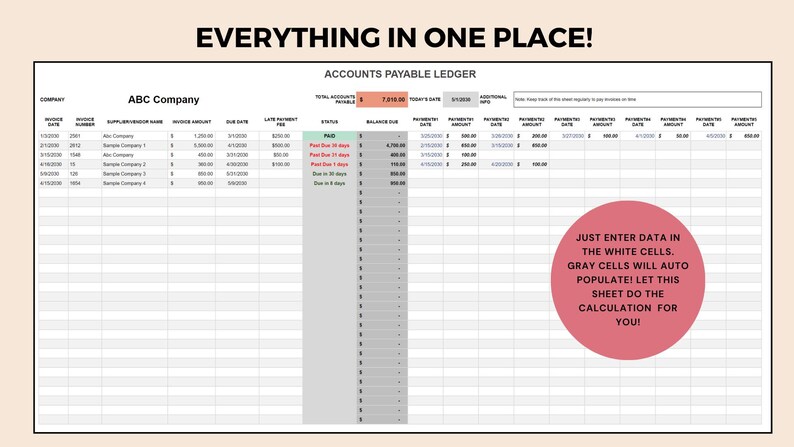
Source: Etsy
accounts payable template excel format
Source: Etsy
accounts payable template excel spreadsheet
Source: ExcelMojo
accounts payable template excel with formulas
Source: Simple Sheets
accounts payable template excel monthly
Source: Etsy
Frequently Asked Questions
What should an accounts payable template include?
A useful template normally includes vendor name, invoice number, invoice date, due date, invoice amount, amount paid, balance due, payment status, and notes. Depending on the workflow, it can also include purchase orders, approval information, payment references, departments, projects, and aging calculations.
Can a small business manage accounts payable in Excel?
Yes. Excel can be practical for a small business when invoice volume is manageable and the workbook is consistently maintained. A simple ledger with formulas, filters, validation, backups, and a regular review process is often more useful than a complicated workbook that nobody maintains.
How do I calculate the balance due?
The basic calculation is invoice amount minus total payments recorded against the invoice. In Excel, if the invoice amount is in H2 and payments are in I2, a simple example is =H2-I2. For multiple payment records, the balance can instead be calculated from a separate payment table.
How should overdue invoices be identified?
Use the due date and the current or selected reporting date. An unpaid invoice with a due date earlier than the reporting date can be classified as overdue. A separate days-overdue calculation makes it possible to group open balances into aging categories.
Should paid invoices be deleted?
Usually, no. Keeping paid invoices in the historical ledger preserves transaction history and supports reconciliation and reporting. Instead of deleting them, mark them as Paid or Closed and exclude them from open-balance calculations.
What is the difference between an AP ledger and an AP dashboard?
The ledger contains transaction-level records, while the dashboard summarizes those records. The ledger is the source of detailed information; the dashboard should normally calculate its figures from that underlying data.
Can Excel calculate AP aging automatically?
Yes. Excel can use dates, IF logic, MAX, SUMIF, SUMIFS, tables, pivot tables, and conditional formatting to calculate and display aging information. The formulas should be tested with current, overdue, partially paid, and fully paid examples.
Is a free template always better than building one from scratch?
Not necessarily. A free template can save setup time, but it may contain fields or formulas that do not match the company’s process. The best choice is the structure that accurately reflects the business’s invoice, approval, payment, and reporting requirements.
Conclusion
A well-designed accounts payable template excel workbook can give a business a clear and practical way to organize supplier invoices, monitor payment deadlines, calculate outstanding balances, analyze aging, and prepare useful monthly reports. The strongest templates focus on clean transaction data first and use formulas, validation, conditional formatting, and dashboards to turn that data into actionable information.
The most important design decisions are straightforward: use one row per invoice, maintain consistent vendor and invoice identifiers, separate input fields from calculated fields, calculate balances rather than typing them, track payments carefully, and review overdue obligations regularly. Where purchase orders and receiving records are used, matching them against invoices can add another layer of transaction verification.
For small businesses, a simple workbook may be enough for years if it is maintained consistently. As transaction volume, users, approval requirements, and integration needs grow, the business should periodically reassess whether Excel remains the right primary system or whether dedicated accounting and AP software would provide stronger controls.
Ultimately, the best AP spreadsheet is not the one with the most charts or the most formulas. It is the one that makes every invoice easy to identify, every balance easy to explain, every due date easy to monitor, and every payment easy to reconcile.
:contentReference[oaicite:12]{index=12}
