Modern invoice design does not mean adding decorative graphics to every page. The strongest layouts usually prioritize information hierarchy, readable typography, logical spacing, recognizable business details, and an obvious total. This makes the document easier for both the customer and the accounting team to review. A reusable template can also reduce repetitive work because the business does not have to rebuild the same structure for every transaction.
This guide explains how to plan, create, customize, review, send, and maintain a modern business invoice template. It covers Word, Excel, PDF, and online workflows, while also explaining when a simple document is enough and when a more structured invoicing system makes sense. The examples use hypothetical businesses and figures so they can be adapted without presenting invented information as real-world data.
What Is a Business Invoice Template Modern Design?
A modern business invoice template is a reusable document structure designed to present billing information in a clean, professional format. The template normally contains predefined areas for the seller’s details, customer’s details, invoice identification, dates, products or services, quantities, prices, taxes where applicable, totals, payment instructions, and notes.
The word “modern” refers primarily to the way information is organized. Instead of filling the page with borders, decorative elements, and dense text, a contemporary layout normally uses visual hierarchy. The invoice title is prominent, important identifiers are easy to locate, line items are aligned consistently, and the amount due receives appropriate emphasis.
A good template also separates reusable structure from transaction-specific information. The company name, logo, contact details, standard payment instructions, and preferred terms may remain consistent, while the invoice number, customer, date, line items, and amount change for each transaction.
This distinction is important because a template should make invoicing faster without encouraging careless copying. A professional process still requires every invoice to be checked before it is sent. A reusable layout is a starting point, not a substitute for reviewing the actual transaction.
Modern design should therefore be understood as a combination of usability and presentation. A beautiful invoice that hides the due date is not effective, while a plain invoice that clearly communicates every important detail can still perform its primary job very well.

Why a Modern Invoice Template Matters
Consistency is one of the strongest reasons to use a reusable invoice template. When invoices follow the same structure, customers know where to look for the invoice number, date, balance, payment instructions, and supporting details. Consistency can make recurring billing easier to review and reduce unnecessary questions.
A template can also reduce administrative effort. Instead of creating a new document from a blank page, the business can duplicate an approved template, replace transaction details, verify calculations, and prepare the document for delivery. The time saved becomes more significant when a business sends invoices frequently.
Professional presentation can reinforce a company’s identity. A logo, consistent typography, restrained brand colors, and a recognizable layout can make invoices look like part of the same customer experience as proposals, quotations, receipts, and other business documents.
Clarity is equally important. A customer should not have to search through several paragraphs to discover the amount due. The invoice should distinguish between subtotal, adjustments, tax when applicable, and final amount so the calculation can be understood without unnecessary effort.
Finally, invoices contribute to organized financial records. Businesses often need supporting documentation to reconcile transactions, monitor outstanding balances, prepare reports, and maintain records. The exact recordkeeping rules depend on the applicable jurisdiction and business circumstances, so the template should support the organization’s broader accounting process rather than attempting to replace it.

Essential Components of a Modern Business Invoice
1. Business identity
Start with the information that identifies the seller. This can include the legal or trading business name, business address when appropriate, email address, telephone number, website, and other relevant contact information. A logo may be included, but it should not be so large that it pushes important billing information below the fold.
The identity section should answer a basic question immediately: who issued this invoice? If a company operates under a brand name that differs from its legal entity, the document should be designed consistently with the way the business handles its commercial and accounting records.
2. Invoice title and identifier
The document should clearly state that it is an invoice. A unique invoice number or identifier should also be easy to find. Numbering systems can be sequential, date-based, project-based, or structured according to an organization’s internal process.
A good numbering system should be predictable enough to manage but flexible enough to accommodate the business’s workflow. Avoid casually changing numbering conventions from one invoice to another because inconsistent identifiers can make reconciliation and document retrieval harder.
3. Customer information
The customer section should contain enough information to identify the party being billed. Depending on the transaction, that might include an individual or company name, billing address, contact person, email address, purchase-order reference, or other information needed by the customer’s accounts-payable team.
Before sending an invoice, check that the customer information matches the intended recipient. A visually polished invoice can still create delays if it is addressed to the wrong entity or omits a reference required for internal approval.
4. Dates
At minimum, consider including the invoice date and payment due date when the transaction uses a defined payment period. A service period, delivery date, or project period can also be useful when the customer needs additional context.
Dates should use a consistent format throughout the document. For international customers, an unambiguous written month format or another clearly understood convention can reduce confusion between day-month and month-day interpretations.
5. Line-item table
The line-item section is the operational center of the invoice. Each row should explain what is being billed. Typical fields include description, quantity, unit, unit price, discount where relevant, tax treatment where relevant, and line total.
Descriptions should be specific enough for the customer to recognize the product or service. A description such as “consulting” may be insufficient for a complex engagement, while “Website accessibility review — Phase 1” gives the customer considerably more context.
Columns should align logically. Numeric values generally benefit from consistent alignment, while longer descriptions need enough horizontal space to remain readable. Avoid forcing the table into too many narrow columns simply because the template designer wants to include every possible field.

Design Principles for a Modern Business Invoice
White space is one of the simplest ways to improve an invoice. Empty space around sections prevents the page from feeling crowded and helps readers distinguish one information group from another. White space does not mean wasting paper; it means giving important information enough room to remain readable.
Typography should also be controlled. A business generally needs only a small number of type treatments: one for the main title, one for section labels, and one for body content. Excessive font changes make the document look less coherent and can distract from transaction details.
Color should support hierarchy rather than compete with it. A restrained brand color can highlight the invoice title, section headers, or amount due. The main body should remain easy to read when printed in grayscale or viewed on a basic display.
Alignment is another important design tool. If currency values, dates, quantities, and invoice identifiers jump around the page, the document feels harder to scan. Consistent margins and column alignment create an invisible structure that guides the reader through the transaction.
Accessibility should be considered as well. Small text, weak contrast, overly decorative fonts, and information conveyed only through color can create unnecessary barriers. A modern invoice should remain understandable without relying on visual decoration alone.

Choosing the Right Business Invoice Format
Word-based invoices
A Word-based template can be useful when the business creates relatively simple invoices and wants straightforward text editing. Word is particularly convenient when descriptions are long or when the invoice is closely connected to other document-based workflows.
The main limitation is calculation management. Although tables can be used effectively, Word is not primarily a spreadsheet environment. If invoices require many automatic calculations, extensive line items, or detailed tracking, another format may be more suitable.
Excel-based invoices
Excel is useful when calculations are an important part of the workflow. A spreadsheet can calculate line totals, subtotals, discounts, taxes, and balances using formulas. It can also support separate tracking sheets for invoice numbers, payment dates, customers, and statuses.
The challenge is controlling formulas and preventing accidental changes. A spreadsheet template should be tested carefully before regular use. Cells containing formulas may need protection, input fields should be clearly distinguished, and the final invoice should be checked after calculations are complete.
PDF invoices
PDF is commonly useful as a final delivery format because it helps preserve the visual layout across devices and makes accidental editing less likely than sending an editable source document. A business can prepare the invoice in Word, Excel, or another system and then produce a PDF for delivery.
A PDF should still be reviewed after export. Check page breaks, table alignment, text visibility, currency symbols, totals, and payment information. Exporting can occasionally introduce formatting changes that were not obvious in the original editing environment.
Online invoices
Online invoicing systems can be helpful when the business needs recurring billing, automated calculations, customer records, payment tracking, reminders, or centralized invoice histories. They can reduce manual steps when the volume of transactions becomes difficult to manage with individual documents.
The right choice depends on the size and complexity of the business. A small service provider with a handful of invoices each month may need only a reliable template, while a growing company may benefit from an integrated invoicing and accounting workflow.

How to Build a Business Invoice Template Modern Format
Begin by defining the information the invoice must communicate. Do not start with colors or decorative elements. List the business identity, customer information, invoice number, dates, transaction details, totals, payment instructions, and notes that are genuinely useful for your business.
Next, arrange the information according to the reader’s natural path. The top area can identify the seller and document, followed by customer and transaction details. The center should explain what is being billed, while the lower section should make the financial summary and payment action clear.
Then create a visual hierarchy. The word “Invoice” should be immediately recognizable, but the amount due may deserve equal or greater visual emphasis because it is one of the most important pieces of information for the recipient.
After the structure works, introduce branding. Add the logo, choose a restrained color palette, and select readable fonts. Branding should strengthen recognition without turning the invoice into a marketing poster.
Finally, test the template with several hypothetical transactions. Use a one-line invoice, a multi-line invoice, a discount, a tax calculation where applicable, a long customer name, and a long description. Testing these situations can reveal layout problems before the template becomes part of routine billing.

Using a Business Invoice Template Modern Excel Workflow
When using Excel, separate editable inputs from calculated values. For example, customer name, description, quantity, and unit price can be input fields, while line totals and the invoice total can be formula-driven. This separation makes the worksheet easier to understand and reduces the chance of overwriting calculations.
A simple line calculation can follow the logic of quantity multiplied by unit price. A subtotal can then add the applicable line totals. If a discount is used, the template should define whether it applies to individual lines or the subtotal. If taxes apply, the calculation should follow the business’s applicable rules rather than relying on a generic percentage copied from another invoice.
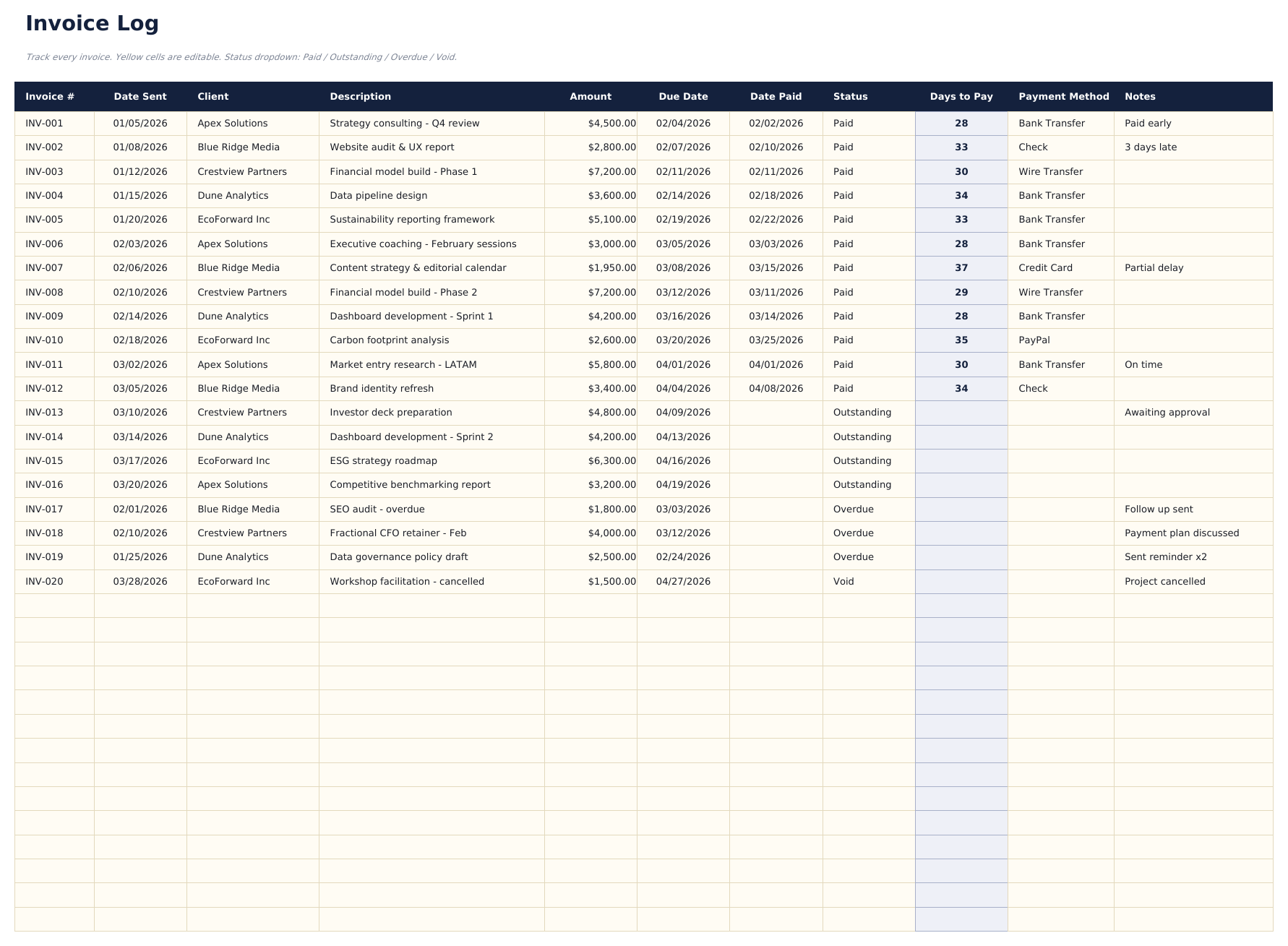
It is also useful to create a dedicated invoice log when the business sends invoices regularly. The log can record invoice number, customer, invoice date, amount, due date, payment date, and status. This creates a bridge between the individual invoice document and the broader accounts-receivable process.
Formula testing should be systematic. Change quantities, prices, discounts, and tax inputs and confirm that the totals respond correctly. Test zero values and unusually large values as well. A formula that works for one sample transaction may still contain an error that appears only under a different combination of inputs.
Before sending an Excel-generated invoice, consider exporting a final copy into a stable delivery format if the recipient does not need to edit the document. Keep the original working file according to the organization’s recordkeeping process, and avoid making uncontrolled edits to the original template itself.

Using a Business Invoice Template Modern PDF Workflow
PDF works especially well when the goal is to present a finished invoice rather than an editable document. Once the transaction has been reviewed, the final layout can be exported and delivered in a format that is generally consistent across common viewing environments.
The PDF should preserve the invoice’s hierarchy. The recipient should be able to identify the seller, customer, invoice number, date, line items, total, and payment instructions without zooming excessively or searching through multiple pages.
Page breaks deserve special attention. A long invoice may span multiple pages, but the layout should not split a line-item row awkwardly or leave the financial summary separated from the transaction it summarizes. If the document becomes unusually long, consider whether the description can be made more concise or whether supporting material should be handled separately.
File naming also matters for internal organization. A consistent naming convention can make documents easier to locate. A business might use a pattern that combines the invoice identifier with a customer or project reference, provided the convention fits its existing document-management process.
Before delivery, open the actual exported PDF rather than assuming that the export was successful. Review it visually from the recipient’s perspective and confirm that the document contains the correct transaction information.

How a Modern Invoice Can Improve Payment Clarity
Payment information should be easy to locate. If a customer has to search for bank details, payment instructions, or a payment link, the invoice creates unnecessary friction. A dedicated payment section near the total can make the next action clearer.
Payment terms should be stated consistently and should match the arrangement agreed with the customer. Avoid placing one term in a quotation and a contradictory term on the invoice. The invoice should reflect the actual commercial agreement rather than introducing unexpected conditions.
If multiple payment methods are accepted, list only the methods that are genuinely available. For example, a business might accept bank transfer and card payment but should not display an outdated payment method simply because it remains in the template.
Where appropriate, include a short reference to the invoice number in the payment instructions. This can help the business match incoming payments to outstanding invoices, particularly when customers manage several transactions at the same time.
A polite closing note can also be useful, but it should remain secondary to the financial information. A short thank-you message is enough; the amount due and payment action should never be visually buried beneath marketing language.

Modern Template Invoice Example for a Service Business
Consider a hypothetical design studio called Northline Creative. The studio completes a small website project for a fictional customer. The invoice begins with the studio’s logo and contact information, followed by the word “Invoice” and a unique identifier such as INV-2026-014.
The customer block identifies the fictional client and provides the billing email. The invoice date and agreed due date appear nearby. A project reference is included so the customer’s purchasing team can connect the invoice with the relevant engagement.
The line-item table then lists “Website discovery and planning,” “Interface design,” and “Final website assets.” Each row includes a clear description, quantity or hours where relevant, rate, and line total. The wording is specific enough that the client can understand the relationship between the work and the amount billed.
At the bottom, the invoice shows the subtotal, any applicable adjustment or tax, and the final amount due. Payment instructions are positioned close to this summary so the customer does not have to search elsewhere on the page.
This hypothetical example demonstrates an important principle: modern design does not require unusual content. The same basic information can be presented in a cleaner hierarchy, making the document easier to scan without changing the underlying transaction.

Invoice for Business Template: Product-Based Example
A product business may require a slightly different line-item structure because quantity and unit price are often more important than billable hours. Imagine a hypothetical stationery supplier invoicing a fictional retail customer for several boxes of notebooks, folders, and planners.
Each line can identify the product, quantity ordered, unit price, and extended amount. If product codes are used internally, the description should still be understandable to the customer. The invoice should not force the recipient to decode internal inventory abbreviations before they can confirm the purchase.
Shipping or delivery charges can be shown separately when they form part of the transaction. This makes it easier to distinguish product value from additional charges and helps the customer reconcile the invoice against an order or delivery record.
If discounts apply, the document should show enough information to explain how the discount affects the amount due. Avoid displaying a final number without enough context for the recipient to understand the calculation.
The same modern design principles remain useful: strong hierarchy, readable rows, adequate spacing, clear totals, and payment instructions that are easy to locate. The content changes because the business model changes, not because modern design requires a completely different visual language.

Basic Business Invoice Template: What to Keep Simple
A small business does not need an elaborate invoice simply because larger companies use sophisticated systems. A basic template can be highly effective when it includes the information necessary to identify the transaction and request payment.
A simple structure might contain the business name and contact information, invoice number, issue date, customer information, item description, quantity, unit price, total, due date, and payment instructions. Additional fields should be added only when they serve a real operational purpose.
Overdesign can create problems. Large decorative headers reduce the available space for transaction details, while complex color schemes can make printing expensive or reduce readability. A minimalist structure often provides a more professional result than a template crowded with visual effects.
Simple also means easy to maintain. If employees need to update the template later, they should be able to understand which areas are permanent and which areas change for each transaction. A template that only one person understands is less useful as the business grows.
The best basic template is therefore not necessarily the shortest document. It is the document that contains the right information without unnecessary complexity.
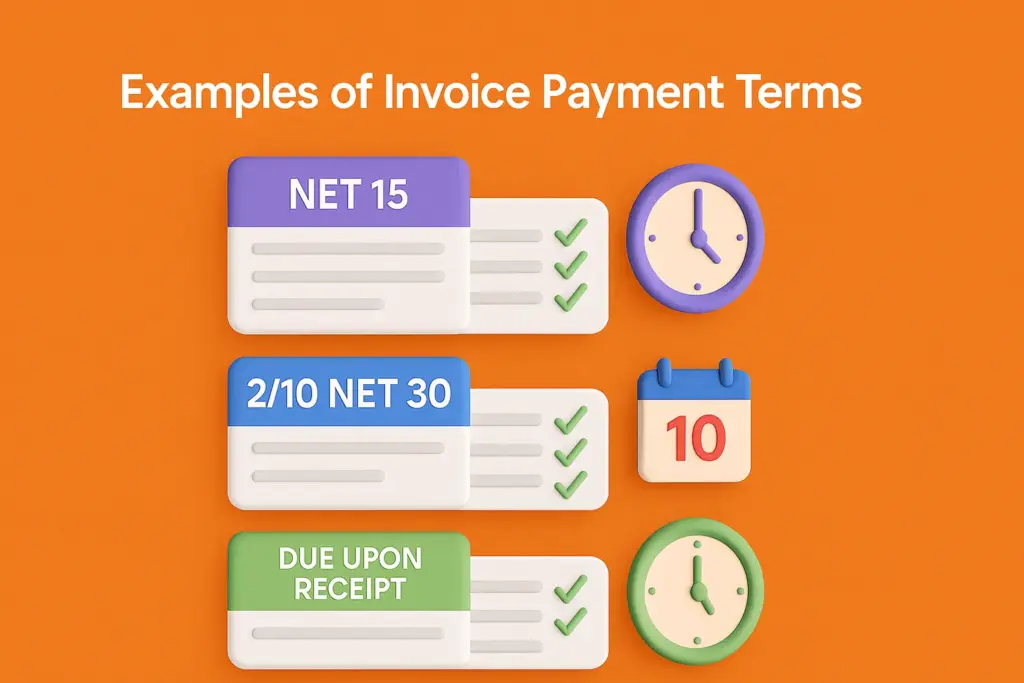
How to Create a Modern Template Invoice Format in Word
Start with a blank document or an existing approved layout. Set consistent margins and establish a clear header area. Place the business identity on one side and the invoice title and identifier on the other if that arrangement improves scanning.
Create separate sections for seller and customer information. A table without heavy borders can help align fields while keeping the page visually clean. The goal is to make the relationship between labels and values obvious.
Build the line-item table with enough width for meaningful descriptions. Use columns for quantity, rate, and amount only when they are relevant to the business. If the invoice is for a fixed-fee service, there may be no reason to create an unnecessarily complicated quantity structure.
Reserve the lower-right area for the financial summary when that placement works with the document’s overall structure. The subtotal, adjustments, applicable tax, and final amount should be visually distinct so the reader can understand the calculation quickly.
Save the completed structure as a reusable template after testing it. Microsoft documentation explains that frequently used document types can be saved as templates so they can be reused as a starting point rather than recreated each time. The same principle is useful for invoice workflows, provided the business maintains control over its approved version.
How to Research and Compare Invoice Templates
Research should begin with the business’s actual invoicing requirements rather than with visual preferences. Write down the information that must appear on every invoice, the fields that change frequently, and any calculations or references required by customers.
Next, examine several template styles. Compare the position of the invoice number, customer details, line-item table, total, and payment section. A template that looks attractive in a preview may become difficult to use when a real transaction contains long descriptions or multiple line items.
Pay attention to the editing environment. A template designed for a spreadsheet may behave differently from one designed for a word processor or online editor. Consider who will maintain the document and whether they are comfortable with formulas, tables, document styles, or online systems.
Review the final-output process as well. If invoices are ultimately delivered as PDFs, test the export before adopting the design. If the business needs an editable document for internal review, make sure the source format remains manageable.
Finally, assess the template against a checklist rather than choosing based only on appearance. Accuracy, clarity, consistency, maintainability, and suitability for the transaction should outweigh decorative features.

Common Invoice Mistakes to Avoid
One common mistake is sending an invoice without a clear identifier. A customer may have several open transactions, so an invoice number provides a useful reference for communication and payment matching.
Another mistake is using vague descriptions. A line that says only “services” may leave the customer wondering what the charge represents. Descriptions should be concise but specific enough to connect the charge to the agreed work or product.
Incorrect dates can also cause confusion. The issue date and due date should be checked before delivery, particularly when a business duplicates a previous invoice and changes only selected fields.
Calculation errors are especially damaging because they can undermine confidence in the entire document. Automated formulas can reduce manual arithmetic, but formulas themselves must be tested and the final totals should still be reviewed.
Finally, outdated payment information should never remain in a reusable template. Bank details, payment links, contact addresses, and terms can change. A template maintenance process should include periodic review of these permanent fields.

Professional Best Practices for Invoice Management
Keep one approved master template rather than allowing multiple unofficial versions to circulate. If several employees create invoices, uncontrolled copies can gradually develop different payment information, branding, calculations, or numbering practices.
Separate the template from completed invoices. The master template should remain clean and should not be overwritten with transaction data. Completed invoices should be stored according to the business’s document-management and recordkeeping procedures.
Use consistent naming and numbering. A predictable system makes it easier to locate a document when a customer asks about an invoice several months later or when the accounting team needs to reconcile historical transactions.
Review invoices before sending them. A practical review can cover recipient, invoice number, date, description, quantities, rates, calculations, tax treatment where relevant, amount due, payment information, and attachment or reference details.
Review the template periodically as well. A business may change its branding, contact information, payment methods, pricing structure, or workflow. A template that was accurate last year can become outdated if nobody owns its maintenance.

When a Free Template Is Enough
A free template can be a practical choice for a new or small business that needs a professional document without investing in specialized software. If invoice volume is low and calculations are straightforward, a carefully tested Word or Excel template may provide everything necessary for the immediate workflow.
The important distinction is between “free” and “unfinished.” A free template still needs to be customized with accurate business information and tested against real-world situations. Removing placeholder content is only the beginning of the customization process.
Businesses should also check the licensing terms of any third-party template before using it commercially. Availability at no monetary cost does not automatically mean that every template can be redistributed, resold, modified, or incorporated into another product.
For internal use, the business should maintain a controlled version of the template and avoid repeatedly downloading different designs. Consistency generally becomes more valuable than novelty once invoices are being sent regularly.
If the business begins handling more transactions, recurring invoices, multiple currencies, complex tax calculations, or extensive payment tracking, it may eventually outgrow a standalone document. At that point, an integrated invoicing process can be evaluated.

Modern Invoice Template Online: When to Use a Browser-Based Workflow
An online invoice workflow can be useful when several people need access to billing information or when the business wants to reduce the number of files stored on individual computers. Browser-based systems can centralize customer details, invoice histories, and payment status depending on the service used.
Online tools can also be convenient for businesses that work from different locations. A template stored within a controlled system can be accessed without manually transferring the latest file between devices.
However, convenience should not replace review. Businesses should understand how the system stores records, exports invoices, handles backups, manages permissions, and protects financial information before making it central to the billing process.
For a small operation, an online editor may simply provide a convenient way to customize a reusable layout. For a larger operation, a dedicated invoicing platform may offer more structured customer and payment management.
The decision should be based on workflow needs rather than the assumption that online is automatically better. The best system is the one the business can use consistently and accurately.

Practical Solution: Build a Reliable Modern Invoice System
The most practical solution is to create a single approved template, define a repeatable preparation checklist, and connect completed invoices to a simple tracking process. This provides structure without requiring a complicated financial system from the beginning.
Step 1: Define the required fields. List the seller information, customer information, invoice identifier, dates, transaction details, totals, payment instructions, and any additional references the business genuinely needs.
Step 2: Select the working format. Use Word when document editing is the priority, Excel when calculations and tracking are central, PDF when delivering a finalized document, or an online system when centralized access and automation are important.
Step 3: Build the visual hierarchy. Make the invoice title, identifier, customer information, line items, amount due, and payment instructions easy to find. Use spacing, alignment, typography, and restrained branding to guide the reader.
Step 4: Test the calculations. If the template calculates totals, deliberately test multiple quantities, prices, discounts, and applicable tax inputs. Confirm that the formulas produce the expected results before the template is approved.
Step 5: Create an invoice checklist. Before sending each invoice, verify the customer, number, dates, descriptions, calculations, payment details, and final output. This takes less time than correcting a preventable billing error later.
Step 6: Maintain a tracking log. Record invoice identifiers, customers, dates, amounts, due dates, payment dates, and status where appropriate. The log should support the business’s accounting process rather than becoming a disconnected spreadsheet.
Step 7: Review the master template regularly. Check contact details, payment instructions, branding, formulas, terms, and file structure. Assign responsibility for template maintenance so important changes do not depend on someone noticing an outdated field.
Step 8: Separate source and final documents. Keep the master template protected from accidental edits. Prepare each transaction separately, review it, and retain the finalized version according to the business’s recordkeeping process.
This workflow works because it treats the invoice as part of a system rather than as an isolated design project. The document looks professional, but the underlying process is equally important.
Reference Examples
The following reference examples illustrate different invoice layouts, document structures, spreadsheet approaches, and historical billing documents. They are visual references rather than claims that any particular format is universally required.
business invoice template modern free

Source: Wikimedia Commons.
business invoice template modern format
Source: Wikimedia Commons.
business invoice template modern template
Source: Wikimedia Commons.
business invoice template modern excel

Source: Wikimedia Commons.
business invoice template modern pdf

Source: Wikimedia Commons.
modern template invoice example

Source: Wikimedia Commons.
modern invoice template pdf

Source: Wikimedia Commons.
modern invoice template online

Source: Wikimedia Commons.
modern template invoice word

Source: Wikimedia Commons.
invoice for business template

Source: Wikimedia Commons.
modern template invoice format

Source: Wikimedia Commons.
basic business invoice template

Source: Wikimedia Commons.
Frequently Asked Questions
What should a business invoice include?
A useful invoice normally identifies the seller and customer, provides a unique invoice number, shows relevant dates, describes the products or services, states quantities and prices where applicable, presents the total amount, and explains how and when payment should be made.
Is a modern invoice better than a traditional invoice?
Modern design is not automatically better. Its advantage is usually improved hierarchy, readability, consistency, and efficient use of space. A traditional-looking invoice can be equally effective if it communicates the transaction clearly and accurately.
Should I use Word or Excel for my invoice?
Choose Word when flexible document editing is the priority. Choose Excel when calculations, formulas, and tracking are central to the workflow. Some businesses use both: Excel for calculation and tracking, followed by PDF for final delivery.
When should an invoice be converted to PDF?
PDF is useful when the invoice is finalized and the recipient does not need to edit the source document. Always review the exported PDF before sending it because page breaks, tables, fonts, or other layout details can change during export.
Can a free invoice template be used for a business?
It can be, provided the template’s usage terms allow the intended use and the business properly customizes and tests it. A free template should not be treated as automatically suitable for every jurisdiction, business model, or transaction type.
How often should an invoice template be updated?
Review it whenever permanent business information changes and periodically as part of normal document maintenance. Payment details, contact information, branding, formulas, and standard terms should not be allowed to become outdated.
Should every invoice have the same design?
Using a consistent design is usually beneficial because customers and internal teams learn where to find important information. Different invoice types can use variations of the same structure when the business needs separate layouts for services, products, recurring billing, or other transactions.
What makes an invoice look professional?
Professional invoices are usually accurate, easy to scan, consistently branded, logically organized, and free of unnecessary clutter. Clear descriptions and an obvious amount due are more important than decorative graphics.
Conclusion
A well-planned business invoice template modern approach combines professional presentation with practical billing discipline. The strongest template is not necessarily the most colorful or elaborate; it is the one that makes the transaction easy to understand, keeps calculations organized, supports consistent records, and gives the customer a clear path to payment. Whether the working file is built in Word, Excel, an online editor, or another system and then delivered as a PDF, the essential principles remain the same: use accurate information, establish a logical hierarchy, keep the design readable, test calculations, protect the master template, and review every completed invoice before it is sent. A modern invoice becomes genuinely valuable when its design and workflow work together.
