The best tracker is not necessarily the most complicated one. It is the one that captures the information people actually need, makes updates easy, and produces useful management visibility without creating another administrative burden. For a small team, that may mean a straightforward spreadsheet. For a larger operation, it may become a connected workbook with dashboards, reporting tabs, resource views, and controlled data-entry fields.
Searchers looking for an operations tracker are often trying to solve several problems at once: organizing daily work, monitoring projects, managing recurring activities, following up on action items, preparing reports, or comparing planned performance with actual results. A practical template can support all of these needs if its structure is designed around decisions rather than simply collecting data.
This guide explains what a management operations tracker template should contain, how to create one in Excel or Google Sheets, how to connect operational activity with reporting, how to use formulas and status controls, and how to avoid common tracking mistakes. It also explains when specialized project, time, activity, and reporting trackers should be connected to the main operations view.
The goal is to help you build a tracker that remains useful after the initial setup. A good system should make ownership visible, reveal overdue work quickly, preserve a history of changes, support weekly or monthly reviews, and help managers answer the most important operational question: what needs attention next?

What Is a Management Operations Tracker Template?
A management operations tracker template is a reusable framework for recording and monitoring operational activities. It normally combines a structured task or activity register with fields such as responsible owner, priority, status, dates, progress, notes, dependencies, and performance indicators.
The term “operations” is broad. Depending on the organization, operational work can include customer service, fulfillment, purchasing, facilities, administration, compliance, staffing, process improvement, internal projects, maintenance, vendor coordination, or recurring management routines. A useful tracker therefore starts with the work that must actually be controlled rather than assuming that every organization needs the same columns.
The word “management” is equally important. A personal to-do list tells one person what to do. A management tracker should help a manager understand what is happening across people, teams, workstreams, and time. It should make exceptions visible and provide enough context to support decisions.
A template becomes particularly valuable when the same tracking process repeats every week or month. Rather than rebuilding a table, managers can copy or roll forward the structure, maintain consistent status definitions, and compare current performance with previous periods.
In practical terms, the tracker acts as an operational control layer. It does not replace an ERP, CRM, project-management platform, ticketing system, or accounting system. Instead, it can provide a management-level view that brings relevant information together when the underlying systems do not provide the exact operational perspective required.
Why an Operations Tracker Matters
Operational problems often become difficult to manage because information is distributed across different places. One person may have a task list, another may have a project spreadsheet, a supervisor may keep notes in email, and leadership may receive a separate weekly report. Each source can be individually accurate while the overall picture remains unclear.
A central tracker reduces that fragmentation by defining a common record for operational work. The team can agree on what a task means, who owns it, which status values are allowed, when a task becomes overdue, and what information should be updated when circumstances change.
Another benefit is accountability. When every significant activity has an owner and a target date, follow-up becomes less personal and more process-driven. A manager does not need to remember every commitment because the tracker provides a shared record of responsibilities.
Tracking also improves prioritization. Ten open tasks do not necessarily represent ten equal problems. A good tracker separates priority from status so that a completed low-priority task does not visually compete with an urgent activity that is blocked.
Finally, consistent tracking creates historical information. After several reporting periods, managers can examine recurring delays, frequently blocked activities, workload patterns, resource constraints, and process bottlenecks. The tracker therefore becomes more valuable over time because it supports both immediate coordination and longer-term improvement.

Core Components of a Strong Operations Tracker
1. Activity or Task ID
Give each record a unique identifier when the tracker is expected to contain many rows. An ID makes discussions easier because managers can refer to a specific record without repeating a long task description.
A useful ID can be simple, such as OPS-001, OPS-002, and OPS-003. If the organization manages multiple workstreams, the prefix can distinguish categories. The exact naming convention matters less than consistency.
2. Activity Description
The activity name should describe the expected action or outcome clearly enough that another person can understand it without asking for extensive clarification. “Review supplier issue” is less useful than “Review delayed supplier order and confirm revised delivery date.”
Descriptions should remain concise while providing enough context. Longer explanations can be stored in a notes field, linked document, or project record rather than making the primary tracker difficult to scan.
3. Owner
Every meaningful activity should have a clearly accountable owner. A team name alone can create ambiguity because several people may assume someone else is responsible.
For shared work, the tracker can include both an accountable owner and a supporting team. This preserves individual accountability while showing the wider operational group involved.
4. Status
Status should describe where the work currently stands. A simple set such as Not Started, In Progress, Blocked, On Hold, Completed, and Cancelled is often sufficient.
Do not create ten or fifteen status categories unless there is a genuine operational reason. Too many choices increase inconsistency and make reporting harder.
5. Priority
Priority answers a different question from status. A task can be high priority and not started, or low priority and already in progress. Keeping these fields separate gives managers a better view of urgency and execution.
6. Dates
At minimum, consider planned start date, due date, and completion date. For project-oriented work, actual start and expected completion dates can also be useful.
Dates allow the tracker to calculate overdue work, upcoming deadlines, cycle time, and schedule variance. They also make historical analysis much easier.
7. Progress
A percentage field can provide additional context when status alone is too coarse. However, progress percentages should have a clear interpretation. “70% complete” should mean something operationally consistent across the team.
For work that is difficult to measure objectively, milestone-based progress may be more reliable than subjective percentages.
8. Dependencies and Risks
Blocked work is often more important than ordinary overdue work. A dependency field can identify another activity, team, approval, vendor, or decision that must occur first.
A risk or issue field can record the reason for a delay and the planned response. This transforms the tracker from a passive list into a management tool.

Designing the Workbook Structure
A practical workbook often works best when it separates detailed records from management summaries. A single sheet can be enough for a small operation, but larger teams benefit from multiple tabs that each have a clear purpose.
A common structure includes a Dashboard tab, Operations Tracker tab, Lists or Settings tab, Issues and Risks tab, Projects tab, and Reporting tab. Not every organization needs all of these. The principle is to separate detailed data entry from summary presentation.
The main Operations Tracker should normally contain one row per activity. Avoid using merged cells, decorative layouts, or blank separator rows inside the data table because these features make filtering, sorting, formulas, and later analysis more difficult.
The Dashboard should answer management questions rather than simply display attractive charts. Useful summary figures might include open activities, overdue activities, blocked work, completion rate, upcoming deadlines, workload by owner, and key operational exceptions.
A Settings or Lists tab can store approved status values, priority levels, departments, owners, project names, and other controlled values. This is especially useful in Excel or Google Sheets because dropdown lists reduce inconsistent entries such as “Complete,” “Completed,” “Done,” and “Finished.”

Management Operations Tracker Template Excel: What to Include
When building a management operations tracker template excel workbook, start with a clean table rather than a heavily formatted dashboard. The underlying data should be reliable before visual reporting is added.
A practical Excel structure might contain columns for ID, Workstream, Activity, Owner, Department, Priority, Status, Start Date, Due Date, Completion Date, Progress, Dependency, Risk, Next Action, and Notes.
Excel is particularly useful when managers need formulas, conditional formatting, pivot tables, charts, data validation, or offline access. It can also be appropriate for teams that already use Microsoft 365 and need a familiar format.
The most important design decision is to keep data fields consistent. If the tracker will later be summarized by department, department names should be standardized. If managers need to analyze workload, owner names should not vary between rows.
Another useful practice is to convert the primary data range into an Excel Table. Structured tables make filtering easier and help formulas expand when new records are added. They also provide a stable foundation for pivot tables and charts.
Management Operations Tracker Template Google Sheets: When It Works Best
A management operations tracker template google sheets can be especially useful when multiple people need to update the same operational record from different locations. Cloud collaboration can make it easier for teams to maintain a shared view instead of emailing revised spreadsheet files.
Google Sheets is well suited to lightweight operational systems where the number of records and complexity remain manageable. Teams can use dropdowns, protected ranges, filters, formulas, charts, and separate reporting tabs to create a practical shared tracker.
Collaboration rules should be defined before many people begin editing the file. Decide which columns team members can change, who maintains formulas, who manages lists, and how historical records are archived.
Filter views can also help different users inspect the same data without permanently changing the main table. A manager might review only high-priority overdue work while a department lead filters for that department’s activities.
Google Sheets should not automatically become the permanent solution for every operation. If the workbook becomes very large, requires complex permissions, depends on multiple external systems, or needs real-time automation at scale, a dedicated work-management or business-intelligence system may eventually be more appropriate.
Free Template Considerations
People searching for a management operations tracker template free are often looking for a usable starting point rather than a sophisticated software platform. A free template can be valuable when it reduces setup time and provides a sensible structure.
However, “free” does not automatically mean “ready for every organization.” A downloaded spreadsheet may contain fields that do not match your workflow, formulas that require adjustment, or formatting that makes data entry harder.
Before adopting any free template, inspect the structure carefully. Check whether the columns match your management process, whether formulas are understandable, whether status values are controlled, and whether the file can be adapted without breaking calculations.
A good free starting point should be treated as a framework rather than a finished operating system. Remove unnecessary fields, rename appropriate headings, define your own status rules, and establish ownership for maintaining the file.
The best template is the one that the team will actually update. A simple tracker completed consistently is usually more useful than an elaborate workbook that requires so much maintenance that users stop entering information.
How to Build the Tracker Step by Step
Step 1: Define the Management Decisions
Before creating columns, identify the decisions managers need to make. Do they need to know what is overdue? Which teams are overloaded? Which projects are at risk? Which recurring processes are failing? Which issues require escalation?
These questions determine what information belongs in the tracker. If a column cannot support a decision, reporting requirement, accountability need, or useful historical analysis, it may not belong in the primary table.
Step 2: Define the Record
Decide what one row represents. A row might represent a task, operational event, project milestone, issue, request, maintenance activity, or weekly commitment.
Do not mix fundamentally different record types in one table unless the structure has been designed for it. Mixing tasks, projects, people, and KPIs in the same row can create ambiguous reporting.
Step 3: Standardize Fields
Create controlled values for status, priority, department, and other categorical fields. Use dropdown menus where the spreadsheet supports them.
Write a short definition for each status. For example, “Blocked” might mean work cannot continue because an external dependency is unresolved, while “On Hold” could mean management intentionally paused the work.
Step 4: Add Date Logic
Use dates to make the tracker proactive. A due date by itself is simply information. A due date combined with today’s date can identify overdue activities or deadlines approaching within a chosen window.
For example, a management review might focus on activities due within seven days, activities already overdue, and activities blocked for more than three business days.
Step 5: Add Ownership
Assign one accountable owner to each important activity. If several people contribute, use supporting fields rather than leaving responsibility ambiguous.
Step 6: Add Reporting
Only after the underlying table is working should you create summary charts. Start with counts and trends that management can act on. A chart that does not change a decision is usually unnecessary.
Step 7: Test With Realistic Records
Enter a small set of realistic sample records and deliberately test edge cases. Include completed work, overdue work, blocked work, missing dates, high-priority activities, and activities assigned to different departments.
Step 8: Establish an Update Routine
Define when the tracker is updated and when it is reviewed. A daily operational tracker may be updated throughout the day, while a management summary could be reviewed weekly.
Using Status and Conditional Formatting
Conditional formatting can make a tracker easier to scan, but it should reinforce the meaning of the data rather than become decoration. Status, priority, overdue conditions, and exceptions are good candidates for visual emphasis.
For example, an overdue activity can be highlighted when its due date has passed and its status is not Completed or Cancelled. A blocked activity can receive a distinct visual indicator because it may require management intervention.
Color should never be the only way to communicate status. Include text labels because colors may be difficult to interpret when printed, viewed by people with color-vision differences, or exported into other formats.
Conditional formatting should also be based on rules rather than manually colored cells. Manual coloring tends to become outdated when the underlying status changes.
When designing the dashboard, use visual hierarchy carefully. The most urgent exceptions should be visible immediately, while routine completed work should occupy less visual attention.
Connecting Operations With Projects
Many operational teams manage recurring work and projects simultaneously. A recurring operational task might happen every day, while a process-improvement project might run for several months. The two types of work should be connected without being confused.
A project field can identify the initiative associated with an activity. This allows managers to filter operational work by project while keeping the individual activity as the basic tracking record.
A program management tracking template can be useful when several related projects contribute to one larger objective. In that situation, the program layer should summarize projects and milestones while the detailed operations tracker records the activities required to execute them.
For example, imagine a hypothetical process-improvement program involving a new customer-support workflow, staff training, documentation updates, and reporting changes. The program view might track four projects, while the operational tracker contains dozens of tasks across those projects.
This layered approach prevents managers from forcing every detail into a single dashboard. Executives can review program-level progress, project managers can inspect milestones, and operations teams can work from the detailed activity records.

Using an Operations Tracker Excel Template for Daily Work
An operations tracker excel template can work well for recurring activities because spreadsheets make it easy to create filters, formulas, date calculations, and summary tables. The key is to keep daily data entry fast.
A daily record might include date, activity, owner, category, priority, status, expected completion, actual completion, issue, and next action. If users must fill out twenty fields for every small task, the tracker will eventually become a burden.
Use detailed fields only where they have a management purpose. For routine work, a compact record is usually preferable. For exceptions, additional notes or issue records can capture the context.
Recurring activities can also be generated from a standard schedule. However, avoid simply duplicating hundreds of future rows if most of them will never require individual management. Track recurring work at the level needed to identify failures and exceptions.
Daily operational tracking is most useful when it feeds a regular review process. The manager should know which items require attention today, which are approaching deadlines, and which patterns suggest that the process itself needs improvement.

Time Management and Workload Tracking
A time management tracker template serves a different but complementary purpose. Instead of primarily asking whether work is complete, it records how time is allocated across activities, projects, clients, departments, or work categories.
Time tracking can help managers understand whether planned workloads are realistic. For example, a hypothetical team may discover that a supposedly small administrative process regularly consumes more staff time than expected.
When connecting time information to an operations tracker, avoid turning every task into a timesheet unless the organization genuinely needs that level of detail. Time records are most valuable when they support staffing decisions, cost analysis, capacity planning, or process improvement.
Useful fields may include date, person, activity, project, start time, end time, total hours, category, and notes. If hourly calculations are used, agree on whether breaks, overtime, meetings, and administrative time are included.
Managers should interpret time data carefully. More hours do not automatically mean better performance, and fewer hours do not automatically mean higher productivity. Time records provide context; they should be evaluated alongside outcomes, quality, service levels, deadlines, and workload complexity.
Project and Activity Tracking
A project management activity tracker template is useful when a project contains many activities that must be assigned, scheduled, and monitored individually. It can include project name, activity, owner, start date, due date, priority, status, dependency, deliverable, and progress.
Projects benefit from explicit deliverables. A task such as “prepare analysis” becomes more measurable when the expected output is defined, such as “complete approved analysis workbook and submit for review.”
Dependencies are especially important in project tracking. If Activity B cannot begin until Activity A is approved, the tracker should make that relationship visible. Otherwise, a delayed upstream activity may look like an isolated problem when it is actually affecting several downstream tasks.
A project tracker should also distinguish between activity completion and project health. A project can have many completed tasks while still being at risk because a critical milestone, dependency, budget condition, or quality requirement is unresolved.
For larger initiatives, a Gantt-style timeline can supplement the activity register. The table remains the detailed source of truth, while the timeline provides a visual view of sequencing and duration.
Program-Level Tracking
When an organization has multiple related projects, a program view can provide a useful middle layer between individual activities and executive reporting. The program view should summarize outcomes, milestones, dependencies, risks, owners, and project health.
For example, a hypothetical service transformation program might contain projects for process redesign, staff training, technology configuration, documentation, and performance reporting. Each project can maintain its own activities while the program tracker monitors cross-project dependencies.
The program layer should not duplicate every task from every project. Instead, it should contain the information required to coordinate the projects and evaluate whether the broader objective remains achievable.
This distinction keeps dashboards readable. A manager responsible for a program needs to know which projects are delayed and why; the manager does not necessarily need every individual task visible on the same screen.
Clear escalation rules are valuable at this level. A project might require escalation when a critical milestone is forecast to slip, when a dependency remains unresolved, or when an issue exceeds the project team’s authority to resolve.
Reporting From the Tracker
An operations manager report template should turn tracker data into a concise management narrative. The report should explain what happened, what is currently happening, what requires attention, and what action is recommended.
A useful weekly report can begin with a short executive summary followed by operational performance, completed priorities, overdue items, current risks, resource concerns, upcoming deadlines, and decisions required from leadership.
The report should not simply copy a spreadsheet into a document. A tracker is designed for ongoing operational control, while a report is designed for communication and decision-making.
For example, a tracker may contain twenty overdue activities. The report might identify that eight are related to one supplier dependency and recommend a management discussion with the supplier owner. This is more useful than presenting twenty isolated rows.
Reports should also preserve the difference between facts and interpretation. “Five activities remain overdue” is a factual statement based on the tracker. “The main cause is insufficient staffing” is an interpretation that should be supported by evidence.
KPIs and Operational Metrics
KPIs can make an operations tracker more useful when they are connected to decisions. Common categories include throughput, completion, timeliness, quality, workload, service performance, capacity, cost, and exceptions.
The right metric depends on the operation. A support team may care about response and resolution performance, while a warehouse may care about order processing, accuracy, backlog, and on-time fulfillment. A facilities team may focus on maintenance completion and unresolved incidents.
Every KPI should have a definition. Record what is included, what is excluded, the reporting period, the calculation method, the source, and the responsible owner.
Targets should also be treated carefully. A target is useful only when its meaning is understood and the team can reasonably influence the result. Avoid creating dozens of KPIs simply because the spreadsheet can display them.
Trend information is often more useful than a single number. A manager can learn more from a measure that has gradually deteriorated over several reporting periods than from one isolated fluctuation.
Data Collection and Quality Control
The quality of an operations tracker depends heavily on data-entry discipline. If owners update statuses inconsistently or leave critical fields blank, the dashboard will produce misleading results.
Start by minimizing manual entry where possible. Dropdowns, date validation, formulas, protected cells, and standardized lists can reduce common errors.
Define who is responsible for data quality. The person maintaining the workbook may control formulas and structure, while task owners remain responsible for keeping their records current.
Regular audits are useful. Once a week or month, check for missing owners, missing due dates, outdated statuses, duplicate records, impossible date combinations, and tasks that have remained “In Progress” for unusually long periods.
Do not silently overwrite historical information when history matters. If the organization needs to understand how an issue developed, preserve completion dates, status changes, review notes, or an appropriate change log.

Example: A Hypothetical Operations Review
Consider a hypothetical regional service team that manages customer requests, internal improvement work, staff training, supplier issues, and recurring compliance checks. The manager wants one weekly view of outstanding work.
The operations tracker contains 80 active records. Each record has an owner, priority, status, due date, category, and next action. Project-related records also contain a project identifier and milestone.
During the weekly review, the manager filters for overdue and blocked items first. Several records are associated with the same supplier dependency. Instead of asking each owner separately for an explanation, the manager groups the records and identifies one common cause.
The manager then reviews workload by owner. One person has many high-priority activities with overlapping deadlines, while another has available capacity. The manager can consider redistribution based on skill, urgency, and dependencies rather than simply counting the number of tasks.
The final review focuses on decisions. The tracker provides evidence, but the meeting is used to remove blockers, reassign work, confirm deadlines, and agree on follow-up actions.

Common Mistakes to Avoid
Tracking Everything
Capturing every minor activity can make a tracker impossible to maintain. Track what needs coordination, accountability, measurement, escalation, or historical analysis.
Using Too Many Statuses
Complex status systems often create confusion. Start with a small controlled set and expand only when the additional distinction produces a meaningful management benefit.
Confusing Activity With Outcome
Completing a task does not necessarily mean achieving the intended result. Whenever practical, connect activities with deliverables or outcomes so management can evaluate effectiveness rather than volume alone.
Ignoring Blockers
An overdue task is not always a performance problem. It may be waiting for approval, information, access, another team, or an external party. A blocker field helps managers distinguish execution issues from dependency issues.
Building the Dashboard First
A visually impressive dashboard cannot compensate for poor underlying data. Build and test the operational table first, then create the dashboard around reliable information.
Failing to Define Ownership
If everyone is responsible, nobody is clearly accountable. Assign an owner to significant work and define who has authority to change deadlines or statuses.
Leaving the Tracker Without a Review Process
A tracker that is never reviewed becomes an archive rather than a management tool. Connect the tracker to daily standups, weekly operational reviews, monthly management meetings, or another appropriate cadence.
Best Practices for Long-Term Use
Keep the main data table simple. The tracker should be easy enough for users to update without extensive training. Complexity should live in formulas, reporting layers, or supporting tabs rather than in the basic data-entry process.
Use consistent naming conventions. A department should have one standard name, not several abbreviations. The same principle applies to projects, statuses, owners, categories, and priority levels.
Separate current work from historical work when the active dataset becomes too large. An archive can preserve completed records while keeping the current tracker fast and readable.
Document important calculations. If a KPI uses a particular formula or definition, record the methodology somewhere accessible. This protects continuity when the person who originally built the workbook changes roles.
Review the tracker itself periodically. Ask whether managers still use every field, whether any information is repeatedly missing, whether reports are easy to produce, and whether the tracker is helping decisions. A template should evolve as the operating process evolves.
Practical Solution: Build a Management Operations Tracker That Teams Will Actually Use
The most practical solution is to begin with one master operational register and build outward only when a real need appears. Start by defining the work that management needs to see and the decisions the tracker must support.
Create these core fields first: Activity ID, Activity, Owner, Category, Priority, Status, Start Date, Due Date, Progress, Risk or Blocker, Next Action, and Notes. Add Project or Program fields if cross-functional initiatives are common.
Next, create controlled dropdown lists for status, priority, category, and owner. This prevents inconsistent values and improves filtering. Define the meaning of each status in a short guide so that different people interpret the fields consistently.
Then add simple management logic. Identify overdue activities, deadlines approaching within a selected window, blocked records, high-priority open work, and activities without an owner. These exceptions should become the first layer of management visibility.
After the core tracker works, create a dashboard containing only the most useful indicators. Consider open work, overdue work, blocked work, completion trend, workload by owner, work by category, and project or program health. The dashboard should answer questions rather than display every available field.
Establish a review cadence. For a fast-moving operation, the team may update records continuously and review exceptions daily. A management team may conduct a deeper weekly review. Monthly reporting can then summarize trends, recurring problems, and improvement actions.
Connect project activities to projects and projects to programs when necessary. This creates a hierarchy without forcing every level of detail onto one screen. Operational staff can work at the task level while management sees the appropriate summary level.
For reporting, create a standard structure with executive summary, performance, completed priorities, overdue or blocked work, risks, resource concerns, upcoming milestones, and decisions required. Use the tracker as the evidence base and the report as the management narrative.
Finally, review the system after several reporting cycles. Remove fields that nobody uses, improve definitions that cause confusion, automate repetitive calculations, and preserve historical records that support meaningful analysis. The goal is not to create a perfect spreadsheet on day one; it is to create a reliable operating rhythm that becomes easier to manage over time.
Reference Examples
The following visual examples illustrate different ways operational trackers, management workbooks, project views, and operational reports can be presented. They are reference visuals rather than claims that every format is appropriate for every organization.
management operations tracker template excel

Source: Template.net
management operations tracker template google sheets
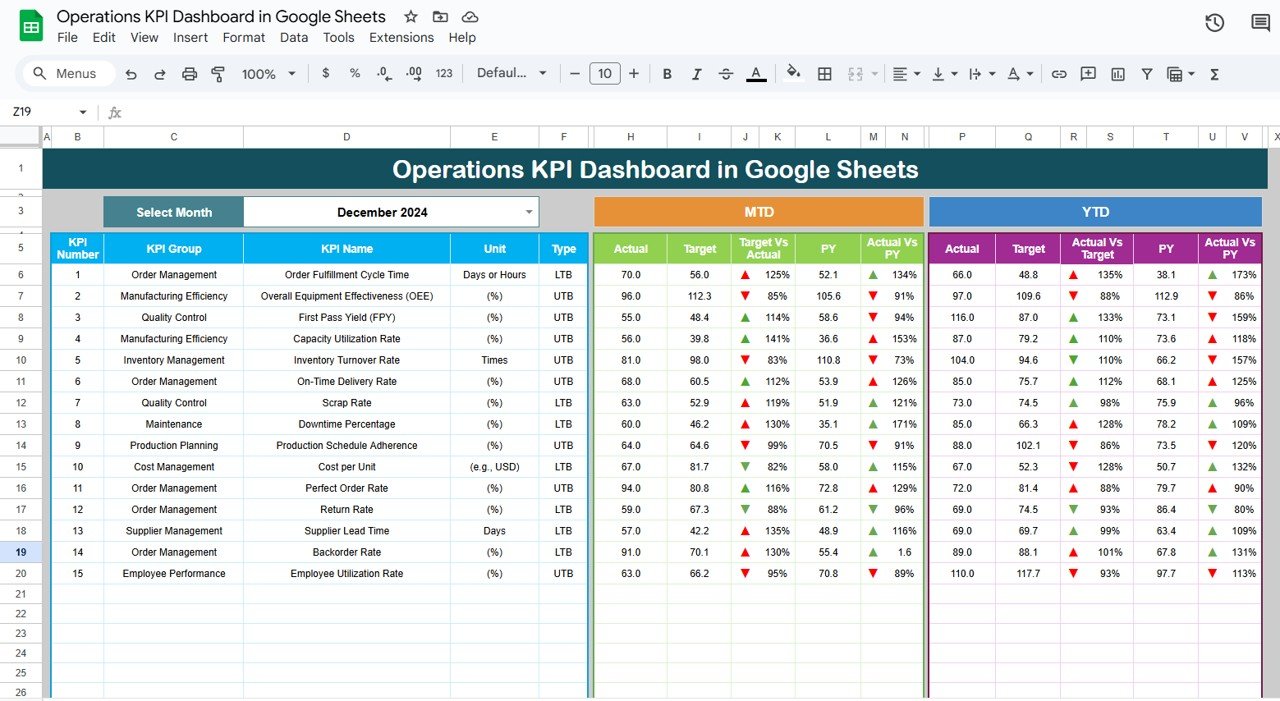
Source: Neotech Navigators
management operations tracker template free

Source: Template.net
management operations tracker template free download
Source: Template.net
management operations tracker template pdf
Source: Template.net
management operations tracker template excel free

Source: Template.net
operations tracker excel template

Source: Neotech Navigators
program management tracking template
Source: Template.net
time management tracker template
Source: Template.net
project management activity tracker template
Source: Template.net
free project management tracker template
Source: Template.net
operations manager report template
Source: Template.net
Frequently Asked Questions
What is a management operations tracker template?
It is a reusable structure for recording operational activities, ownership, deadlines, status, progress, risks, and related management information. It helps teams maintain a consistent view of current work and exceptions.
Should I use Excel or Google Sheets?
Choose Excel when advanced spreadsheet analysis, offline work, or an existing Microsoft workflow is important. Choose Google Sheets when real-time collaboration and shared editing are higher priorities. The best choice depends on the team’s workflow and technical requirements.
What columns should an operations tracker have?
A practical starting set includes activity, owner, priority, status, start date, due date, progress, blocker or risk, next action, and notes. Project-oriented operations may also need project, milestone, dependency, and deliverable fields.
How often should an operations tracker be updated?
The update frequency should match the pace of the work and the decisions being made. Fast-moving operations may need daily updates, while less volatile management processes may work well with weekly updates and monthly trend reviews.
Can one tracker manage both operations and projects?
Yes, when projects and operational activities share a common record structure. A project field can connect activities to initiatives, while separate project or program summaries can provide higher-level visibility without overcrowding the detailed tracker.
How do I make an operations tracker easier to maintain?
Keep the data-entry fields focused, use dropdowns for repeated values, automate calculations, define ownership, archive completed records when necessary, and establish a predictable review routine.
What should an operations manager report contain?
A useful report commonly includes an executive summary, operational performance, major completed work, overdue or blocked items, risks, resource concerns, upcoming milestones, and decisions or actions requiring management attention.
When should a spreadsheet tracker be replaced by dedicated software?
Consider a more specialized system when the workbook becomes difficult to maintain, requires complex permissions, depends on many data sources, needs real-time integrations, or creates significant manual reporting work.
Conclusion
A management operations tracker template is most valuable when it creates clarity without adding unnecessary administration. The strongest systems define what each row represents, assign clear ownership, standardize status and priority values, capture meaningful dates, identify blockers, and turn operational records into decisions. Whether the tracker is built in Excel, Google Sheets, or another platform, the underlying principles remain the same: reliable data, clear accountability, useful reporting, and a consistent review process.
