The right format depends on how your business operates. A seven-day weekly sheet may be enough for a small office, while a project-based company may need task codes, client names, billable hours, and separate project totals. Businesses with more complex schedules may benefit from daily, biweekly, or monthly formats. The objective is not to collect the maximum amount of information; it is to collect the information that supports accurate payroll, billing, planning, and management decisions.
This guide explains what a useful timesheet should contain, how to choose between spreadsheet and document formats, how to calculate hours, how to organize records for employees and managers, and when a template has reached its practical limits. It also includes examples of common layouts so you can compare approaches before creating your own system.
For U.S. employers covered by the Fair Labor Standards Act, the U.S. Department of Labor explains that covered employers must maintain accurate records for nonexempt workers, including hours worked each day and total hours worked each workweek. The rules do not prescribe one universal timesheet form, which means businesses can choose a format appropriate to their operations while still maintaining accurate records. :contentReference[oaicite:0]{index=0}
A good template therefore should be treated as part of a process rather than as a document alone. Employees need clear instructions, managers need a reliable review step, and the business needs a consistent way to store completed records. When those pieces work together, even a simple spreadsheet can provide useful operational visibility.
What Is a Small Business Timesheet Template?
A timesheet template is a reusable form or spreadsheet for recording time worked during a defined period. Instead of creating a new table every week or month, a business creates one standardized layout and copies it for each employee or pay period. The template can contain fields for employee information, dates, start and finish times, breaks, regular hours, overtime, leave, project information, and approval.
The simplest version records the date, clock-in time, clock-out time, unpaid break, and total hours. More advanced designs separate regular and overtime hours or allow employees to divide their time among clients and projects. The more detailed the operation, the more useful those additional fields can become.
Templates are especially useful when a business has a small administrative team. An owner who handles payroll, scheduling, client billing, and operations may not want to maintain a complex timekeeping platform. A structured template can provide a low-cost starting point while the company determines what information it actually needs.
There is also an important difference between a schedule and a timesheet. A schedule describes when an employee is expected to work. A timesheet records what the employee actually worked. Keeping those concepts separate makes it easier to identify absences, schedule changes, overtime, and differences between planned and actual labor.
Microsoft describes Excel as suitable for tracking data in a timesheet or list, which illustrates why spreadsheet-based templates remain useful for businesses that need calculations and structured records without specialized software. :contentReference[oaicite:1]{index=1}
Why Small Businesses Use Timesheets
Time records help connect labor to payroll. When employees record their hours consistently, managers have a documented basis for reviewing the time submitted for a pay period. The record can also show regular and additional hours separately when that distinction matters to the company’s payroll process.
Timesheets can also support client billing. A consultant, marketing agency, repair business, or professional service provider may need to know how much time was spent on a particular client or task. A project-oriented timesheet can capture that information at the same time the employee records working hours.
Another benefit is operational planning. Suppose a small design agency records time against project codes for several months. Managers can examine the accumulated records to see which types of work consume the most capacity. That information can improve future estimates, staffing decisions, and project planning without requiring employees to complete a separate research report.
Consistent records can also make disagreements easier to investigate. If an employee believes a shift was recorded incorrectly, the business has a dated record to review rather than relying entirely on memory. Approval fields, notes, and consistent submission dates can strengthen that process.
Finally, timesheets create a shared vocabulary for time. Instead of saying that a project “took a long time,” a manager can examine hours assigned to design, revisions, meetings, administration, or client support. That makes conversations about capacity and cost more concrete.
Core Components of a Good Timesheet
The employee identification area should normally contain enough information to distinguish one record from another. A name, employee ID if applicable, department or role, and pay period are common choices. The goal is simple identification, not unnecessary collection of personal information.
The date column establishes when work occurred. A weekly sheet generally contains seven daily rows, while a monthly sheet may contain a row for every calendar day. Businesses should select a period that matches their payroll or reporting cycle rather than forcing every team to use the same structure.
Start and finish fields capture the beginning and end of a work period. If employees regularly split shifts, the template may need multiple clock-in and clock-out pairs. If breaks are unpaid and need to be excluded from paid time, separate break fields can make calculations easier to understand.
Hour categories are useful when the business needs to distinguish regular time from overtime, vacation, sick leave, holidays, or other categories. A simple company may need only regular and overtime hours. A more complex operation may need several categories to support payroll or internal reporting.
Approval fields provide a final control. A manager or supervisor can verify that the record is complete before it moves into payroll or billing. Digital workflows can replace handwritten signatures, but the underlying principle remains the same: someone should be responsible for reviewing submitted records.
Choosing the Right Timesheet Frequency
A weekly timesheet is often a practical choice for small teams because it keeps the amount of information on each sheet manageable. Employees can submit one record at the end of the week, while managers can review discrepancies before they become difficult to remember.
A biweekly timesheet is useful when the company’s pay cycle covers two consecutive weeks. It reduces the number of individual documents while still keeping records aligned with a common payroll period. The template should clearly separate the first and second week so totals can be checked independently.
A monthly timesheet can be useful for contractors, consultants, volunteers, or employees whose time is reviewed monthly. Its main disadvantage is that a large number of daily entries can make errors harder to notice. Monthly sheets work best when the business has a reliable daily-entry habit.
A daily timesheet is appropriate when work changes substantially from day to day or when employees need to allocate hours among several activities. It provides detailed records but creates more administrative work, so it should only be used when that additional detail has a clear purpose.
The best frequency is therefore the shortest cycle that provides useful information without creating unnecessary administration. If employees regularly forget entries because a monthly sheet feels too large, moving to weekly records may improve accuracy even if the business ultimately summarizes the data monthly.
Weekly Timesheet Structure
A weekly sheet usually contains one row for each day and columns for start time, finish time, break, regular hours, overtime, and total hours. An employee information section at the top identifies the worker and pay period. A totals row at the bottom summarizes the week.
This format works particularly well for businesses with stable schedules. For example, a small office with employees working Monday through Friday can use one standardized seven-day sheet and leave weekend rows blank when they are not applicable.
Weekly sheets are also easy to audit. A manager can compare daily entries with the employee’s normal schedule and investigate unusual values. A sudden 13-hour day, missing clock-out time, or unexpected overtime entry becomes visible before payroll is finalized.
The layout should remain uncluttered. If a small business does not use holiday, sick, vacation, and project fields, adding all of them can make the form harder to complete. Templates are most effective when every field has a defined purpose.
The example below illustrates how a weekly format can combine daily time entries with regular hours, overtime, leave categories, and a weekly total.

Source: Smartsheet.
Daily Timesheet Structure
A daily timesheet breaks a workday into smaller time segments. Instead of asking only for a start and finish time, it can provide hourly rows or activity intervals. This can be useful when employees work across several tasks or when a supervisor needs more precise information about how time is allocated.
Daily formats are particularly helpful for project-based work. A business could replace generic categories with project names or task codes, allowing employees to record time against specific activities throughout the day.
The downside is administrative effort. A daily template can produce excellent detail, but only if employees actually keep it current. If entries are completed from memory several days later, the apparent precision of the format may not translate into accurate records.
For that reason, daily sheets work best when employees are expected to record time close to when the work occurs. Managers should also establish a consistent deadline for correcting missing or ambiguous entries.
A daily layout commonly includes employee identification, manager information, date, hour categories, total hours, gross pay where appropriate, and approval fields. The example demonstrates that structure.

Source: Smartsheet.
Hourly Tracking for Variable Work
Hourly tracking becomes more useful when an employee’s day does not follow a predictable block of work. Instead of recording only the first and last time of the day, the employee can associate specific periods with regular work, overtime, leave, or other categories.
This approach can also help with internal cost analysis. A business that knows how much time is spent on administration, sales support, client work, and internal projects can compare capacity across categories.
For example, imagine a hypothetical marketing employee who works eight paid hours but spends two hours on internal administration, five hours on Client A, and one hour on Client B. A project-oriented record can make that allocation visible without requiring a separate weekly report.
Hourly templates should use clear time conventions. Mixing decimal hours such as 7.5 with clock notation such as 7:30 without explaining the difference is a common source of calculation errors.
The following example uses an hour-by-hour structure with categories for regular time, overtime, vacation, sick time, other paid time, unpaid time, totals, and notes.

Source: Smartsheet.
Biweekly Timesheet Design
Biweekly records cover two consecutive weeks in one document. This can reduce the number of forms employees need to manage while providing a clear relationship between daily entries and the overall pay period.
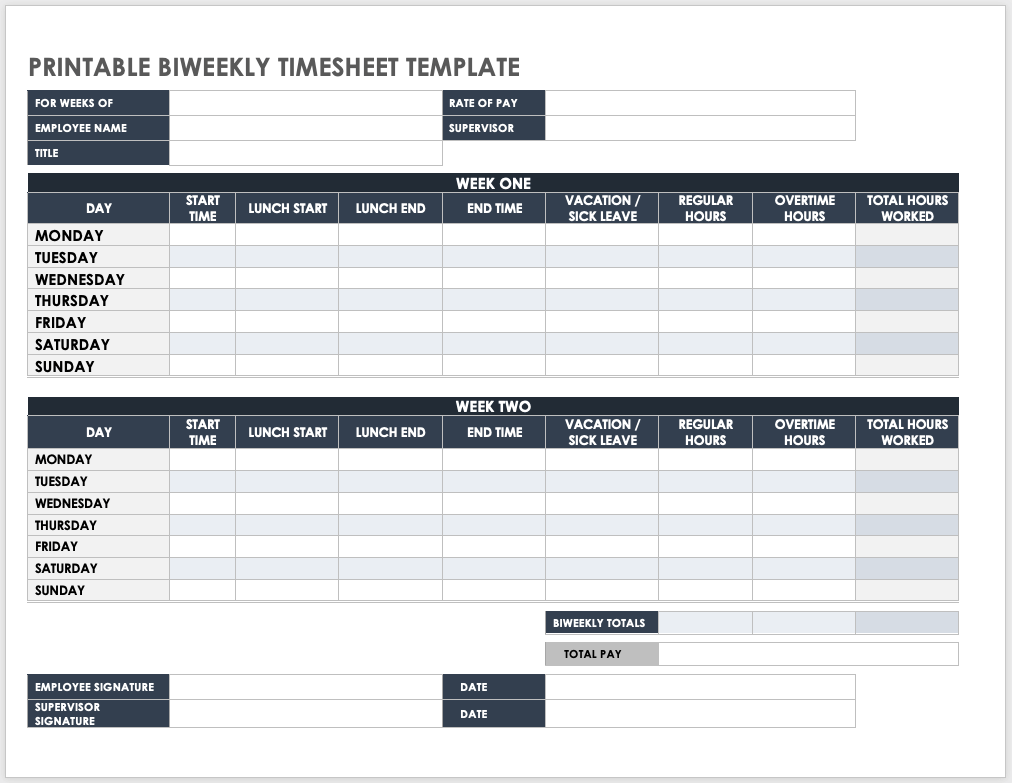
A good biweekly template should visually separate Week One and Week Two. Each week can have its own daily rows, followed by a combined total for the full period.
Lunch and break fields are particularly important when they affect the calculation of paid hours. The template should explain how employees are expected to record them so that workers do not interpret the same field differently.
Biweekly records can also be useful for businesses that review payroll every two weeks but need a straightforward approval process. The employee and supervisor can review the completed record before it is transferred to the payroll workflow.
The example below shows a printable two-week design with separate daily sections, regular and overtime categories, total hours, and signature areas.

Source: Smartsheet.
Project-Based Timesheets
A conventional employee timesheet answers the question, “How long did this person work?” A project timesheet adds another question: “What work was that time spent on?” That second question is valuable for agencies, consultants, contractors, and businesses managing multiple client jobs.
Useful project fields include project or client name, project code, task description, break time, regular hours, overtime, total hours, and notes. The business can then summarize hours by project rather than only by employee.
Consider a hypothetical web agency with three active projects. If a designer records 5.5 hours against Project A, 2 hours against Project B, and 1 hour on internal work, management can see both total labor and allocation. Those figures can inform project reviews and future estimates.
Project codes should be short and consistent. A code such as WEB-01 is easier to filter and summarize than a long project description typed differently by every employee.
A project-oriented template can therefore become more than a payroll record. It can serve as a basic operational dataset for understanding how labor is distributed across clients, services, and tasks.

Source: Smartsheet.
Construction and Field-Service Timesheets
Field teams often need information that office employees do not. A construction or service record may need jobsite details, employee role, supervisor, task, project, regular hours, and total hours.
Location information can make the record more useful when employees move between jobsites. It can also reduce confusion when the same employee works on more than one project during a pay period.
Task fields are valuable because two employees may work the same number of hours while performing very different activities. A supervisor reviewing labor costs may need to know whether time was spent on installation, inspection, setup, repair, documentation, or another task.
Field records should remain easy to complete. Employees working away from desks may have less time to enter information, so a form with too many optional fields can reduce compliance with the process.
The example below demonstrates how a field-oriented timesheet can combine employee information, jobsite information, hour-by-hour records, task details, project information, and approval fields.

Source: Smartsheet.
Consultant and Contractor Timesheets
Consultants often need to distinguish billable work from time that is not billed to a client. A task-oriented timesheet can provide a simple way to document that allocation.
For example, a consultant might spend time on client meetings, research, project delivery, internal administration, and business development. Not every category necessarily belongs on an invoice, but knowing how the total workday was allocated can still be useful.
Client-facing records should use descriptions that are understandable to the customer. “Project work” may be less useful than a concise description such as “Review campaign performance data,” provided that the business’s billing arrangement supports that level of detail.
Approval fields can also be valuable for contractors. A client or project manager can review the recorded hours before billing, reducing misunderstandings about what work was performed during the period.
The following example illustrates a consultant-oriented layout that organizes tasks across days and provides a total billable-hours column.

Source: Smartsheet.
Employee Timesheets for Payroll Review
Payroll-focused timesheets emphasize employee identity, pay-period dates, daily time entries, regular hours, overtime, breaks, and totals. The design should make it easy for the payroll reviewer to see whether the record is complete.
A useful payroll record should not hide important totals in a dense layout. Employees and managers should be able to identify the total hours for the period without manually adding every row.
If the business uses different rates or pay categories, those should be defined clearly. A template can calculate amounts, but the business remains responsible for ensuring that the underlying rates and classifications are correct.
Payroll review should also include a check for missing entries. An employee with a blank clock-out time should not simply receive an automatic zero or an assumed value without review.
The following employee-oriented design shows how a two-week record can include company details, employee information, lunch periods, daily entries, and summary areas.

Source: Smartsheet.
Managing Overtime Records
Overtime deserves explicit attention because it can affect payroll calculations, labor budgets, and staffing decisions. A timesheet should make overtime visible rather than requiring a manager to infer it from total hours.
One approach is to calculate regular and overtime hours separately. Another is to record start and finish times and use formulas to calculate the categories according to the business’s established rules.
Managers should avoid treating the template’s formula as the rule itself. Payroll classification depends on applicable law, employment arrangements, and company policies. The template should implement an already-established policy rather than silently creating one.
Overtime records can also reveal scheduling issues. If several employees repeatedly generate additional hours, management may need to examine workload, staffing levels, deadlines, or scheduling practices.
The example below shows an overtime-focused design with employee names, tasks, start and end times, regular hours, overtime hours, and a total overtime figure.

Source: Smartsheet.
How to Build a Small Business Timesheet Template in Excel
Start by defining the record period. Decide whether employees will submit time weekly, biweekly, monthly, or daily. This decision determines the number of rows and the summary calculations required.
Next, create the identification area. Include employee name, employee ID if your organization uses one, department or role where useful, and the start and end dates of the period.
Create the daily table with columns that directly support your process. A basic design might use Date, Start Time, End Time, Break, Regular Hours, Overtime Hours, and Total Hours. A project-based business could add Client, Project Code, Task, and Notes.
Use consistent time formatting. Excel can calculate time values, but users need to enter them consistently. The template should also be tested with overnight shifts or unusual schedules if those situations occur in the business.
Finally, add a totals area and review section. Microsoft recommends using templates and structured spreadsheet tools to reduce repetitive setup, and its Excel guidance specifically identifies timesheet tracking as a practical spreadsheet use case. :contentReference[oaicite:2]{index=2}
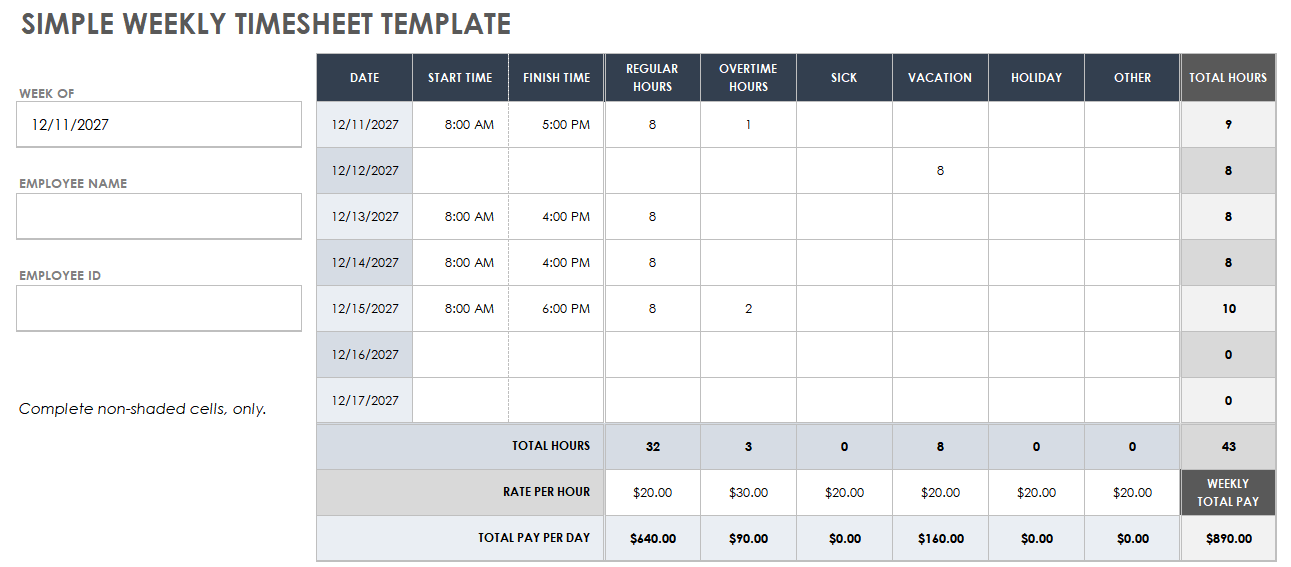
Source: Smartsheet.
Creating a Printable Version
Some businesses still prefer paper forms, particularly when employees work in locations where computers are not always available. A printable timesheet should use large enough fields for handwriting and avoid unnecessary columns that make the page difficult to read.
The print layout should be tested before adoption. Check whether all columns fit on the selected paper size, whether totals remain visible, and whether signature fields have enough room.
Employees should know exactly where to record breaks and how to represent partial hours. A paper form is only useful when different workers interpret the same fields consistently.
Completed paper records should also have a defined storage process. A business should decide who collects them, when they are reviewed, and how they are retained according to its applicable recordkeeping requirements.
A printable biweekly layout can be particularly useful when employees need to write start and finish times manually and a supervisor needs a visible sign-off area.
Source: Smartsheet.
Monthly and Long-Term Tracking
Monthly records are useful when the business wants a longer view of employee attendance and working hours. They can also help managers identify patterns that are less obvious in individual weekly sheets.
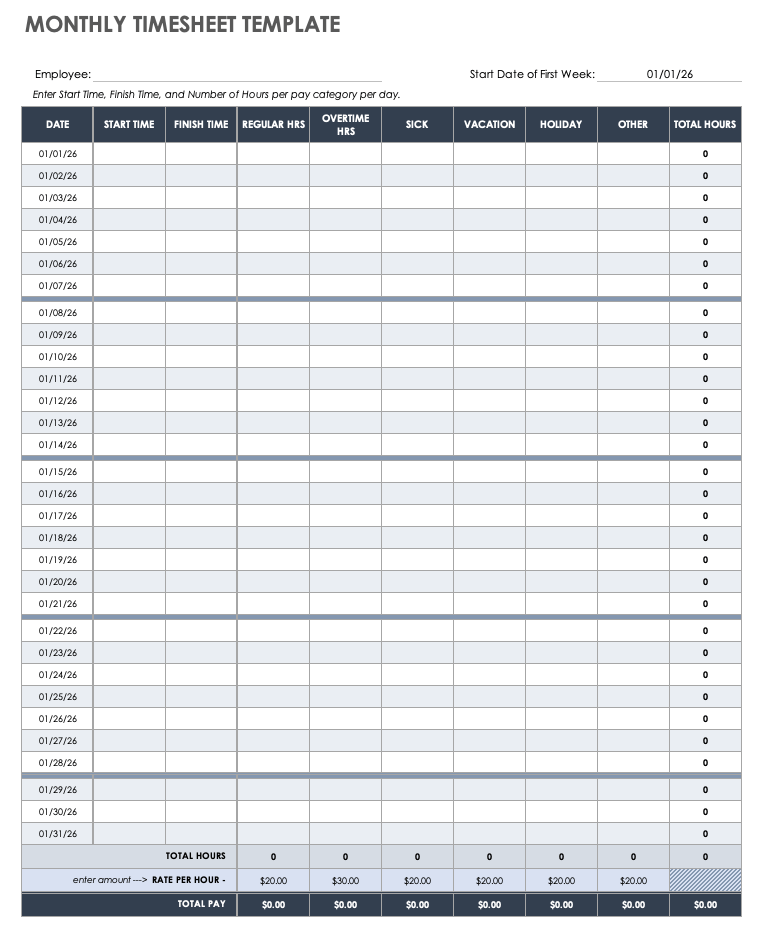
A monthly record may include regular hours, overtime, sick time, vacation, holidays, and other categories. The totals area should summarize the month without requiring manual addition.
Longer records can support workforce planning. For example, a manager could compare the distribution of regular and additional hours across several months to identify recurring workload peaks.
However, monthly sheets should not replace daily accuracy. The longer the interval between entry and review, the more difficult it may be to resolve forgotten or disputed details.
The following example demonstrates a monthly format with daily rows and separate hour categories that roll into monthly totals.
Source: Smartsheet.
Volunteer and Non-Payroll Hour Tracking
Not every timesheet exists to calculate employee wages. Nonprofit organizations, community groups, and other organizations may need to document volunteer hours and the activities performed during those hours.
For these records, the most useful fields may be date, organization, task description, hours, supervisor approval, and a monthly total. Pay-rate fields that do not apply can be removed.
This illustrates a broader principle: a timesheet should be customized to the business process. Copying a payroll form and leaving irrelevant fields in place can make a record harder to use.
Volunteer records may also support internal reporting. A coordinator can review the number of hours devoted to different activities and understand where volunteer capacity is being used.
The example below shows a monthly volunteer layout with organization, task description, hours, approval, and a summary section.

Source: Smartsheet.
Sample Daily Records and Quality Checks
A sample timesheet can be useful when employees are learning a new process. A blank form tells workers where to type information, while a completed example can demonstrate how the fields are expected to relate to one another.
For example, a sample can show that a start time and finish time produce a total, while a vacation day is recorded in a separate category. It can also demonstrate how signatures or approvals are completed.
When creating your own sample, clearly identify it as an example. Do not use realistic-looking sample numbers in a way that could later be mistaken for actual payroll data.
Managers should test the completed sample by recalculating the totals independently. This is a simple way to discover formula mistakes before employees begin using the live template.
A sample daily template provides a useful visual reference for this kind of training because it combines employee information, categorized hours, totals, pay, and approval fields.

Source: Smartsheet.
Timesheets for Field and Jobsite Work
Field workers may need to identify the jobsite and project as well as the employee and supervisor. This makes the record more useful for businesses that operate across several physical locations.
Task-level information can also support project costing. A construction company might want to distinguish preparation, installation, inspection, cleanup, and other activities rather than recording only a single daily total.
Because field conditions can make data entry inconvenient, the form should remain concise. If the same information is already stored elsewhere, duplicating it in the timesheet may create more opportunities for inconsistent data.
Supervisors should establish when the record is reviewed. End-of-day review can catch errors sooner than waiting until the end of a two-week pay period.
The following daily construction example shows how jobsite name, location, employee details, tasks, projects, and hours can be brought together in one record.

Source: Smartsheet.
Project Timesheets in Word
Word-based timesheets can work well when the primary goal is a printable form rather than automated calculations. They are particularly convenient for businesses that want employees to complete a document manually or type into a straightforward table.
A project version can contain employee, project, week, regular hours, overtime, leave categories, and total hours. If calculation needs are minimal, this may be sufficient.
The main limitation is that Word is not designed primarily as a calculation environment. If employees need automatic totals, filtering, project summaries, or large-scale consolidation, a spreadsheet is generally better suited to those tasks.
Word can nevertheless be valuable when document presentation matters. A clean printable form may be easier to distribute and archive than a complex spreadsheet, especially for a small operation.
The example below shows a project-oriented Word layout that emphasizes employee, project, daily hours, and pay-related categories.

Source: Smartsheet.
Biweekly Examples With Breaks
Break tracking deserves careful treatment because the business must distinguish between working time and break time according to the applicable rules and its established policies.
A two-week form can show separate clock-in and clock-out periods around a lunch break. That structure is particularly helpful when an employee leaves and returns during the same workday.
Employees should receive a simple explanation of what each time field means. “Lunch,” “break,” and “unpaid time” should not be used interchangeably unless the business intentionally defines them that way.
Managers should also watch for impossible or ambiguous sequences, such as a finish time occurring before a start time or a missing second clock-in after lunch.
A completed biweekly example can help demonstrate the intended workflow while making it easier for employees to understand how daily records roll into period totals.

Source: Smartsheet.
Payroll Register and Consolidated Reporting
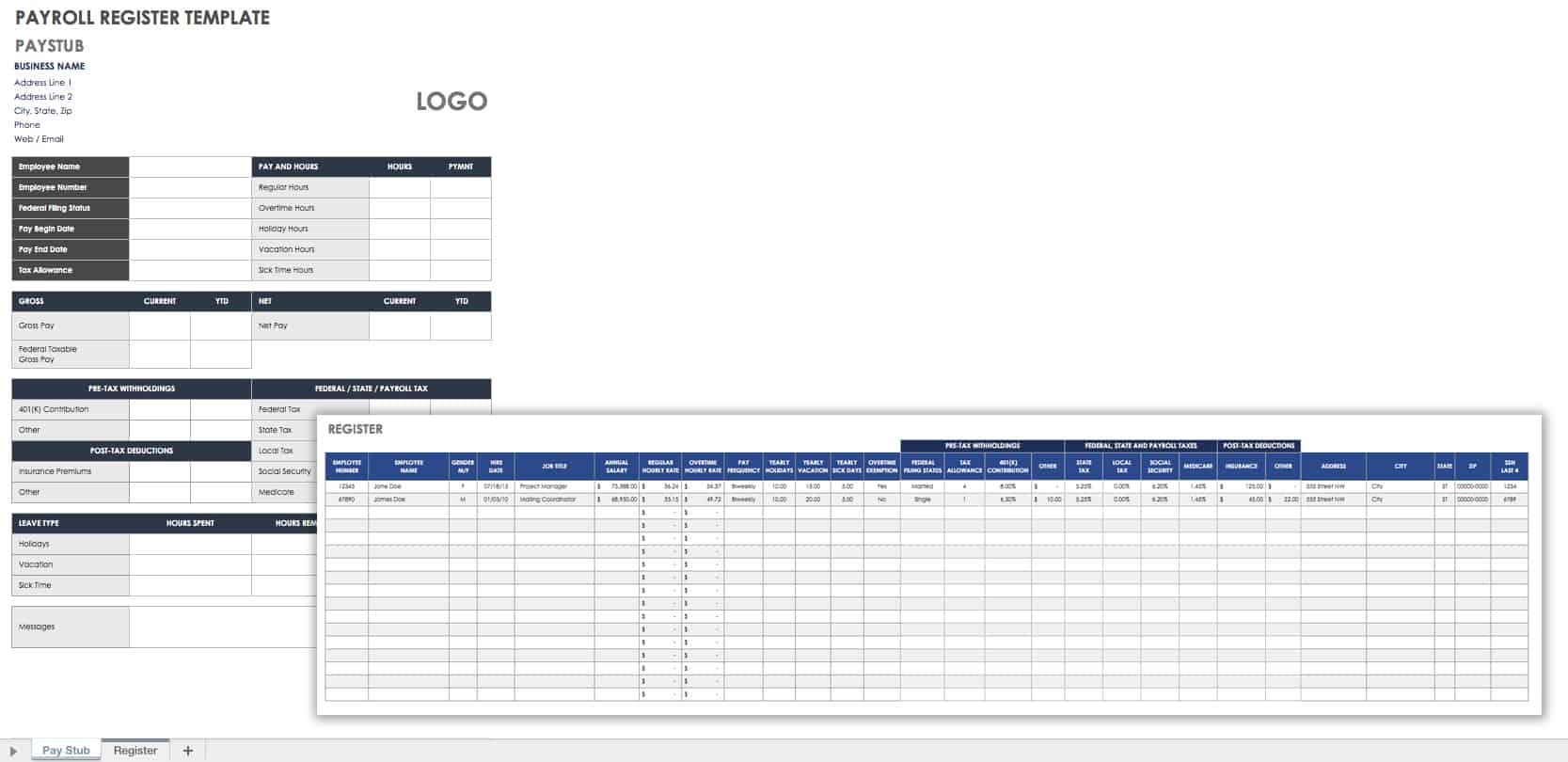
Individual timesheets are useful for collecting information, but management often needs a consolidated view. A payroll register or master spreadsheet can summarize approved hours from multiple employees.
The master record should ideally be fed from approved source records rather than being edited independently. Otherwise, the business can end up with one number on the employee timesheet and another number in the payroll summary.
A simple consolidation process might contain employee name, pay period, regular hours, overtime hours, leave categories, total hours, and approval status. Businesses can add project or department information when it supports management reporting.
Managers should also decide who can edit the master record. Limiting unnecessary editing helps preserve the integrity of approved information and reduces accidental changes.
A payroll register is therefore best viewed as a reporting layer that sits above individual time records, not as a substitute for the underlying documentation.
Source: Smartsheet.
Small Business Timesheet Template Excel: When a Spreadsheet Makes Sense
A small business timesheet template excel approach is useful when calculations, sorting, filtering, and summaries are important. Spreadsheet software can automatically calculate daily and weekly totals and can be customized as the business changes.
Excel is especially useful when the business wants to create a master sheet containing several employees. A manager can use formulas to summarize approved records, while separate sheets can preserve individual employee submissions.
Another advantage is customization. Columns can be added for project codes, departments, clients, job numbers, or other internal categories. The template can also be protected so that employees enter data only in designated cells.
The main risk is uncontrolled complexity. A spreadsheet that contains dozens of formulas, hidden sheets, manual overrides, and inconsistent formats can become difficult to maintain. Small businesses should favor transparent formulas and simple instructions.
A good spreadsheet template should make the correct action obvious: enter time in the input cells, review calculated totals, correct discrepancies, and submit the record for approval.
Small Business Timesheet Template Google Sheets: Collaboration and Access
A small business timesheet template google sheets approach can be useful when employees and managers need to work with records online. Google explains that Sheets provides templates and features such as notifications, collaboration, and automatic saving, which can support recurring spreadsheet workflows. :contentReference[oaicite:3]{index=3}
One practical structure is to create a standard template and make a copy for each employee or pay period. A separate master sheet can consolidate approved totals when appropriate.
Shared spreadsheets require permission discipline. Employees should have the access necessary to enter their information without unnecessarily changing formulas, other employees’ records, or management summaries.
Google Sheets can also be useful for businesses with distributed teams because employees do not have to be in the same physical location to submit records. The business should still define deadlines and approval responsibilities.
Google’s template guidance confirms that users can select templates from the Sheets Template Gallery and can also create organizational templates, making a repeatable internal timesheet workflow possible. :contentReference[oaicite:4]{index=4}
Small Business Timesheet Template PDF: When Printability Matters
A small business timesheet template pdf is useful when the finished document needs to be easy to print, view, or distribute consistently. PDF is particularly convenient when a business wants the layout to remain visually stable across different computers.
A PDF is usually less convenient for calculations than a spreadsheet. For that reason, businesses should decide whether the PDF is the primary working document or simply the final printable version of information collected elsewhere.
For paper-based workflows, the PDF should provide sufficient writing space and clearly labeled fields. The document should also include the relevant pay period and employee identification information.
If employees complete the document electronically, test the actual PDF before deployment. Some PDFs are simply static pages, while others contain interactive form fields. The business should not assume that every PDF can calculate totals automatically.
A practical approach is to maintain a calculation-friendly source record and produce a printable PDF when a signed or archived document is needed.
Small Business Timesheet Template Free and Cost Considerations
The phrase small business timesheet template free often reflects a desire to avoid adding another recurring expense. A free template can be perfectly adequate when the team is small, schedules are predictable, and the administrative process is straightforward.
Free does not necessarily mean unsuitable, but it also does not guarantee that a template matches your workflow. Before adopting one, inspect the fields, formulas, calculation assumptions, pay-period structure, and approval process.
A free template is usually most valuable when it saves setup time while remaining simple enough for the business to understand and maintain. A template that requires extensive modification may provide less value than a simpler document built internally.
Businesses should also consider the cost of errors. If a free template produces frequent calculation mistakes or requires hours of manual consolidation, the apparent financial saving may disappear through administrative effort.
The strongest selection criterion is therefore total process value: accuracy, usability, reviewability, maintainability, and fit with the business’s actual timekeeping needs.
Timesheets for Small Business Employees
timesheets for small business employees should be designed around the employee’s actual work pattern. A field employee, consultant, retail worker, and office administrator may all require different information.
Employees are more likely to complete a form correctly when the instructions are short and the required fields are obvious. A template should not force workers to interpret complicated formulas or business terminology.
Training should cover when time must be entered, how breaks are recorded, how corrections are handled, when the record is due, and who reviews it. These procedural rules are just as important as the spreadsheet itself.
Managers should avoid changing the template frequently without communicating those changes. A stable structure allows employees to develop a routine and reduces inconsistent submissions.
The best employee-facing design balances detail with speed. Every additional field should answer a real business question or support a necessary administrative step.
Timesheets for Small Business Software
timesheets for small business software become more attractive as the number of employees, projects, locations, or approval steps increases. Software can reduce manual consolidation and provide centralized records.
The decision to move beyond a template should be based on process complexity rather than employee count alone. A five-person business with complicated project billing may need more automation than a larger business with extremely simple schedules.
Useful software capabilities may include employee time entry, approval workflows, project allocation, reporting, reminders, payroll integrations, and audit history. Businesses should select only features that solve actual operational problems.
A template can also serve as a useful test environment before purchasing software. By running the process manually for a period, management can discover which fields and reports are genuinely necessary.
The goal is not to replace a spreadsheet simply because software looks more sophisticated. The goal is to remove repetitive work and reduce the risks that matter most to the business.
Timesheets for Small Business Management
timesheets for small business management can provide information beyond payroll. When hours are connected to projects, departments, clients, or tasks, managers can examine where labor capacity is being used.
For example, a hypothetical service company could summarize monthly hours by client and discover that one account consumes significantly more support time than expected. Management could then investigate scope, staffing, pricing, or workflow.
Time data should be interpreted carefully. A large number of hours does not automatically mean poor performance, and a small number does not automatically mean high efficiency. Context matters, including task complexity and the expected workload.
Dashboards and summaries can be useful when they answer specific management questions. Examples include total hours by project, overtime trends, billable versus nonbillable time, or labor allocation by department.
The strongest management reporting starts with accurate underlying records. A sophisticated dashboard cannot correct inaccurate or inconsistent time entries.
How to Analyze Timesheet Data
Begin with basic totals. Calculate hours per employee, per week, and per month. These figures provide a baseline for identifying unusual values and understanding overall labor volume.
Next, group time by meaningful business dimensions. Depending on the organization, those dimensions might include client, project, department, task, location, or work type.
Look for patterns rather than isolated numbers. One unusual week may have a reasonable explanation, while a recurring pattern over several periods may indicate a staffing or process issue.
Compare planned and actual time when schedules or project estimates exist. This can help identify where estimates are consistently optimistic or where certain tasks require more resources than expected.
Finally, turn the findings into an action. Data collection has little management value if nobody uses the results to improve scheduling, project planning, workload distribution, or administrative processes.
Common Timesheet Mistakes
One common mistake is entering time days later from memory. Even when the employee is acting honestly, delayed entries can be less precise than records made closer to the actual work.
Another mistake is mixing decimal and clock-time formats. Seven hours and thirty minutes is represented as 7.5 decimal hours, not 7.30. A template should clearly specify the expected format.
Missing break information can also create incorrect totals. If breaks affect paid hours, the template needs a clear place to record them and clear instructions about how they are treated.
Businesses sometimes allow employees to edit formulas accidentally. Protecting calculation cells and using clearly marked input areas can reduce this risk.
Finally, some businesses collect detailed time information without ever reviewing it. Unused fields increase administrative effort, so every recurring field should have a defined purpose.
Best Practices for Accurate Time Records
Keep the template simple enough that a new employee can understand it after brief training. The employee should know exactly where to enter start time, finish time, breaks, project information, and corrections.
Use consistent naming conventions for projects and clients. This is especially important when the business intends to summarize data later.
Set a fixed submission deadline. A recurring deadline helps employees develop a routine and gives managers enough time to review records before payroll or billing activities begin.
Review exceptions instead of checking every field manually. Missing times, unusually high totals, unexplained overtime, and inconsistent project codes are good candidates for manager attention.
Keep completed records organized by period and employee or by another consistent filing system. The exact retention approach should follow the applicable legal and business requirements for the organization.
How to Decide Between Excel, Google Sheets, Word, PDF, and Software
Choose Excel when calculations, filtering, formulas, and structured analysis are central to the workflow. It is particularly useful when a business wants to maintain a master dataset and build summaries from individual records.
Choose Google Sheets when online access and collaboration are important. It can be convenient for teams that need to work with shared information while maintaining a spreadsheet-style structure.
Choose Word when the primary requirement is a document-style form that employees can type into or print. It works well for simple layouts but is less suitable for extensive calculations.
Choose PDF when stable presentation and printing are more important than editing and calculation. A PDF can serve as a clean final record, especially in workflows that use paper or signed documents.
Choose dedicated software when manual consolidation, approvals, reminders, project tracking, reporting, or integrations have become significant administrative burdens. The transition should be driven by a measurable need rather than by the assumption that software is automatically better.
Practical Solution: Build a Reliable Small Business Timesheet Process
The most practical solution is to start with the simplest small business timesheet template that captures the information your business genuinely needs. Do not begin by adding every possible field. Begin with employee identification, pay period, date, start and finish time, breaks when relevant, total hours, and approval.
Next, identify whether the business needs project or client allocation. If employees regularly work across several jobs, add a project code and task description. If they do not, leave those fields out and keep the employee experience straightforward.
Then decide where calculations should happen. A spreadsheet is appropriate when formulas and summaries are needed. A document or printable PDF can work when the record is primarily completed manually. Online spreadsheets become more useful when multiple people need shared access.
After creating the template, test it using several hypothetical scenarios. Test a normal workday, a day with a break, a day containing overtime, a vacation day, a missing clock-out time, and a project split across several activities. These tests reveal weaknesses before actual records depend on the template.
Finally, create a repeatable workflow: employee records time, employee checks the entry, manager reviews exceptions, approved totals move into payroll or billing, and the completed record is stored consistently. The workflow matters more than visual design.
Step 1: Define the business rules
Write down the rules that the template needs to support before creating formulas. Define the workweek, pay period, break treatment, overtime categories, leave categories, project codes, approval responsibility, and correction procedure.
Step 2: Build only required fields
Start with the smallest useful table. Add fields only when they solve a specific problem. This keeps employee data entry fast and makes the resulting records easier to review.
Step 3: Automate repetitive calculations
Use formulas for totals rather than asking employees to perform manual arithmetic. Formula cells should be protected where practical, and the template should be tested with realistic edge cases.
Step 4: Create an approval checkpoint
Decide who reviews submitted records and what they should check. The review can focus on missing values, unusual totals, overtime, project allocation, and unexplained changes.
Step 5: Consolidate approved information
Move approved totals into a payroll, billing, or management summary. Avoid maintaining competing versions of the same record wherever possible.
Step 6: Review the process periodically
After several pay periods, ask whether employees are confused by any fields, whether managers are spending too much time correcting records, and whether the information is actually being used. Remove unnecessary fields and improve unclear instructions.
Reference Examples
The following reference examples correspond directly to the requested formats, use cases, and selection questions. They are intended as visual examples of different timesheet structures rather than as a statement that every business should use the same design.
small business timesheet template excel
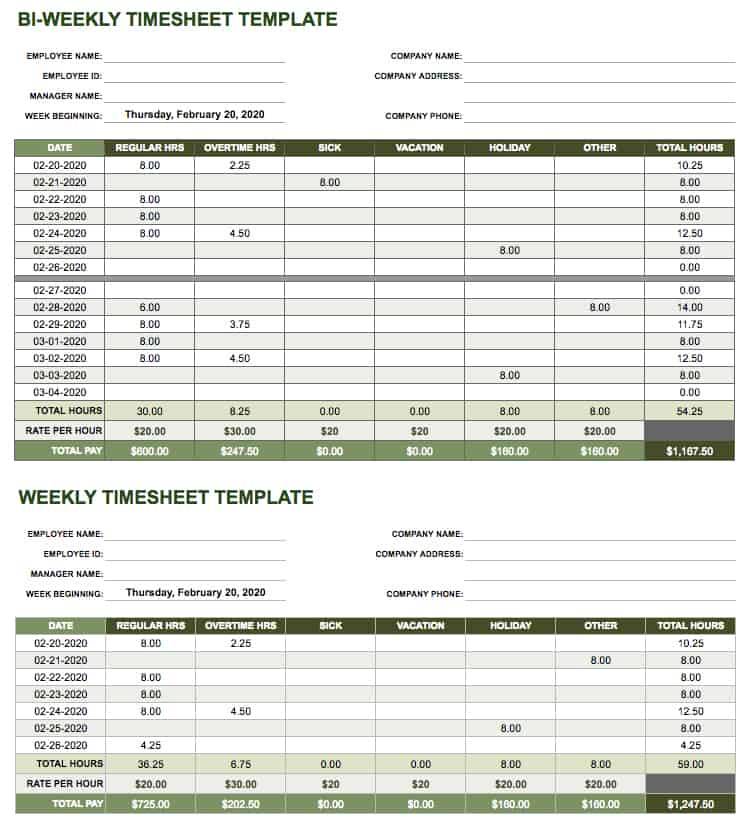
Source: Smartsheet.
small business timesheet template google sheets
Source: Smartsheet.
small business timesheet template free

Source: Template.net.
small business timesheet template pdf
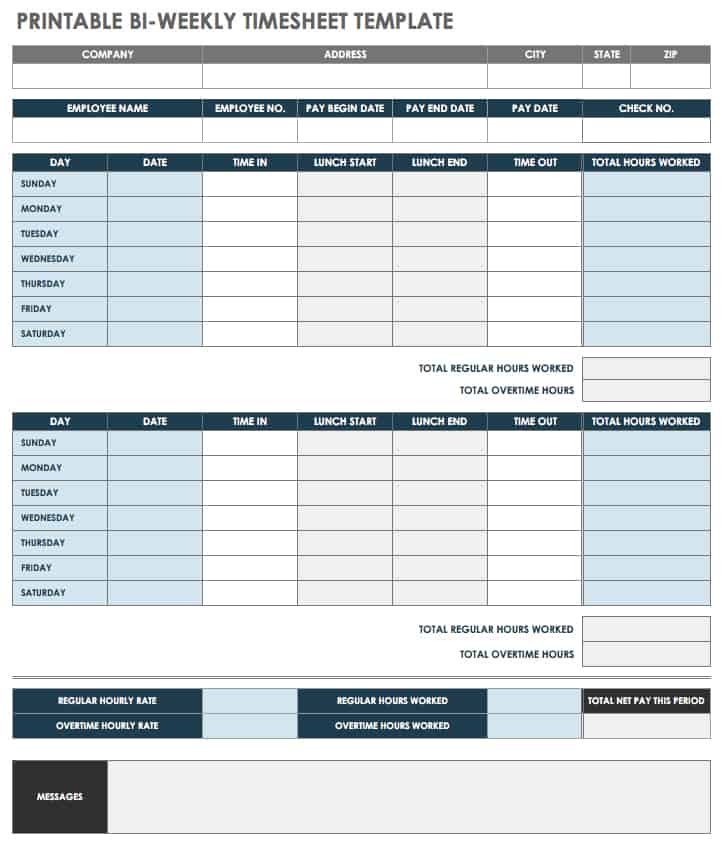
Source: Smartsheet.
small business timesheet template free download

Source: Template.net.
small business timesheet template google docs

Source: Template.net.
small business timesheet template word
Source: Smartsheet.
timesheets for small business free
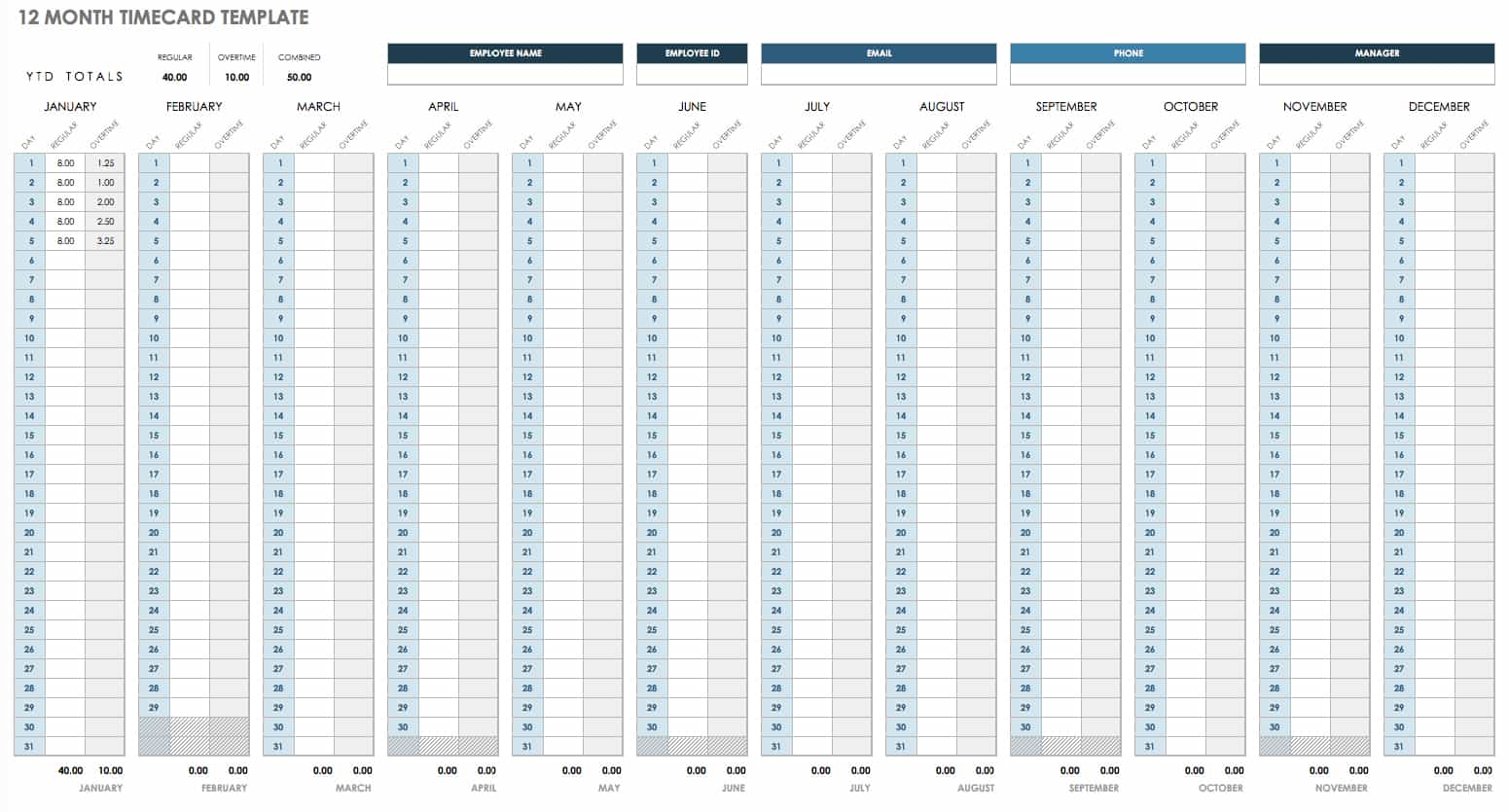
Source: Smartsheet.
timesheets for small business employees
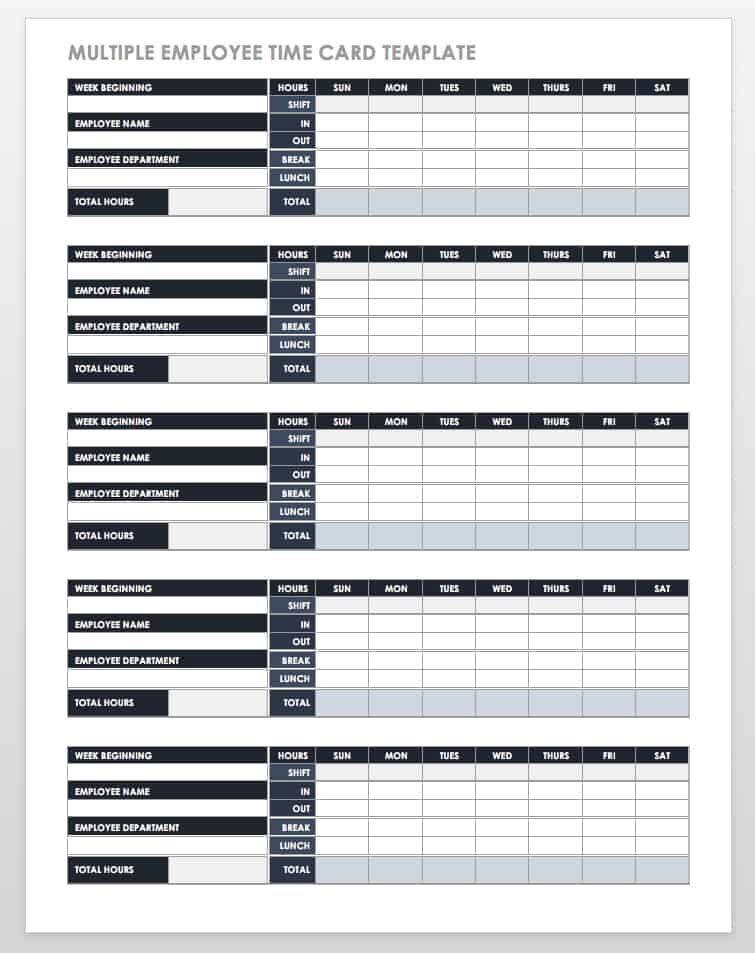
Source: Smartsheet.
timesheets for small business software

Source: Sandtime.io.
timesheets for small business management

Source: Template.net.
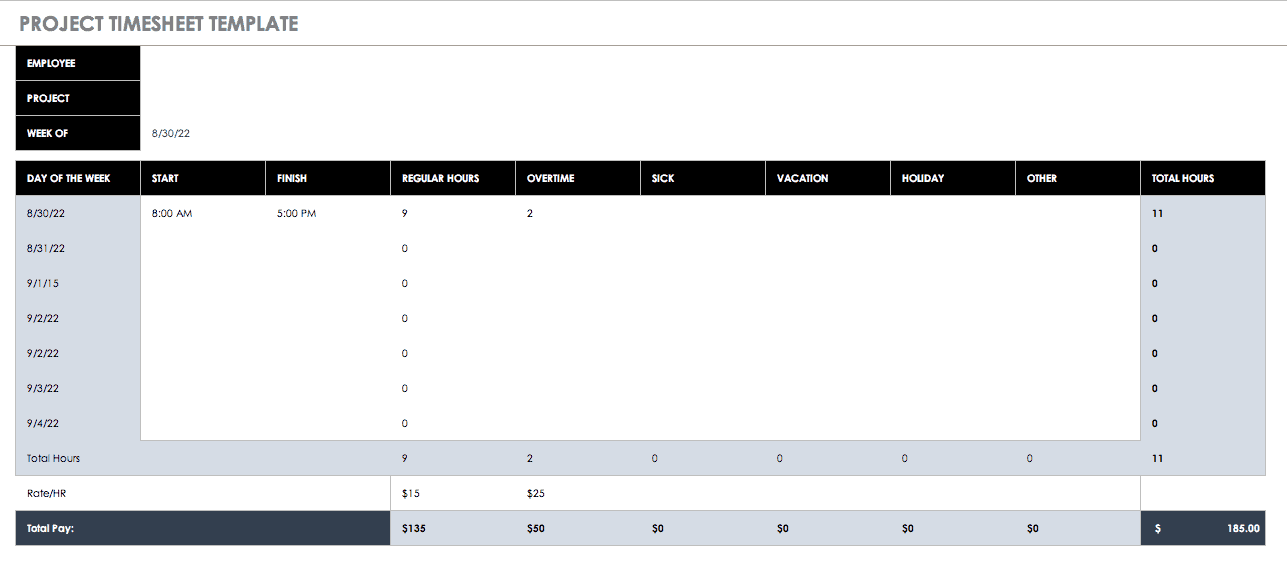
best timesheet for small business
Source: Smartsheet.
Frequently Asked Questions
What should a small business timesheet template include?
At minimum, include employee identification, pay period, work date, start time, finish time, applicable break information, total hours, and an approval method. Add overtime, leave, project, client, or task fields only when they serve a real business purpose.
Is a spreadsheet enough for a small business?
Often, yes. A spreadsheet can be sufficient when the team is small and the timekeeping process is straightforward. The important considerations are accuracy, consistent use, calculations, review, access control, and record storage.
Should employees enter their hours every day?
Daily entry is generally easier to verify because the work is still fresh in the employee’s memory. The business can still use weekly or biweekly submission periods while asking employees to enter their daily hours throughout the period.
What is the difference between a timesheet and a schedule?
A schedule describes expected working time, while a timesheet records time actually worked or otherwise recorded under the business’s timekeeping process. Keeping both can help managers compare planned staffing with actual hours.
Can a small business use a paper timesheet?
Yes, a paper form can be appropriate when employees have limited access to computers or when the operation prefers handwritten records. The business should use a consistent form and establish a reliable process for review, correction, storage, and transfer into payroll or billing records.
Should overtime have its own column?
If overtime needs to be separately identified for payroll, management, or billing purposes, a dedicated column can make the record easier to review. The template should follow the business’s established rules and applicable requirements rather than creating its own overtime policy.
Is Google Sheets suitable for employee timesheets?
Google Sheets can be suitable for small teams that need online spreadsheet access and collaboration. Google provides templates and spreadsheet features that support repeatable workflows, although businesses should configure sharing permissions carefully and protect important formulas.
When should a business move from a template to software?
Consider software when manual consolidation, reminders, approvals, project allocation, reporting, integrations, or record management become difficult to handle reliably. A template is still appropriate when the process remains simple and accurate.
Conclusion
A well-designed small business timesheet template should make timekeeping easier, not more complicated. Start with the information required to record work accurately, choose a frequency that matches the business process, and select a format that fits the way employees actually work.
Excel and Google Sheets are strong choices when calculations and structured data matter, while Word and PDF can work well for document-oriented or printable workflows. Dedicated software becomes useful when approvals, reporting, integrations, projects, or growing administrative complexity justify automation.
The most important improvement is usually not adding more columns. It is creating a consistent routine in which employees record time promptly, managers review exceptions, approved information reaches payroll or billing accurately, and completed records are stored systematically.
For a small organization, that disciplined process can provide enough visibility to support payroll review, project costing, workforce planning, and day-to-day management without unnecessary complexity.
Before adopting any template, test it with normal hours, breaks, overtime, leave, project allocation, corrections, and approval scenarios. A template that remains understandable and accurate under those conditions is far more valuable than one that simply looks comprehensive.
If a visual walkthrough would help your team, I can also create an image explaining the timesheet workflow.
