A good invoice does more than display an amount due. It identifies the seller and customer, records what was sold, explains quantities and prices, shows applicable adjustments, communicates payment terms, and creates a clear transaction record. The right structure makes those details easy for both the buyer and the business to understand.
People searching for an editable invoice format usually have several practical questions at once: which file type is easiest to customize, what information belongs on the document, how should calculations be handled, and when is a downloadable template better than an online workflow? This guide addresses those decisions without assuming that every business has the same needs.
The best template is not necessarily the most elaborate one. A small retailer may need a compact item table, while a wholesaler may need shipping information, purchase-order references, customer IDs, tax details, and multiple payment terms. Customization should therefore improve accuracy and usability rather than simply add visual decoration.
Throughout this article, the focus is on practical invoice design, customization, document control, format selection, calculation accuracy, record keeping, and professional presentation. The examples are illustrative, so any tax, retention, numbering, or legal requirements should be checked against the rules that apply to the business and transaction.
What Is a Sales Invoice Template Customizable?
A sales invoice template customizable is a reusable invoice layout that can be adapted to a seller’s products, services, branding, customer information, pricing structure, payment instructions, and transaction requirements. It normally provides predefined areas for the information that changes from one invoice to another.
The distinction between a template and a finished invoice is important. A template is a framework, while an issued invoice contains the specific information for an actual transaction. Keeping those two concepts separate helps prevent accidental reuse of old customer data, invoice numbers, dates, or amounts.
Customization can be as simple as replacing a business name and logo or as extensive as adding columns for product codes, shipping charges, discounts, tax categories, delivery information, payment references, or project identifiers. The appropriate level depends on the complexity of the seller’s normal transactions.
Templates are also useful because they standardize recurring work. If every invoice uses the same sequence of fields, employees know where to enter information, customers know where to find totals, and accounting records become easier to review. Consistency is especially valuable when more than one person prepares invoices.
Modern templates are commonly built in spreadsheet, word-processing, PDF, or cloud-document formats. Each format has different strengths. A spreadsheet is particularly useful when formulas and repeated calculations matter, while a word-processing document can be convenient when the invoice is primarily a formatted document that requires manual editing.

Why Customization Matters in Sales Invoicing
Customization should begin with the business process rather than with colors and fonts. Before changing the appearance of a template, determine what information your customers need to see and what your business needs to retain. This produces a document that is both attractive and operationally useful.
Branding is one practical reason to customize an invoice. A consistent logo, business name, contact information, typography, and restrained visual treatment can make documents immediately recognizable. Branding should remain secondary to readability, however, because customers need to identify amounts, dates, and payment instructions quickly.
Another reason is transaction complexity. A business selling three standard products may need only description, quantity, unit price, and amount. A distributor handling freight, purchase orders, customer codes, discounts, and several tax treatments may need a much more detailed layout.
Customization can also reduce manual errors when it is designed carefully. For example, a spreadsheet can calculate line totals and subtotals from entered quantities and prices. A standardized payment section can prevent staff from forgetting important instructions. A consistent numbering convention can make later searches easier.
The goal is not to make every invoice unique. In fact, excessive variation can make invoicing harder to control. The strongest approach is usually a stable master template with controlled areas that can change for each customer, product group, project, or transaction.

Core Components of a Professional Sales Invoice
The invoice heading should make the document type obvious. A clear title such as “Invoice” or “Sales Invoice” helps distinguish the document from a quotation, purchase order, delivery note, receipt, or statement. The title can be visually prominent without occupying excessive space.
Seller information normally appears near the top of the document. Depending on the business and applicable requirements, this may include the legal or trading name, business address, telephone number, email address, website, registration details, or other identifiers. Use the information customers actually need to identify and contact the seller.
Customer information is equally important. A bill-to section can include the customer’s name, company, billing address, email address, phone number, account number, or other internal reference. If the shipping destination differs from the billing address, a separate ship-to section can reduce confusion.
Invoice identification should be easy to locate. A unique invoice number and issue date are fundamental organizational fields. If payment is not due immediately, a due date or clearly stated payment term should also be shown. Businesses should establish a numbering approach that remains consistent and avoids accidental duplicates.
The transaction table is the central working area. It should explain what was sold and how the amount was calculated. Common columns include item or SKU, description, quantity, unit price, discount, tax, and line total. Not every business needs every column, so the template should be adjusted to the transaction model.

Designing the Line-Item Table
Line items should be specific enough for a customer to recognize the purchase without requiring a separate explanation. “Consulting” may be insufficient for a complex engagement, while “Website accessibility audit — March project phase” gives the recipient more useful context.
Quantity and unit price should remain conceptually separate. A quantity might represent physical units, hours, licenses, or another measurable unit. The unit price is the price associated with one unit. Separating these values makes the calculation transparent and helps customers check the arithmetic.
Product codes can be useful for businesses with inventories or standardized catalogs. A code gives staff and customers another way to identify an item, particularly when product names are similar. If codes are used, they should be maintained consistently across invoices and internal records.
Descriptions should avoid unnecessary marketing language. The invoice is a transaction document, so clarity is more useful than promotional copy. Short descriptions, consistent capitalization, and logical grouping usually produce a more professional result than paragraphs of sales text.
When an invoice contains many items, visual hierarchy becomes increasingly important. Alternating row treatment, adequate spacing, aligned numbers, and a clearly separated totals area can make a long table easier to review. The design should still remain printable and readable at normal document size.

Choosing Between PDF, Excel, Word, and Cloud Formats
File format should be selected according to the task performed at each stage of the invoice lifecycle. Editing, calculating, approving, sending, printing, and archiving do not necessarily require the same format. A business can therefore use one working format and another delivery format.
PDF is often useful for the final customer-facing copy because the layout is comparatively fixed. A finalized PDF can preserve the intended appearance across devices and reduce the chance that a recipient will accidentally alter the document. The editable master should generally be retained separately.
Excel and other spreadsheet formats are particularly helpful when calculations are central to the workflow. Formulas can calculate line totals, subtotals, discounts, taxes, shipping, and final amounts. Spreadsheet templates can also support product lists, recurring pricing, and structured transaction data.
Word-processing formats can be convenient when the invoice contains substantial text or when users are more comfortable editing document layouts than spreadsheets. They are also useful for simple invoice designs where calculations are limited, although manual arithmetic creates additional opportunities for mistakes.
Cloud-based documents can be valuable for teams that need shared access. A controlled master file can be maintained centrally, while individual invoice copies can be generated for transactions. Permissions and version control should be considered so that one person cannot unintentionally change the master template while another person is preparing an invoice.

When a Spreadsheet Is the Better Choice
A spreadsheet becomes particularly attractive when an invoice contains several numerical relationships. If quantity multiplied by unit price determines a line amount, formulas can reduce repetitive manual calculations. The spreadsheet can also calculate totals consistently across invoices.
Another advantage is structured data. A spreadsheet can separate the invoice presentation from supporting information such as a product price list or customer list. This can allow authorized users to select standardized information rather than repeatedly typing the same values.
However, formulas should be tested before the template becomes part of daily operations. Adding rows, changing ranges, inserting new columns, or copying formulas incorrectly can produce inaccurate totals. A template should therefore be treated like a small business tool that requires quality control.
Formatting should also be protected where appropriate. Cells intended for formulas can be distinguished from cells intended for user entry. Clear labels, sensible column widths, and consistent number formats make the workbook easier to use and reduce accidental changes.
For recurring sales, a spreadsheet may become more valuable when combined with a separate invoice register. The register can track invoice number, customer, date, total, due date, and payment status. This separates transaction monitoring from the individual invoice documents themselves.
Using PDF Templates Correctly
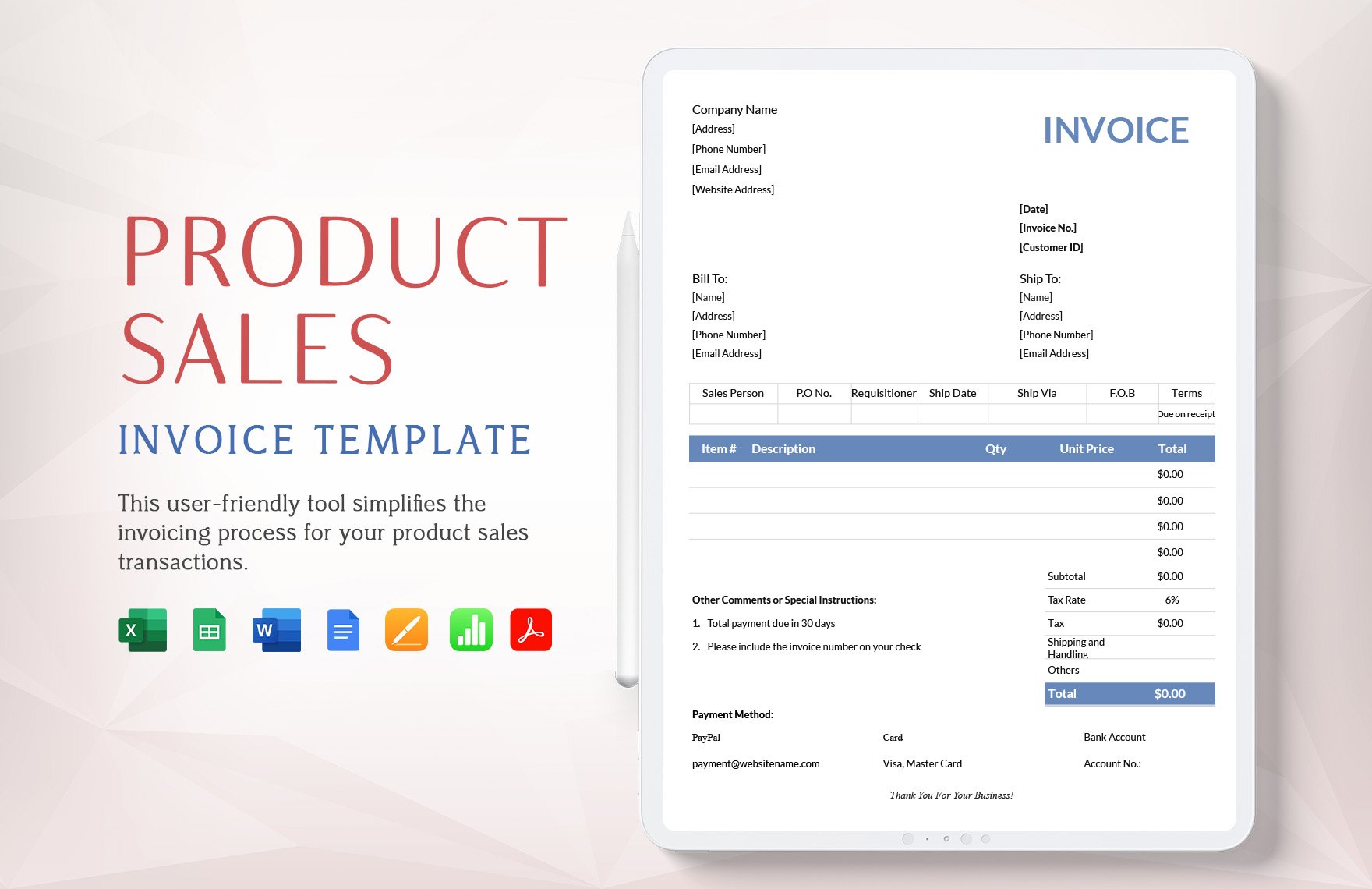
A PDF template is useful when the priority is a consistent printable or shareable appearance. The main distinction is whether the PDF is genuinely fillable or simply a static design. A static PDF may need to be edited in another application, while a fillable PDF can provide designated fields.
Before relying on a PDF workflow, check whether the document supports the fields your business actually needs. A visually attractive template is not necessarily practical if it lacks sufficient rows, has cramped totals, or makes customer information difficult to enter.
Final PDFs should be reviewed before sending. Check the customer name, invoice number, dates, item descriptions, quantities, calculations, tax treatment, payment instructions, and final amount. Also check that no hidden sample information remains from the template.
File naming can make archived PDFs easier to retrieve. A consistent convention might combine the invoice number and customer reference without placing unnecessary personal information in the filename. The exact approach should fit the business’s existing record-management system.
PDFs are especially useful as final records because they can preserve the appearance of the issued document. The editable source should still be retained when the business expects to need future corrections, recurring invoices, or internal review.

Creating a Sales Invoice From Scratch
Start by defining the transaction rather than opening a blank document and improvising. Identify the seller, buyer, goods or services, pricing method, delivery details, applicable adjustments, payment expectations, and any references that customers or accounting staff will need.
Next, establish the document hierarchy. Put the invoice title and identifying information where they can be found immediately. Follow with seller and customer details, then the transaction table, totals, payment information, and supporting notes.
Build the numerical logic before investing time in visual design. For a simple goods invoice, the basic relationship may be quantity multiplied by unit price for each line, followed by a subtotal and applicable adjustments. More complex transactions should be modeled explicitly so that each amount has a clear origin.
After the calculations are reliable, customize the visual presentation. Add the logo, select readable typography, establish consistent spacing, and create a hierarchy that makes the total due easy to locate. Avoid design choices that make numbers difficult to scan.
Finally, test the template using a hypothetical transaction. Enter several line items, a discount, shipping, and a tax scenario if relevant to the business. Confirm that the resulting document looks correct, calculates correctly, and contains no unnecessary fields.

Step-by-Step Workflow for Using a Reusable Template
The first step in a repeatable workflow is to preserve one clean master copy. The master should contain the approved structure, formulas, branding, standard payment language, and other stable information. It should not contain real customer transactions unless the file is specifically designed for that purpose.
The second step is to create a transaction-specific copy. Enter the customer information and confirm that it belongs to the intended recipient. If customer information is selected from another system, compare key identifiers before continuing.
The third step is to enter the sale details. Add each product or service separately when separate identification improves transparency. Verify quantity and price against the order, quotation, sales record, or other source document used by the business.
The fourth step is to review the calculations and commercial terms. Check discounts, shipping, taxes, deposits, credits, or other adjustments. The person preparing the invoice should be able to explain how the final amount was reached without relying on guesswork.
The fifth step is to finalize and save the customer-facing version. Before delivery, perform a visual inspection and a data check. Then retain the appropriate internal copy according to the business’s record-keeping process and any applicable retention obligations.

How to Make an Invoice Easier for Customers to Pay
Payment instructions should be obvious rather than buried in small text. If the business accepts several methods, list the relevant options clearly. The customer should not need to search through a long invoice to determine where or how payment should be made.
The amount due should have strong visual emphasis. It does not need oversized typography, but it should be visually distinct from individual line amounts. A clear subtotal, adjustment section, and final total help the customer understand the progression from purchase details to payment obligation.
Payment terms should be written in plain language. If payment is due on a particular date, show that date. If the business uses a term such as Net 30, consider displaying the actual due date as well so there is less room for interpretation.
References can also improve payment processing. A customer may need to include an invoice number when making a transfer or when communicating with accounts payable. Displaying that identifier prominently can reduce delays caused by unclear payment references.
A professional invoice should be polite without becoming cluttered. A short thank-you message can be appropriate, but the main priority remains transaction accuracy, payment clarity, and easy identification of the seller and customer.
Customizing the Template for Different Business Models
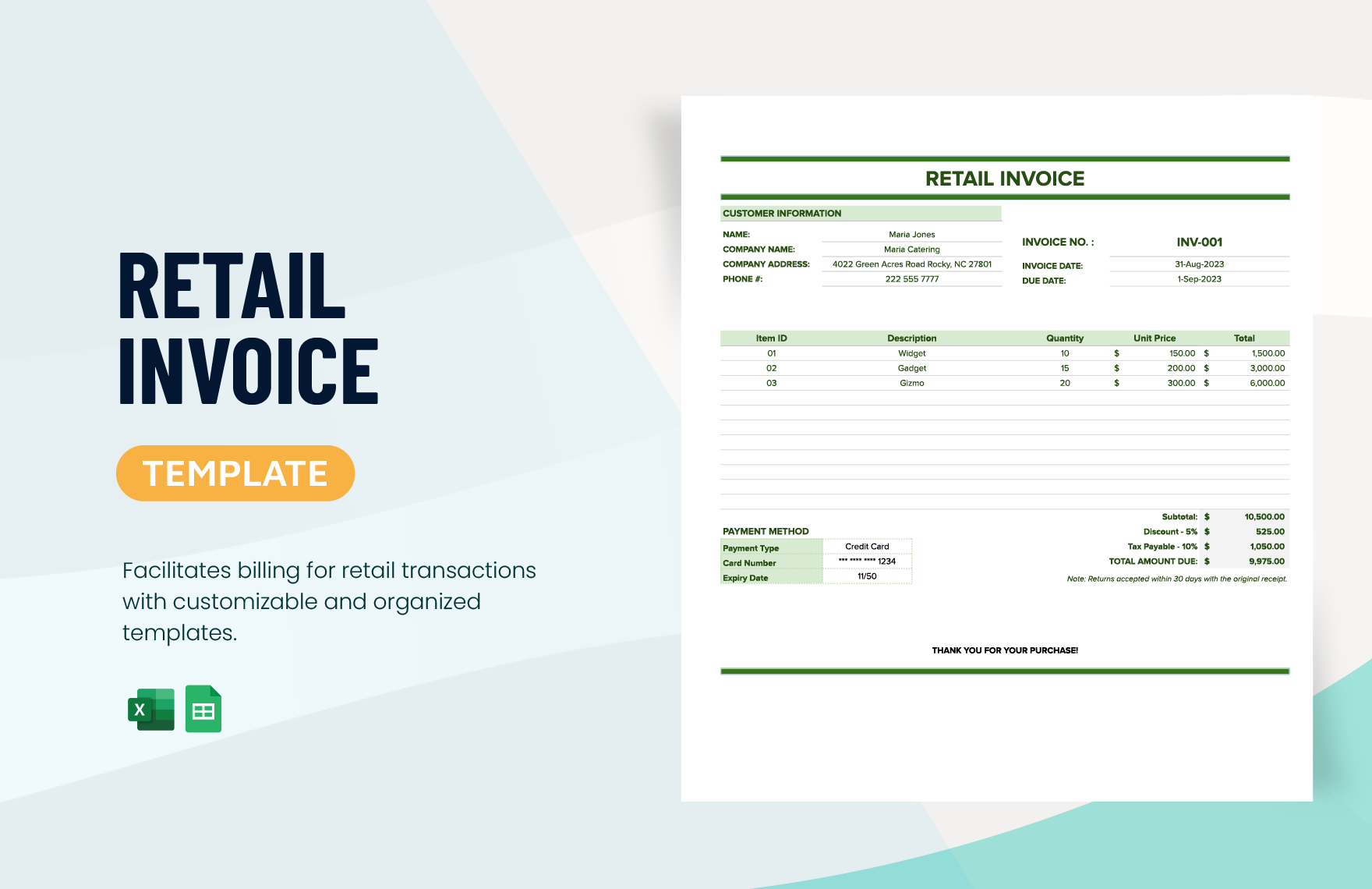
A retail business generally benefits from a compact product-focused table. Useful fields may include item code, product description, quantity, unit price, discount, tax, and amount. The customer should be able to compare the invoice against the purchase quickly.
A wholesale operation may require additional information because transactions can involve larger quantities, purchase orders, shipping arrangements, customer account references, or negotiated pricing. The template can be expanded without changing its fundamental structure.
A service business may replace quantity with hours, sessions, milestones, project phases, or another unit of work. Descriptions should make the service recognizable while avoiding unnecessary narrative. Project dates can be useful when the timing of work affects the customer’s understanding of the charge.
An online seller may prioritize shipping and customer references. Depending on the sales process, the invoice may need an order number, shipping address, delivery charge, discount code, or return-related information. The template should reflect the actual customer journey rather than a generic business model.
Businesses that sell both products and services can use a hybrid layout. The important principle is to make each charge understandable. If different types of items are subject to different pricing or tax treatment, the invoice should make those distinctions clear rather than combining unrelated amounts into one vague line.

Managing Taxes, Discounts, Shipping, and Adjustments
Taxes should be handled according to the rules that apply to the transaction. A template can provide a field for a tax rate and tax amount, but the template itself does not determine whether a particular sale is taxable or which rate applies. Those decisions depend on the relevant jurisdiction and circumstances.
Discounts should be identifiable when they affect the amount due. A percentage discount and a fixed-amount discount are not interchangeable from a calculation perspective. The invoice should make it possible to understand which approach was used.
Shipping and handling can be displayed separately when doing so improves transparency. This is particularly useful when the customer agreed to a product price before delivery charges were known. Separating the amounts also makes reconciliation easier.
Credits, deposits, or prior payments require special care because they reduce the amount currently payable without necessarily changing the underlying sale value. A clear adjustment section can distinguish the original charges from amounts already paid or credited.
Do not hard-code a tax percentage into a reusable template unless it is genuinely appropriate for the business’s controlled workflow. A change in jurisdiction, product category, customer status, or applicable rules may require a different treatment, so users should be able to verify the calculation before issuing the document.

Using a Free Customizable Invoice Template Responsibly
A free template can be an excellent starting point, particularly for a freelancer, small retailer, new business, or occasional seller. The absence of a template fee does not automatically make a document unsuitable; what matters is whether the layout supports accurate transactions and whether its licensing terms permit the intended use.
Before adopting a free template, inspect the fields carefully. Remove sample information, check formulas, confirm that the page prints correctly, and replace generic payment instructions with the business’s actual information. A free template still needs business-specific quality control.
Licensing is another consideration. Some templates permit personal or internal use but restrict redistribution or resale. If a business plans to modify a template and distribute it to customers, employees, franchisees, or other parties, the applicable license should be reviewed rather than assumed.
Free resources can also vary significantly in maintenance quality. A template with clear formulas and sensible structure may be more valuable than a visually impressive document that requires extensive manual correction. Test the resource with realistic examples before using it for live transactions.
When a business grows, it may eventually need features beyond a static template. Multiple users, automatic reminders, payment tracking, accounting integration, audit trails, or large transaction volumes can justify a more structured invoicing system. A template can still remain useful as a controlled design reference.

Online Customization Versus Downloadable Templates
An online workflow can be convenient when users want to create invoices directly in a browser. It may reduce the need to manage local document files and can make collaboration easier when several authorized people work on the same process.
Downloadable templates provide a different advantage: control over the working document. A business can retain a master copy, make local modifications, and create customer-facing files without depending entirely on an online editor. This can be useful when internet access or platform availability is inconsistent.
Online systems may provide additional automation, but those features vary by provider. Some workflows support automatic numbering, recurring invoices, customer databases, payment tracking, or integrations. These features can reduce repetitive work when the volume of invoicing becomes substantial.
The decision should therefore be based on workflow requirements rather than the assumption that one format is universally superior. Consider who creates invoices, how often they are issued, how calculations are performed, how documents are archived, and whether multiple people need access.
Regardless of platform, the same quality principles apply. Customer information must be accurate, amounts must reconcile, dates must be clear, payment instructions must be understandable, and the final document should represent the actual transaction rather than a generic example.

How to Build a Customizable Invoice Template Online
When using an online editor, begin with a blank or appropriate invoice structure rather than changing unrelated sections simply because they are available. The objective is to create a focused transaction document, not to fill every optional field.
Set the stable business information first. Add the company name, contact information, logo, standard payment methods, and other details that normally remain unchanged. Keeping these values in one controlled area makes future maintenance easier.
Next, design the variable fields. These should include invoice number, dates, customer details, product or service lines, quantities, prices, adjustments, and total amounts. Distinguishing stable and variable information helps prevent accidental edits to important business details.
Test the template with at least several transaction patterns. A single-item invoice tests the basic layout, while a multi-item invoice tests table expansion. A transaction containing a discount, delivery charge, or tax tests the totals area and reveals whether the structure can accommodate real-world variation.
Finally, define the output process. Decide whether completed invoices are downloaded as PDFs, stored in cloud folders, printed, emailed, or transferred into another accounting workflow. The template is only one part of the process; reliable delivery and record management are equally important.

How to Create a Sales Template for Invoice Workflows
To create a sales template for invoice use, first document the information that appears in almost every sale. This normally includes seller information, customer information, invoice identification, dates, transaction details, totals, and payment instructions.
Then identify information that changes by business type. A product seller may need SKU and quantity fields, while a consultant may need project or service descriptions. A wholesaler may need purchase-order and shipping references. Customization should follow these recurring patterns.
Next, establish calculation rules. Every amount should have a clear relationship to the information entered. If a line amount is calculated from quantity and unit price, that relationship should be explicit. If discounts or taxes are applied, their placement in the calculation should be documented.
After the calculation model is tested, create the visual hierarchy. Put identification details near the top, transaction details in the center, and the amount due and payment instructions where they are easy to find. Keep optional notes visually subordinate to the financial information.
The final step is operational testing. Have someone other than the template creator enter a sample transaction. A fresh user can reveal confusing labels, hidden formulas, insufficient rows, or unclear instructions that may not be obvious to the person who designed the document.

Practical Example: Product Sales Invoice
Consider a hypothetical small retailer selling office equipment. The business has three products on one transaction: a desk lamp, a keyboard, and a monitor stand. The invoice should identify each item, show the quantity and unit price, and calculate the line amount independently.
Suppose the hypothetical transaction contains two lamps at $35 each, one keyboard at $48, and three monitor stands at $22 each. The line amounts would be calculated separately before being combined into the subtotal. These figures are illustrative and are not presented as market prices.
The template could then provide separate fields for any applicable discount, shipping charge, and tax. If the business has no discount or shipping charge for the example, those fields can remain blank or display zero according to the template’s design.
The customer section should identify the buyer clearly, while the invoice header should contain a unique number and issue date. If payment is due later, the due date should be visible rather than hidden inside a general notes area.
For a retailer, this simple structure creates a useful balance between detail and speed. The customer can compare the invoice against the purchase, while the seller retains a structured record that can be reconciled with inventory and payment information.

Practical Example: Service-Based Invoice
Now consider a hypothetical design consultant who bills by project phase rather than by physical product. The invoice might contain research, initial design, revisions, and final delivery as separate service lines.
Instead of a product SKU, each line could contain a project phase or reference. Quantity might represent hours or milestones, depending on the agreement. The unit price would correspond to the agreed rate for that unit of work.
A strong service invoice avoids vague descriptions that force the customer to consult another document unnecessarily. The description can identify the project, service period, milestone, or deliverable while remaining concise enough for the invoice table.
If the customer has already paid a deposit, the invoice can show the current charges and then identify the deposit as a separate adjustment. This gives the customer a clearer explanation of how the remaining amount was determined.
Service businesses should also make sure the template does not accidentally imply a product-based transaction. Small changes to headings and labels can make the document more appropriate without requiring an entirely new template.

Practical Example: Retail and Repeat Sales
A repeat-sales workflow benefits from consistency. Imagine a small shop that sends invoices to business customers every month. Each invoice contains recurring product categories, customer information, agreed payment terms, and changing quantities.
The template can preserve stable customer fields while leaving transaction rows editable. A product list can help staff select standardized descriptions and prices, reducing typing and making the resulting invoices more consistent.
For recurring transactions, invoice numbers should be generated or assigned carefully so that each issued document has a distinct identifier. The invoice register should be updated as part of the same workflow rather than weeks later when details may be harder to reconstruct.
Monthly invoices can also benefit from a review checklist. The reviewer can confirm the billing period, customer, quantities, prices, discounts, taxes, due date, and payment instructions. A short checklist is often more reliable than relying on memory.
The result is a repeatable process in which customization happens where it belongs: transaction details change, while the core structure remains stable. That approach reduces unnecessary design work and makes customer documents easier to recognize.
Common Invoice Template Mistakes
One common mistake is leaving sample information in the final invoice. Templates frequently contain placeholder names, addresses, dates, example products, or fictional totals. Every field should be checked before the document is issued.
Another mistake is inconsistent numbering. If invoices are created from multiple copies of different templates, duplicate or confusing invoice numbers can appear. A centralized numbering approach is preferable for businesses that issue many documents.
Incorrect formulas are another risk in spreadsheet templates. A formula may work correctly for the original number of rows but fail when new rows are inserted. Testing the template with more line items than usual can expose this weakness before it affects a customer.
Overdesigned invoices can also reduce usability. Decorative elements that compete with the total, payment instructions, or transaction table make the document harder to scan. Professional design should support comprehension, not distract from it.
Finally, some businesses fail to distinguish an invoice from other sales documents. A quotation communicates proposed pricing, while an invoice records an amount being billed. Using the correct document type and terminology helps prevent misunderstandings.

Quality-Control Checklist Before Sending an Invoice
Begin the final review with identity information. Confirm the seller name, customer name, billing address, shipping address where relevant, and customer reference. An incorrect recipient can create administrative and privacy problems even when the financial calculation is correct.
Next, review the transaction lines. Confirm that each product or service is actually associated with the sale, quantities match the source record, unit prices are correct, and descriptions are understandable. Check that there are no accidental blank rows or obsolete sample entries.
Then inspect the arithmetic. Recalculate a few lines independently when practical, compare the subtotal with the line amounts, and confirm that discounts, shipping, taxes, credits, or deposits have been treated correctly.
Review dates and payment terms separately. The issue date should correspond to the transaction or invoicing process, while the due date should follow the agreed terms. If a payment term is displayed, make sure it does not conflict with the actual date shown.
Finish with a visual inspection. Open the final customer-facing file, not merely the editable master. Check page breaks, alignment, readability, missing fields, and the visibility of the total amount. A final PDF or print preview can reveal problems that are easy to miss while editing.

Data Collection and Invoice Records
Invoices can provide structured information that becomes useful beyond individual customer billing. When invoice data is recorded consistently, a business can analyze sales by date, customer, product, service, transaction value, or payment status.
The quality of that analysis depends on the consistency of the source data. If one invoice calls a product “Desk Lamp” and another calls it “Lamp – Desk,” simple reporting may treat them as different categories. Standardized descriptions and product codes can improve consistency.
A basic invoice register might include invoice number, issue date, customer, subtotal, tax, total, due date, and status. More detailed systems can add product categories, sales channels, sales representatives, payment dates, and other operational fields.
Data should be collected only for legitimate business purposes and handled according to applicable privacy and record-management obligations. Not every customer detail needs to be copied into every report. Use the minimum information needed for the business process.
Templates therefore have an indirect role in data quality. A well-designed invoice encourages consistent entry, while a poorly structured document creates ambiguity. Good template design can make later reporting more reliable because the underlying transaction records are easier to interpret.

Reporting and Analysis From Invoice Data
Once invoice information is consistently recorded, businesses can produce useful internal reports. A sales-by-customer report can show which accounts generate recurring transactions, while a product-level report can help identify frequently invoiced items.
Invoice totals should not automatically be treated as profit. Revenue, taxes collected, discounts, refunds, costs, and other accounting concepts can have different meanings. A sales report should therefore define what each metric represents before management uses it for decisions.
Payment-status reporting can also be valuable. Grouping invoices by unpaid, partially paid, paid, or overdue status can help staff prioritize follow-up. The exact categories should match the organization’s accounting workflow.
Trend analysis can compare periods when the underlying data is sufficiently consistent. For example, a business could examine monthly invoiced amounts or average transaction values. Hypothetical trends should never be presented as real market statistics without supporting evidence.
The invoice template itself does not perform the analysis. Its role is to create a consistent source document. Reliable analysis requires a separate process for collecting, validating, organizing, and interpreting the information generated by transactions.

How to Improve Template Usability Over Time
A template should be reviewed after it has been used in real workflows. Users may discover that certain fields are unnecessary, that descriptions need more room, or that customers repeatedly ask the same questions. Those observations can guide controlled improvements.
Change one part of the template at a time when possible. If formulas, labels, design, and payment terms are all changed simultaneously, it becomes harder to identify which modification introduced a problem. Controlled changes make testing easier.
Maintain a version identifier for important templates. A simple internal version such as “Sales Invoice Master v3” can help staff recognize whether they are working from the current approved document. The version does not necessarily need to appear on the customer-facing invoice.
Document significant formula or workflow changes. If a tax calculation, discount rule, or payment section is redesigned, record what changed and why. This creates useful institutional knowledge and helps future staff understand the template’s logic.
Retire obsolete templates rather than leaving many versions in shared folders. Multiple competing invoice masters increase the chance that staff will use an outdated logo, payment account, pricing field, or calculation structure.

Practical Solution: Build a Reliable Custom Invoice System
The practical solution is to treat the invoice template as part of a complete workflow rather than as an isolated document. Start with one approved master that contains only stable information and tested calculations. Store it where authorized users can find it easily.
Create a simple preparation sequence: identify the customer, confirm the transaction source, enter line items, verify calculations, review dates and terms, generate the final customer-facing copy, and update the invoice register. Keeping the sequence consistent is more important than making it complicated.
For spreadsheet-based workflows, separate input cells from formulas and use clear labels. For document-based workflows, keep the transaction table and totals section visually consistent. For online workflows, establish permissions and decide who is responsible for maintaining the master template.
Use a short quality-control checklist before every invoice is issued. At minimum, verify the customer, invoice number, date, line items, quantities, prices, adjustments, total, payment instructions, and final file. A second-person review can be useful for higher-value or more complex transactions.
Finally, review the system periodically. If the same correction appears repeatedly, fix the template or workflow rather than correcting every invoice manually. The strongest customizable invoice system becomes more efficient over time because recurring problems are turned into permanent process improvements.

Reference Examples
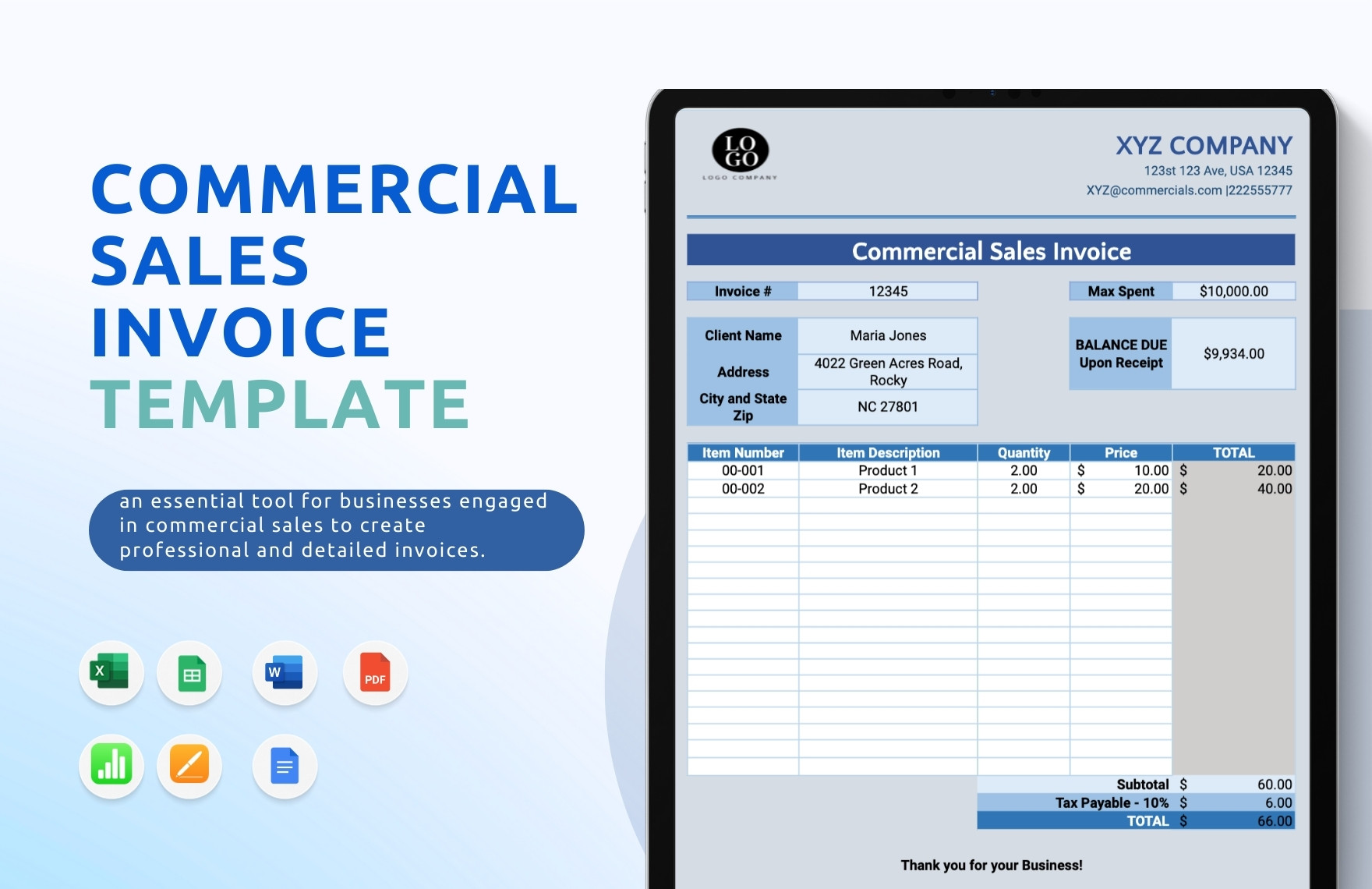
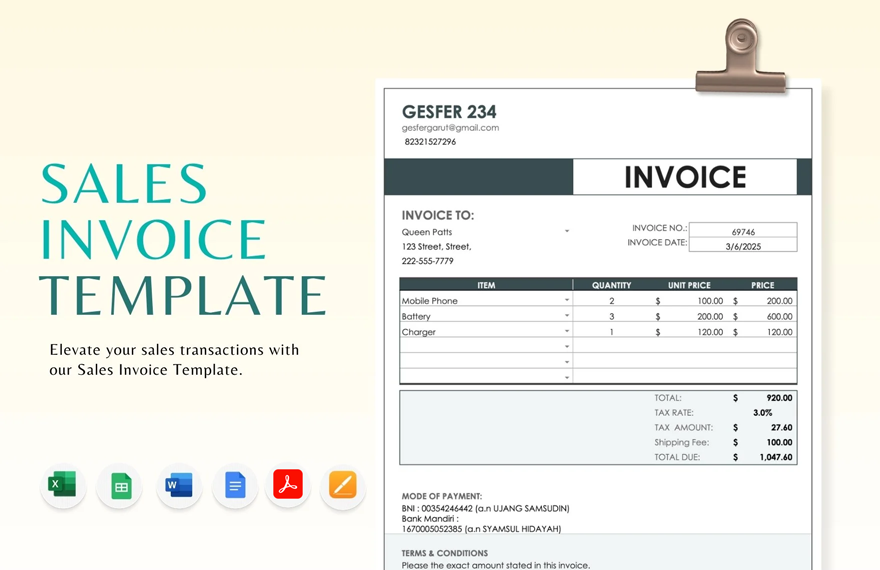
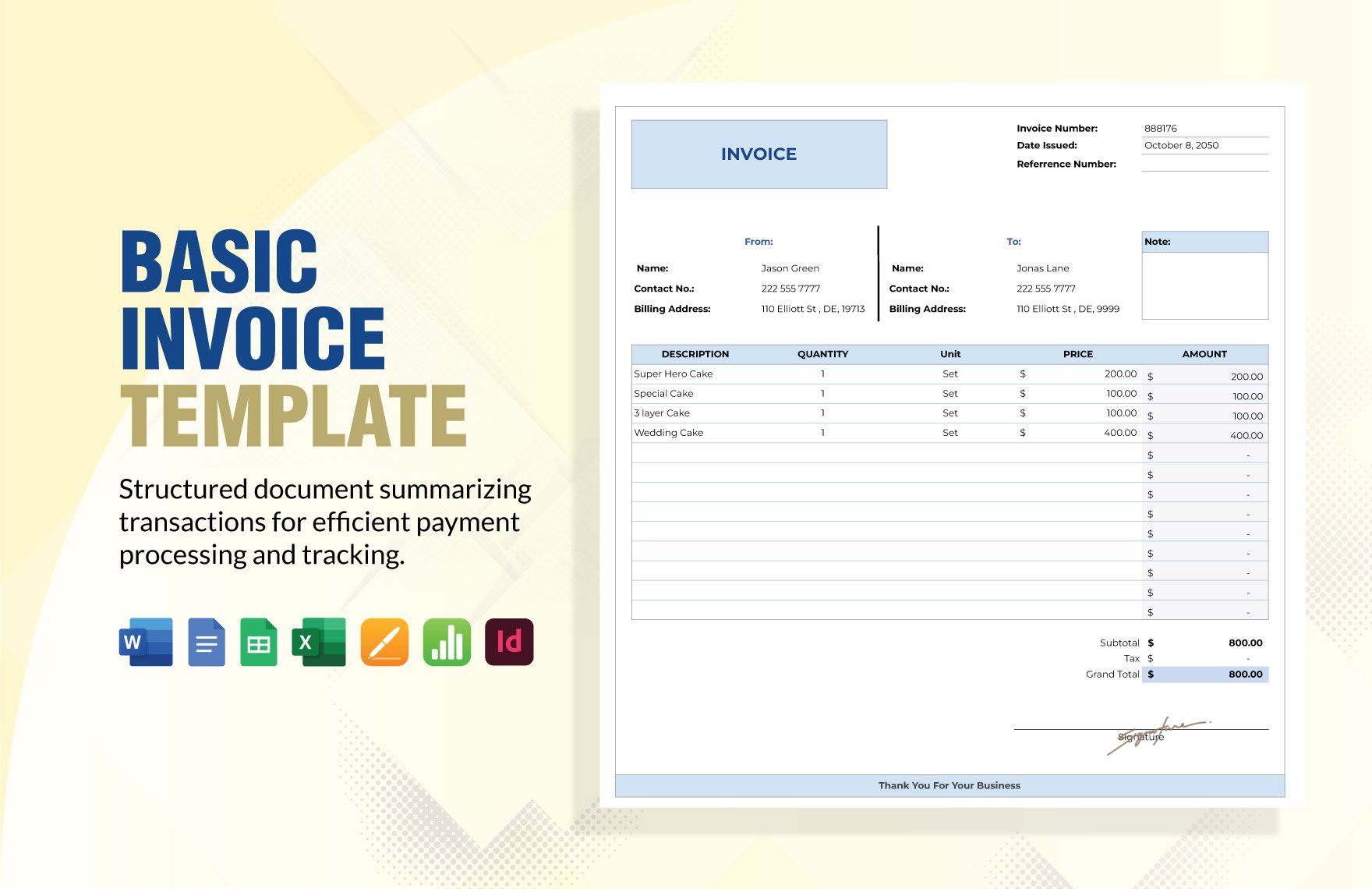
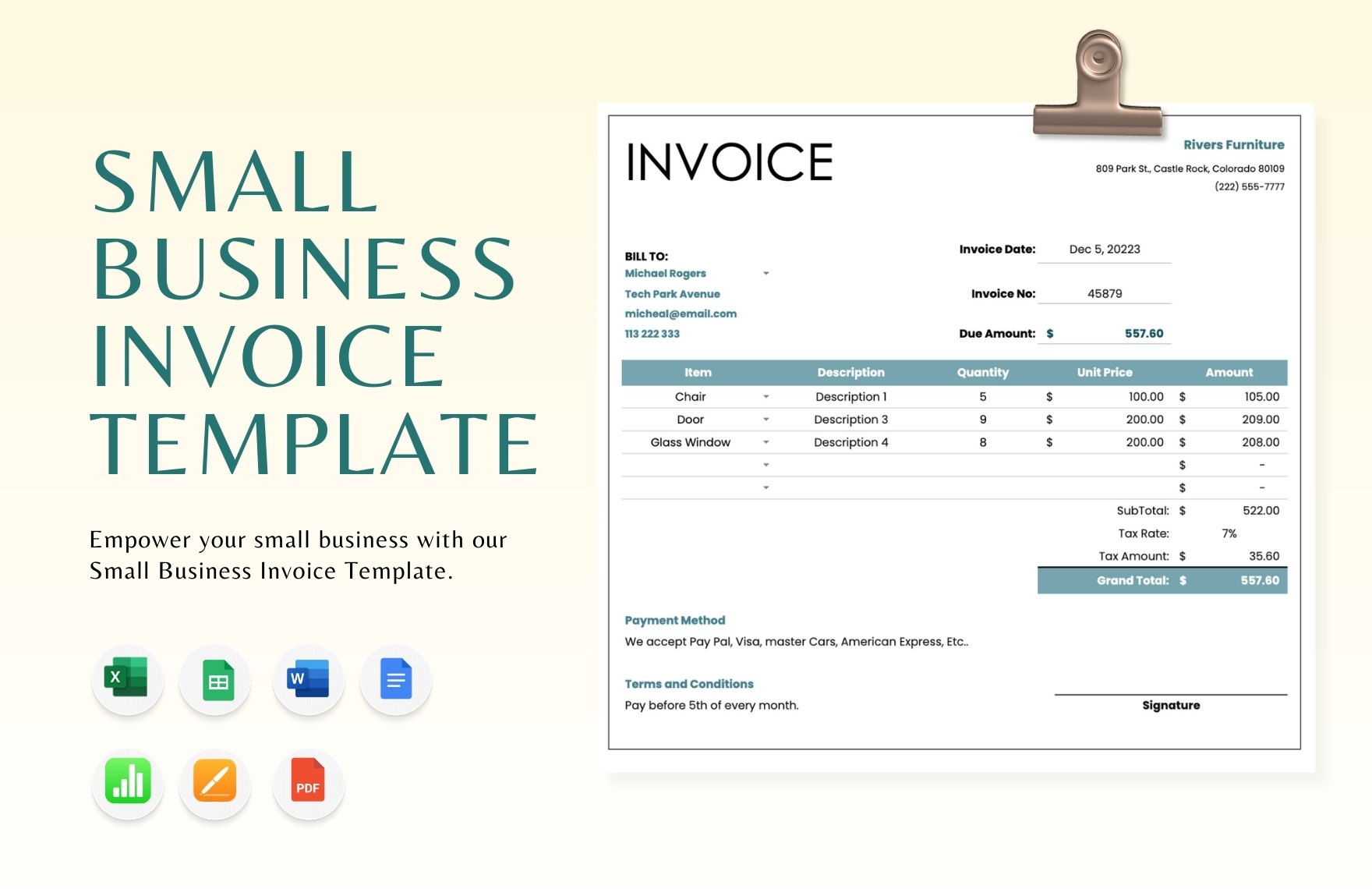
The following visual examples illustrate different approaches to sales invoices, spreadsheet-based layouts, customizable fields, business-oriented formats, and retail billing structures. They are provided as visual references rather than as claims that any particular template is required for every business.
sales invoice template customizable pdf
Source: Template.net
sales invoice template customizable excel

Source: Template.net
sales invoice template customizable free
Source: Template.net
sales invoice template customizable google docs
Source: Template.net
sales invoice template customizable google sheets
Source: Template.net
sales invoice template customizable word
Source: Template.net
free customizable invoice template
Source: Template.net
sales invoice free template
Source: Template.net
template of an invoice for sales
Source: Template.net
customizable invoice template online
Source: Template.net
create sales template for invoice
Source: Template.net
customizable invoice template free online
Source: Template.net
Frequently Asked Questions
What makes a sales invoice template customizable?
A customizable template allows the business to modify fields, branding, transaction rows, payment information, and other relevant sections while retaining a consistent document structure. The level of customization should match the actual sales process.
Should I use Excel or Word for an invoice?
Excel is often more convenient when invoices require repeated calculations, formulas, or structured numerical data. Word can be suitable for simpler documents where manual calculations are limited. The better choice depends on how the invoice is prepared and checked.
Is PDF better for sending an invoice?
PDF is often useful for a finalized customer-facing copy because it preserves the intended layout more reliably than an editable working document. Keep the original editable version separately when future changes or recurring invoices are expected.
Can I customize an invoice with my logo?
Yes. A logo can usually be incorporated into a template when the design supports it. Keep the logo appropriately sized so it establishes branding without reducing the visibility of invoice numbers, customer details, line items, or the total amount.
What should I check before sending a customized invoice?
Verify the seller and customer information, invoice number, issue date, due date, products or services, quantities, prices, discounts, shipping, taxes where applicable, final total, and payment instructions. Also inspect the final exported file for layout or sample-data errors.
Can a customizable invoice template be used for recurring sales?
Yes. Recurring transactions are one of the strongest use cases for templates. The stable business information remains in the master structure while customer, date, quantity, pricing, and other transaction-specific fields are updated for each invoice.
How many line items should an invoice template contain?
There is no universal number. The template should accommodate normal transactions without becoming unnecessarily large. If longer invoices are common, the design should support additional rows or pages without breaking totals or making the document difficult to read.
What is the biggest benefit of a customizable invoice?
The main benefit is repeatable efficiency. A well-designed template reduces the need to recreate the document structure for every transaction while allowing the business to present accurate, relevant information in a consistent format.
Conclusion
A sales invoice template customizable to the needs of a particular business can provide a practical foundation for accurate, consistent, and professional billing. The strongest templates balance clear transaction information with flexible fields, reliable calculations, sensible branding, and straightforward payment instructions.
Choose the working format according to the job: spreadsheets are valuable when calculations and structured data matter, word-processing files can suit document-focused workflows, PDFs are useful for finalized presentation, and online tools can help when collaboration or automation is important.
Customization should always serve a business purpose. Add fields because customers or internal processes need them, not simply because a template provides them. Test calculations, protect important formulas, standardize descriptions, control invoice numbering, and review the final document before it reaches the customer.
When the template becomes part of a disciplined workflow, it can also support better record keeping and reporting. Consistent invoice information makes transactions easier to reconcile, review, archive, and analyze, while a controlled master template reduces unnecessary variation between documents.
Ultimately, the best sales invoice template customizable for your organization is the one that makes every transaction easier to understand and easier to verify. Start with a clear structure, customize it around real sales processes, test it with realistic examples, and improve it whenever recurring problems reveal an opportunity for a better invoicing workflow.
