The value of a worksheet is not simply that it contains empty fields. Its real value comes from deciding which information needs to be captured, where that information belongs, and how one section relates to another. A construction worksheet that separates scope from cost, planned dates from actual dates, and assumptions from confirmed information is much easier to maintain than an unstructured page of notes.
Searchers looking for a blank construction worksheet template often want more than a blank page. They may need something printable, editable in Word or Excel, usable in Google Docs, suitable for students, or adaptable into a project plan. Others may actually need a construction contract, estimate, daily report, work schedule, or budget. Understanding these distinctions prevents the common mistake of using one document for every construction-management purpose.
This guide explains what a construction worksheet should contain, how to build one from scratch, which file format makes sense for different situations, how to use the worksheet during a project, and how to avoid common documentation problems. It also examines examples of schedules, estimates, scopes of work, daily logs, budgets, and contract documents so readers can choose a structure based on the job rather than on file format alone.
Template examples published by established construction-management resource providers commonly organize information around scope, schedules, tasks, costs, responsibilities, materials, and project status. For example, construction planning templates can include project title, manager, phases, task names, start dates, finish dates, duration, and notes, while estimating templates commonly separate labor, materials, quantities, rates, and totals. These recurring structures are useful models when designing a customized worksheet.
What Is a Blank Construction Worksheet Template?
A blank construction worksheet template is a preformatted document containing fields, tables, headings, or calculation areas that are intended to be completed with project-specific information. The document starts mostly empty, allowing a contractor, supervisor, student, estimator, project manager, or client to enter information relevant to a particular construction activity.
The word “blank” does not necessarily mean that every cell must be empty. A useful blank template may already contain field labels such as Project Name, Job Number, Location, Task Description, Quantity, Unit, Start Date, Finish Date, Responsible Party, Cost, Status, and Notes. The structure is prepared in advance, while the project data remains to be entered.
A construction worksheet can be a single page or a multi-page workbook. A simple version may only record tasks and dates. A more advanced version can connect a work breakdown structure to labor, materials, budget values, approvals, inspections, and progress. Spreadsheet versions can also calculate totals or durations automatically.
The right level of detail depends on the purpose of the worksheet. A classroom activity may need a project goal, sketch area, materials list, and reflection section. A residential project may need rooms, trades, quantities, costs, and completion dates. A commercial project may require more extensive tracking of responsibilities, dependencies, submittals, approvals, change orders, and reporting.
It is therefore useful to think of the template as a framework rather than as a finished construction-management system. The framework creates consistency, but the user must still verify project-specific requirements, drawings, specifications, contracts, permits, schedules, quantities, and applicable professional or legal obligations.
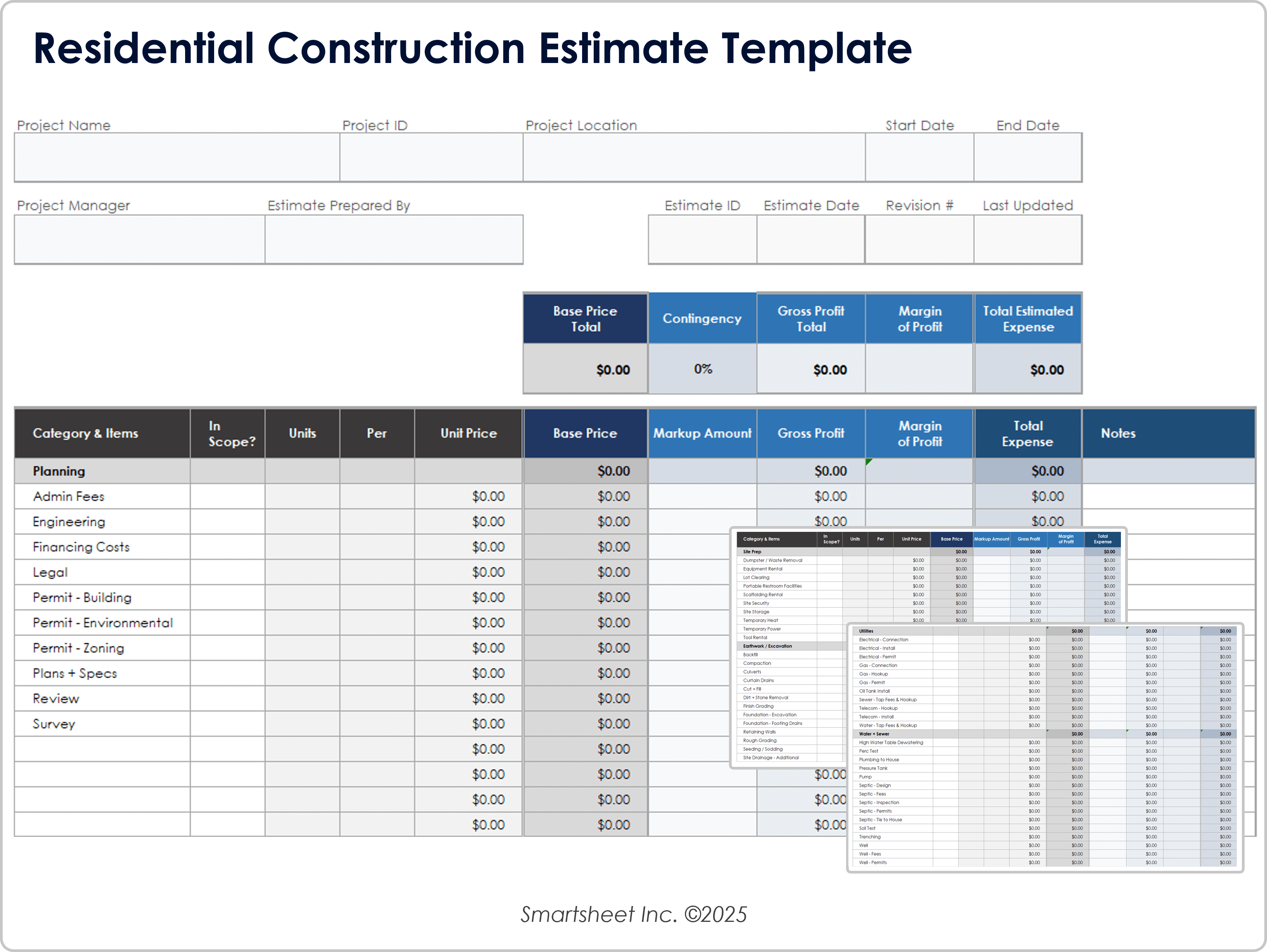
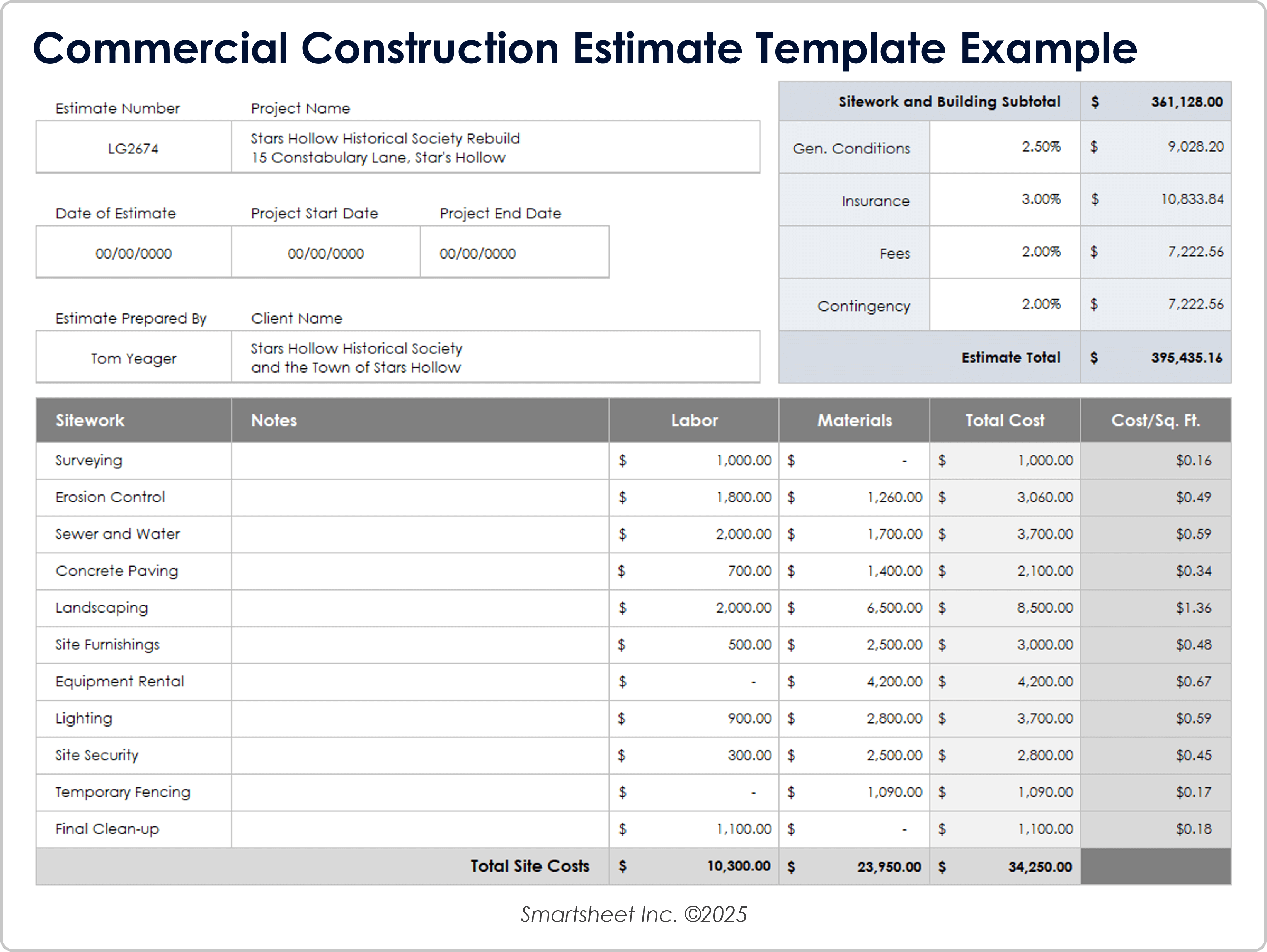
Construction estimates are a good example of why structure matters. A simple estimate can separate project scope, materials, labor, and other costs, while a more detailed estimate can add quantities, unit prices, markup, contingency, and notes. A blank worksheet can therefore be designed to support either a quick preliminary estimate or a more controlled cost record, provided the fields match the intended use.
For small projects, a compact worksheet may be preferable because excessive detail can slow data entry. For larger projects, a workbook with separate sheets for schedule, budget, materials, daily reports, and change tracking can make information easier to maintain. The important principle is to collect the information needed for a decision or record without adding fields that nobody will use.
A worksheet also becomes more valuable when its fields are logically connected. For example, a task called “Foundation Work” should have a responsible party, planned start date, planned finish date, status, and potentially an estimated cost. If the same task appears in a budget and schedule, using the same task name or identifier makes later comparison much easier.
Consistent identifiers are especially useful when a project grows. A task ID such as 2.3 can identify one activity across a worksheet, schedule, estimate, daily report, and change-order record. This approach reduces ambiguity when several activities have similar names.
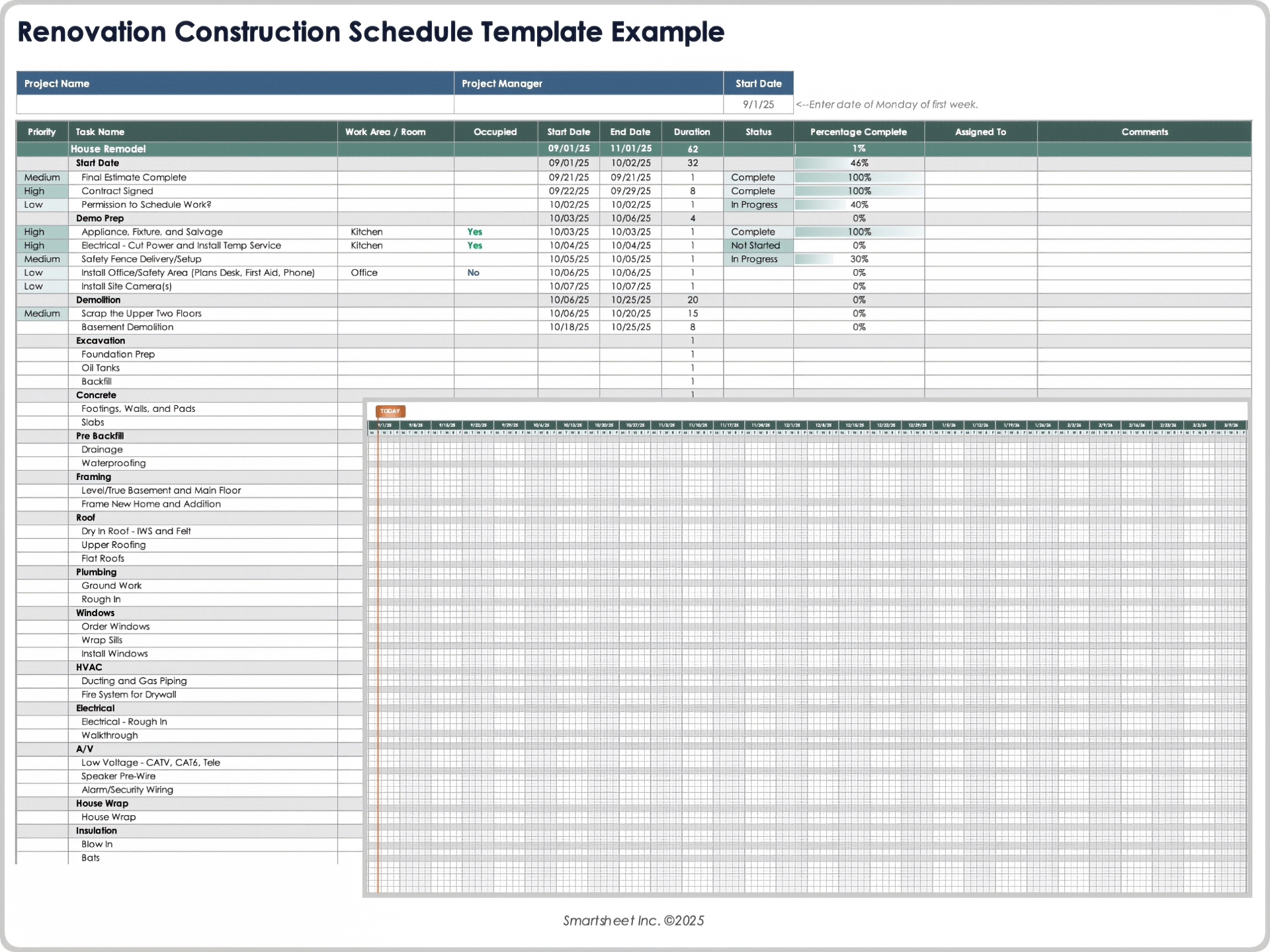
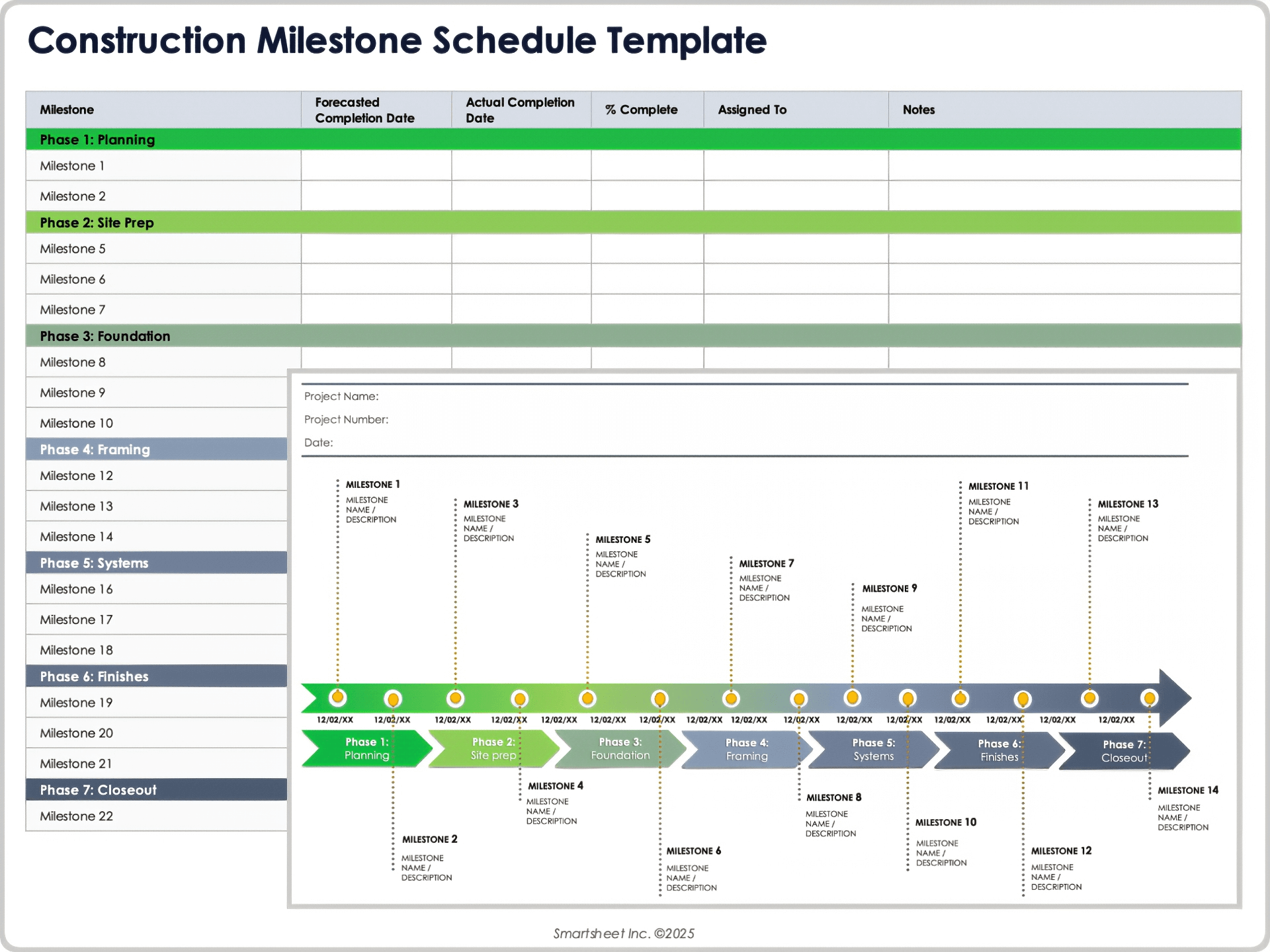
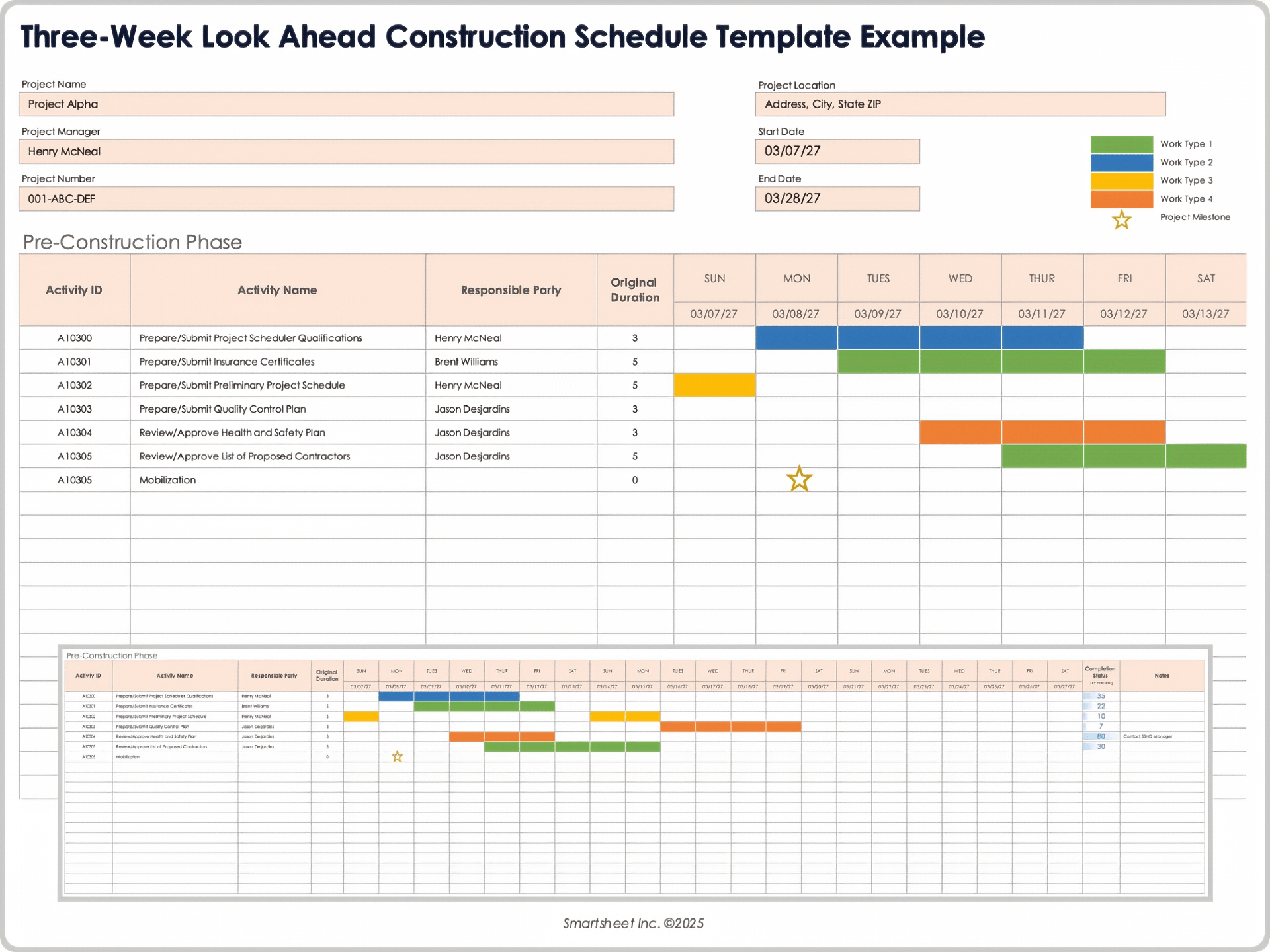
Construction schedules commonly use fields for phases, tasks, dates, durations, dependencies, responsible parties, completion percentages, and notes. Spreadsheet-based schedules can also visualize those relationships with Gantt-style timelines. The worksheet can therefore serve as the source structure from which a more detailed schedule is developed.
Why Use a Blank Construction Worksheet?
The first benefit is consistency. When every project uses the same basic document structure, people know where to look for information. A supervisor can quickly find the project identifier, a cost reviewer can locate budget information, and a student can understand which sections need to be completed.
The second benefit is reduced setup time. A reusable worksheet removes repetitive formatting work. Instead of rebuilding tables, headings, and calculation areas for each project, the user can copy a clean version and focus on the information that actually changes.
The third benefit is improved completeness. A blank template can act as a checklist. If the worksheet contains sections for location, scope, dates, materials, labor, costs, risks, approvals, and notes, the user is less likely to forget an important category than when working from an unstructured page.
The fourth benefit is easier comparison. If two projects use the same field structure, their information can be compared more easily. A contractor can compare estimated and actual costs, planned and actual dates, or different phases of work without first reorganizing every document.
The fifth benefit is communication. A well-designed worksheet gives different participants a shared reference. Owners, contractors, subcontractors, estimators, students, and supervisors may have different responsibilities, but a common structure makes it easier to discuss the same project information.
There is also a documentation benefit. Daily reports, schedules, estimates, and change records can become useful evidence of what was planned or observed. A worksheet does not automatically make a record legally sufficient, but clear dates, identifiers, descriptions, and approvals can make project information easier to retrieve and review.
A template should not, however, be treated as proof of compliance with a particular regulation or contract requirement. Requirements differ by project, location, contract, trade, owner, and governing authority. A generic worksheet is best understood as an organizational tool unless a qualified professional or controlling project document specifies otherwise.
The best worksheet is therefore not necessarily the longest one. It is the one that captures the information needed for its intended decision, record, or activity while remaining practical for the people who must complete it.
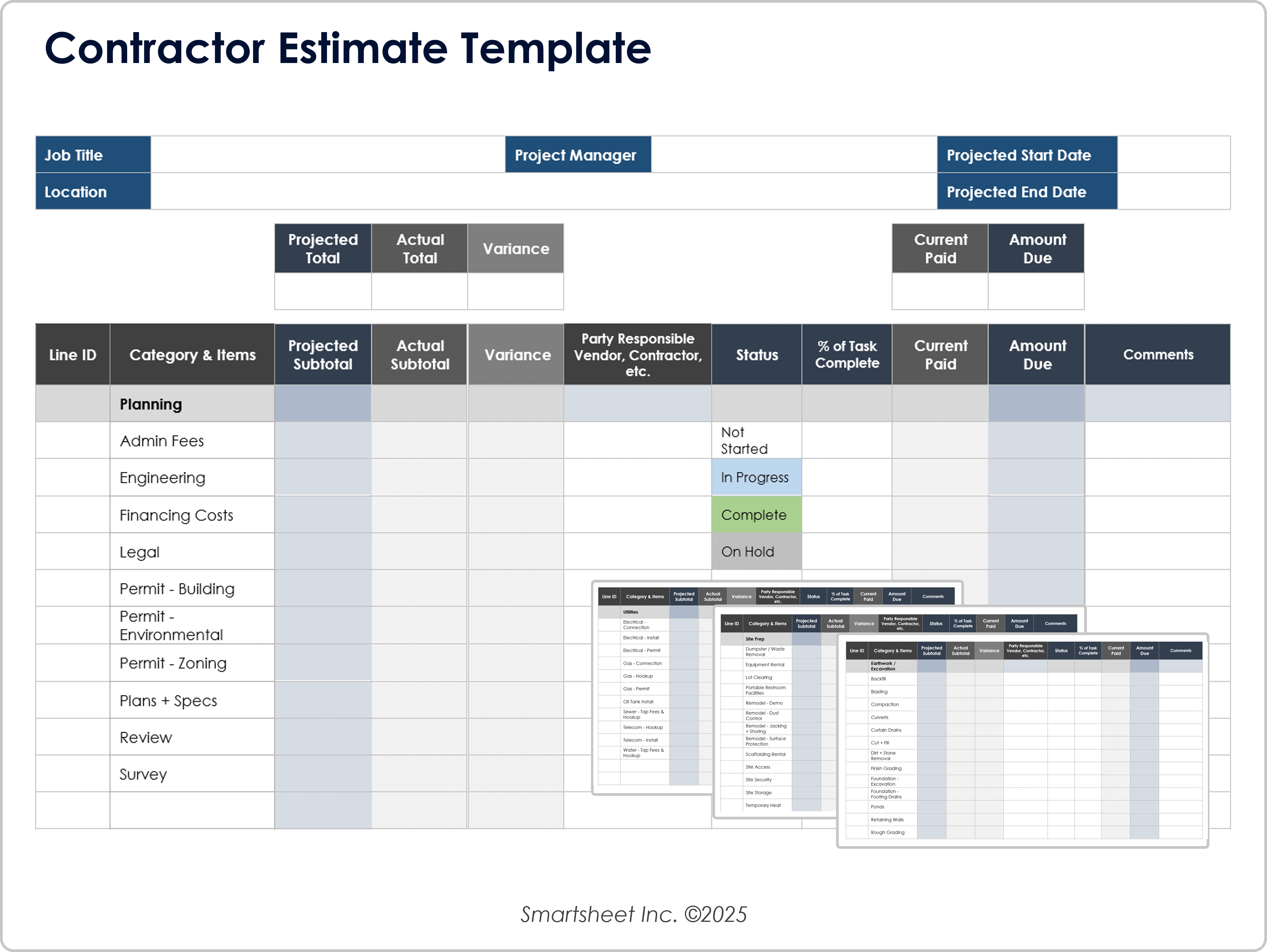
A construction estimate illustrates this balance. A detailed estimate may include projected and actual totals, variance, responsible parties, completion status, and payment information. A smaller repair may only require the client, scope, materials, labor, unit prices, and total. Both can be useful if their structures match the job.
Construction planning resources also show the importance of distinguishing a plan from a schedule. A project plan can establish scope, objectives, resources, budget, risks, and responsibilities, while a schedule concentrates more heavily on the sequence and timing of activities. A worksheet can support either, but the labels should make the purpose clear.
Essential Sections of a Blank Construction Worksheet
1. Project Identification
Start with information that uniquely identifies the project. Useful fields can include project name, job number, client, site address, project type, worksheet date, revision number, and prepared-by information. These fields prevent a completed worksheet from becoming detached from its project context.
For recurring documents, include a revision field rather than silently replacing old versions. A revision number can be paired with a revision date and short description. This is especially useful when a worksheet is updated after scope, schedule, or budget changes.
Do not overload the identification section with information that is already controlled elsewhere. If the project has a formal contract number or document-management system, use the same identifier instead of inventing a second numbering system.
2. Scope of Work
The scope section should explain what the worksheet covers. It may include work included, work excluded, assumptions, deliverables, locations, trade categories, and important limitations. Clear scope language helps prevent the worksheet from being interpreted more broadly than intended.
A good scope description is specific enough to distinguish included work from excluded work. For example, “install interior paint to designated rooms” is more useful than simply writing “painting.” If exact quantities are known, they can be recorded separately so the descriptive scope does not become unnecessarily complicated.
3. Task or Activity Table
The task table is often the central part of the worksheet. Common columns include Task ID, Phase, Activity, Responsible Party, Start Date, Finish Date, Duration, Status, and Notes. Additional columns can be added for dependencies, percentage complete, inspection status, or cost codes.
Tasks should be written at a useful level of detail. “Build house” is too broad for most project controls, while hundreds of tiny tasks may create unnecessary administrative work. A practical breakdown might use phases such as preconstruction, site preparation, foundation, framing, mechanical systems, finishes, inspections, punch list, and closeout.
Construction schedule templates commonly use phase-based task lists and date columns because they make the sequence of work easier to see. Some also use Gantt charts to provide a visual representation of when activities overlap.
A task should ideally have one clearly accountable owner even when multiple people contribute. “Electrical rough-in” might involve several workers, but assigning a responsible subcontractor or supervisor provides a clear point of accountability for the record.
Dependencies should be recorded when sequencing matters. If one activity cannot begin until another is complete, that relationship should be visible rather than left in someone’s memory. This becomes particularly important when a delay in one activity can affect several later activities.
4. Materials and Equipment
A materials section can record item descriptions, quantities, units, suppliers, required dates, delivery status, and notes. For larger jobs, separate material procurement tracking from simple material usage because the two activities answer different questions.
Equipment tracking can include equipment type, quantity, assigned task, expected use dates, actual use dates, condition, and responsible party. The level of detail should reflect the project rather than the template designer’s assumptions.
Long-lead materials deserve special attention. If a material must arrive before a dependent task can start, the worksheet should connect its required delivery date to the project schedule. This makes procurement a visible part of planning rather than a separate administrative activity.
5. Labor Information
Labor fields can include trade, crew, worker count, hours, rate, task, and total labor cost. A daily report may use hours actually worked, while an estimate may use planned hours. The worksheet should clearly distinguish those concepts.
Do not mix planned labor and actual labor in one unlabeled number. A planned value represents an expectation or budget; an actual value represents recorded performance. Keeping both allows meaningful variance analysis.
For educational worksheets, labor can be simplified to roles and estimated time. For professional project controls, labor data may need to align with payroll, cost codes, or production tracking systems.
6. Cost and Budget Fields
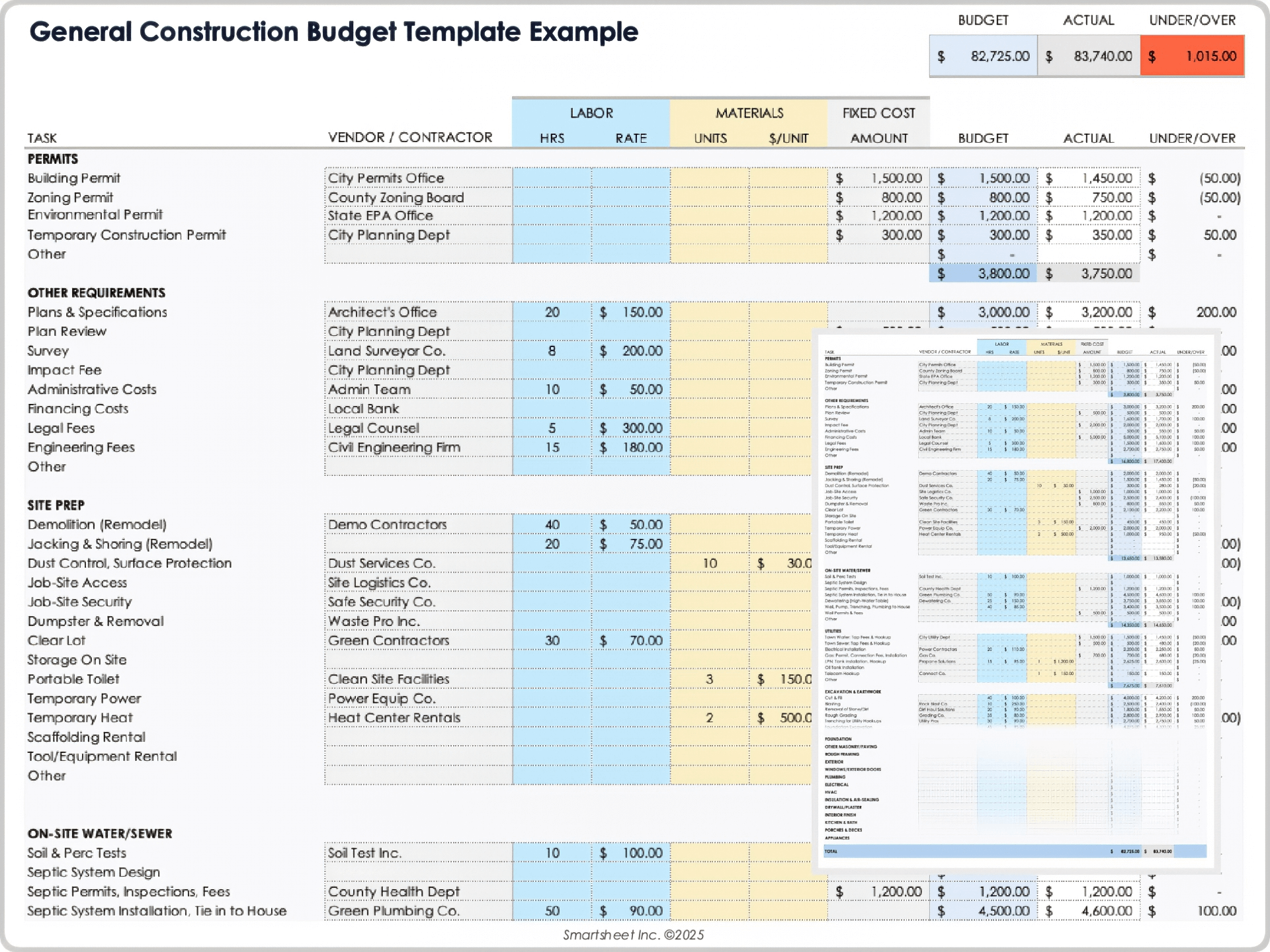
Construction cost worksheets often separate labor, materials, equipment, subcontractors, permits, fees, and other project costs. The worksheet can then calculate a subtotal and, when appropriate, include contingency or other project-level adjustments.
Estimated and actual values should have separate columns. A variance column can show the difference between them, but users should define the calculation consistently. A positive variance might mean an overrun in one system and an underrun in another, so labels should remove ambiguity.
For client-facing estimates, transparency is important. The document should make clear which costs are included, which are excluded, and whether the figures are preliminary, budgetary, or part of a formal proposal.
A budget worksheet can also track remaining funds. This is particularly useful for renovation projects where the owner has a defined funding limit and wants to monitor spending as individual purchases and work items are recorded.
How to Create a Blank Construction Worksheet Template
Step 1: Define the worksheet’s purpose
Before opening Word, Excel, or another editor, write one sentence describing the purpose. Examples include “track residential renovation tasks,” “record material quantities,” “prepare a preliminary estimate,” or “help students plan a model building.” This single decision prevents unrelated fields from accumulating.
Next, decide who will complete the worksheet and who will read it. A field supervisor may prefer concise tables, while an owner may need a summary view. A teacher may need instructions and reflection prompts. A worksheet should be designed around its actual users.
Define the expected frequency of use as well. A one-time planning worksheet can be more static than a daily report that will be completed repeatedly. Repeated documents benefit from standardized naming, revision control, and simple data-entry conventions.
Decide what decisions the worksheet must support. If the purpose is scheduling, emphasize tasks, dependencies, dates, and status. If the purpose is estimating, emphasize quantities, units, labor, materials, rates, and totals. If the purpose is student learning, emphasize clear prompts, drawing areas, vocabulary, and reflection.
Finally, decide what information should not be included. Every additional field increases completion time. A useful template is selective, not exhaustive.
Step 2: Build the project header
Create a compact header containing project name, project number, location, client or organization, date, prepared by, and revision. Keep it visually distinct from the working table so users can identify the document quickly.
If the worksheet will be printed, leave sufficient space for handwriting. If it will be completed digitally, use consistent field sizes and avoid tiny entry boxes that become difficult to use on a laptop or tablet.
Use clear labels instead of unexplained abbreviations. A professional worksheet should be understandable to someone who did not design it.
If the worksheet will be shared, include a document title that describes its function. “Construction Worksheet” is less informative than “Residential Renovation Task and Cost Worksheet.” The title should make the document’s purpose obvious.
Use the same header structure across related documents whenever possible. Consistency between a worksheet, daily report, schedule, and budget makes the project file easier to navigate.
Step 3: Add the main table
Choose columns based on the purpose defined earlier. For a general construction activity worksheet, a practical starting point is Phase, Task, Responsible Party, Start Date, Finish Date, Status, and Notes.
Add Quantity and Unit when the worksheet tracks physical work. Add Estimated Cost and Actual Cost when it tracks financial performance. Add Dependency when sequencing matters. Avoid adding all possible fields automatically.
Use one row per logical item. Do not place several unrelated activities in one cell because that makes sorting, filtering, and later analysis difficult.
For spreadsheet templates, reserve separate columns for dates rather than typing a date range into one cell. Separate dates allow calculations and timeline visualizations to work correctly.
For printed templates, use enough row height for handwritten entries. A beautifully formatted spreadsheet can become frustrating if there is not enough physical writing space.

Step 4: Add validation and instructions
Digital templates can benefit from controlled choices for fields such as Status. Options might include Not Started, In Progress, On Hold, Complete, and Needs Review. The exact choices should reflect the workflow rather than being copied blindly from another project.
Date fields should use a consistent format. Currency fields should use a consistent unit. Quantities should identify units such as each, square meter, square foot, linear meter, hour, or other project-specific measures.
Short instructions can appear at the top of a worksheet when users need clarification. For example, a note can explain whether “Cost” means estimated cost, actual cost, or approved contract value.
Instructions should not overwhelm the working area. If extensive guidance is necessary, place it on a separate Instructions sheet or accompanying document in a digital workbook.
Templates become more reliable when the same terms mean the same thing throughout the project. Define important terms once and use them consistently.
Choosing the Right File Format
Word
Microsoft Word is well suited to narrative documents, printable forms, scopes of work, agreements, and worksheets that require substantial written explanation. Tables can be formatted cleanly, and the document is familiar to many users.
Word is especially useful when the worksheet will be printed and completed manually. It also works well for documents that need signatures, explanatory paragraphs, or a fixed page layout.
The limitation is that Word is less convenient than a spreadsheet for calculations, large datasets, automatic totals, or complex timelines. If the document begins to behave like a database, spreadsheet software may be more appropriate.
A Word worksheet should use consistent table formatting and page breaks. Avoid splitting important headers from the tables they describe, especially when the document will be printed.
Word can also be useful when a construction worksheet needs to evolve into a formal narrative report. The same information can be expanded into project notes, scope descriptions, assumptions, and recommendations.

Excel
Excel is often the strongest choice when the worksheet involves quantities, costs, dates, formulas, filtering, sorting, or repeated rows. Construction schedule and estimate templates frequently use spreadsheet structures because calculations and timeline relationships can be automated.
For a cost worksheet, Excel can calculate line-item totals from quantity multiplied by unit price. For a schedule, it can calculate durations from start and finish dates. For a budget, it can compare planned and actual amounts.
Spreadsheet formulas should be tested before a template is distributed. A formula that references the wrong row or range can silently produce incorrect totals.
Protect formula cells when appropriate, while leaving input cells clearly identifiable. This reduces the chance that a user accidentally overwrites calculations.
Excel is also useful for turning worksheet information into charts. A monthly budget can be summarized visually, while a schedule can be represented as a Gantt-style timeline.
Google Docs
Google Docs works well when a worksheet needs collaborative editing, comments, sharing, and a document-style layout. It is especially useful for teams that already use Google Workspace.
A Google Docs version can be created from a Word-style worksheet and shared with appropriate collaborators. Tables, headings, checkboxes, and explanatory notes can make a practical collaborative form.
For calculations, Google Sheets is generally more appropriate than Google Docs. A construction worksheet that contains extensive numerical data should not be forced into a document editor simply because the team uses Google Workspace.
Access permissions should also be considered. A project document may contain sensitive commercial information, so sharing should be limited to the people who need it.
Version discipline remains important in collaborative environments. A shared document can still become confusing if several unofficial copies circulate outside the primary project record.

PDF is useful when the primary goal is preserving a consistent visual layout. A PDF can be printed, reviewed, archived, or completed with appropriate annotation tools.
A static PDF is not automatically editable. If users need to type directly into the document, a fillable PDF is a different implementation from a simple exported PDF.
PDF is often appropriate for a finalized form, printable worksheet, approved schedule, or controlled record. The editable source should usually be retained separately when future revisions are expected.
Before distributing a PDF, check page breaks, table readability, field sizes, and whether any content has been clipped during export.
Never assume that a generic PDF template meets a project’s legal or regulatory requirements. Treat it as a formatting resource unless the applicable authority or contract establishes a specific requirement.

Blank Construction Worksheets for Students
A blank construction worksheet template for students should be simpler than a professional project-control document. Students need clear prompts, manageable sections, and enough space to draw, label, calculate, explain, or sequence ideas.
Construction-themed learning activities can connect design, measurement, writing, geometry, engineering, sequencing, and problem solving. A student worksheet might ask learners to identify a project goal, sketch a building, list materials, estimate dimensions, sequence construction steps, and explain what they would change.
For younger learners, a large drawing area and simple labels may be more valuable than a dense table. For older students, the worksheet can include scale, quantities, cost calculations, floor-plan interpretation, or project scheduling.
The worksheet should distinguish educational exercises from real-world construction instructions. Students can learn planning concepts without being asked to perform hazardous construction work. Classroom activities can focus on paper plans, models, calculations, design decisions, and documentation.
A strong educational worksheet also gives students a clear success criterion. Instead of simply saying “design a building,” the task can require a labeled sketch, a materials list, several measurements, and a short explanation of why the design meets the stated objective.

Construction Worksheet vs. Construction Contract
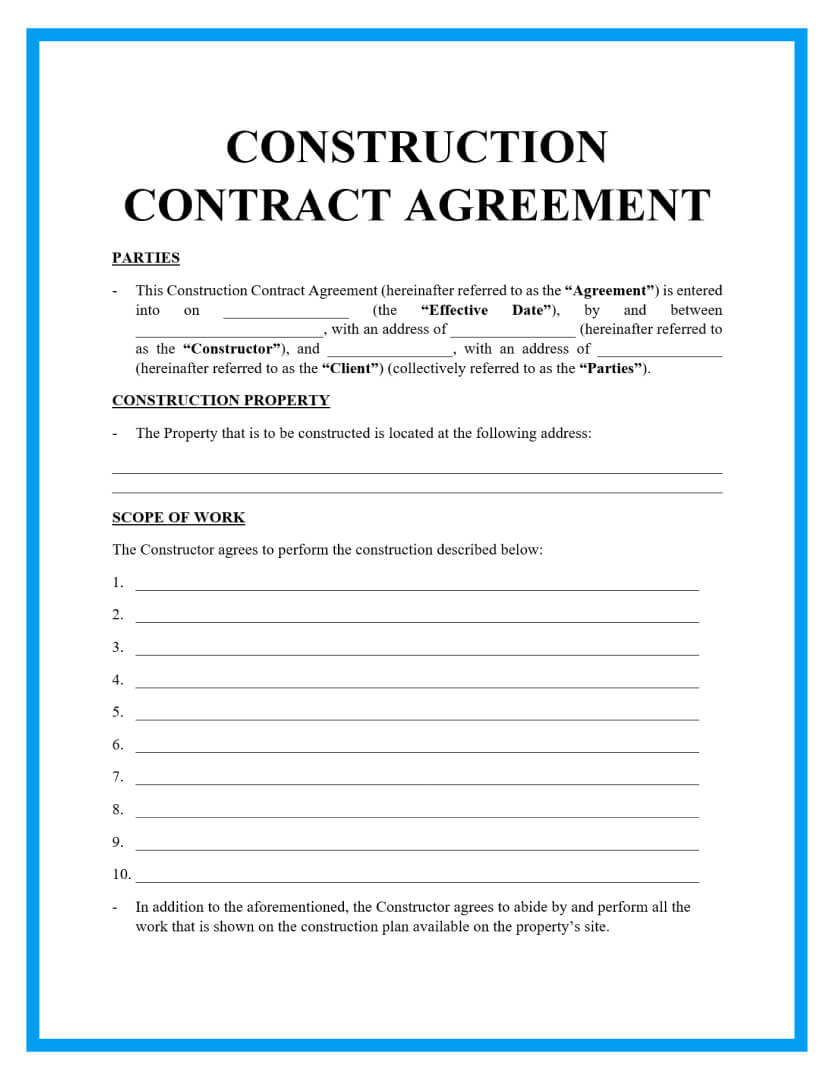
A worksheet and a contract serve different purposes. A worksheet is primarily an organizational or planning document. A construction contract is an agreement that establishes obligations between parties and can have legal consequences.
A blank construction contract template may contain party information, property details, scope of work, price, payment terms, dates, change procedures, warranties, insurance provisions, dispute procedures, and signature sections. The exact content depends on the jurisdiction, project, parties, and professional advice involved.
A worksheet may help prepare information that later appears in a contract, but the two should not be treated as interchangeable. A worksheet can contain a preliminary scope or estimate without becoming the final contractual agreement.
Contract documents should be reviewed carefully before signing. A generic online template may omit provisions required for a particular project or jurisdiction. It should not be represented as universally valid or sufficient for every construction situation.
Where a project involves substantial financial, legal, licensing, insurance, or regulatory obligations, appropriate professional review is more important than choosing a visually attractive template.
Practical Examples of Construction Worksheet Structures
Example A: Small Residential Renovation
A small renovation worksheet could begin with project name, address, owner, contractor, start date, target completion date, and revision. The main table could then list demolition, preparation, electrical work, plumbing, flooring, painting, fixtures, cleanup, and inspection.
Each task could have columns for responsible party, planned start, planned finish, estimated cost, actual cost, status, and notes. A separate materials section could track quantities and delivery status for items that need to arrive before installation.
A budget summary could show estimated total, actual total, remaining allowance, and approved changes. If the project is small, this can remain on one worksheet rather than becoming a complicated multi-sheet workbook.
The important point is that the worksheet reflects the project’s actual control needs. There is little value in adding dozens of fields that will remain blank throughout the project.
A renovation worksheet should also leave space for unexpected conditions. Existing structures can reveal conditions that were not visible during initial planning, so the document should distinguish original scope from subsequently approved changes.

Example B: Commercial Construction Schedule
A commercial worksheet may require more detailed control. Tasks can be grouped under preconstruction, design, procurement, site work, structure, building systems, interiors, inspections, commissioning, and closeout.
Each activity can have a unique ID, responsible party, planned dates, actual dates, duration, percentage complete, dependency, approval requirement, and notes. This structure helps project managers see which activities are late and which activities may be affected by a delay.
A Gantt-style view can then summarize the table visually. The worksheet remains the source of structured data while the timeline provides a faster visual interpretation.
Commercial projects may also need dedicated records for submittals, payment applications, change orders, and punch-list items. These should be linked to the project through consistent identifiers.
When a worksheet becomes too large, separate sheets or documents should be created rather than forcing every control into one page. The project overview can remain concise while detailed records are maintained separately.
Example C: Construction Cost Worksheet
A cost worksheet can organize items by phase and cost category. For example, permits, site preparation, excavation, foundation, framing, roofing, plumbing, electrical, HVAC, finishes, landscaping, and cleanup can each become categories.
Within each category, line items can include description, quantity, unit, unit price, estimated amount, actual amount, and variance. The worksheet can then summarize totals at the project level.
When using hypothetical figures for training, clearly identify them as examples. A sample budget should never be presented as a current market price unless it has been independently established for the relevant location, scope, date, and specifications.
Contingency can be shown as a separate planning allowance rather than hidden inside individual line items. This makes it easier to understand the relationship between expected work and uncertainty.
A good cost worksheet also records assumptions. For example, an estimate may depend on an assumed quantity, material grade, access condition, or scope boundary. Recording assumptions makes later revisions easier to explain.
Data Collection and Analysis
A construction worksheet becomes more useful when the information entered into it is collected consistently. Decide in advance what counts as an observation, estimate, planned value, actual value, approval, or completed activity.
For daily records, information should be captured close to the time the activity occurs. Waiting several days can make descriptions less precise. A daily report may include weather, work performed, labor, equipment, materials, deliveries, inspections, delays, meetings, and notes.
For schedule data, distinguish planned dates from actual dates. This enables later analysis of whether activities started or finished earlier or later than planned.
For cost data, distinguish estimates from actual expenditures. A variance is meaningful only when the underlying categories are comparable.
For materials, record units carefully. “10” is not enough information if nobody knows whether the quantity means pieces, boxes, meters, cubic meters, kilograms, or another measure.
Once data has been collected, simple analysis can reveal patterns. A project team might find that several delays are associated with late material deliveries, or that actual labor hours consistently exceed planned hours for a particular type of activity.
Analysis should lead to a decision or action. A worksheet filled with numbers but never reviewed does not provide much management value.
Charts can be useful when they simplify rather than decorate. A budget variance chart can highlight areas requiring attention, while a timeline can show overlapping work and approaching milestones.
Construction schedules can also support dependency analysis. If one delayed activity affects several downstream tasks, the team can prioritize corrective action based on the potential impact rather than simply reacting to whichever task is most visible.
For educational projects, analysis can be simpler. Students might compare planned and actual model dimensions, calculate material quantities, or explain why changing one design dimension changes the overall result.

Daily Reporting and Documentation
A daily construction worksheet should record what happened on a particular day rather than what was expected to happen. This distinction is important. A schedule describes planned work, while a daily report records actual conditions and activities.
Useful daily fields include project details, date, weather, work completed, crew information, equipment, materials received, delays, meetings, inspections, visitors, problems, and follow-up actions.
Descriptions should be specific enough that someone who was not on site can understand the event later. “Work delayed” is weaker than “Delivery arrived later than scheduled, moving the planned installation activity to the next available work period,” provided that description accurately reflects what occurred.
Daily reports should avoid unsupported assumptions. Record observations separately from interpretations when the distinction matters.
Consistent file naming also helps. A pattern such as ProjectNumber_Date_DailyReport can make records easier to retrieve. The exact naming convention should be standardized within the project or organization.
A daily record should also be reviewed according to the project’s established process. A blank form cannot enforce timely completion, version control, approval history, or communication procedures by itself.
Modern daily-report resources commonly provide versions for Excel, Word, and PDF because each format serves a different workflow. Excel is useful for calculations and structured rows, Word allows narrative flexibility, and PDF preserves a fixed printable layout.
For projects with many photographs, attachments, or approvals, a simple worksheet may eventually become insufficient. At that point, a dedicated project-management or field-reporting system may provide better control.
Even when software is used, the worksheet structure remains useful because it clarifies what information the system should capture.

Common Mistakes to Avoid
Making the worksheet too complicated
A template with dozens of unused fields can discourage completion. Start with the information necessary for the intended purpose and add fields only when they solve a recurring problem.
Mixing planned and actual information
Planned dates, estimated costs, actual dates, and actual costs should be clearly labeled. Mixing them makes the worksheet difficult to interpret and can produce misleading comparisons.
Using vague task descriptions
Task descriptions should identify meaningful work. “Construction” is too broad for most scheduling purposes. More precise descriptions make responsibilities and progress easier to track.
Ignoring assumptions
Estimates and plans often depend on assumptions. Record important assumptions so that later changes can be traced to a changed condition rather than appearing to be unexplained errors.
Failing to control revisions
When a worksheet changes, preserve a clear revision history where appropriate. Multiple conflicting versions can create confusion about which schedule, budget, or scope is current.
Treating a generic template as an official requirement
A template found online is not automatically an official government, owner, contractor, or regulatory form. Verify any project-specific requirements with the applicable controlling source.
Overusing color
Color can make a spreadsheet easier to scan, but it should not be the only way information is communicated. Status labels should remain understandable when the worksheet is printed in grayscale.
Failing to test formulas
Spreadsheet templates should be tested with simple sample data before use. Check totals, date calculations, percentages, and variance formulas to make sure they behave as intended.

Best Practices for Professional Use
Keep the first page focused on the information users need most often. Project identity, current status, major dates, scope summary, and key responsibilities are usually more useful at a glance than a large amount of detailed narrative.
Use consistent terminology throughout the project. If one document calls an activity “Site Preparation” and another calls it “Site Prep,” decide whether those terms refer to the same activity and standardize them where practical.
Separate source information from calculated information. A quantity entered by a user is different from a total calculated by a formula. Visually distinguishing input and calculated cells reduces accidental editing.
Document who prepared or updated the worksheet and when. This is especially useful when the same document is revised repeatedly.
Keep the template adaptable. Construction projects vary significantly, so the best template provides a stable core while allowing project-specific rows, categories, or notes.
Use tables when information needs to be compared and paragraphs when information needs explanation. A construction worksheet should not become a wall of prose when a simple table would communicate the same information more clearly.
Review the worksheet after the first real use. Ask which fields were unclear, which were unnecessary, and which important information was missing. Improve the template based on repeated experience rather than changing it randomly after every individual suggestion.
When a project involves multiple documents, establish relationships among them. A task ID can connect a schedule to a budget, a daily report, a submittal, and a change order. This creates a more coherent project record.
Finally, keep the blank master template separate from completed project copies. This prevents project-specific information from accidentally carrying into the next job.

Practical Solution
The most practical way to build a blank construction worksheet Template is to start with a simple core and expand it only when the project requires more control. Begin with project identification, scope, activities, dates, responsibility, status, and notes. Add materials, labor, costs, dependencies, approvals, or calculations only when those categories support the actual workflow.
For a small project, create one clean worksheet with a project header and a main activity table. Add a compact cost section if money needs to be tracked. If the project becomes more complex, move detailed schedules, estimates, daily logs, and budgets into separate sheets or documents while maintaining consistent project and task identifiers.
For Word, prioritize readable tables and printable page structure. For Excel, prioritize formulas, data validation, sortable columns, and clearly separated input cells. For Google Docs, prioritize collaboration and document readability; use Google Sheets when calculations and structured data become dominant. For PDF, prioritize fixed layout and printing or controlled distribution.
For students, simplify the worksheet and emphasize learning objectives. A student construction worksheet can include a project goal, drawing area, labels, measurements, materials, sequence of steps, and reflection. The design should encourage planning and reasoning rather than attempting to reproduce a professional project-control system.
For professional construction work, treat the worksheet as one component of a broader documentation system. Confirm scope against the governing contract and drawings, compare schedule information with the current project baseline, reconcile costs against approved financial records, and verify any legal or regulatory requirements separately.
Before releasing a template, test it with a realistic fictional project. Enter several tasks, dates, quantities, and costs. Check whether the information is easy to understand and whether calculations work correctly. Print the document and inspect it as a physical page if printable use is expected.
After the first real project, collect feedback from the people who actually complete and review the worksheet. If everyone repeatedly skips a field, determine whether the field is unnecessary or unclear. If people repeatedly add the same information in free-text notes, consider creating a dedicated field for it.
A useful worksheet should reduce administrative friction rather than create it. The objective is not to create the most elaborate document possible. The objective is to make important project information easier to capture, understand, compare, communicate, and retrieve.
The examples below illustrate different document structures that can help when selecting or designing a blank construction worksheet. They are examples of document layouts and should not be treated as universal requirements for every construction project.

Reference Examples
The following reference examples show different construction-oriented worksheet, schedule, scope, educational, contract, daily-log, and work-plan layouts. Each example is matched to the requested phrase in the order provided.
blank construction worksheet template free
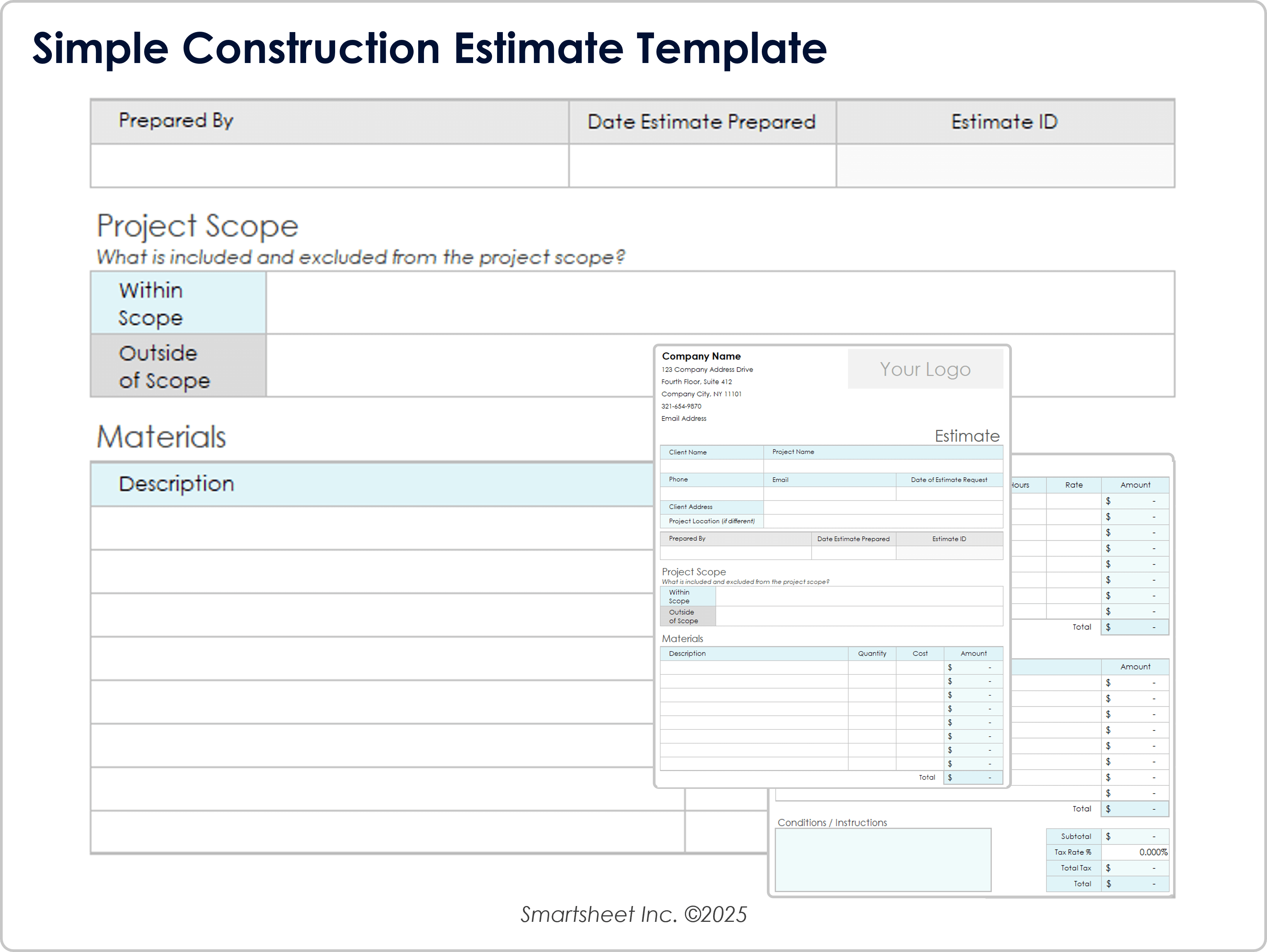
Source: Smartsheet
blank construction worksheet template pdf
Source: Smartsheet
blank construction worksheet template free download

Source: Smartsheet
blank construction worksheet template free printable

Source: Smartsheet
blank construction worksheet template word
Source: Smartsheet
blank construction worksheet template for students
Source: Teachers Pay Teachers
blank construction worksheet template excel
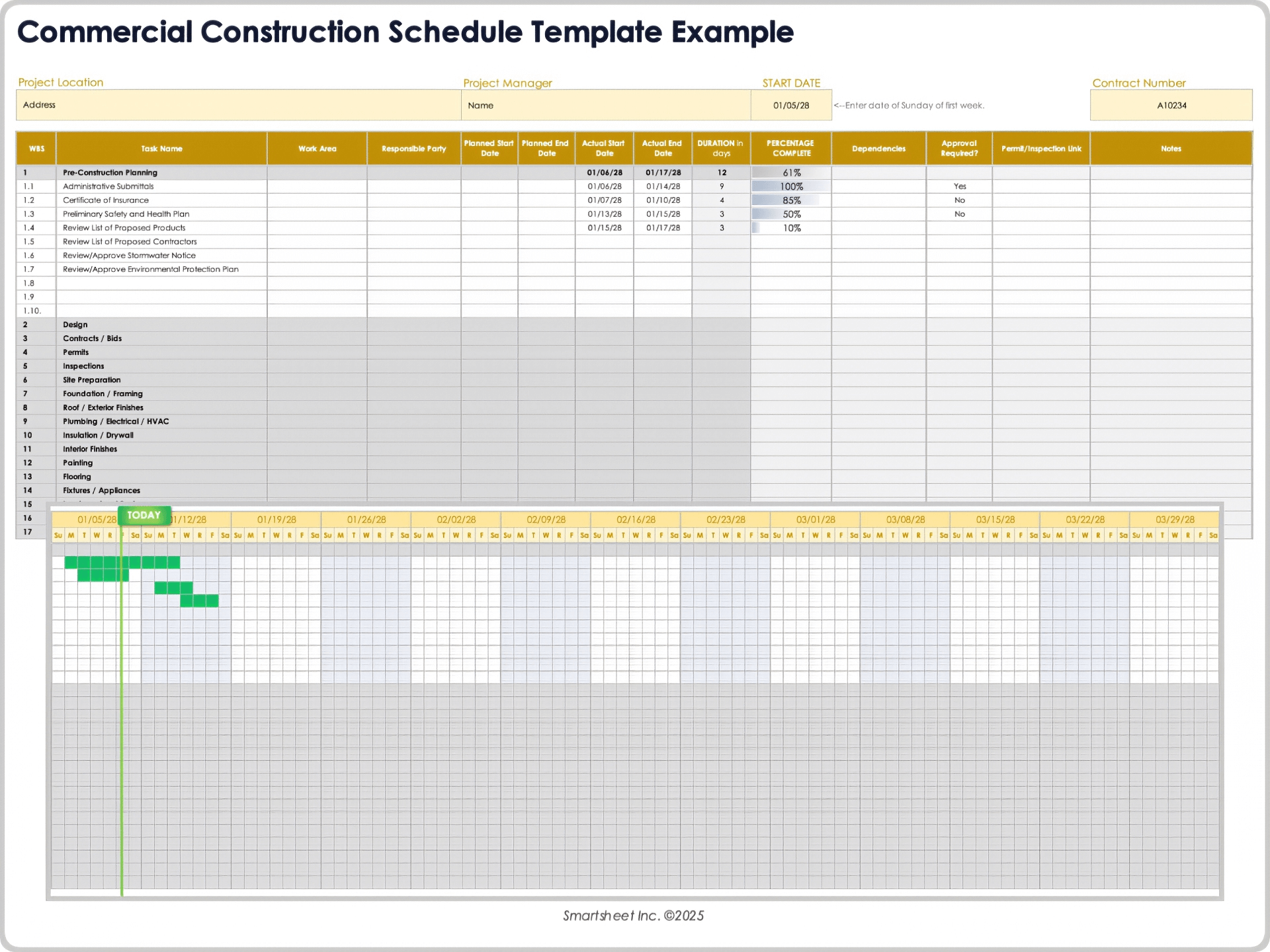
Source: Smartsheet
blank construction worksheet template google docs
Source: Smartsheet
blank construction contract template
Source: Signaturely
free printable construction templates pdf

Source: Smartsheet
construction templates free printable
Source: Smartsheet
construction work plan template pdf
Source: Smartsheet
Frequently Asked Questions
What should a blank construction worksheet include?
At minimum, it should identify the project and provide the fields needed for its purpose. A general worksheet can include project details, scope, tasks, responsible parties, dates, status, and notes. Cost, materials, labor, dependencies, or approvals can be added when relevant.
Is a blank construction worksheet the same as a construction project plan?
No. A worksheet is a flexible document structure, while a project plan usually provides a broader roadmap covering objectives, scope, schedule, resources, responsibilities, risks, and other project controls. A worksheet can be one part of a project plan.
Should I use Word or Excel for a construction worksheet?
Use Word when narrative, printing, signatures, and fixed page layout are important. Use Excel when calculations, quantities, dates, repeated rows, sorting, filtering, or schedule tracking are central to the task.
Can a construction worksheet be used in Google Docs?
Yes. A document-style worksheet can work well in Google Docs when collaboration and narrative editing are important. If the worksheet requires extensive calculations or structured data, Google Sheets is generally more suitable.
What should a construction worksheet for students contain?
A student version can include a project goal, drawing or design area, labels, measurements, materials list, sequence of construction steps, simple calculations, and reflection questions. The complexity should match the students’ age and learning objective.
What is the difference between a construction worksheet and a construction contract?
A worksheet is primarily a planning or information-recording tool. A construction contract establishes an agreement between parties and can create legal obligations. A worksheet should not be assumed to replace a properly prepared contract.
Can I turn a worksheet into a PDF?
Yes. Word and spreadsheet documents can generally be exported or printed to PDF. Before distributing the PDF, check page breaks, readability, formulas, field placement, and whether the intended users need an editable or fillable version.
How detailed should a construction worksheet be?
It should be detailed enough to support its intended purpose without becoming unnecessarily difficult to complete. A simple repair may need only a few fields, while a complex commercial project may require separate schedules, budgets, daily reports, and change records.
Should estimated and actual costs be separate?
Usually, yes. Separate fields make it possible to compare the original expectation with recorded performance. The labels and calculation method should be consistent throughout the project.
How often should a construction worksheet be updated?
The frequency depends on its purpose. A planning worksheet may be updated when the plan changes, while a daily report is normally completed for each reporting period. A live schedule or budget may require more frequent updates.
Can a template guarantee that a construction project will be compliant?
No. A template can improve organization and consistency, but compliance depends on applicable laws, regulations, contracts, specifications, permits, professional requirements, and project procedures. Those requirements should be verified independently.
Conclusion
A well-designed blank construction worksheet Template gives construction information a consistent place to live. The strongest worksheets begin with a clear purpose, identify the project accurately, define scope, organize tasks, distinguish planned information from actual results, and provide enough room for costs, materials, labor, notes, or approvals when those details are genuinely needed. Choosing between Word, Excel, Google Docs, or PDF should follow the workflow rather than the other way around.
For professionals, the worksheet works best as part of a broader documentation system that connects schedules, budgets, daily records, scopes, changes, and closeout information. For students, the same basic idea can become a simpler planning tool that develops design, measurement, sequencing, and documentation skills. Whether the goal is a printable page or a structured spreadsheet, the principle remains the same: capture the right information in a format that people can understand and use.
Before adopting any template, test it with a realistic example, verify the fields against the project’s actual needs, check calculations and formatting, and confirm any applicable contractual or professional requirements. A blank construction worksheet template is most valuable when it makes real work easier, clearer, and more consistent rather than simply adding another document to the project file.

Used thoughtfully, a blank construction worksheet Template can become a practical foundation for planning, estimating, scheduling, documenting, teaching, and reviewing construction work. The best version is not the one with the most fields; it is the one that captures essential information clearly, supports sound decisions, and remains simple enough for its intended users to complete accurately.
