The most useful manual is not simply a long document. It is an operational reference that a supervisor can audit, a security officer can follow during a shift, a manager can review during an incident, and an organization can update when risks or operating conditions change. A strong document therefore combines policy-level direction with practical procedures and clearly defined records.
Organizations searching for a security operations manual template often want more than a blank document. They need to understand what belongs in the manual, which procedures should be separated into supporting forms, how the document should be controlled, and how different formats such as PDF, Word, and Excel can work together.
This guide explains how to build that documentation system from the ground up. It covers risk assessment, access control, patrols, incident reporting, emergency response, communications, training, audits, document control, performance measurement, and practical implementation.
The goal is to provide a reusable framework rather than present one universal policy as mandatory. Security requirements differ by facility, industry, jurisdiction, contract, technology environment, and risk profile. A template should therefore be treated as a starting structure that must be adapted and reviewed by the responsible organization.
What Is a Security Operations Manual?
A security operations manual is a controlled document that describes how an organization’s security function is managed and performed. It normally establishes the purpose and scope of security operations, defines roles and authority, identifies routine duties, explains response procedures, and specifies how activities are recorded and reviewed.
The distinction between policy and procedure is important. A policy expresses an organizational requirement or management position, while a procedure explains how that requirement is implemented. NIST guidance similarly distinguishes policies from standards, guidelines, and procedures, noting that procedures provide more detailed steps for accomplishing security-related tasks. :contentReference[oaicite:0]{index=0}
A manual can contain both levels when that arrangement makes sense, but readers should be able to tell the difference. For example, a policy might state that access to restricted areas is limited to authorized personnel. The corresponding procedure can explain how officers verify credentials, handle visitors, document exceptions, and escalate attempted unauthorized entry.
Modern security operations may include physical protection, information security, emergency preparedness, monitoring, reporting, risk management, and business resilience. The Secure Controls Framework describes security operations as an operational discipline involving defined processes, personnel, monitoring, escalation, procedures, and continuous improvement rather than simply a security operations center function. :contentReference[oaicite:1]{index=1}
The manual therefore acts as the operational backbone of the security program. It should connect management expectations with the forms, checklists, logs, post orders, training records, and reports used during day-to-day work.
Why a Security Operations Manual Matters
Consistency is one of the strongest reasons to create a formal manual. If two officers receive different verbal instructions about the same situation, the organization has created an avoidable control gap. Written procedures make expectations repeatable and provide a common reference for supervisors, officers, contractors, and managers.
A manual also reduces dependence on individual memory. Security work frequently involves recurring activities such as opening and closing checks, patrols, access verification, alarm response, visitor management, equipment inspections, and incident reporting. A documented workflow helps staff perform those activities in a predictable sequence.
Documentation also supports accountability. If an incident occurs, management should be able to determine which procedure applied, who had responsibility, what was reported, what actions were authorized, and whether the procedure itself needs improvement. Good records turn an event into information that can be analyzed instead of leaving it as an isolated anecdote.
Management support is equally important. HPE’s security policy guidance emphasizes that security policies depend on organizational cooperation and management support, and that specific procedures should be developed from the broader policy framework. :contentReference[oaicite:2]{index=2}
Finally, the manual provides a foundation for training and auditing. A new employee can learn the expected process, while an auditor or supervisor can compare actual performance with documented requirements. This makes the manual useful not only during normal operations but also during onboarding, inspections, incident reviews, and continuous improvement.
Core Structure of a Security Operations Manual Template
A practical template should begin with document control. Include the document title, document number, owner, approval authority, effective date, revision number, classification if applicable, and review date. This information prevents staff from unknowingly relying on an obsolete version.
The next section should define purpose and scope. State what the manual is designed to accomplish, which locations or functions it covers, and which personnel must follow it. If contractors or third-party security providers are included, their relationship to the manual should be explicit.
Roles and responsibilities should follow. Identify the security manager, supervisors, officers, control-room personnel, relevant facilities or IT personnel, emergency coordinators, and management decision-makers. Responsibilities should be written as actions rather than vague job descriptions.
The operational section can then contain procedures for access control, patrols, monitoring, key management, visitor processing, incident response, emergency response, communications, evidence or record handling, equipment checks, and shift handover. Each procedure should identify the trigger, responsible role, required action, escalation condition, documentation requirement, and completion or closure criteria.
Supporting appendices can hold forms and detailed site-specific information. This keeps the main manual readable while preserving a controlled connection to daily activity reports, inspection forms, emergency contact lists, post orders, risk registers, and incident forms.
Document Control and Revision Management
Document control should answer five basic questions: What document is this? Who owns it? Which version is current? When did it become effective? When will it be reviewed? These questions sound simple, but missing answers create practical problems when different teams keep different copies.
Use a revision table that records the revision number, date, description of change, author or responsible function, and approval. Major operational changes should trigger a review of related procedures rather than being inserted into one section without checking dependencies.
For example, changing a facility’s access-control system may affect the access procedure, visitor process, officer training, emergency response instructions, contact lists, audit checklist, and post orders. A controlled revision process helps ensure that the whole system changes consistently.
Electronic distribution should also be controlled. Staff should have a clear method for determining which copy is current. Archived versions should be retained when appropriate, but obsolete versions should not remain in locations where staff could accidentally use them.
A useful review cycle includes routine scheduled review plus event-driven review. Significant incidents, changes in site layout, new technology, changes in responsibilities, new contractual requirements, and regulatory changes can all justify an earlier review.
Risk Assessment as the Foundation
A security manual should be based on the actual risks faced by the organization. Begin by identifying assets, threats, vulnerabilities, existing controls, possible consequences, and operational dependencies. Assets may include buildings, equipment, information, inventory, vehicles, critical systems, employees, visitors, and services.
Risk assessment should not be treated as a one-time paperwork exercise. Conditions change. A construction project can alter patrol routes, a new tenant can change access requirements, a technology upgrade can create new dependencies, and a previous incident can reveal an overlooked vulnerability.
A practical risk register can contain fields for risk ID, asset, threat, vulnerability, likelihood, impact, existing controls, additional controls, owner, target date, status, and review date. The scoring method should be documented so different assessors apply the same logic.
Risk assessment templates commonly use likelihood and impact to establish priority. Smartsheet’s security risk assessment guidance, for example, describes documenting impact, likelihood, risk levels, and review information when assessing security components. :contentReference[oaicite:3]{index=3}
The manual should explain how identified risks influence operational decisions. A high-priority risk may require additional patrols, restricted access, stronger monitoring, revised emergency procedures, additional training, or management escalation. The important point is to connect assessment results directly to operational controls.

Access Control Procedures
Access control procedures define who may enter a facility, restricted area, system, or asset location and under what conditions. The manual should distinguish employees, contractors, visitors, delivery personnel, vendors, emergency responders, and other categories that may require different treatment.
A strong procedure starts with authorization. It should identify the approved credential or authorization method, who can approve access, how exceptions are handled, and what happens when credentials are missing, expired, damaged, or inconsistent with the person’s identity or assignment.
Visitor procedures should cover registration, identification requirements where applicable, host confirmation, temporary credentials, escort rules, restricted areas, departure recording, and handling of unclaimed or unauthorized visitors. The exact requirements should reflect applicable privacy and legal obligations.
Physical access controls should also address doors, gates, loading areas, keys, access cards, mechanical locks, alarmed entrances, and after-hours entry. The manual should explain who can authorize changes and how access privileges are reviewed or withdrawn.
Access records should be treated as operational evidence. A log should make it possible to reconstruct relevant access activity without collecting unnecessary personal information. Retention periods and access to the records should be defined by organizational requirements.
Patrols, Inspections, and Security Checks
Patrol procedures should tell officers what to inspect, where to go, when to perform checks, and what conditions require escalation. Avoid instructions such as “patrol regularly” when a more precise operational instruction is possible.
A useful patrol procedure identifies checkpoints or zones, inspection criteria, expected frequency, abnormal-condition reporting, and documentation requirements. For example, an inspection may cover perimeter barriers, doors, windows, lighting, alarms, restricted areas, fire equipment, hazardous conditions, and signs of unauthorized activity.
Patrol routes should be designed around risk rather than convenience. High-value assets, isolated areas, access points, and locations with known vulnerabilities may deserve greater attention. Where operationally appropriate, supervisors can vary patrol timing while retaining minimum coverage requirements.
Every abnormal observation should have a clear response path. A damaged lock may require maintenance notification and temporary access control. An alarm may require a specific response procedure. A suspicious condition may require escalation to a supervisor or other authorized party.
Patrol records should be concise but useful. Time, location, observation, action taken, and follow-up status are generally more valuable than long repetitive narratives. The goal is to create an auditable record without encouraging officers to spend excessive time completing paperwork.

Post Orders and Site-Specific Instructions
Post orders are a practical extension of the security operations manual. While the manual describes the overall security program, post orders translate those requirements into instructions for a particular location or position.
A post order can identify the post purpose, location, shift responsibilities, patrol requirements, access rules, equipment, emergency procedures, reporting requirements, prohibited actions, escalation contacts, and handover expectations.
Site-specific instructions are especially useful when multiple facilities operate under one security program. A corporate security manual can establish common principles while individual post orders describe local differences such as gates, patrol zones, restricted rooms, delivery procedures, and emergency contacts.
Post orders should be reviewed whenever site conditions change. New construction, changes in tenant occupancy, new access systems, modified operating hours, changed emergency routes, or altered staffing can make previously accurate instructions obsolete.
A simple quality test is whether a properly trained officer who has not previously worked the post could understand the expected duties without relying on undocumented personal knowledge. If important decisions still depend on “how we usually do it,” the instructions may need improvement.

Key and Asset Control
Key control is a small operational function that can have major security consequences. A manual should define how keys, access cards, mechanical credentials, equipment, and other controlled assets are issued, returned, stored, and reconciled.
A key-control record normally identifies the key or asset, location or lock, person receiving it, issue date and time, return date and time, and verification or signature information. The exact fields should be adapted to the organization’s process.
Lost or unreturned keys should trigger a documented escalation process. Depending on the risk, the organization may need to notify a supervisor, disable an access credential, change a lock, review affected areas, or conduct a reconciliation.
Periodic reconciliation is important because a complete log does not automatically mean the process is effective. Supervisors should compare records with physical inventory and investigate discrepancies.
Controlled assets should also have clear ownership. The security function may manage the log while facilities, IT, human resources, or another department retains authority over specific assets. The manual should make these boundaries explicit.

Daily Activity Reporting
A daily activity report provides a structured record of what happened during a security shift. It can include routine patrols, access-control issues, alarms, maintenance observations, visitor activity, unusual conditions, notifications, and other relevant events.
The reporting procedure should distinguish routine activity from incidents requiring a separate incident report. Otherwise, daily reports can become overloaded with information that belongs in a more detailed investigation record.
Good daily reporting uses objective language. Officers should record observable facts, times, locations, actions, notifications, and outcomes rather than unsupported assumptions about motives or causes.
Supervisors should review reports for completeness and patterns. A single broken light may be a maintenance issue; repeated observations of damaged lighting across a perimeter may indicate a larger control problem.
Digital reporting can improve searchability and trend analysis, but paper forms can remain useful in environments where connectivity is limited. The manual should define the official record and how paper records are transferred into the organization’s retention system when required.

Incident Reporting and Investigation
The incident procedure should explain what qualifies as an incident, who must be notified, how urgent situations are escalated, and which form or system must be used for documentation.
Incident categories can include unauthorized access, theft or suspected loss, property damage, alarm activation, safety concerns, security breaches, suspicious activity, policy violations, service disruption, and other events defined by the organization.
The initial report should capture essential facts such as date, time, location, people or assets involved where appropriate, observed circumstances, immediate actions, notifications, and current status. Investigative conclusions should be separated from initial observations when facts are still developing.
Escalation criteria should be objective wherever possible. Severity, operational impact, risk to people, potential legal implications, critical asset involvement, business interruption, and external notification requirements may influence escalation.
Post-incident review is equally important. The organization should ask what happened, how the response worked, whether procedures were followed, whether controls were adequate, and what should change. The result may be a corrective action, training update, technical control, or revision to the security operations manual.
Emergency Response Procedures
Emergency procedures should provide clear direction for foreseeable events without attempting to replace emergency services or specialized professional response. The manual should define organizational responsibilities and escalation rather than encouraging personnel to perform tasks outside their training or authority.
Typical scenarios may include fire alarms, severe weather, medical emergencies, power failures, security breaches, evacuation, sheltering, hazardous conditions, and significant service interruptions. The exact scenario list should be based on the site’s risk assessment.
Each procedure should establish how the event is detected, who takes initial control, what immediate organizational actions are expected, who must be notified, how people are accounted for when applicable, and how the situation transitions to recovery.
Emergency contact information should be maintained separately when possible so that changing a telephone number does not require rewriting the entire manual. The manual can point to the controlled contact list and specify who is responsible for keeping it current.
Exercises and reviews are important because emergency procedures that look clear on paper can fail in practice. Testing should identify communication gaps, unclear responsibilities, inaccessible equipment, outdated contact information, and procedural conflicts.

Emergency Contacts and Communications
Communication procedures should specify how security personnel receive information, how urgent messages are escalated, and which channels are approved for routine and emergency communication.
A contact list should distinguish emergency services, security management, facility management, technical support, senior management, building representatives, and other relevant contacts. Avoid placing unnecessary personal information in widely distributed documents.
Contact information should have an owner and review date. A list is not controlled simply because it exists; it is controlled when someone is responsible for verifying that the information remains accurate.
Communication during an incident should prioritize clarity. Messages should identify what happened, where it happened, what immediate action has been taken, what assistance is needed, and who is responsible for the next decision.
Where communication systems have known limitations, the manual should document alternatives. A security operation should not depend on a single communication method without considering what happens if that method becomes unavailable.

Visitor Management and Entry Records
Visitor management should provide enough information to establish who entered, why they entered, who authorized the visit when relevant, and when they departed. The procedure should be proportionate to the facility’s risks.
A visitor log can include date, visitor name, organization, time in, time out, purpose, host, credential number, and other appropriate fields. Organizations should avoid collecting information that is unnecessary for the legitimate security purpose.
Visitor procedures should also cover contractors and delivery personnel. These groups may require different verification, access areas, escort rules, equipment controls, or work authorization than ordinary visitors.
After-hours visitors deserve particular attention because normal administrative controls may be unavailable. The manual should specify who can approve entry and how officers verify that approval.
Visitor records should be retained, protected, and disposed of according to organizational requirements. A good manual connects the log to privacy, records management, and incident procedures without making the security officer responsible for unrelated legal determinations.

Security Training and Competency
Training should be tied directly to the responsibilities defined in the manual. New personnel should understand site rules, reporting requirements, emergency procedures, access controls, communication protocols, equipment use, and escalation expectations before assuming independent duties.
Refresher training should be triggered by more than the calendar. Procedure changes, new equipment, recurring errors, audit findings, incidents, and changes in site conditions can all justify targeted retraining.
Training records should identify the employee or role, training topic, date, trainer or responsible function, applicable site, and completion status. Additional fields can be used when the organization requires competency verification or formal assessment.
Managers should distinguish attendance from competency. Someone can attend a briefing without demonstrating that they understand how to apply the procedure. Where appropriate, practical exercises, scenario discussions, knowledge checks, or supervised demonstrations can provide stronger evidence of readiness.
Training records also help identify systemic problems. If multiple employees repeatedly misunderstand the same procedure, the issue may be the manual itself rather than individual performance.

Security Audit and Inspection Programs
An audit program checks whether documented security controls exist, are understood, and are being applied consistently. It should not be limited to checking whether forms have been completed.
Auditors can examine access records, patrol logs, incident reports, key inventories, training records, equipment inspections, emergency contact lists, and corrective-action records. They should also compare documentation with actual conditions at the site.
Audit criteria should be derived from the manual and related procedures. Each finding should identify the requirement, observed condition, evidence, risk or consequence, responsible owner, corrective action, and target date where appropriate.
Inspection frequency should reflect risk. Critical controls may require frequent verification, while lower-risk administrative controls may be reviewed less often. The frequency should be documented rather than left entirely to personal preference.
Corrective actions should be tracked to closure. A finding should not be considered resolved merely because someone promises to address it. Evidence of completion should be recorded and, when appropriate, independently verified.

Choosing Between PDF, Word, and Excel Formats
Different formats serve different purposes. A PDF is generally useful when a document needs to be distributed as a controlled, visually consistent reference. It is particularly appropriate for an approved manual or a finalized procedure that readers should not casually modify.
Microsoft Word is generally more convenient during drafting, review, editing, and version-controlled authoring. A security operations manual template word file can therefore be useful as a working master before an approved version is exported or published in another format.
Excel is better suited to structured records and calculations. A security operations manual template excel workbook can support risk registers, asset inventories, training records, inspection schedules, corrective-action trackers, or KPI calculations rather than serving as the primary narrative manual.
Organizations should avoid treating file format as a substitute for document governance. A well-controlled Word document can be more useful than a poorly maintained PDF, and a carefully designed spreadsheet can be more valuable than a visually impressive but unstructured manual.
The strongest approach is usually a document ecosystem: an approved manual for overall requirements, editable source documents for controlled authoring, spreadsheets for structured operational data, and standardized forms for recurring records.
How to Build a Security Operations Manual Step by Step
Start by defining the operational environment. List the facilities, operating hours, security roles, major assets, critical services, access points, technology systems, contractors, and known dependencies. This creates the context for everything that follows.
Next, conduct or update the security risk assessment. Do not begin by copying procedures from another organization and assuming they fit. Determine what your organization needs to protect and which threats or vulnerabilities require documented controls.
Third, create a responsibility matrix. For each important security activity, identify who performs it, who supervises it, who approves exceptions, who receives notifications, and who owns corrective actions.
Fourth, write the core procedures. Start with the highest-risk activities and work toward routine processes. Use consistent language, numbered steps, decision points, escalation conditions, and record requirements.
Fifth, build the supporting forms and logs. Each form should capture information that is actually needed for operations, analysis, accountability, or compliance. Remove fields that nobody uses because unnecessary paperwork reduces adoption.
Sixth, test the draft. Ask someone who understands the operation but was not involved in writing the procedure to follow it. Confusion during the test is valuable evidence that the wording, sequence, responsibilities, or terminology needs improvement.

Data Collection, Reporting, and Analysis
A security program produces operational data every day. Patrol records show activity, incident reports show events, visitor records show access patterns, training records show competency activity, and audit findings show control weaknesses.
The first analytical requirement is data consistency. If one officer records “unauthorized entry,” another writes “access issue,” and a third uses “door violation,” trend analysis becomes harder. Controlled categories and clear definitions improve the quality of the resulting dataset.
The second requirement is completeness. A form should collect the minimum information needed to answer the questions management will actually ask. If leadership needs to know where incidents occur, the location field must be standardized. If response time matters, the form needs reliable time fields.
The third requirement is review. Data should be analyzed at a frequency appropriate to its purpose. Supervisors may review daily activity reports every shift, while management may review trends monthly or quarterly.
Useful indicators might include incident volume by category, recurring locations, overdue corrective actions, patrol completion, access-control exceptions, training completion, audit findings, and emergency exercise results. Metrics should support decisions rather than exist simply because they are easy to count.

Business Continuity and Security Operations
Security operations are often connected to business continuity because a security incident can interrupt access, facilities, communications, information systems, supply chains, or critical services.
A continuity section should identify which security functions are essential during disruption and which activities can be reduced, postponed, or transferred. It should also identify dependencies such as power, communications, access-control systems, surveillance systems, staffing, and alternate work locations.
Continuity planning should distinguish prevention from recovery. Preventive controls reduce the likelihood or impact of disruption, while recovery arrangements help restore essential operations after an event has occurred.
Emergency procedures and continuity procedures should be connected but not confused. Emergency response focuses on immediate protection and stabilization; continuity focuses on sustaining or restoring important operations.
A business continuity template can therefore be useful as a supporting document within the broader security program. It should identify critical functions, responsibilities, recovery priorities, communication arrangements, and review requirements.

Practical Example: A Small Commercial Facility
Consider a hypothetical commercial facility operating seven days per week with a main entrance, loading area, restricted storage room, employee access cards, contractors, and an after-hours security post. The organization wants a simple but controlled security documentation system.
The manual begins with purpose, scope, roles, access control, patrols, incident reporting, emergency response, key management, visitor management, communications, training, and auditing. A separate post order describes the actual duties at the facility’s security post.
The risk assessment identifies unauthorized entry, theft, fire, equipment failure, after-hours access, and communication loss as important scenarios. Each risk receives an owner and appropriate controls rather than being listed without follow-up.
Daily operations use a patrol checklist, visitor log, key-control record, daily activity report, and incident report. Supervisors review completed records and enter significant corrective actions into a central tracker.
Once a month, management reviews trends. Suppose several reports show recurring problems with a loading-area door. The organization can investigate the physical control, maintenance history, access permissions, and patrol observations instead of treating each report as a separate event.

Common Mistakes to Avoid
The first common mistake is making the manual too generic. Statements such as “maintain security” or “respond appropriately” do not tell personnel what to do. Procedures should be specific enough to guide action while remaining flexible enough for legitimate judgment.
The second mistake is copying another organization’s manual without adapting it. A procedure designed for an airport, hospital, campus, warehouse, or data center may contain assumptions that do not apply elsewhere.
The third mistake is creating excessive paperwork. Every additional field has a cost. If forms take too long to complete, personnel may rush, omit information, or create low-quality records.
The fourth mistake is failing to maintain the document. A manual with outdated contacts, old access procedures, discontinued equipment, or obsolete site maps can create more risk than a shorter but current document.
The fifth mistake is separating the manual from actual practice. If officers routinely use an unofficial process because the documented procedure is impractical, the organization needs to investigate the gap and either correct the process or revise the procedure.
Best Practices for Professional Documentation
Use plain language. A security manual should be understandable to the personnel who rely on it during real operations, not merely impressive to someone reviewing the document.
Use consistent terminology. If the organization defines “security incident,” “emergency,” “visitor,” “restricted area,” and “supervisor,” use those terms consistently throughout the manual and supporting forms.
Separate stable information from frequently changing information. Procedures should contain durable requirements, while contact lists, rosters, and similar volatile information can be maintained in controlled appendices or systems.
Use version control on every significant document. A procedure, form, checklist, post order, or appendix that can materially affect operations should have an identifiable owner and revision status.
Finally, design the manual for actual use. Clear headings, short sections, numbered procedures, tables, decision points, and well-organized appendices are usually more useful than dense pages of uninterrupted prose.
Practical Solution: How to Implement Your Manual
Begin with a master document that contains the purpose, scope, governance, responsibilities, risk-management method, core operational procedures, reporting requirements, training requirements, audit process, and document-control rules. Do not attempt to put every operational form into the main document.
Create a controlled library of supporting documents next. Include site post orders, patrol checklists, visitor logs, key-control records, incident forms, emergency contact lists, inspection checklists, training records, risk registers, and corrective-action trackers.
Assign an owner to every document. The owner should be responsible for accuracy, review, change requests, and coordination with affected functions. Ownership is especially important when a document contains information that changes frequently.
Test each procedure with the people expected to use it. Ask them to identify unclear instructions, missing decision points, unnecessary fields, unrealistic timing assumptions, and missing escalation contacts. Practical feedback often reveals weaknesses that are invisible during desk-based drafting.
After approval, train personnel on the procedures that apply to their roles. Explain where current documents are located, how forms are completed, what events require escalation, and how employees should report gaps or outdated instructions.
Establish a review calendar and an event-driven review rule. At minimum, documents should be reviewed according to the organization’s risk and governance requirements. A major incident, site change, technology change, organizational change, or significant audit finding should trigger an earlier review.
Finally, measure whether the documentation system is working. Look for recurring errors, overdue corrective actions, inconsistent reports, incomplete logs, repeated questions, and procedures that staff routinely bypass. These signals can be used to improve both operations and the manual itself.
Reference Examples
The following reference examples illustrate the kinds of documents, forms, layouts, and operational records that can support a security documentation system. They are examples of document structures rather than universal requirements or endorsements of a particular format.
security operations manual template pdf

Source: Scribd — Brevard Community College Security Department Operations Manual preview
security operations manual template free
Source: Etsy — Standard Operating Procedure template preview
security operations manual template free download
Source: Etsy — GuardGuides Security Post Order template preview
security operations manual template word

Source: Scribd — Emergency Response Plan template preview
security operations manual template download
Source: PDFfiller — Security Daily Activity Report preview
security operations manual template excel
Source: Etsy — GuardGuides Security Guard Tour Tracker preview
security management operations manual
Source: Scribd — Business Continuity Plan document preview
template for operations manual
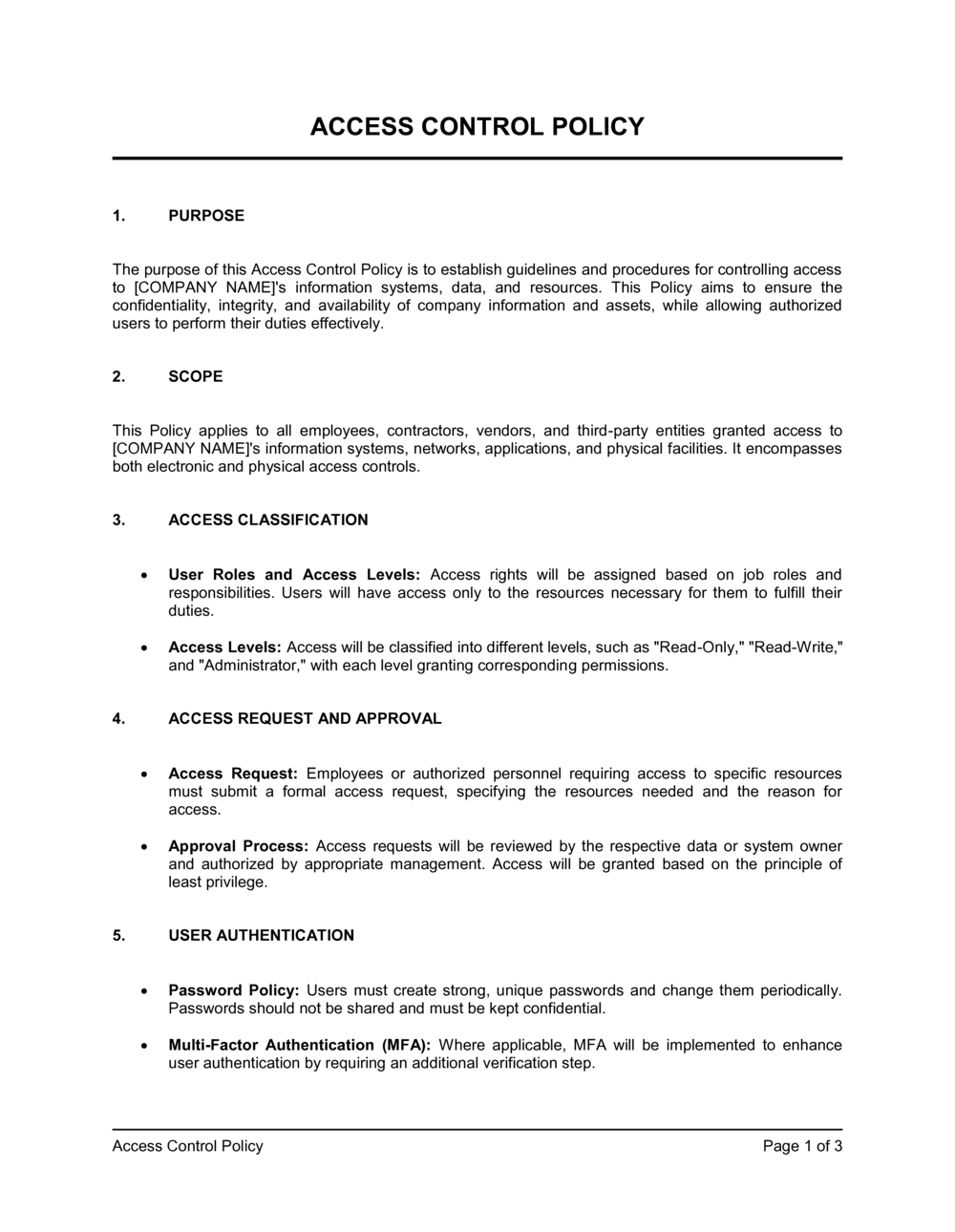
Source: Business-in-a-Box — Access Control Policy template
security officer manual pdf
Source: Scribd — Security Training Records template preview
security management manual pdf
Source: Scribd — Monash University Emergency Response Plan template preview
operations security policy pdf
Source: Smartsheet — Safety Audit Template
security policy and procedures manual pdf
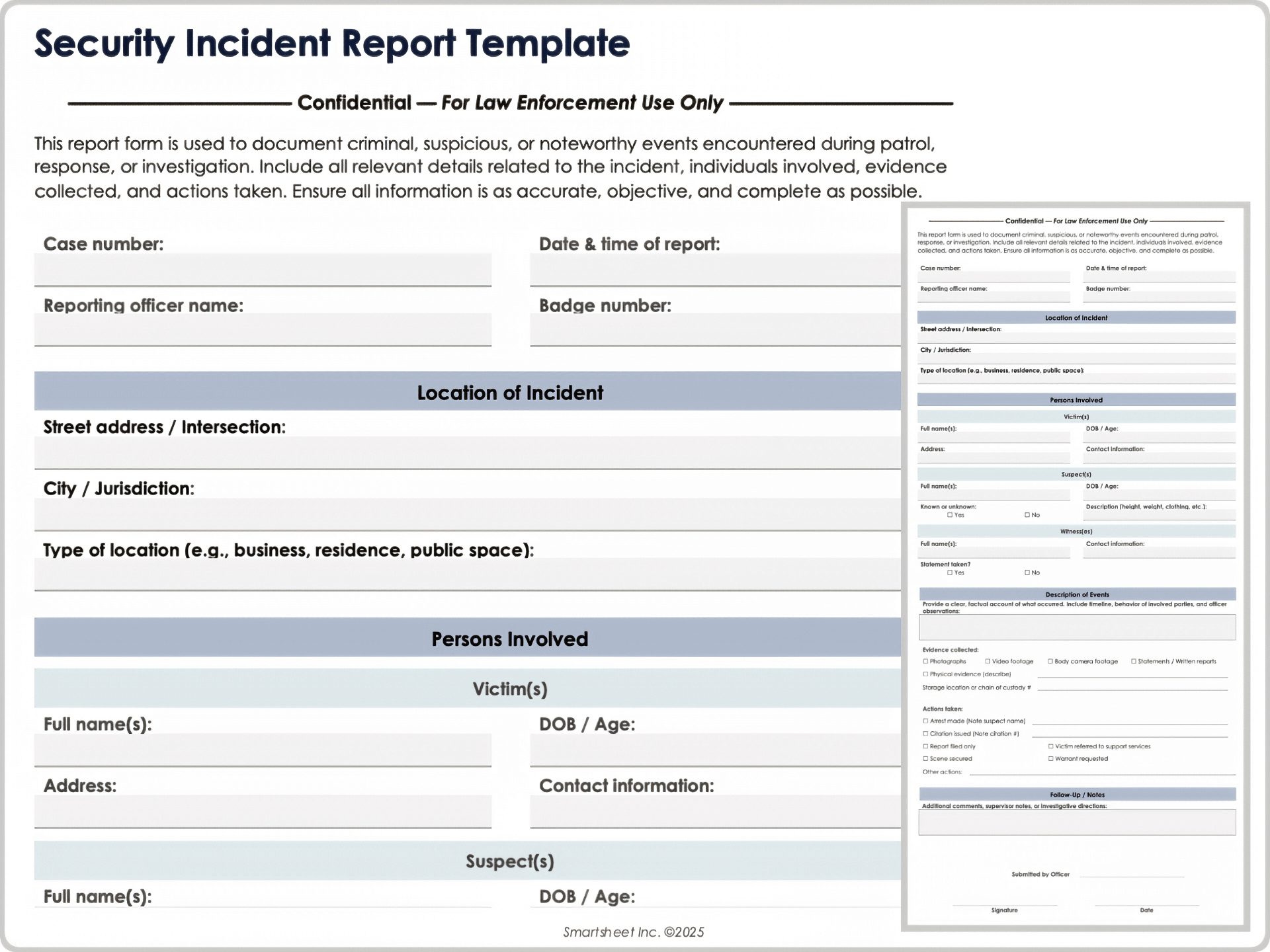
Source: Smartsheet — Security Incident Report Template
Frequently Asked Questions
What should a security operations manual contain?
A comprehensive manual normally contains document control, purpose and scope, responsibilities, risk management, access control, patrols, incident reporting, emergency response, communications, training, audits, records management, and review procedures. Site-specific post orders and operational forms can be maintained as controlled supporting documents.
How detailed should a security operations manual be?
It should be detailed enough to produce consistent results without becoming so complicated that personnel cannot use it during normal operations. High-risk or frequently misunderstood activities deserve precise procedures, while straightforward administrative tasks can remain concise.
Should a security manual be in PDF or Word?
Both can be useful. Word is generally convenient for controlled drafting and editing, while PDF is useful for distributing an approved, visually stable version. Organizations may also use spreadsheets for structured records such as risk registers, training logs, inspection schedules, and corrective-action tracking.
Can a free template be used as an official security manual?
A free template can provide a useful structure, but it should not automatically be treated as an organization’s approved policy. It needs to be adapted to the site’s risks, responsibilities, technology, contracts, applicable requirements, and operating conditions, then reviewed and approved through the organization’s governance process.
What is the difference between a security manual and post orders?
The manual normally describes the broader security management system and operational framework. Post orders are more specific and explain what personnel assigned to a particular post or location must do. Multiple post orders can operate under one organization-wide manual.
How often should a security operations manual be reviewed?
The appropriate review frequency depends on the organization’s risk and governance requirements. A scheduled review should be combined with event-driven reviews after significant incidents, organizational changes, technology changes, facility changes, or identified control weaknesses.
Should incident forms be part of the manual?
They can be included as appendices, but maintaining them as separate controlled forms is often easier. The manual should clearly identify which form applies, when it must be completed, who receives it, and how the resulting record is retained and reviewed.
How can a security manual improve training?
The manual provides a common reference for onboarding and refresher training. It can also define competency requirements, required training topics, reporting expectations, and the circumstances that trigger additional instruction.
How can management tell whether the manual is effective?
Management can compare documented requirements with actual practice, review incident and audit trends, monitor corrective actions, examine training records, and ask operational staff whether procedures are clear and practical. Repeated workarounds or recurring errors are useful signals that a procedure needs improvement.
Conclusion
A strong security operations manual template should be treated as the framework for an operational system rather than a standalone document. Its value comes from connecting management requirements with practical procedures, trained personnel, reliable records, risk assessments, incident response, and continuous review.
The best manual is specific enough to guide action while flexible enough to reflect the organization’s actual environment. It should distinguish policy from procedure, define responsibilities, establish escalation paths, and connect the main manual with controlled forms and site-specific instructions.
Document formats should serve the operation. PDF can support controlled distribution, Word can support authoring and revision, and Excel can support structured operational data. None of these formats is inherently sufficient by itself; the quality of the underlying governance and procedures matters more.
Risk assessment should remain at the center of the program. Security procedures should exist for a reason, and their priority should reflect the assets, threats, vulnerabilities, and consequences identified by the organization. Regular audits, incident reviews, exercises, and feedback should then be used to improve the controls.
When these elements are combined, a security operations manual template becomes much more than a document. It becomes a practical operating framework that helps security personnel work consistently, helps managers make informed decisions, and gives the organization a structured way to maintain and improve its security program over time.
For organizations building a new program or updating an outdated one, the most practical approach is to start with the core manual, add only the procedures that genuinely support operations, connect each procedure to the appropriate record or form, test the documentation with real users, and establish clear ownership for future revisions.
The result is a security documentation system that is easier to train against, easier to audit, easier to maintain, and more useful when normal operations are interrupted by an unexpected security event.

A well-maintained security operations manual template ultimately succeeds when personnel can find the right instruction, understand what is expected, record what happened, escalate appropriately, and learn from the result. That combination of clarity, accountability, and continuous improvement is what turns security documentation into an effective operational control.
