An email marketing optimal send time Template is a structured way to record campaign timing, audience segments, recipient time zones, engagement results, and the decisions that follow from those results. Instead of treating sending time as a fixed rule, the template turns timing into a repeatable measurement process. You can record when each message was sent, compare open and click behavior, identify useful time windows, and then test those windows again with a similar audience.
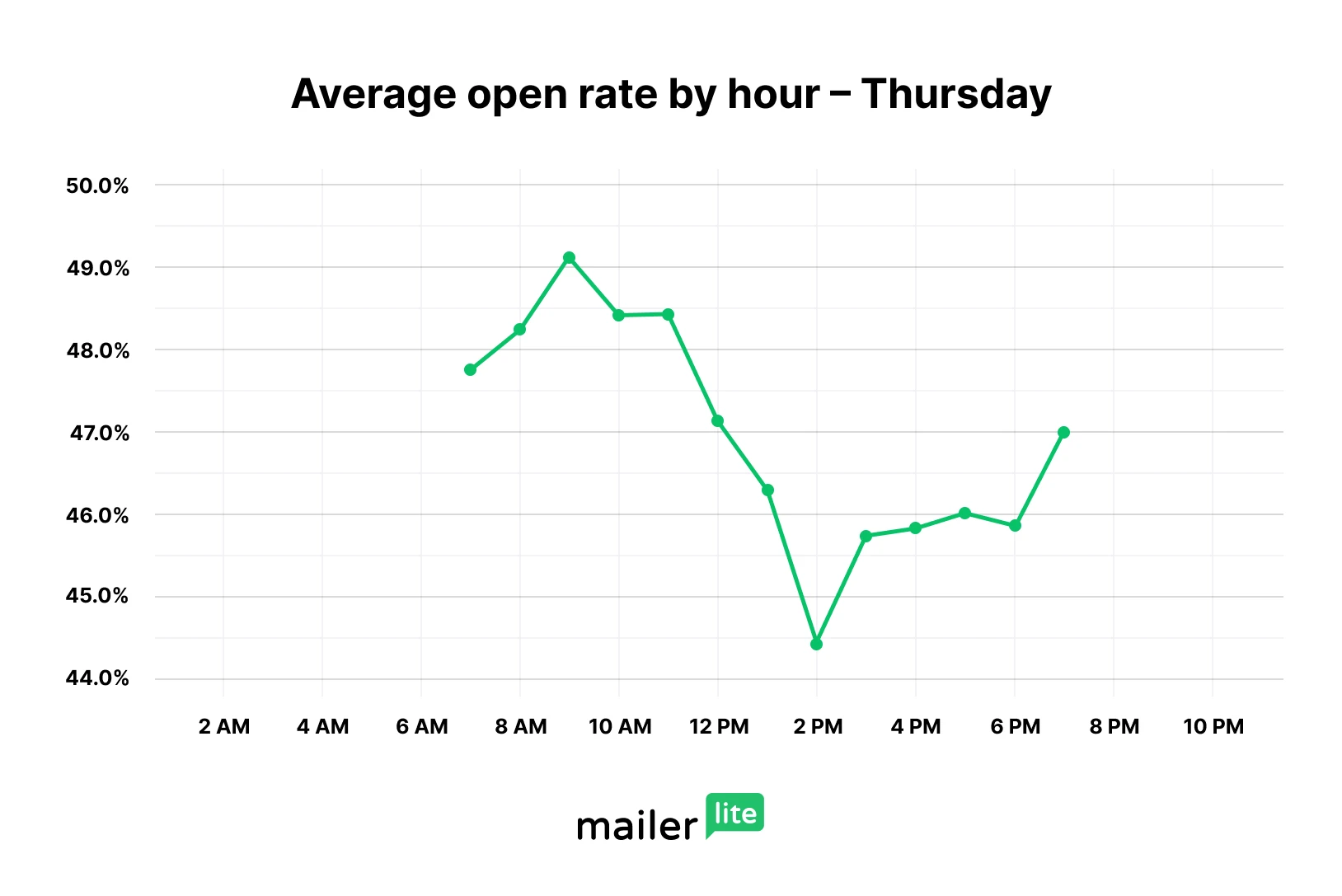
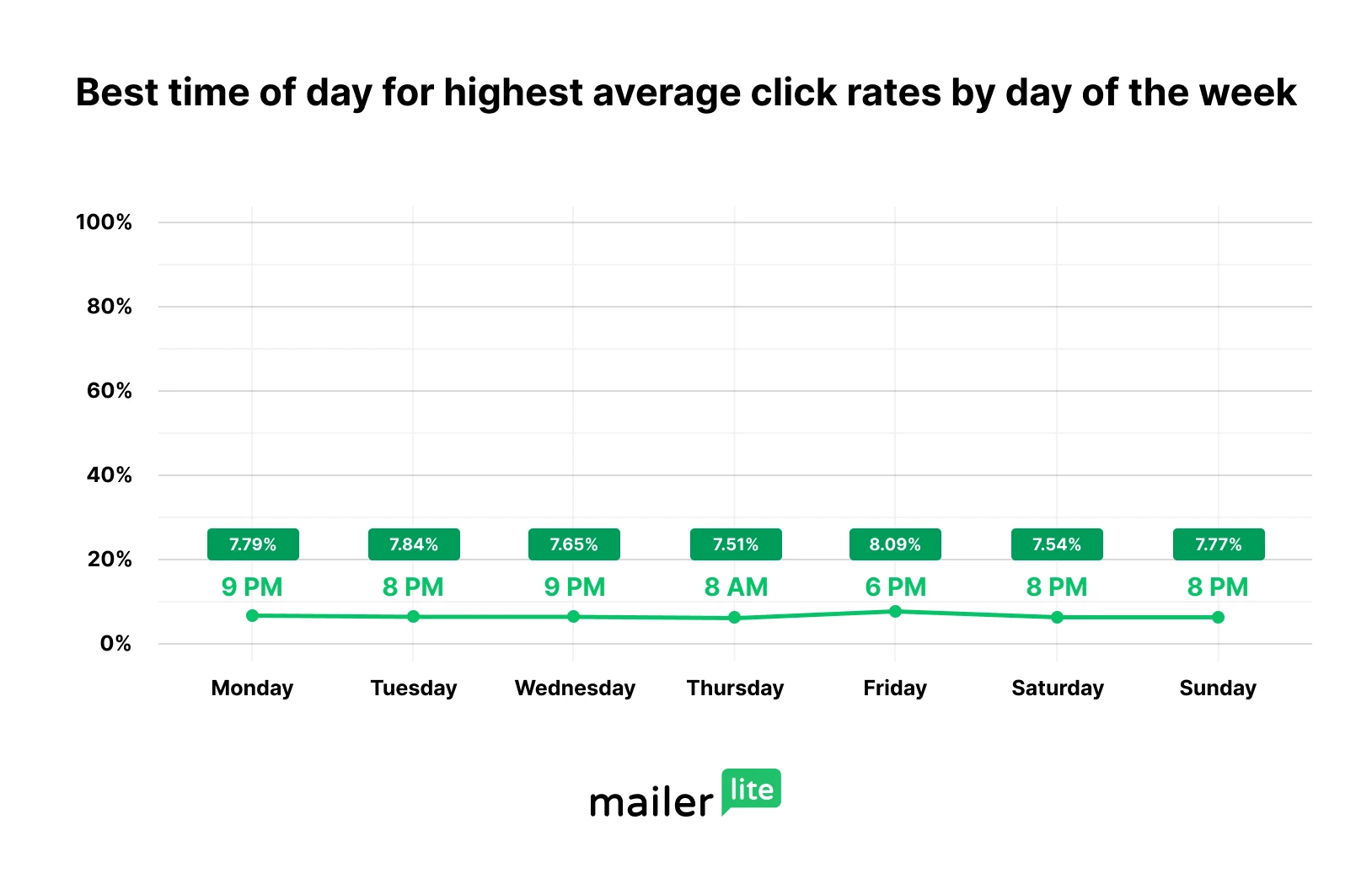
The central idea is simple: the optimal time to send email is not necessarily the same for every company, audience, campaign type, or objective. Current research from major email platforms shows meaningful differences between the hour that produces more opens and the hour that produces more clicks. MailerLite’s analysis of more than two million campaigns, for example, found strong morning open activity while also showing that click peaks can occur later in the day.
A useful timing template therefore should not merely contain a calendar. It should connect the planned send time with the reason for choosing it and the results that followed. A practical worksheet can contain campaign name, audience, goal, local time zone, planned date, planned time, actual send time, open rate, click rate, conversion rate, bounce rate, and notes. This creates a historical record that becomes more valuable as more campaigns are measured.
What an email marketing optimal send time Template should contain
The strongest template begins with campaign context. Record the campaign objective before recording the clock time. A newsletter designed to generate reading behavior may have a different timing objective from a promotional message designed to generate clicks, while a time-sensitive event reminder may need to arrive at a specific local hour regardless of general benchmarks. This distinction prevents one performance metric from becoming the only measure of success.
The next layer is audience information. Include the audience segment, country or region, recipient time zone, customer stage, and campaign type. A single mailing list can contain people with very different daily routines, so an average send time may hide useful differences. If your audience is spread across several regions, a local-time column is especially important because a single clock setting can place some recipients at a convenient hour and others at an inconvenient one.
The final layer is measurement. Include planned send time, actual send time, delivered messages, opens, clicks, click-to-open rate, conversions when available, unsubscribes, bounces, and a short interpretation field. The interpretation field is important because raw numbers do not explain why a campaign performed differently. A note such as “strong clicks during evening period” or “morning opens were high but clicks were weak” gives future tests a clear starting point.

Why send time should be treated as a testing variable
There is no universal hour that guarantees strong email performance. HubSpot’s current guidance describes send-time optimization based on recent contact engagement, while Brevo similarly uses recipient engagement patterns to estimate when individual contacts are more likely to interact. These systems illustrate an important principle: historical behavior from the intended audience can be more useful than a generic industry rule.
Industry benchmarks still have value, but they should be treated as starting points. MailerLite’s 2026 analysis found strong open-rate periods around the morning on several weekdays, while click behavior often shifted toward later hours. This difference means that a marketer optimizing for visibility may choose a different test window from a marketer optimizing for traffic or sales.
A template makes this testing process easier because it prevents memory from becoming the measurement system. Instead of remembering that “Tuesday morning seemed good,” record the exact date, audience, time zone, campaign goal, and performance. After several comparable sends, patterns become easier to inspect. The purpose is not to manufacture a perfect number, but to build evidence that helps the next scheduling decision.

Understanding the optimal time to send email
When people ask for the optimal time to send email, they often expect one answer such as 9 AM or 10 AM. A better interpretation is a decision window. You might begin with several candidate periods, such as morning, early afternoon, and evening, then measure which period performs best for a specific audience and objective. This method recognizes that inbox behavior changes with work schedules, weekends, industry, geography, and personal habits.
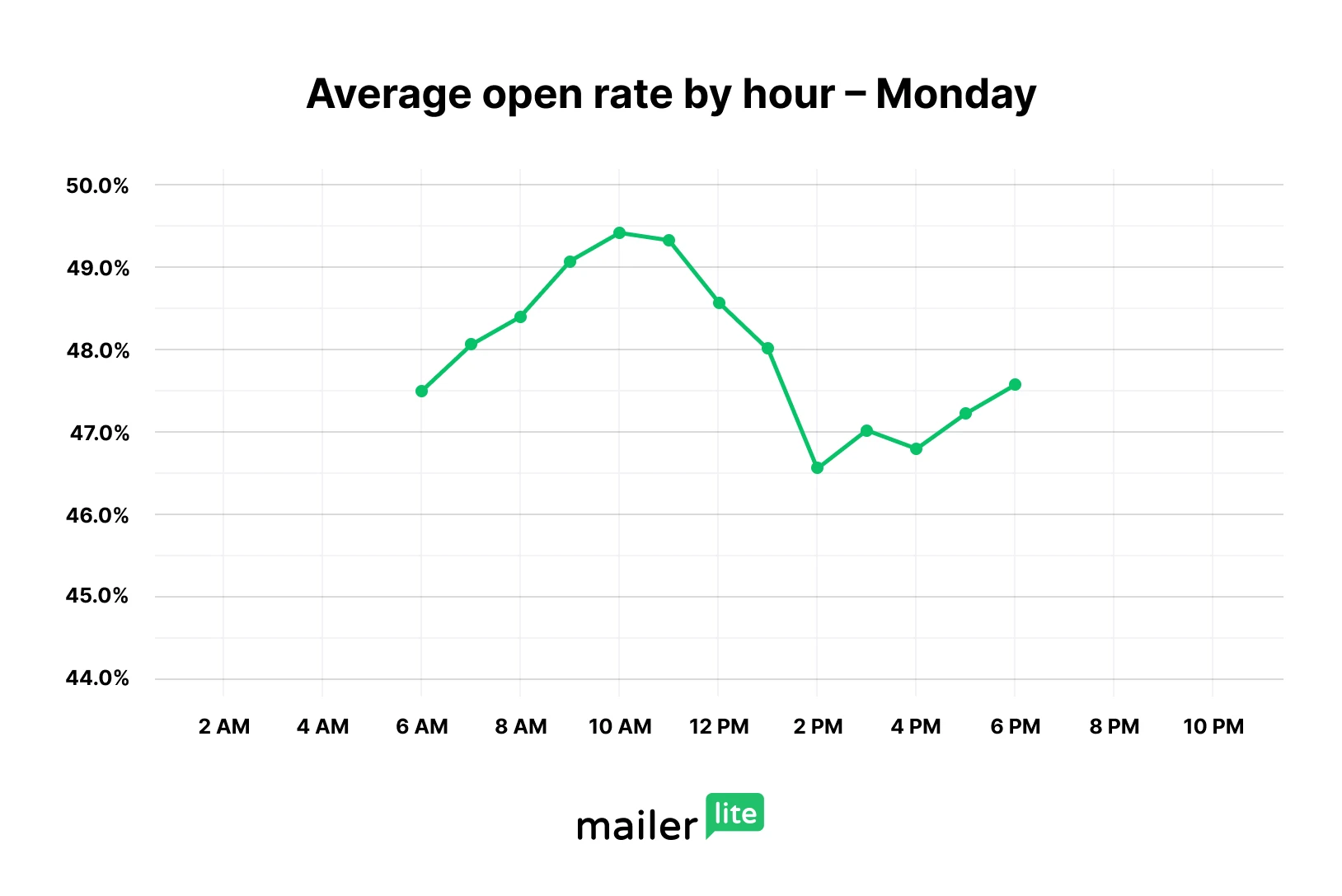
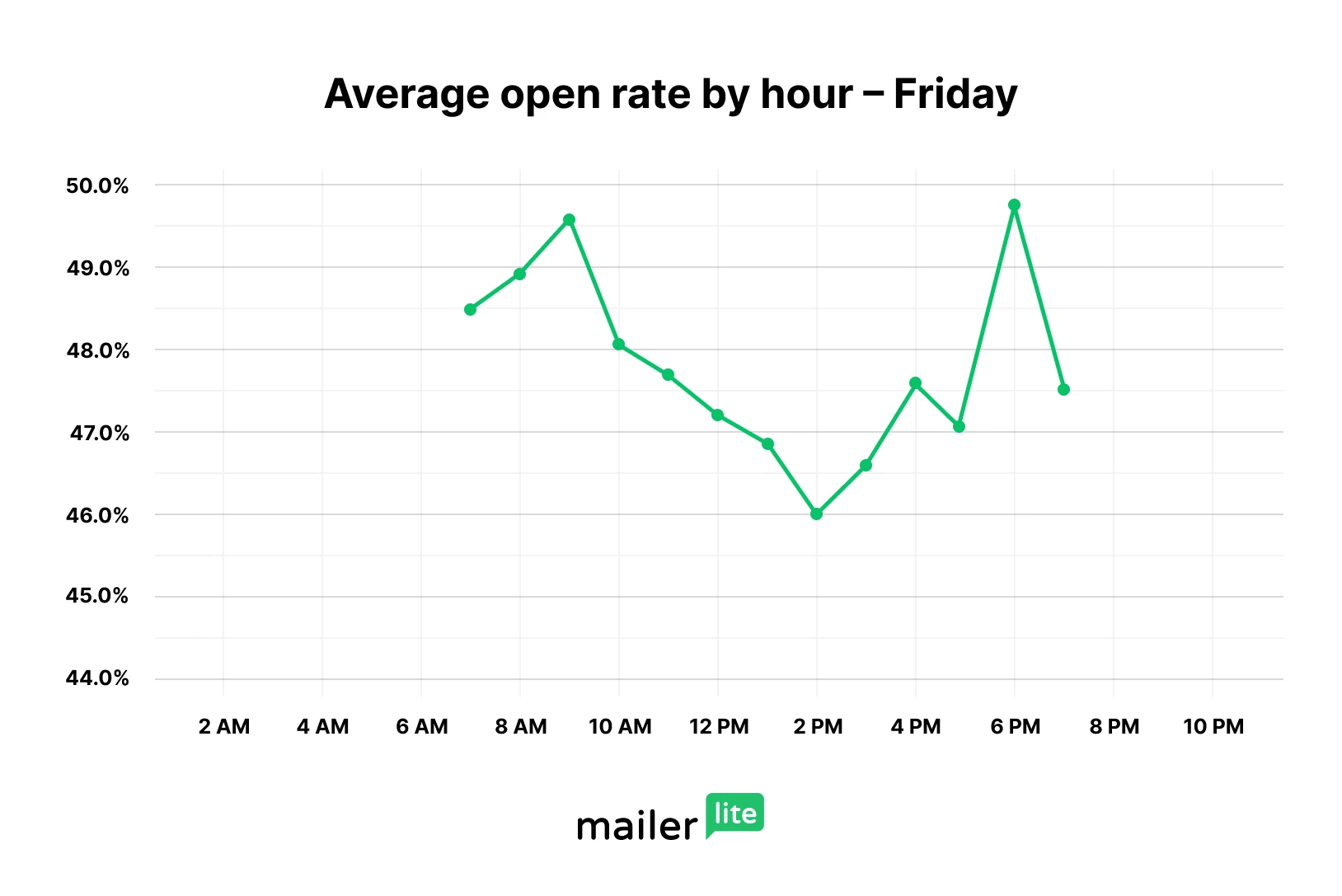
Recent MailerLite data provides a useful example of why day-level detail matters. Monday reached its highest open rate around 10 AM, Tuesday also peaked around 10 AM, Wednesday peaked later in the morning, and Thursday reached a high point around 9 AM. Friday was unusual because its strongest open point occurred in the evening. These are benchmark observations rather than guarantees for an individual list.
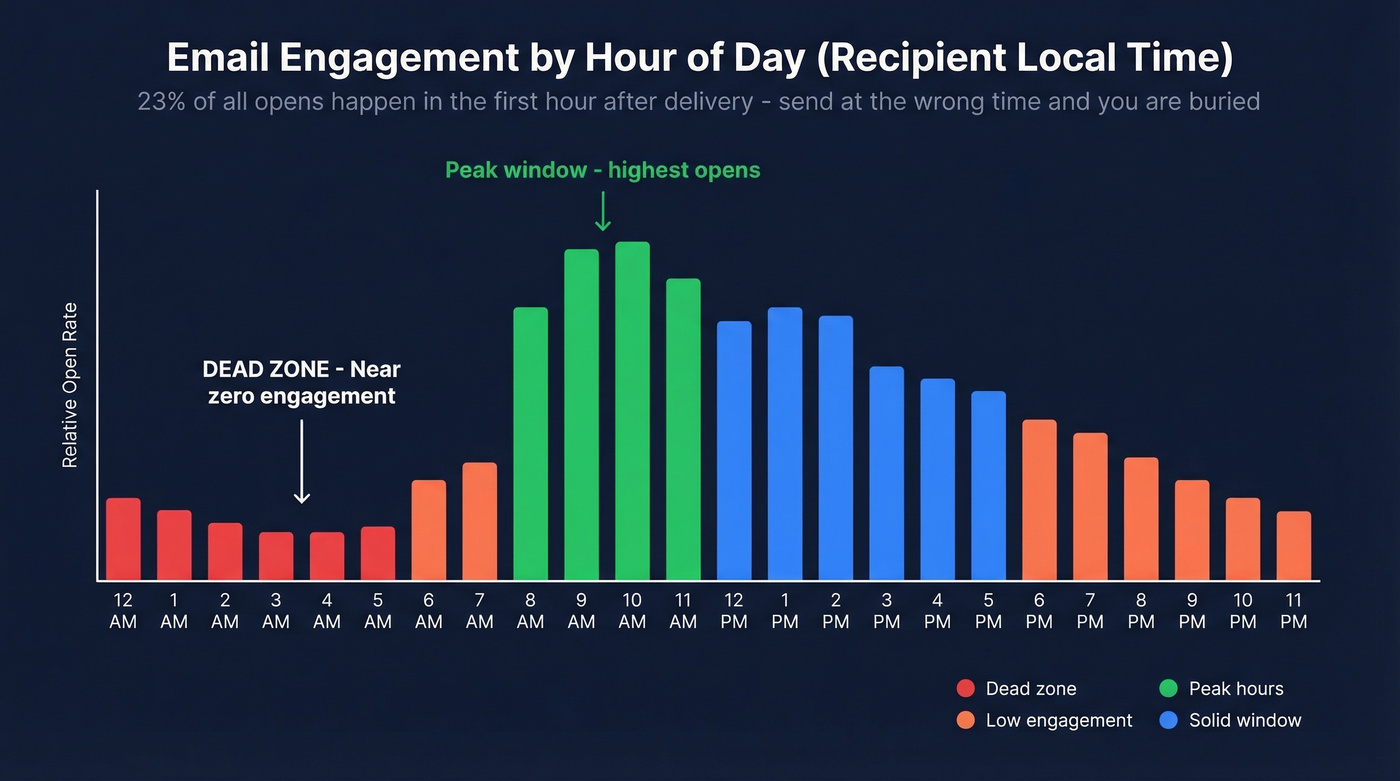
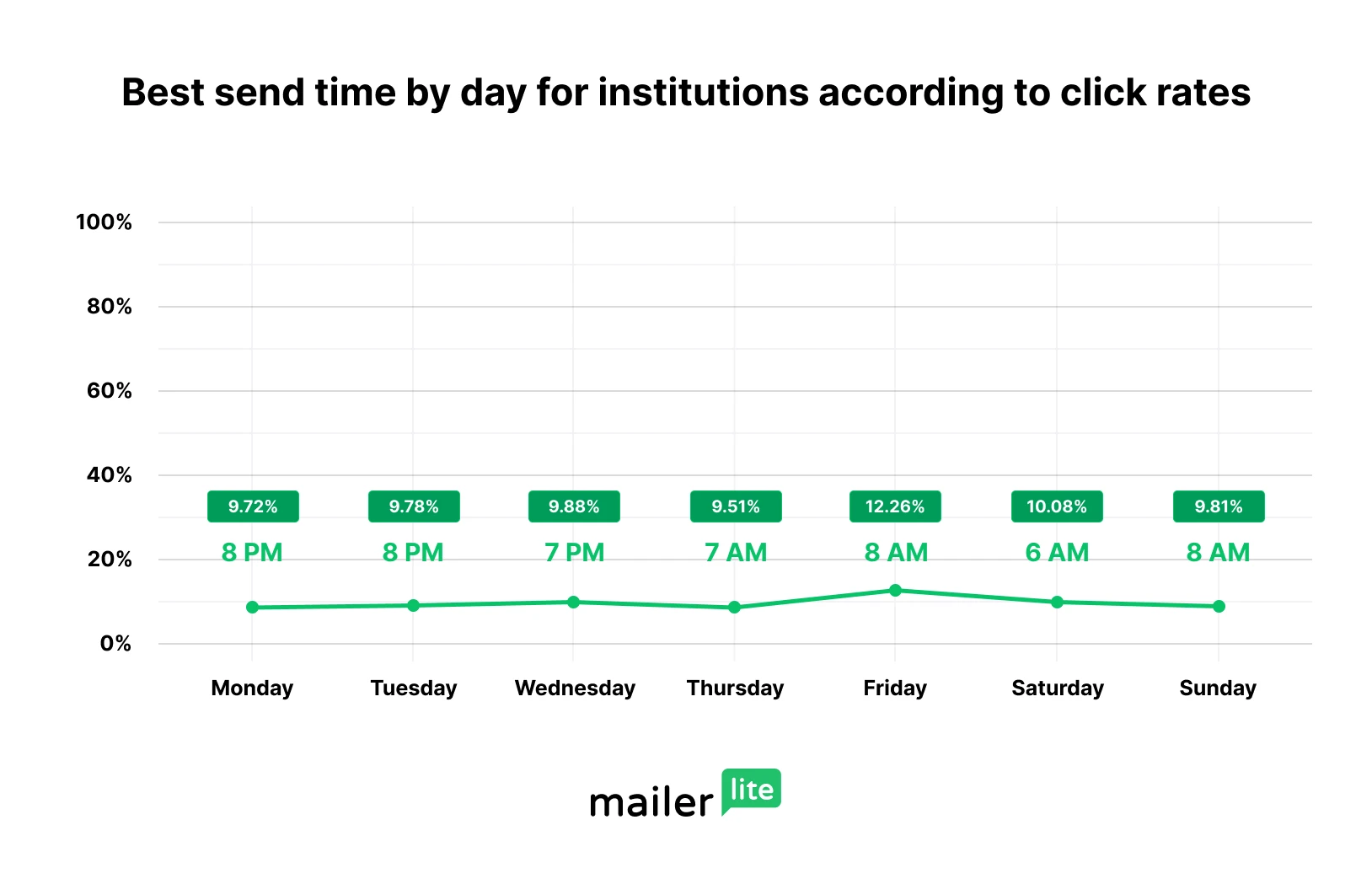
The distinction between opens and clicks is especially important. A message can be noticed early in the day but acted upon later. MailerLite reports that morning periods were strong for opens while evening periods often produced stronger click rates. If the goal is awareness, an opening window may matter most; if the goal is a site visit, registration, or purchase, click behavior deserves greater weight.
How to structure a send-time worksheet
Start with a planning area containing campaign name, campaign type, audience segment, objective, send date, planned local time, recipient time zone, and owner. The owner field is useful for teams because it makes responsibility clear before a message is scheduled. A status field can then show whether the campaign is planned, being reviewed, scheduled, sent, or analyzed.
Add a results area directly beside or below the planning area. Useful fields include delivered count, unique opens, total opens when available, clicks, click-to-open rate, conversions, bounces, and unsubscribes. Keep the definitions consistent from one campaign to another. If one campaign uses a unique click rate while another uses total clicks, comparisons may become misleading.
A final analysis area can contain the tested time window, performance rating, learning, and next test. This is where the worksheet becomes more than a calendar. For example, a hypothetical campaign could record “Tuesday 10 AM, recipient local time” as the test condition and then note whether the next test should move earlier, later, or remain in the same period. The decision should be based on comparable results rather than a single unusually strong or weak campaign.

Choosing a useful day and time for testing
Weekday mornings are often a sensible starting point for business-oriented newsletters because multiple benchmark sources report meaningful engagement during that period. HubSpot’s research has highlighted Tuesday as a strong day among surveyed marketers, with substantial engagement reported from morning through early afternoon. The same research also stresses that B2B and B2C behavior can differ.
Other datasets show why marketers should avoid turning that observation into a rigid rule. MailerLite’s 2026 data found strong morning open periods across much of the week, but Friday showed an evening peak, while weekend mornings also produced notable activity. The practical lesson is to treat benchmark periods as test candidates and then compare them against your own audience records.
For a first test, choose two or three windows that are realistic for your audience. For example, a business newsletter might compare Tuesday at 9:30 AM, Thursday at 10:30 AM, and Thursday at 2 PM in recipient local time. A consumer newsletter might add an evening test. Keep the message type and audience reasonably consistent so that timing remains the main variable under review.

Time zones can change the answer
Time zone handling is one of the most important fields in a send-time template. Sending a campaign at 10 AM in one account time zone does not mean every recipient receives it at 10 AM locally. For an audience distributed across regions, the same scheduled clock time can create very different recipient experiences.
Modern send-time optimization systems increasingly account for local recipient behavior. HubSpot documents both a suggested group-level send time and an individual-contact option based on recent opens and clicks, while Brevo describes an individualized timing process based on engagement data. These systems demonstrate why local time and recent behavior are useful dimensions for a timing worksheet.
If your sending system does not personalize timing, the template can still help. Create separate rows for major geographic segments and record the preferred local window for each group. A campaign targeting Jakarta, London, and New York, for example, can be planned as three local-time groups rather than one universal clock setting. This keeps the scheduling logic visible and easier to review.

Using open rates without overvaluing them
Open rate is useful for evaluating whether recipients noticed a message, but it should not be the only timing metric. Technical changes in email privacy and measurement can affect how opens are recorded, and an open does not necessarily mean the recipient read the full message. For that reason, timing decisions should consider clicks, conversions, replies, or another meaningful action when the campaign has a measurable action goal.
Click behavior can tell a different story from opening behavior. A newsletter may receive strong morning visibility but stronger evening interaction. If the main purpose is to drive visitors to a resource, registration page, product page, or other destination, click performance may be more closely aligned with the business goal than the initial open count.
A useful template therefore has separate fields for visibility and action. Record open rate and click rate independently, then add a goal field. If the goal is sales, record revenue or completed transactions when reliable attribution exists. If the goal is content readership, record meaningful link activity. This keeps the send-time decision connected to the actual purpose of the campaign.

How to time an email send with a controlled test
The question of how to time an email send is easiest to answer with a controlled experiment. Select a defined audience, keep the campaign type similar, and choose two or more timing windows. Do not change the subject line, offer, audience definition, and timing all at once if the purpose is specifically to learn about timing.
Split the test so that comparable groups receive substantially similar content at different times. Record the local time used for each group and the date of the send. After the measurement period, compare the metrics that matter to the campaign goal. If the groups differ greatly in audience quality or size, interpret the result carefully rather than declaring a winning hour from a single comparison.
Repeat the test. One campaign can be affected by holidays, news, seasonality, list composition, or unusual audience behavior. A timing pattern becomes more credible when it appears across multiple comparable sends. A practical template can include a “next test” field so every completed campaign creates a clear question for the next experiment.

How to set email send time in a scheduling workflow
Knowing how to set email send time begins with identifying the time zone that the scheduling system will use. Gmail states that scheduled messages are sent according to the time zone used when the schedule is created. A scheduled message can later be canceled and rescheduled, which makes it useful for individual messages and small-scale communication.
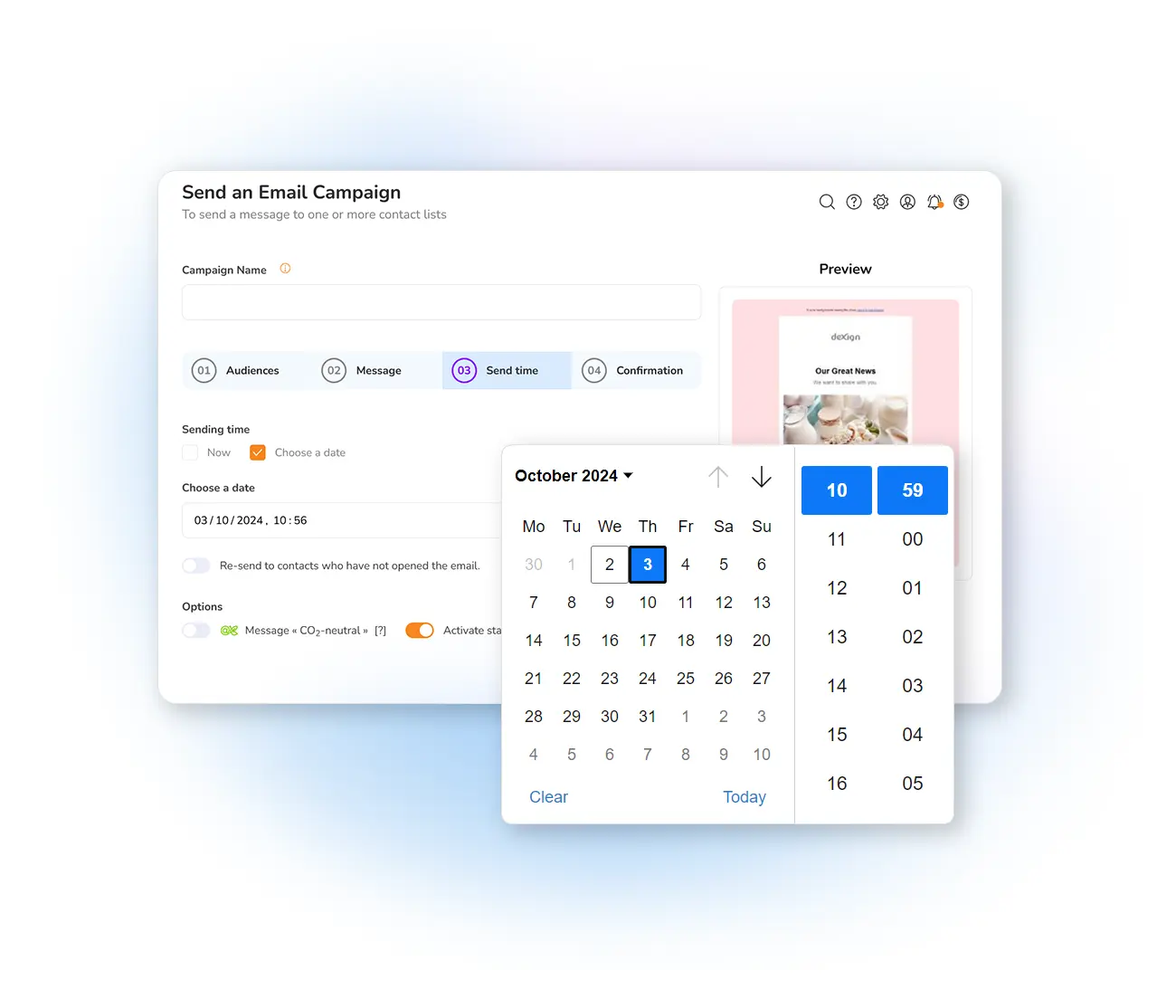
For larger marketing campaigns, the workflow usually starts with selecting the audience, confirming the message, choosing the date, selecting the time or timing strategy, checking the recipient time zone, and reviewing the final schedule. HubSpot supports scheduling at a specific date and time and also provides recipient-time-zone options in supported marketing configurations.
Send-time optimization adds another layer. Instead of selecting one universal hour, a platform can use engagement history to estimate a stronger time for a group or individual. Mailchimp describes its optimization as finding an ideal time within a defined period based on recipient behavior, while Brevo describes a process that learns from previous campaign engagement.

Spreadsheet formats for timing analysis
An email marketing optimal send time template excel workflow is useful when the marketing team wants a familiar grid with sortable fields, formulas, charts, and historical records. A spreadsheet can calculate averages by weekday or hour, compare campaign groups, and highlight periods that deserve another test. Keep the original campaign-level data intact so summary calculations can be checked later.
An email marketing optimal send time template google sheets workflow is useful when several people need to review or update timing records from different locations. The important point is not the spreadsheet brand but the structure. Columns should remain consistent, dates should use a consistent format, and times should be clearly labeled as account time or recipient local time.
For teams that document procedures, an email marketing optimal send time template google docs record can sit beside the numerical worksheet. The document can explain the testing method, definitions, audience rules, and decision criteria, while the spreadsheet stores campaign-level results. A similar email marketing optimal send time template word format can serve teams that prefer a formal written planning document rather than a data-first worksheet.

Gmail timing and one-to-one scheduling
An email marketing optimal send time template gmail workflow is most useful when the template helps decide timing before the message is scheduled. Gmail provides a scheduling function for messages, and its help documentation notes that scheduled messages use the time zone associated with the scheduling action. This makes a local-time column valuable when planning messages for people in different regions.
For one-to-one communication, the goal may be different from a newsletter. A personal message can depend on the recipient’s workday, meeting schedule, or expected response window. The template can therefore record recipient region, message purpose, preferred contact window, and actual response time. Avoid assuming that a marketing benchmark automatically applies to a personal message.
For campaign-scale communication, use the worksheet as the planning layer and the marketing sender as the delivery layer. This separation makes the timing decision easier to review before sending. It also helps distinguish a deliberate send-time test from an ordinary scheduled message.

How to use community discussions as supporting evidence
Searchers sometimes look for an email marketing optimal send time template reddit because community discussions can reveal practical testing experiences that are not visible in benchmark reports. Community comments can be useful for generating hypotheses, but they should not be treated as controlled research. A post describing success at a particular hour may reflect one audience, one industry, one geography, or one campaign type.
A stronger workflow is to record the community suggestion as a hypothesis and then test it with your own list. For example, if several marketers describe stronger evening clicks, add an evening slot to your next timing experiment. Keep the source of the idea in a notes field, but let your own campaign results determine whether the slot remains in your schedule.
The same principle applies to search results, social discussions, newsletters, and benchmark articles. External evidence is useful for choosing candidate windows. Your own historical data is more useful for deciding whether those windows should become part of your recurring schedule.

Using send email marketing templates without losing timing context
Teams often search for send email marketing templates when they want reusable structures for newsletters, promotions, reminders, or recurring campaigns. A timing-focused template should add scheduling fields to the normal content-planning fields. That means recording audience, objective, subject line, campaign type, send date, local time, and the performance measures that matter after delivery.
Do not make the timing field a single “best time” cell. A better structure contains a primary test window, a secondary test window, the reason for the choice, and the result. This prevents the worksheet from becoming a static rulebook. As new evidence accumulates, the preferred period can change.
Recurring campaigns also benefit from historical comparison. If the same newsletter is sent each week, record the timing and performance for every edition. Over time, the team can distinguish a recurring timing pattern from a one-time spike caused by a special event or unusual audience condition.
Practical Solution
The most practical solution is to build one master timing worksheet with four sections: campaign plan, audience context, performance results, and next-test decision. Start each row with the campaign name and objective. Add the audience segment and recipient time zone. Then record the planned send date and time, actual delivery time, and the timing method used, such as fixed local time or behavior-based optimization.
After delivery, add the results that match the campaign objective. Record opens and clicks, but also record conversions or another meaningful action when available. Then write one short interpretation explaining what the numbers suggest. For example, a hypothetical result might say, “Morning produced stronger visibility, while evening produced stronger link activity.” The next-test field could then specify a later send for another comparable campaign. This turns every campaign into another step in a structured learning cycle.
For the first month, avoid changing too many variables at once. Select two or three realistic timing windows and rotate them across comparable campaigns. Use recipient local time whenever the sending system supports it. If the audience spans several regions, segment the schedule or use a timing feature that accounts for recipient time zones. Review the worksheet at the end of each testing cycle and retain the periods that consistently support the campaign goal.
If your team is small, keep the worksheet simple. Ten well-defined fields are more useful than a crowded form nobody maintains. If your team is larger, add owner, approval status, audience definition, campaign category, test group, control group, and decision history. The core principle remains the same: record the timing decision before the send, record the result afterward, and make the next scheduling decision from accumulated evidence.
Common timing mistakes to avoid
The first mistake is copying a benchmark without considering the audience. A benchmark can provide a useful starting point, but it cannot account for every recipient’s work pattern, geography, industry, or communication preference. Treat benchmark hours as test candidates rather than permanent rules.
The second mistake is measuring only one campaign. A single result can be distorted by subject line quality, message relevance, seasonality, holidays, list composition, or competing events. Repeated tests with similar audiences provide stronger evidence than one unusually successful send.
The third mistake is confusing delivery time with recipient local time. A campaign sent at 10 AM from one account may arrive at very different local hours for recipients in other regions. Always record the time-zone basis in the worksheet so later analysis remains interpretable.
Building a repeatable timing review process
A weekly review can focus on recently completed campaigns and identify unusual timing patterns. Compare the planned time with the actual send time, then compare both against recipient behavior. If a campaign was delayed or sent outside its intended window, record that fact rather than treating the result as a normal timing test.
A monthly review can compare timing by weekday, hour, audience, and campaign objective. Look for repeated patterns rather than isolated peaks. If Tuesday morning repeatedly performs well for newsletter opens but Thursday evening repeatedly performs better for clicks, preserve both observations and connect each to the relevant campaign goal.
A quarterly review can refine the overall strategy. Remove timing assumptions that no longer have evidence, add new test windows, and revisit time-zone segmentation. This keeps the template useful as audience behavior changes rather than allowing it to become an outdated record.
Reference benchmarks by audience type
Different audience categories can show different timing patterns, which is why an email marketing optimal send time Template should retain an audience-type field. MailerLite’s 2026 analysis separates creators, entrepreneurs and small businesses, institutions, and ecommerce audiences, showing that their strongest open and click periods are not identical. For creators, several high click periods occur in the evening, while entrepreneurs and small businesses show stronger morning open periods. Ecommerce timing also differs from institutional timing.
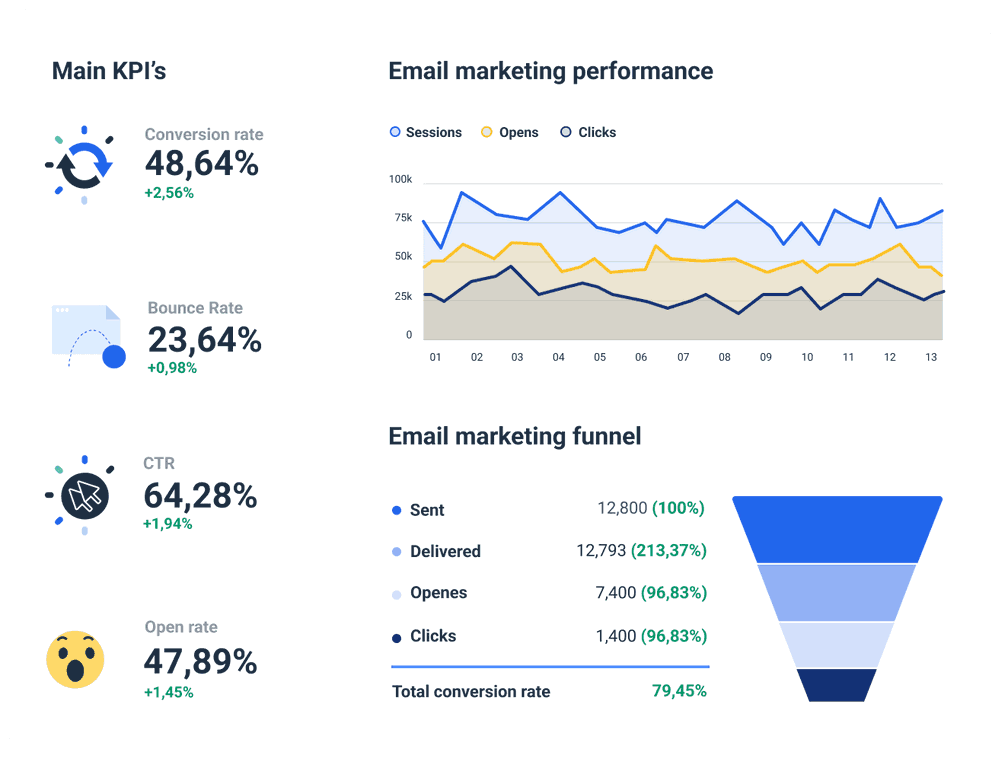
These visual references are useful because they show how timing analysis can be represented as charts, heatmaps, campaign worksheets, and dashboards rather than as one isolated recommendation. A good reference should help you recognize the fields that matter: date, hour, audience, objective, open behavior, click behavior, and the distinction between planned and observed performance. Use the visuals as structural inspiration while keeping your own campaign records as the primary evidence for future scheduling decisions.

Email Marketing Optimal Send Time Analyzer Template
Source: Template.net

Email Marketing Optimal Send Time Analyzer Template
Source: Template.net

Email Marketing Optimal Send Time Analyzer Template
Source: Template.net

Email Marketing Optimal Send Time Analyzer Template
Source: Template.net

Email marketing campaigns planner
Source: Rows
Email Marketing Dashboard to monitor your email performance
Source: Whatagraph
ActiveCampaign Campaigns Calendar Overview
Source: ActiveCampaign
Mailpro Email Campaign Scheduling
Source: Mailpro

Einstein Send Time Optimization Dashboard
Source: Horizontal Digital

Email Marketing Performance Dashboard
Source: Post Affiliate Pro
