A short dental assistant template can make everyday clinic responsibilities easier to organize, track, and complete. Dental assistants often handle several tasks throughout the day, from preparing treatment rooms and instruments to supporting dentists, updating records, and maintaining a clean clinical environment. A simple printable template can help keep these responsibilities visible without creating unnecessary paperwork.
Whether you are a dental assistant, dental office manager, student, or someone creating a practical workflow for a dental clinic, a concise checklist can provide a useful daily reference. It can also help reduce the chance of overlooking routine responsibilities during a busy schedule.
This guide explains how to use a short dental assistant template, what information to include, and how a printable checklist can support a more organized dental office routine.
What Is a Short Dental Assistant Template?
A short dental assistant template is a compact document designed to organize common dental assisting duties in an easy-to-follow format. Instead of listing every possible responsibility in a long document, it focuses on essential daily tasks, patient-related notes, procedure preparation, supplies, and end-of-day checks.
A well-designed template can be printed and placed at a workstation, used as a daily checklist, or adapted to a clinic’s specific procedures. The goal is not to replace professional training or clinical protocols. Instead, it provides a convenient organizational aid.
Why Keep the Template Short?
A concise checklist is easier to scan during a busy workday. Dental assistants may need to move quickly between rooms and responsibilities, so a practical layout can make routine information easier to find.
- Quickly review daily responsibilities.
- Check off completed tasks.
- Record important appointment notes.
- Monitor commonly used supplies.
- Prepare treatment areas efficiently.
- Review end-of-day duties before leaving.
Key Sections to Include in a Short Dental Assistant Checklist
The best template depends on the needs of the dental practice. However, several sections are particularly useful for creating a practical dental assistant daily checklist.
1. Daily Task Checklist
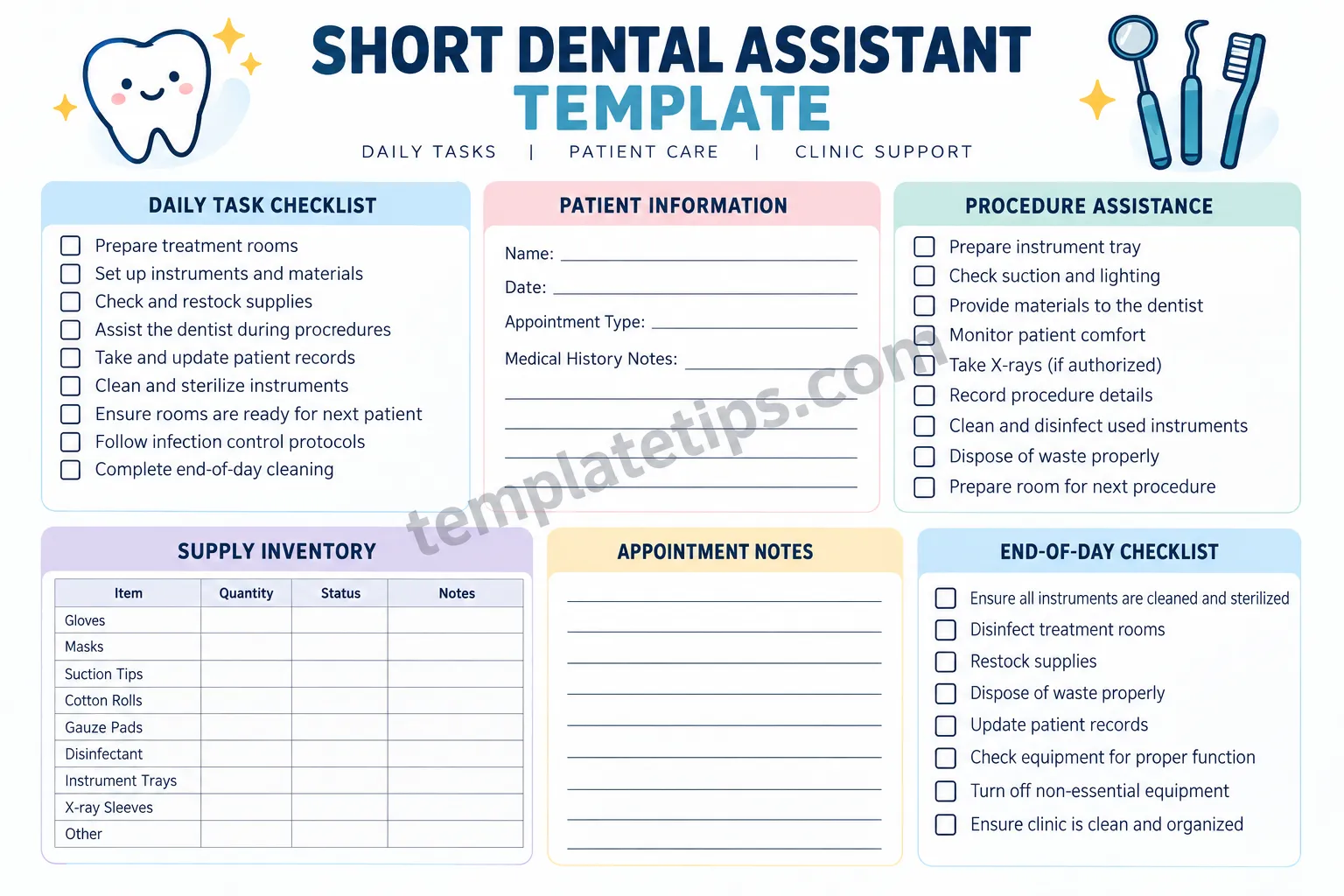
The daily task section can cover recurring responsibilities such as preparing treatment rooms, organizing instruments, checking supplies, assisting during procedures, maintaining records, and following applicable infection-control procedures.
Checkboxes are useful because they allow the assistant to quickly identify completed and outstanding tasks. The list should remain concise so that it works as a practical reference rather than becoming another complicated administrative document.
2. Patient Information
A patient information area can provide space for basic appointment details and notes. Depending on the clinic’s policies and privacy requirements, this may include a patient name, appointment date, appointment type, and designated notes area.
When creating or using a template, sensitive patient information should be handled according to the dental practice’s privacy, recordkeeping, and security requirements. A printable checklist should not replace the clinic’s official patient record system.
3. Procedure Assistance
A procedure assistance section can help organize preparation and support tasks. Examples may include preparing an instrument tray, checking equipment, preparing materials, supporting the dentist during treatment, documenting appropriate information, and preparing the room for the next appointment.
The exact tasks should always reflect the assistant’s training, authorization, workplace policies, and applicable professional requirements.
4. Supply Inventory
Dental clinics use many consumable supplies, so a small inventory table can be helpful. A simple format can include the item, quantity, status, and notes.
- Gloves
- Masks
- Suction tips
- Cotton rolls
- Gauze pads
- Disinfectant
- Instrument trays
- X-ray supplies
Keeping supply information visible can make it easier to identify items that need attention before they become a problem during a busy clinic session.
How to Use a Short Dental Assistant Template
A template becomes most useful when it fits naturally into the clinic’s existing workflow. It should take only a short amount of time to review and update.
Start at the Beginning of the Day
Before appointments begin, review the daily checklist and confirm that treatment areas are ready. Check the supplies and equipment needed for scheduled procedures, following the practice’s established protocols.
This quick review can help identify missing materials or preparation tasks before the first patient arrives.
Update It During the Day
Use the checklist as a running reference rather than waiting until the end of the day to complete everything. Mark tasks as they are completed and use the notes area for appropriate reminders.
For patient-specific information, follow the practice’s approved documentation system and privacy procedures. Avoid placing confidential information on a sheet that could be viewed by unauthorized people.
Complete an End-of-Day Review
An end-of-day checklist can provide a final reminder to complete routine closing responsibilities. Depending on the dental office’s procedures, this might include cleaning and disinfection, instrument processing, restocking, documentation, equipment checks, and preparing rooms for the next working day.
Benefits of Using a Printable Dental Assistant Checklist
A printable dental assistant checklist offers several practical organizational benefits. Its value comes from making routine responsibilities easier to see and manage.
- Better organization: Important routine tasks are collected in one place.
- Faster reviews: A short format can be checked quickly between appointments.
- Greater consistency: Recurring responsibilities can be reviewed using the same structure.
- Supply awareness: Inventory notes can highlight items that need attention.
- Workflow support: Assistants can use the checklist to structure preparation and closing routines.
- Easy customization: Clinics can add or remove sections according to their workflow.
Tips for Creating an Effective Short Dental Assistant Template
A useful template does not need to be complicated. The best design is usually clear, practical, and easy to scan.
Keep the Layout Simple
Use clear headings, short task descriptions, checkboxes, and enough writing space. Avoid filling the page with unnecessary instructions. The document should allow an assistant to identify a task almost immediately.
Group Similar Tasks Together
Organize related responsibilities into sections such as daily preparation, patient information, procedure assistance, inventory, and end-of-day duties. Logical grouping reduces the time needed to search for information.
Customize the Checklist
Every dental office has its own workflow. Add tasks that are genuinely relevant to the practice and remove items that do not apply. The final checklist should support established procedures rather than introduce conflicting instructions.
Leave Room for Notes
A small notes area can be useful for non-sensitive reminders, supply observations, or workflow notes. For protected patient information, use the clinic’s authorized recordkeeping system instead of relying on an unsecured printed sheet.
Short Dental Assistant Template for Students and New Assistants
A short dental assistant checklist can also be useful as a learning and organization aid for students or new dental assistants. A clearly structured template can help them become familiar with the types of responsibilities commonly encountered in a dental office.
For example, a learner can organize responsibilities into preparation, chairside support, documentation, inventory, and closing activities. This structure can make it easier to understand how individual tasks fit into the broader clinic workflow.
However, a checklist should not be treated as a substitute for formal education, supervision, workplace policies, or professional requirements. Tasks should only be performed when the individual is properly trained and authorized to perform them.
Digital or Printable: Which Format Should You Use?
Both digital and printable formats can work well. The right choice depends on how the dental office manages its daily workflow.
A printable template can be convenient when staff need a physical checklist at a workstation. A digital version may be easier to update, duplicate, or integrate into an existing office system.
Some clinics may benefit from using both. A digital workflow can handle official records and documentation, while a simple printable checklist can serve as a quick operational reminder.
How to Make Your Dental Assistant Workflow More Efficient
Efficiency is not simply about completing tasks faster. It also means reducing unnecessary steps and making routine responsibilities predictable.
- Review the appointment schedule before beginning the day.
- Prepare commonly needed materials according to clinic procedures.
- Keep frequently used supplies organized and easy to locate.
- Use consistent room-preparation routines.
- Mark completed checklist items promptly.
- Keep official patient documentation in the approved system.
- Review outstanding tasks before the end of the day.
Small improvements to organization can make a daily checklist more useful without adding significant administrative work.
Conclusion
A short dental assistant template can be a simple but practical way to organize daily responsibilities in a dental office. By combining a concise task checklist with procedure preparation, supply tracking, appointment notes, and an end-of-day review, the template can provide a clear reference throughout the workday.
The most effective checklist is one that matches the clinic’s actual workflow. Keep it short, readable, customizable, and consistent with professional procedures. Whether printed beside a workstation or adapted into a digital workflow, a well-structured dental assistant template can help make routine organization easier and more manageable.
Readability Analysis
Yoast-style readability target: Green.
- Short paragraphs: Most paragraphs contain only a few sentences and are easy to scan.
- Clear headings: The article uses descriptive H2 and H3 headings to divide topics logically.
- Active and direct language: Sentences are written to be practical and straightforward.
- Transition-friendly structure: Sections move naturally from definition to usage, benefits, tips, and conclusion.
- Lists: Bullet lists break up longer explanations and make practical information easier to scan.
- Keyword placement: The primary keyword is used naturally without excessive repetition.
